0:54

Orgo - Introducing Orgo: computers for agents. Give every agent its own des
Orgo · B2B · Oct 2026
Reason Machines · Oct 2026 · 0:37 · AI-annotated
Reason Machines’s 0:37 launch film runs 26 scenes, about 1.4 s each. The product shows up at 0:03 and 6 features are revealed, with social proof. There is no explicit call to action; a voiceover carries the film. The video opens on a glitch-art question card, then locks into a cream paper stage where six numbered beats (01/06 to 06/06) each pair a 3D device mockup with a flat UI card and a one-line headline. Signature moves are pixel-mosaic dissolves between surfaces, monospace HUD corner labels with timecodes, and a benchmark stat card that resolves into the wordmark.
Is this your launch? to your site or press kit.
A circular graphic, half white dots and half blue radial lines with a white looped mark at its center, expands outward then contracts. A serif headline reads What will you word by word across the left, framed by small monospace HUD labels in the corners.
On-screen text: “What will you”
Techniques: Kinetic type
Camera: Static
On a black grid, a white etched drawing of nested cubes and orbital rings cuts to a grayscale 3D head, each framed by small technical labels in the corners. Scattered blue and orange squares flicker over the imagery while the centered white serif line reads 'What will you build?'
On-screen text: “What will you”, “What will you build?”
Techniques: Kinetic type
Camera: Push in
A glitchy, scanline-textured montage of classical drawings, the Vitruvian man cutting to an impossible triangle with scattered colored squares, framed by small HUD labels in the corners. The white question holds steady in the center throughout.
On-screen text: “What will you build?”
Camera: Static
A centered white line reads “What will you build?” over a rapid cut of vintage engravings: a red circle with an inscribed triangle, then a grayscale study of hands that flashes with RGB glitch distortion. Tiny technical labels sit in the corners.
On-screen text: “What will you build?”
Camera: Static
A blue-and-orange 3D mesh face fills a circle, framed by a white pentagon, a red ring and dashed radial lines on a dark grid. The shot pushes into the eye, the lines drop out, and the white headline stays fixed at center.
On-screen text: “What will you build?”
Camera: Static
A glitching abstract background flickers between a dark cracked texture with a white circle and a light pixel-streak texture. The white headline “What will you build?” holds steady in the center while small HUD labels sit at the edges.
On-screen text: “What will you build?”
Camera: Static
The camera pulls back from a close-up of engraved marble texture, a numbered grid with blue and orange patches, to reveal a grayscale 3D head model framed by thin annotation boxes and percentage labels, with a zoomed crop of the eye. The white question stays centered.
On-screen text: “What will you build?”
Techniques: UI zoom
Camera: Static
On a cream background, a gray flower mark sits above the black heading “What will you build?” and a white rounded input field. The field’s placeholder is replaced by typed text reading “Migrate our C++ ledger to Rust”, then the entire panel scales up and fades out.
Camera: Static
A flat prompt screen reading “What will you build?” with a typed request pulls back to reveal it as a floating 3D app window, its left sidebar sliding into view on a cream backdrop.
Techniques: 3D mockup
Camera: Pull out
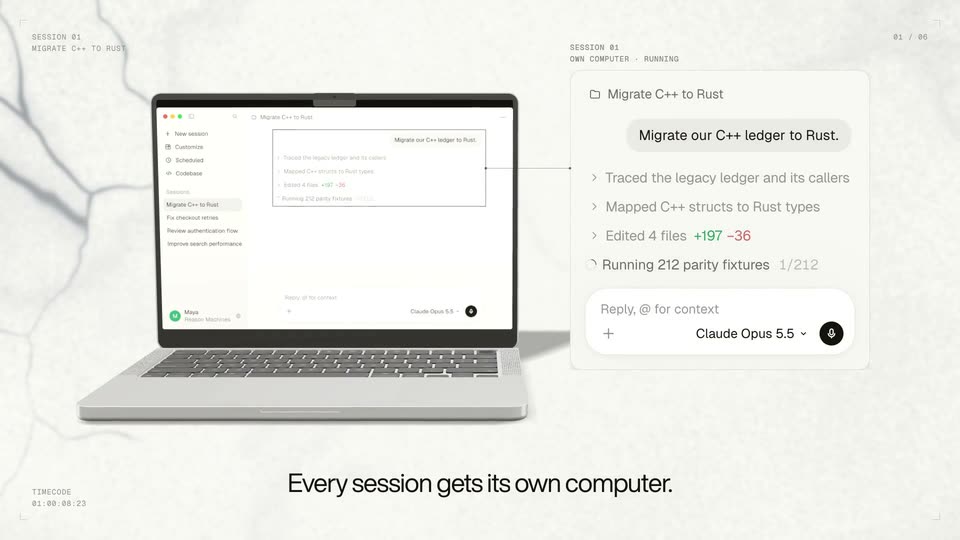
A 3D laptop sits on a light textured background with faint branch shadows. Its screen's chat panel is extracted to a larger card on the right that fills with task steps. A bottom headline scales in, then swaps to a second line as the laptop lid closes.
On-screen text: “SESSION 01”, “MIGRATE C++ TO RUST”, “01 / 06”, “TIMECODE 01:00:00:00”, “Hand off the whole task.”, “OWN COMPUTER - RUNNING”, “Every session gets its own computer.”
Techniques: 3D mockup, UI zoom, Kinetic type
Camera: Pull out
A silver laptop in 3D perspective rests on a crumpled white paper surface, its screen showing a session interface with a task list. The black headline Close the laptop. scales in at the bottom as small monospace session labels hold the corners. The frame stays locked off.
On-screen text: “SESSION 01”, “MIGRATE C++ TO RUST”, “01 / 06”, “TIMECODE 01:00:30:00”, “Close the laptop.”
Techniques: 3D mockup, Kinetic type
Camera: Push in
A silver laptop in low 3D perspective rests on a cream marble surface. Its lid animates shut while a phone mockup rises above it, displaying a chat interface. The bottom caption swaps from “Close the laptop.” to “It keeps working.”
On-screen text: “Close the laptop.”, “It keeps working.”
Techniques: 3D mockup, Kinetic type
Camera: Static
A flat phone mockup left holds a chat thread titled Migrate C++ to Rust. Right, a card updates from running parity fixtures to all passed, then a push notification slides in. Light marble background, small corner labels frame the shot.
On-screen text: “MARKET ST, SAN FRANCISCO”, “LAPTOP CLOSED - AGENT RUNNING”, “02 / 06”, “TIMECODE 01:00:12:00”, “It keeps working.”
Techniques: 3D mockup
Camera: Static
An angled phone mockup and a push-notification card rest on a pale marble field, then the layout dissolves into a floating swarm of code tiles around a centered terminal window. The bottom caption shifts from 'It keeps working.' to 'Start it from your terminal, Slack or browser.'
On-screen text: “MARKET ST, SAN FRANCISCO”, “LAPTOP CLOSED, AGENT RUNNING”, “02 / 06”, “PUSH NOTIFICATION”, “SESSION 01”, “TIMECODE 01:00:14:18”, “It keeps working.”, “03 / 06”, “Start it from your terminal, Slack or browser.”
Techniques: 3D mockup, Particles
Camera: Static
A flat dark terminal window, titled reason, is centered on a cream veined-paper background. Inside, a prompt and a bulleted list of bash and file commands appear, the last two lines fading in. A black caption sits beneath.
On-screen text: “Start it from your terminal, Slack, or browser.”
Camera: Static
A flat Slack thread mockup sits centered on a cracked paper background, showing Maya's message while the Reason bot's reply fades from gray to black. A serif headline holds at the bottom and small spec labels frame the corners.
On-screen text: “SURFACES”, “TERMINAL -> SLACK -> BROWSER”, “SLACK”, “02 / 03”, “03 / 06”, “TIMECODE 01:00:16:05”, “Start it from your terminal, Slack, or browser.”
Camera: Static
A flat browser mockup on a paper-grain background types the prompt “Build a dashboard of our AI spend per” into its input. The window then breaks into a checkerboard mosaic that dissolves left to right, revealing a terminal beside a second browser view.
On-screen text: “SURFACES”, “TERMINAL · SLACK · BROWSER”, “BROWSER 03 / 03”, “Start it from your terminal, Slack, or browser.”, “TIMECODE 01:00:17:00”
Techniques: Masking, Split screen
Camera: Static
Three product panels, a dark terminal, a Slack thread and a browser chat, sit side by side on a cream grid. They emerge from a pixel mosaic, hold, then dissolve into scattered squares as the headline reads below.
On-screen text: “SURFACES”, “TERMINAL - SLACK - BROWSER”, “03 / 06”, “Start it from your terminal, Slack, or browser.”, “TIMECODE 01:00:18:05”
Techniques: Masking, Split screen, Particles
Camera: Static
A flat browser mockup shows a stacked bar chart whose total counts up to $130,000; a cursor hovers the December bar, a dark tooltip confirms the values match the billing export, and the checklist step flips to a green check. The caption sits at the bottom.
On-screen text: “It tests its own work.”
Techniques: Cursor demo
Camera: Static
A flat white phone mockup holds a pull request screen on the left while a Checks card assembles on the right from scattered code tiles, then a dark tagline fades in below. Pale marbled backdrop with small uppercase corner labels frames the scene.
On-screen text: “PULL REQUEST”, “ACME/LEDGER - 8 CHECKS PASSED”, “05 / 06”, “TIMECODE 01:00:22:19”, “Review it. Merge it from anywhere.”
Camera: Static
A 3D phone mockup mirrors a checks card on the right. The eight rows flip from grey pending icons to green ticks, the header reads All 8 checks passed, and the black Squash and merge button becomes a blue Merged button. A centered tagline sits below.
On-screen text: “PULL REQUEST”, “ACME/LEDGER · 8 CHECKS PASSED”, “05 / 06”, “Review it. Merge it from anywhere.”
Techniques: 3D mockup
Camera: Static
A dark terminal, a purple chat app, a laptop, a white review card, and a phone fade in around a central laptop on a light grid background. The headline “One agent. Every screen.” appears below, then the whole lineup blurs and fades out.
On-screen text: “ONE SESSION EVERY SURFACE”, “06 / 06”, “TIMECODE 01:00:26:00”, “One agent. Every screen.”
Techniques: 3D mockup
Camera: Static
A white benchmark chart card on the right plots solving time, while a large percentage counter on the left counts up to 36% between 'Up to' and 'lower median solving time'. A pixel mosaic band dissolves across the top as the frame resolves.
On-screen text: “Up to”, “36%”, “lower median solving time”, “Reason and Codex: solving time”, “DeepSWE v1.1 - confirmed passing attempts”, “Reason Agent”, “Codex - Astra xhigh”, “Confirmed successes (%)”, “Solving time (minutes)”, “2 MIN: 7.7% REASON: 0.4% CODEX: 0.0%”
Techniques: Masking, Kinetic type
Camera: Static
A split layout pairs a large Up to 39% stat on the left with a line chart on the right. The black and gray curves draw themselves across the grid as median markers and a delta bracket fade in, while the percentage ticks from 38 to 39.
On-screen text: “Up to”, “39%”, “lower median solving time”, “REASON AGENT 1.0 · DEEPSWE V1.1”, “ASTRA XHIGH · REASONMACHINES.COM/BLOG”
Camera: Static
On a pale cream grid, scattered dark and light squares drift inward from the edges and cluster into a tight pixelated mass at the center, then hold.
Techniques: Particles
Camera: Static
A black five-loop flower logo sits centered above the wordmark on a cream background with a faint grid and scattered thumbnail images that slowly swap. The tagline fades in below the wordmark, then the URL and Y Combinator line appear, all on a locked-off frame.
On-screen text: “Reason Machines”, “A frontier coding agent.”, “reasonmachines.com”, “Backed by Y Combinator”
Camera: Static