2:51

ClickUp Release 4.08: Meetings Hub, Super Agent Cloning, and more!
ClickUp · Productivity · Sep 2026
Rainbow · Sep 2024 · 0:21 · AI-annotated
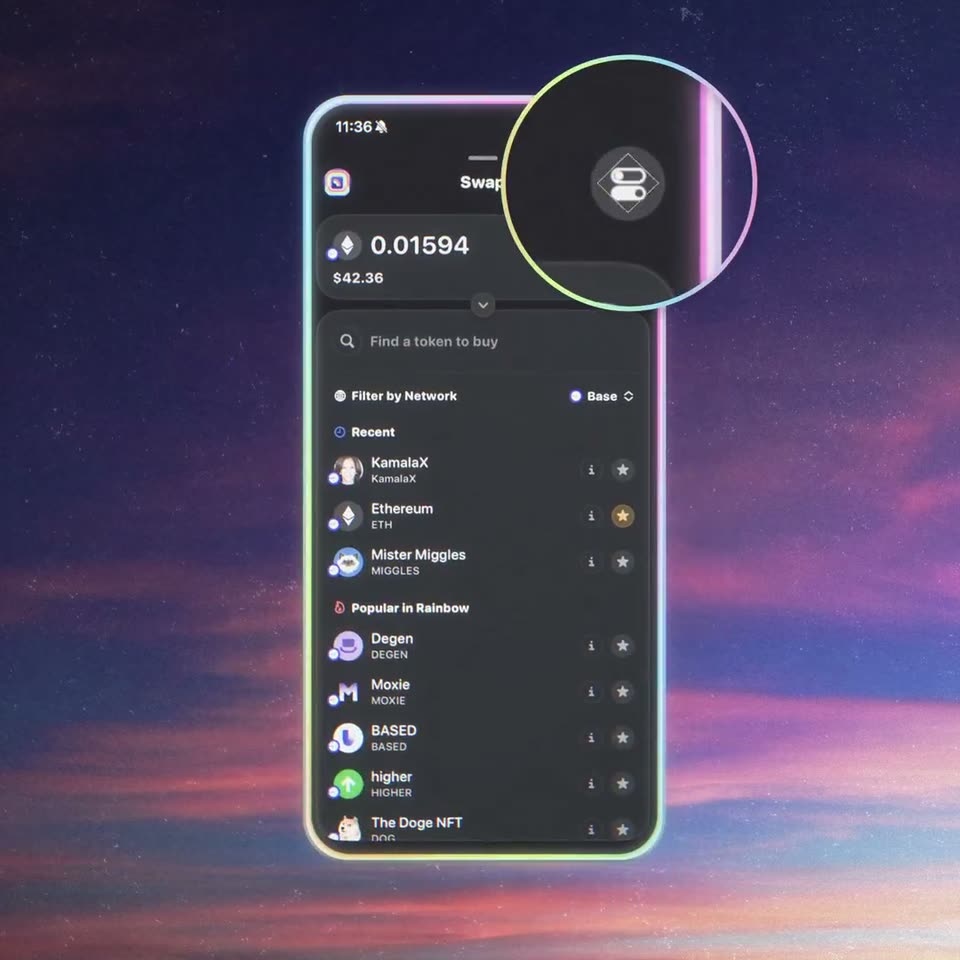
Rainbow’s 0:21 launch film runs 13 scenes, about 1.7 s each. The product is on screen from the first frame and 1 feature is revealed. There is no explicit call to action. Built as a single feature launch: a brand and feature title card, a 3D phone demo that toggles Degen Mode on and walks the tap, paste and hold to swap flow, then a static benefit card. The style is defined by a floating neon-rimmed phone mockup over a starry twilight sky, bold rounded sans headlines with chromatic and rainbow glitch accents, and quick 3D spins and magnifier zooms that punctuate each step.
Is this your launch? to your site or press kit.
ClickUp · Productivity · Sep 2026
Canva · Design · Oct 2023
Over a starry dusk sky with pink clouds, the rainbow logo and wordmark sit centered. The large white headline Degen Mode slides up from the bottom edge into place beneath the logo, its letters trailing a rainbow reflection downward.
On-screen text: “rainbow”, “Degen Mode”
Techniques: Kinetic type
Camera: Static
Against a starry dusk sky, the rainbow logo and a large “Degen Mode” title hover above vertical rainbow light streaks. The title slides upward while a dark 3D card with a rainbow arc rises from the bottom, passing in front of the text.
On-screen text: “rainbow”, “Degen Mode”
Techniques: Kinetic type, 3D mockup
Camera: Static
A 3D phone mockup holding a dark crypto swap screen rotates from a tilted angle to a flat front view against a starry purple nebula. A blurred duplicate of the same interface sits behind it, and a glowing neon outline frames the device.
Techniques: 3D mockup
Camera: Static
A phone mockup with a glowing neon border floats in a starry purple sky. A circular magnifier lens drifts down the screen, zooming first onto the swap icon, then onto the Degen Mode toggle as it flips on, revealing the settings panel.
Techniques: 3D mockup, UI zoom
Camera: Static
A starry dusk sky in purple and pink fills the frame. The white word TAP sits centered, sliding and splitting into a second, larger copy with cyan and magenta chromatic fringing beneath it. A small static number 0.01594 holds in the frame.
On-screen text: “0.01594”, “TAP”
Techniques: Kinetic type
Camera: Static
White bold words TAP, TAP, SWAP stack vertically over a starry dusk sky, SWAP carrying a rainbow glitch blur. A 3D phone mockup spins up from behind the text to show a crypto wallet screen, then spins out, leaving the words in focus.
On-screen text: “TAP”, “TAP”, “SWAP”
Techniques: Kinetic type, 3D mockup
Camera: Static
A phone mockup with a glowing neon border floats centered on a starry purple nebula. Its wallet screen switches from a portfolio list, where a yellow Swap button pulses inside a ring, to a token search view.
Techniques: 3D mockup
Camera: Static
A glowing 3D phone floats over a starry sunset sky, showing a crypto swap app. A token row is ringed yellow, the screen flips to a keypad, the button fills and reads Swapping, then the display darkens as a black card with a gem logo and TAP pops in.
On-screen text: “TAP”
Techniques: 3D mockup
Camera: Static
A starry night sky fills the frame as white bold words TAP, PASTE and SWAP scale in one by one with a rainbow glow, then a tilted 3D phone mockup rotates into view.
On-screen text: “TAP”, “PASTE”, “SWAP”
Techniques: Kinetic type, 3D mockup
Camera: Static
A 3D phone mockup rotates from an edge-on rainbow slab to a flat face, revealing a dark crypto wallet screen. A circular magnifier hovers over the Swap button against a starry purple sky.
Techniques: 3D mockup, UI zoom
Camera: Static
A phone mockup floats in 3D over a starry pink sky, stepping through a crypto swap screen. A yellow marker ellipse highlights the Paste button, then the BasedPepe token; a purple ellipse marks Hold to Swap. The phone tilts and zooms as the headline Bot-like trading speeds appears.
On-screen text: “Bot-like trading speeds”
Techniques: 3D mockup, UI zoom
Camera: Pan
A starry twilight sky with pink and orange clouds fills the frame. A bold white headline appears over vertical rainbow bars that fade away, while two lighter sublines fade in below it. The camera stays locked off.
On-screen text: “Bot-like trading speeds”, “The Security & Convenience of”, “your favorite EOA Wallet”
Camera: Static
A starry twilight sky with pink clouds fills the frame. Centered white text fades in: a bold headline over a two-line regular-weight subhead. The lines hold still once visible against the static sky.
On-screen text: “Bot-like trading speeds”, “The Security & Convenience of”, “your favorite EOA Wallet”
Camera: Static