0:21


Lyon finetuning demo
Lyon · B2B · Nov 2026
QuiverAI · Nov 2026 · 0:25 · AI-annotated
QuiverAI’s 0:25 launch film runs 3 scenes, about 8.4 s each. The product is on screen from the first frame and 1 feature is revealed. There is no explicit call to action. The video is built as a single continuous product demo inside a floating white UI card, moving from code generation to zoomed vector editing. Its style is defined by a soft blue background, a dotted canvas, and smooth zoom transitions that emphasize precision.
Is this your launch? to your site or press kit.
Lyon · B2B · Nov 2026
Instinct · Fintech · Oct 2026
Akon Labs · B2B · Nov 2026
A white Vectorize panel floats over a blurred blue backdrop. A coat line drawing is drawn stroke by stroke on a dotted grid while SVG code scrolls in the bottom strip. A cursor clicks zoom in and the canvas magnifies to show blue anchor points.
Techniques: Cursor demo, UI zoom
Camera: Push in
Thin blue schematic lines, dashed connectors and small circles holding the numbers 36 and 56 drift across a dotted white grid while motion-blurred gray rings and bars fly past. The line art then fades out, leaving a plain white card.
On-screen text: “reference”, “36”, “56”
Techniques: Parallax
Camera: Pan
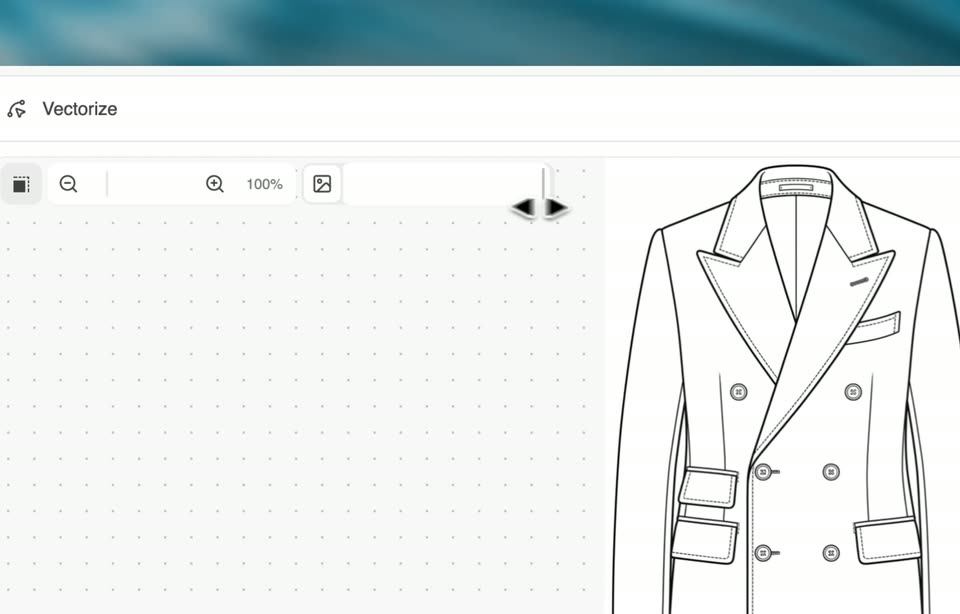
A white Vectorize editor card floats in 3D over a blurred blue backdrop, then flattens as a hand cursor drags the zoom from 100% to 305% into a vector coat, the blue wireframe turning to solid black line art before zooming back out.
Techniques: 3D mockup, Cursor demo, UI zoom
Camera: Pull out