0:30

Aryan Sawhney - Today we’re launching Narrative: the AI video editor for the rest of
Narrative · Consumer · Sep 2026
Posthog · Jul 2026 · 0:58 · Full motion · AI-annotated
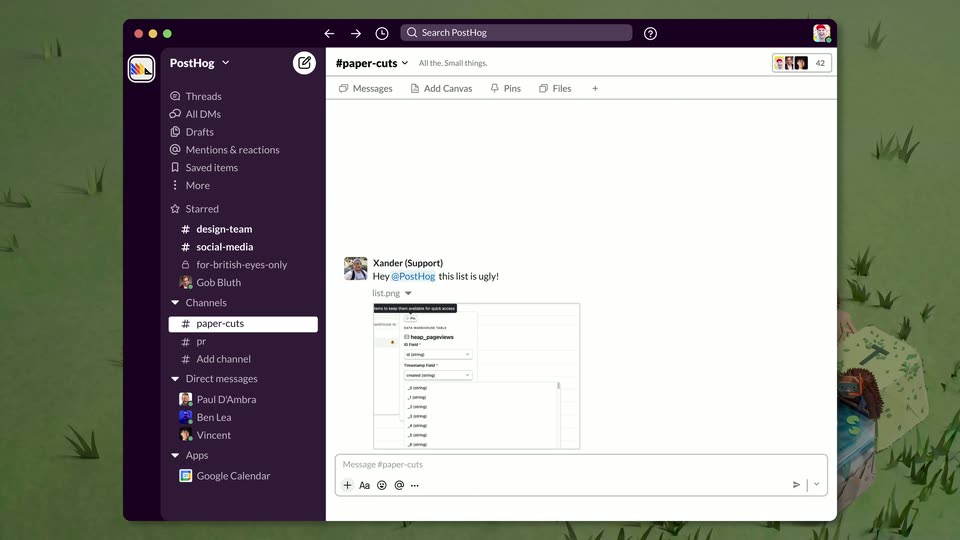
Posthog’s 0:58 launch film runs 15 scenes, about 3.9 s each. The product is on screen from the first frame. The call to action lands at 0:50 (87% in), over a voiceover. The film lets one Slack conversation carry the whole story, floating realistic chat UI over a handcrafted 3D diorama and moving between threads with smooth zooms, pans and wipes. Its signature moves are the typing compose bar that bookends the piece, blue callout pills that pop in to name each capability, and the camera pulling back to reveal the full window sitting in the 3D world.
Is this your launch? to your site or press kit.
Narrative · Consumer · Sep 2026
Higgsfield AI · Sep 2026
A white message input bar sits in the lower foreground over a 3D paper-cut grassland with lettered cubes and hedgehog figures. The gray placeholder text is replaced by the typed word Hey in black, and the send button expands into a green pill with a paper plane icon.
Camera: Static
A message input field and autocomplete dropdown sit over a green 3D grass field with cartoon hedgehogs. The typed text grows from “Hey @Po” to “Hey @Post” as the suggestion list refreshes and highlights the PostHog row in blue.
Camera: Static
A 3D isometric grassy field with small diorama structures sits behind a white tweet compose box. The message types out word by word, then a hand cursor moves onto the green send button.
Techniques: 3D mockup, Kinetic type, Cursor demo
Camera: Static
A 3D isometric diorama of grass and cube structures sits behind a flat white chat bar. The bar holds the typed line 'Hey @PostHog this list is ugly!' with a hand cursor on the green send button, then empties to a gray placeholder.
Techniques: 3D mockup, Cursor demo
Camera: Pull out
A PostHog chat window sits on a green grass field beside a hedgehog. The view starts tight on a support message and an attached list image, then pulls back to show the full window with sidebar and channel header.
Techniques: UI zoom
Camera: Pull out
A Slack-style app window sits on a grassy field; the view zooms into the chat as new lines of a message appear, then a hand cursor clicks 'View thread' and the screen reframes to a side thread panel showing an app status card and a reply.
Techniques: UI zoom, Cursor demo
Camera: Push in
A white Slack thread panel sits over a green 3D game backdrop. Chat messages type out line by line as the view zooms in and scrolls down, and blue outlined callout pills pop in to label each feature.
On-screen text: “😬 Easily collab (fix a colleague's mistake)”, “🔀 Let PostHog Slack draft PRs for you”, “🐿️ Run skills stored in PostHog's skill store”
Techniques: UI zoom
Camera: Push in
A PostHog comment card with a pull request link and emoji reactions slides left, revealing a GitHub pull request page in focus. The view zooms onto the green merge button as a hand cursor hovers over it, then a white panel wipes across the screen.
Techniques: Cursor demo, UI zoom, Masking
Camera: Pull out
A flat close-up of a Slack chat shows a PostHog bot message under a tooltip, then the camera pulls back and tilts to reveal the whole window floating in 3D over a painted pond, as a red badge and the Slack logo pop into the center.
Techniques: 3D mockup
Camera: Pull out
A full PostHog chat window on a grassy hedgehog desktop zooms into the right thread panel, blurring the rest, as a cursor hovers a brain-icon pill. The view then pans right to a second thread showing an error report.
Techniques: UI zoom, Cursor demo
Camera: Push in
A chat thread in a messaging app. A blue pill button with a magnifier icon and the label 'Investigate errors and generate detailed reports' appears under the first message, then the thread shows a second exchange above a reply input box.
Camera: Pan
A chat thread card over a blurred background shows a user question with a blue-outlined button and the PostHog app reply. The camera then zooms in on the reply and the Reply input box at the bottom.
Techniques: UI zoom
Camera: Push in
A white rounded message box with a plus, Aa, smiley, at-sign, ellipsis and a green send button floats over an isometric grass field. The letters Le type into the empty field next to a blinking caret.
Camera: Push in
A flat white message input floats over a low-poly green grass field with 3D hogs and blocks. An autocomplete dropdown shows PostHog highlighted, then closes as the typed message cycles through Slack, text, diagnose, debug, and code.
Techniques: Kinetic type
Camera: Static
A white rounded compose box reading “Let @PostHog code.” with a send toolbar floats over a low-poly grass field. Two hand cursors point at the green send button, then the box clears to reveal lettered cubes and hedgehog figures tending a small garden.
On-screen text: “Let @PostHog code.”
Techniques: Masking
Camera: Static