
0:46
Explore
00:00:00 / 03:35:27
- Length
- 3:35
- Scenes
- 40 · 5.4 s avg
- Product on screen
- 0:00
- Features shown
- 9
- Voiceover
- Yes
- Views
- 11K on YouTube
as of November 26, 2026
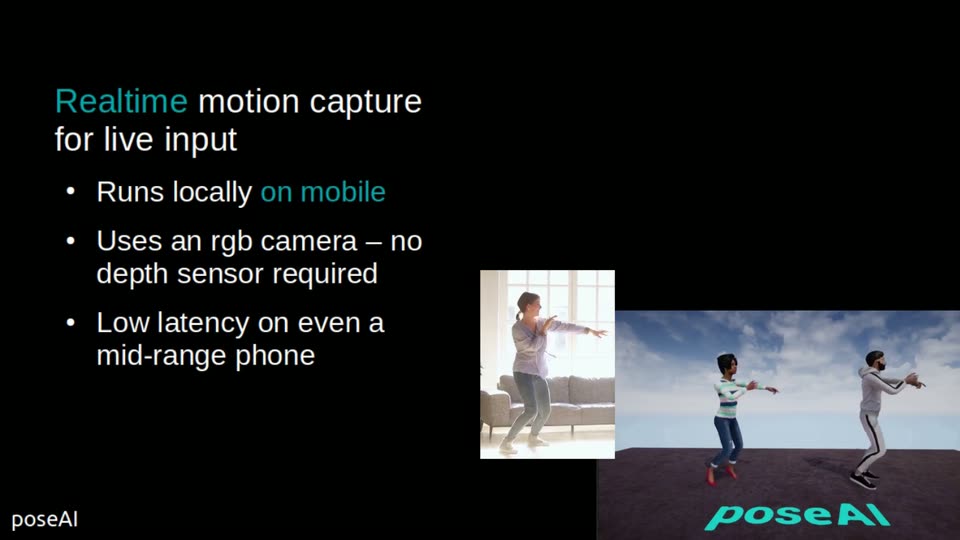
PoseAI’s 3:35 launch film runs 40 scenes, about 5.4 s each. The product is on screen from the first frame and 9 features are revealed. There is no explicit call to action; a voiceover carries the film. A black slide-deck presentation where each cyan-and-white headline card pairs with inset live-action and 3D render clips, then cuts to full split-screen demos of a person mirrored by a 3D avatar. Pacing is steady and expository, driven by static title cards and slow zooms on editor screenshots, with the signature move being the side-by-side real-time mocap comparison.
Footage neededEstimated needs: 1 capture group — your screens or recordings · 1 official logo — reused across the film · 11 filmed passages — shoot, supply or replace · 1 graphic passage — draw or supply · 13 3D passages — build or supply
Is this your launch? to your site or press kit.
More like this


Similar soundtrack
Films whose music sounds like this one, voice left out
2:18

Introducing AndroidGoogle
1:19

Introducing Canvas
Loom · Product Tutorial
2:10

ChatGPT recommande-t-il vos produits ? Le nouveau Shopping GetMint
GetMint · Modern electronic bed transitioning to a lo-fi hip-hop instrumental
PoseAI realtime player mocap in Unreal Engine and Unity 3D, scene by scene
· 40 scenes as text
01 · Product intro · 0:00–0:02
The poseAI wordmark holds centered on a black field, white pose with cyan AI, locked off and still for the whole shot while the voiceover welcomes the viewer to the demo.
On-screen text: “poseAI”
Camera: Static
02 · Feature reveal · 0:02–0:14
A black slide holds a white headline with teal accents and three bullets on the left. On the right, two panels fade in side by side: a woman dancing in a bright living room, and two 3D avatars on a platform under a blue sky mirroring her moves in real time. The text fades out near the end, leaving the two panels.
On-screen text: “Realtime motion capture for live input”, “Runs locally on mobile”, “Uses an rgb camera – no depth sensor required”, “Low latency on even a mid-range phone”, “poseAI”
Techniques: Split screen
Camera: Static
03 · Feature reveal · 0:14–0:16
A black slide splits the frame: a bulleted list fades in on the left while the right holds two video panels, a small live-action dancer and a 3D render of two characters dancing on a platform under a blue sky. The poseAI logo sits at the bottom of the render.
On-screen text: “Game-ready motion capture”, “Designed for 3D skeletal rigs”, “Full-body including hands”, “Complete joint rotations”, “poseAI”
Techniques: Split screen
Camera: Static
04 · Feature reveal · 0:16–0:26
A black slide lists game-ready motion capture bullets on the left. On the right, video panels fade in and out: a man in a red shirt and yellow helmet dances beside 3D characters mirroring his moves. The panels settle into a side-by-side live-action and 3D comparison.
On-screen text: “Game-ready motion capture”, “Designed for 3D skeletal rigs”, “Full-body including hands”, “Complete joint rotations”, “poseAI”
Techniques: Split screen
Camera: Static
05 · Feature reveal · 0:26–0:37
A black slide holds a cyan-and-white headline and a four-item bullet list on the left, fading in over the first second. On the right, inset clips of people dancing and exercising fade in and out in pairs, each mirrored by a white 3D skeleton.
On-screen text: “Licensable with many use cases”, “Gaming”, “Creators”, “Fitness / Sports coaching”, “Physiotherapy”, “poseAl”
Techniques: Split screen
Camera: Static
06 · Feature reveal · 0:37–0:44
A black slide lists the heading and three bullets on the left while two small clips play on the right: a man exercising in a living room and a 3D scene of a woman, robot and man dancing.
On-screen text: “Computer vision AI”, “Developed from our state-of-the-art research”, “Patented method and technology”, “Lightweight models, customizable to use cases”, “poseAI”
Techniques: Split screen
Camera: Static
07 · Feature reveal · 0:44–0:45
A black card shows a left-aligned white headline and three bullets with cyan accent words. On the right, two small clips of people with pose-tracking overlays fade out while the text stays fixed.
On-screen text: “Computer vision AI”, “Developed from our state-of-the-art research”, “Patented method and technology”, “Lightweight models, customizable to use cases”
Camera: Static
08 · Feature reveal · 0:45–0:46
A black card shows the heading Computer vision AI above three bullet points, white text with teal keywords, then fades to black.
On-screen text: “Computer vision AI”, “Developed from our state-of-the-art research”, “Patented method and technology”, “Lightweight models, customizable to use cases”
Camera: Static
09 · Feature reveal · 0:46–1:11
Two columns of bullet-point text on black, Unreal Engine and Unity 3D, sit side by side. The right column fades out, then a dark node-graph screenshot fades in on the right and slowly zooms across the editor.
On-screen text: “Unreal Engine”, “LiveLink plugin”, “Unity 3D”, “C# script api”
Techniques: UI zoom
Camera: Push in
10 · Feature reveal · 1:11–1:12
A black card holds a right-aligned bulleted list in white and teal sans-serif, naming Unity 3D and C# script api features, with a small poseAI mark in the lower left corner. The frame is static.
On-screen text: “Unity 3D”, “C# script api”, “Available on Github”, “Animation controller, fully blendable”, “Customizable character controller”, “poseAI”
Camera: Static
11 · Feature reveal · 1:12–1:26
A Unity editor screen recording occupies the left, a cursor moves through the inspector as panels expand into sliders and the 3D view pans. A static white and teal bullet list holds the right on black, with the poseAI mark bottom left.
On-screen text: “Unity 3D”, “C# script api”, “Available on Github”, “Animation controller, fully blendable”, “Customizable character controller”, “poseAI”
Techniques: Cursor demo
Camera: Static
12 · Demo · 1:26–1:29
A hand holds a phone in the foreground, its dark screen showing a blue camera icon and 'Desktop mode' text. Behind it, a large slide titled 'Pose Camera with Deep AI' is softly out of focus. The shot fades in from black and holds steady.
Camera: Static
13 · Demo · 1:29–1:30
A hand holds a smartphone, its dark screen showing a blue app icon, in front of a large display reading Pose Camera by PoseAI. The hand lowers the phone and focus shifts to the slide behind, showing two phone mockups over a blue sky with setup steps.
Camera: Static
14 · Demo · 1:30–1:31
A pair of hands holds a smartphone in front of a wall-mounted monitor displaying a Pose Camera demo screen with setup instructions. The phone's dark screen shows a blue camera icon and the words rotate phone. The hands tilt the phone gently; the monitor stays softly out of focus.
Camera: Static
15 · Demo · 1:31–1:31
A pair of hands holds a smartphone at an angle in front of a large monitor. The phone screen shows a dark interface with a blue square icon. The hands tilt the device, creating motion blur, while the monitor behind displays demo instructions.
Camera: Static
16 · Demo · 1:31–1:34
A pair of hands holds a phone horizontally in front of a monitor showing the Pose Camera demo page. The phone displays a dark screen with a blue camera icon and the words Desktop mode; a thumb taps the icon. The frame stays locked off.
Camera: Static
17 · Demo · 1:34–1:54
Locked-off shot of a desk: a monitor shows a 3D avatar in a white hoodie that mirrors the hand gestures of a man seen on a smartphone below it. He raises both hands, waves, and counts fingers while the avatar copies each move.
Camera: Static
18 · Demo · 1:54–1:55
A dim desk holds a curved monitor showing a white-suited avatar with arms spread, while a phone clipped below displays the tracked person. The frame stays static, then fades to black.
Camera: Static
19 · Feature reveal · 1:55–1:55
A black background holds three centered lines of text that remain fully static. The word Event is teal, the rest is white, and Move forward is set in italics. The frame is locked off with no motion.
On-screen text: “Event trigger”, “Jog in place (per step)”, “Move forward”
Camera: Static
20 · Feature reveal · 1:55–1:58
Three centered lines of text sit on a black background. The word Event is blue, the rest white, and Move forward is italic. The frame holds still, then fades to black near the end.
On-screen text: “Event trigger”, “Jog in place (per step)”, “Move forward”
Camera: Static
21 · Feature reveal · 1:58–2:00
Split screen: a child in a green hoodie walks barefoot on a wooden floor at left, mirrored by a white humanoid robot running through a 3D field of balloon trees at right. Step and jump counters tick up at the bottom as both figures move in sync.
On-screen text: “Steps”, “Jumps”, “Pumps 3”, “Flexes 1”, “Flaps 0”, “Jacks 0”
Techniques: Split screen, Parallax
Camera: Push in
22 · Feature reveal · 2:00–2:01
A split screen pairs a man jogging in place against a beige wall with a white 3D avatar running across a gray floor marked with blue text. A step counter at the bottom ticks up as the avatar's stride matches the man's.
On-screen text: “Steps 15”, “Pumps 3”, “Flexes 1”, “Flaps 0”, “Jacks 0”, “Jumps 3”
Techniques: Split screen, 3D mockup
Camera: Static
23 · Feature reveal · 2:01–2:04
A split screen pairs a live shot of a child jogging in place against a beige wall with a 3D white robot running through a minimal landscape of balloon trees and a black ribbon loop, the camera tracking behind it. A bottom counter tallies steps and jumps.
Techniques: Split screen
Camera: Push in
24 · Feature reveal · 2:04–2:05
Split screen: a barefoot man in a green jacket jogs against a beige wall on the left, while a white humanoid robot runs away from camera through a 3D plaza of balloon trees on the right. A stats panel counts steps and jumps below.
On-screen text: “Steps 25”, “Pumps 3”, “Flexes 1”, “Flaps 0”, “Jacks 0”, “Jumps 3”
Techniques: Split screen, 3D mockup
Camera: Push in
25 · Feature reveal · 2:05–2:06
Split screen: a man in a green hoodie jogs in place against a beige wall on the left, while a white humanoid figure sprints away through a white 3D plaza of spherical trees on the right, the frame fading to dark at the end.
Techniques: Split screen
Camera: Static
26 · Feature reveal · 2:06–2:08
A solid black frame holds for the full duration of the clip. No elements, text or motion are visible; it reads as a blank transition hold.
Camera: Static
27 · Feature reveal · 2:08–2:11
Two text columns hold still on a black background. The left, headed 'Event trigger' in cyan and white, lists 'Pump arms' and 'Move forward'. The right, headed 'Continuous' in cyan, lists 'Lean or twist torso' and 'Rotate char'.
On-screen text: “Event trigger”, “Pump arms”, “Move forward”, “Continuous”, “Lean or twist torso”, “Rotate char”
Camera: Static
28 · Feature reveal · 2:11–2:12
Split screen: left, a boy in a green hoodie pumps his arms in a beige room; right, a low-poly white avatar runs on a 3D track under a cloudy sky. Bottom counters update as he moves.
Techniques: Split screen, 3D mockup
Camera: Pull out
29 · Feature reveal · 2:12–2:23
Split screen: left, a boy in a green hoodie runs in place in a beige room; right, a white humanoid robot mirrors his motion, sprinting through a low-poly world of black ribbons and balloon trees. Counters at the bottom right tick up with each step.
On-screen text: “Steps 32”, “Pumps 41”, “Flexes 5”, “Jumps 3”, “Flaps 010”, “Jacks 0”
Techniques: Split screen, 3D mockup
Camera: Static
30 · Feature reveal · 2:23–2:24
Split screen: left, a barefoot person in a green hoodie jogs in a beige room; right, a grey 3D character runs along a dark curved track, then a second runner appears. White movement counters sit at the bottom. The frame darkens.
Techniques: Split screen
Camera: Static
31 · Feature reveal · 2:24–2:24
The frame is almost entirely black, with a faint dark rectangular form resting in the center. The shape stays static across the brief clip, reading as a low-light transition into the next shot.
Camera: Static
32 · Feature reveal · 2:24–2:27
Two text columns sit on a black background. The left reads Event trigger, Flap arms, Fly up; the right reads Continuous, Extend arms, Glide. The headings are teal, the rest white, with the last line of each column in italics. The text holds still with no motion.
On-screen text: “Event trigger”, “Flap arms”, “Fly up”, “Continuous”, “Extend arms”, “Glide”
Camera: Static
33 · Feature reveal · 2:27–2:41
A split screen pairs a barefoot boy in a green jacket dancing in a plain room on the left with a silver humanoid robot on the right, which mirrors his jumps and arm swings while running up tiled stairs in a blue, grid-lined 3D world.
Techniques: Split screen, 3D mockup
Camera: Pan
34 · Feature reveal · 2:41–2:46
A split screen shows a barefoot boy in a teal hoodie flapping his arms on the left while a gray 3D avatar on the right mirrors the motion, rising and settling onto a white disc against a blue gradient.
Techniques: Split screen, Particles
Camera: Static
35 · Feature reveal · 2:46–3:05
A split screen pairs a barefoot boy in a beige room with a gray robot character in a blue 3D world. The boy stretches his arms and leans to the side, and the robot mirrors each pose, gliding and banking past floating platforms.
On-screen text: “E”
Techniques: Split screen
Camera: Static
36 · Feature reveal · 3:05–3:07
Split screen pairs a boy in a teal jacket in a plain room with a grey 3D humanoid on a blue grid that mirrors his pose. Both lower their outstretched arms, then the frame fades to black.
Techniques: Split screen, 3D mockup
Camera: Static
37 · Feature reveal · 3:07–3:09
The phrase “Free motion” holds centered on a black field, “Free” in blue and “motion” in white. The line eases in from a dim gray and then stays locked in place for the rest of the clip.
On-screen text: “Free motion”
Camera: Static
38 · Feature reveal · 3:09–3:28
A diagonal split screen shows a man dancing barefoot in a plain room at top left and a 3D avatar in a black suit copying the moves on a blue grid floor at bottom right. Both stay in sync through arm raises, kicks and spins.
Techniques: Split screen
Camera: Static
39 · Feature reveal · 3:28–3:33
A split screen shows a boy dancing barefoot in a beige room on the left while a 3D character in black mirrors the same moves on a blue grid floor on the right.
Techniques: Split screen
Camera: Pull out
40 · Outro · 3:33–3:35
The poseAI logo in white with a blue 'AI' sits centered on a black background, with the email [email protected] in white directly below. The frame stays locked and still for the full duration.
On-screen text: “[email protected]”
Camera: Static