1:01


Rencontrez votre DAF préféré · Cleavr TV
Cleavr · Nov 2026
OpusClip’s 1:36 launch film runs 54 scenes, about 1.8 s each. The product is on screen from the first frame and 4 features are revealed, with social proof. The call to action lands at 1:23 (86% in), over a voiceover. The video alternates bright live-action presenter shots in an open office with dark grid motion graphics, framing UI demos in glowing green-bordered windows and stressing key words in lime italic serif. Pacing runs near ten cuts per minute, driven by rolling numbers, orbiting clip rings and recurring green pixel accents as its signature moves.
Is this your launch? to your site or press kit.
Cleavr · Nov 2026
Pika · AI · Feb 2026
Extreme close-up on a goldfish's eye, then the camera pulls back to reveal a laptop resting on gravel inside a fish tank. Fish swim past the glass while the screen shows the title Introducing OpusClip 4.0 between four vertical video thumbnails.
On-screen text: “Introducing”, “OpusClip 4.0”
Techniques: Kinetic type
Camera: Pull out
Through the fish tank glass, a laptop screen shows the title card. The camera pulls back to reveal a man in a black shirt holding the laptop above the tank in an open office, smiling at the camera.
On-screen text: “Introducing”, “OpusClip 4.0”
Camera: Pull out
Through the fish tank glass, a laptop screen shows the title card. The camera pulls back to reveal a man in a black shirt holding the laptop above the tank in an open office, smiling at the camera.
On-screen text: “Introducing”, “OpusClip 4.0”
Camera: Pull out
A man in a black T-shirt stands in a bright office, speaking to the camera as large yellow-green phrases appear above his head in sequence: 'Introducing', 'Clipping changes', 'the way we', 'share content'. At the end, the shot shrinks into a green-bordered inset on a black grid background.
On-screen text: “Introducing”, “Clipping changes”, “the way we”, “share content”
Techniques: Kinetic type
Camera: Pull out
A vertical clip of a man speaking in an office sits centered on a dark grid background, captioned ONE VIDEO, 30 CLIPS. Near the end it shifts right while a stack of smaller clips with social icons appears left and the text more chances to get discovered slides in.
On-screen text: “ONE VIDEO,”, “30 CLIPS”, “more chances to get discovered”
Techniques: Kinetic type, Split screen
Camera: Pull out
A cluster of vertical phone mockups, each showing the same man and badged with a social media icon, drifts and re-arranges on the left over a dark grid. The static headline sits to the right, the word discovered set in green italic.
On-screen text: “more chances to get discovered”
Techniques: 3D mockup, Parallax
Camera: Pan
Phone cards showing the man's clips on social platforms sit on a dark grid, captioned “more chances to get discovered.” The cards rearrange, then cut to the man in an office, one phone card floating over his chest.
On-screen text: “more chances to get discovered”
Techniques: Kinetic type, Parallax
Camera: Push in
A man in a black t-shirt stands in a bright open office, speaking to the camera. A lower-third caption scales in at the bottom, reading takes more than clips, with takes in white sans and the rest in green italic serif.
On-screen text: “takes more than clips”
Techniques: Kinetic type
Camera: Static
A man in a black t-shirt stands in a glass-walled office, speaking to camera while a small brand logo sits on his chest. On the left, large white uppercase words and green italic serif words cycle in, scaling or sliding to match his speech: founder, thought leader, marketing team.
On-screen text: “WHETEHER”, “YOU'RE”, “A FOUNDER”, “A THOUGHT”, “LEADER”, “OR A”, “MARKETING”, “TEAM”, “takes more than clips”
Techniques: Kinetic type
Camera: Push in
A man in a black tee stands in a bright office, talking to camera while stacked phone and video-player mockups animate in on the left. Yellow caption words pop in over the mockups in sync with his speech, then a Reels-style phone card with a red follower badge slides up and out.
On-screen text: “different”, “formats”, “and”, “and consistent”, “consistent quality”, “keep your”, “VIEWERS”, “watching”, “OR A”, “MARKETING”
Techniques: Kinetic type, 3D mockup
Camera: Push in
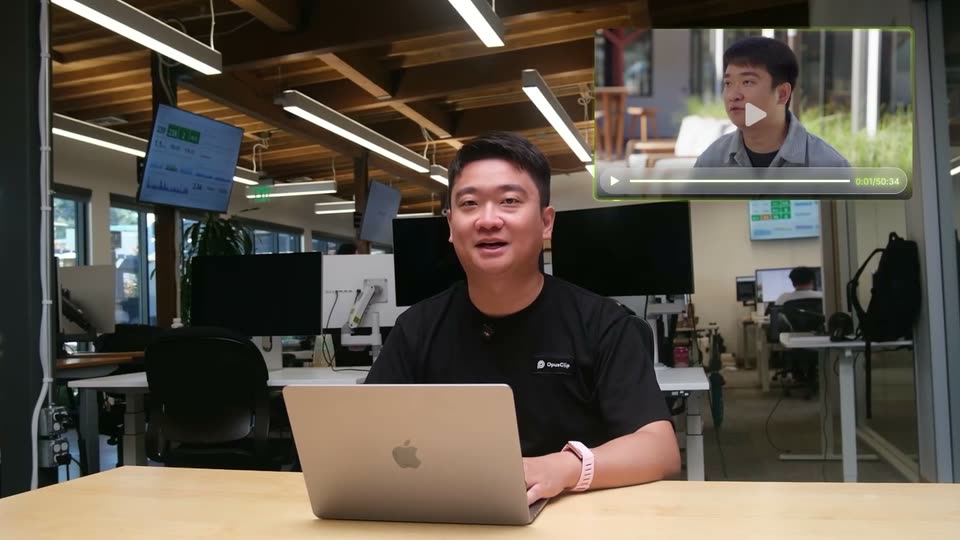
A man in a black T-shirt sits at a desk in a bright office, in front of a MacBook, talking and gesturing. A video player card fades in at the top right, showing a clip of him with a play button and progress bar.
Camera: Static
A video editor interface fills the frame: a preview window at top shows a man in a gray shirt, a horizontal ruler and clip thumbnails with an audio waveform sit below. The timeline pans left so the ruler numbers shift, and the preview reframes to his torso.
Camera: Push in
A dark timeline on a grid shows a row of thumbnails of a man speaking, with a waveform track below. A white playhead sits at 5 seconds as the fourth waveform block lights up yellow and the thumbnails refresh.
Camera: Static
Close-up of an editing interface: a green-bordered preview window shows a man in a gray Malbon jacket speaking, while a filmstrip of clips and an audio waveform track sit below. The view reframes slightly to bring the preview into full view as the playhead rests on the five-second mark.
Techniques: UI zoom
Camera: Pull out
A man in a gray shirt sits on an outdoor patio inside a rounded green-bordered window on a black grid. He turns to face the camera as a white caption appears at left and a green pixel glow blooms at right. Pixel clusters dot the corners.
On-screen text: “HI EVERYONE,”
Techniques: Particles
Camera: Static
A man in a light blue shirt sits outdoors before a glass facade, framed in a green-bordered rounded card on a black grid background. A lower-third name label sits at left, then a white caption appears at the bottom as he speaks.
On-screen text: “HI EVERYONE,”, “YOUNG ZHAO”, “Co-tounder & CEO, OpusClip”, “WE'RE TURNING”
Camera: Static
A smartphone in a stand sits before a blurred gym scene on a dark gridded backdrop with green pixel accents. The phone screen shows a man holding a pink ball as the text RAW FOOTAGE INTO builds on it, and the frame zooms in slightly.
On-screen text: “WE'RE TURNING”, “RAW FOOTAGE INTO”
Techniques: UI zoom, Kinetic type
Camera: Static
A man in a black shirt sits at a desk in a bright office, speaking to the camera behind a laptop. Large words scale in above him in sequence, alternating bold sans and italic serif in white and lime green.
On-screen text: “RAW FOOTAGE INTO”, “But that video alone”, “is not enough”, “to perform”
Techniques: Kinetic type
Camera: Push in
A dark video editor screen with a glowing green border fills the frame. A vertical preview shows a man speaking, a template panel of thumbnail cards sits at right, and a timeline with an audio waveform runs along the bottom. The view zooms in slightly.
Techniques: UI zoom
Camera: Push in
A dark UI panel with category tabs and a grid of hook-style thumbnails sits on a black gridded background. A cursor moves across the grid, and a green selection outline shifts from one thumbnail to the Halo card as the panel scrolls.
Techniques: Cursor demo
Camera: Push in
A dark interface panel titled 'Choose a hook style' shows a grid of video thumbnails, each with a label. A green selection frame jumps from the top-left card to the bottom-right as a cursor moves in and the view zooms slightly.
Techniques: Cursor demo, UI zoom
Camera: Pan
Three phone-shaped cards sit side by side on a black grid floor, each resolving from a green dithered block into a talking-head clip of the same man. White captions pop onto each card in turn: EARLY ON, Early, Our, while the OpusClip logo sits top right.
On-screen text: “Build habits that last”, “EARLY ON”, “Early”, “Our”
Techniques: Masking, Kinetic type
Camera: Static
Three vertical phone frames, each tagged with the OpusClip logo, show the same man in a gray shirt speaking against a dark grid backdrop. Captions change across the frames while a progress bar in the left one fills to 40 percent.
Camera: Static
Three phone-shaped cutouts sit side by side on a dark grid with green pixel dots. Each frames the same man speaking, with captions sliding and fading in; the right cutout flips to a hand holding a phone showing an app.
On-screen text: “EARLY ON 40% OF OUR RESULTS”, “Early on 40%”, “to 50,000”, “to”
Techniques: Split screen, Kinetic type, Masking
Camera: Static
Three rounded phone frames sit side by side on a dark grid background. The left and right frames play live-action clips of a man in a gray shirt with yellow caption bars, the right frame stacks two clips, and the center white card reveals serif text above a small video inset. Captions update as the clips progress.
On-screen text: “EARLY ON 40% OF OUR RESULTS”, “40% of our”, “50,000”, “match the”, “results”, “one week”
Techniques: Split screen, Kinetic type
Camera: Static
A man in a black shirt sits at a desk in an office, holding a phone and gesturing. A green-bordered frame in the top right shows a person with a microphone, then slides down and splits into two stacked windows revealing more footage.
Techniques: Masking
Camera: Static
A dark editor home screen shows an MP4 file icon with a man's thumbnail hovering over the dashed drop zone, then the icon vanishes as it is dropped, leaving the full interface with a green glow along the top edge.
Camera: Pan
A dark recipe panel scrolls down past clipping and captions settings, revealing rows of style thumbnails. A white cursor glides across them and settles on the Polaroid Tilt Card preview, marking it with a green outline.
Techniques: Cursor demo
Camera: Push in
A dark settings screen with a left panel and a list of auto-enhance options; a glowing white cursor rests on the white Create button as the interface drifts upward, a thin green line glows at the right edge.
Techniques: Cursor demo
Camera: Push in
A vertical office video of a man holding a small mic plays inside a green rounded frame on a dark grid. A white caption card pops over the clip, then slides down to reveal the full frame with a typewriter caption at the bottom.
On-screen text: “things going wrong at my startup and it's day 16”, “oh one of running Opus Clip”
Techniques: Kinetic type
Camera: Static
A man in a black shirt sits at a desk in a bright open office, speaking to the camera behind a closed laptop. White bold text scales in at the top, then green italic serif text takes its place.
On-screen text: “Now here's the”, “good part”
Techniques: Kinetic type
Camera: Static
A man in a black shirt sits at a wooden desk in an open office, talking and gesturing behind an open silver laptop. The static medium shot keeps him centered, with rows of desks, monitors and a wooden ceiling in the soft-focus background.
Camera: Static
A dark editor panel with recipe buttons and demo project cards fades in over a grid. The view zooms onto the More button, a glowing white cursor clicks it, and a dropdown of saved recipes opens.
Techniques: UI zoom, Cursor demo
Camera: Push in
A dark Manage recipes panel with three recipe cards sits on a faint grid, framed by a soft green glow. A glowing cursor glides from the lower center across the cards toward the top-right Create new recipe button.
Techniques: Cursor demo
Camera: Static
A dark recipe management panel with three cards sits centered on a black grid background. A glowing white cursor hovers over the middle card, then drifts downward while the panel stays locked in frame.
Techniques: Cursor demo
Camera: Static
A dark upload card on a grid background. A white cursor drags an MP4 video file over the card, drops it, then moves to the lower left. The card lists caption, subtitle, brand and audio icons above a link field and upload options.
Techniques: Cursor demo
Camera: Static
A flat upload card with a glowing green border sits on a dark grid, then the frame pulls back into 3D perspective. A calendar dashboard recedes into the background while floating Scheduled post cards with video thumbnails drift in the foreground.
Techniques: 3D mockup, Parallax
Camera: Pull out
A dark Opus Clip calendar sits at the center of a 3D field of floating “Scheduled” post cards, each tagged with a social icon and a talking-head thumbnail. The layered cards drift slowly at different depths over a faint grid.
Techniques: 3D mockup, Parallax
Camera: Pull out
A tilted 3D window of the OpusClip calendar sits in a dark grid space, ringed by small upload notification cards. The camera zooms in to a flat front view as the cards clear and a scheduled video card slides into the lower right.
Techniques: 3D mockup, UI zoom
Camera: Push in
A dark OpusClip calendar interface, filled with a month grid of scheduled post cards, floats in 3D perspective over a black grid backdrop. A green glow traces its border as the panel tilts and rotates slightly.
Techniques: 3D mockup, Light sweep
Camera: Pull out
A man in a black shirt stands center frame in a busy office, speaking to camera. A large light-green number rolls upward across the top, counting from 10,783,433 to 20,000,000. Coworkers sit at desks behind him.
On-screen text: “10,783,433”, “20,000,000”
Techniques: Kinetic type
Camera: Static
A man in a black shirt stands in a busy office while a large green 20,000,000 sits across the top. The shot dims and cuts to a dark grid where a green 1 appears in the center.
On-screen text: “20,000,000”, “1”
Camera: Static
On a dark grid, large green numbers count up and scale from a few digits to 1,000,000,000, the full figure sliding into a centered, locked-off frame.
On-screen text: “1,000,000,000”
Techniques: Kinetic type
Camera: Pan
A glowing lime number 1,000,000,000 sits on a dark grid with drifting green squares, then scales down as small video clips tumble in around it.
On-screen text: “1,000,000,000”
Techniques: Kinetic type, Particles
Camera: Static
A white OpusClip logo and wordmark sit centered on a black grid background. A ring of small vertical video clips orbits around it, rotating slowly and growing larger near the bottom, smaller at the top.
Techniques: Parallax
Camera: Pan
A black grid background holds the white OpusClip logo and wordmark at center while a ring of small vertical video clips of creators orbits slowly around it. At the end, the white serif word “the” slides in from the left edge.
On-screen text: “the”
Camera: Static
Centered italic serif text reads “the first time ever” on a dark grid background, with “ever” in green. The line scales up slightly while holding in place.
On-screen text: “the first time ever”
Techniques: Kinetic type
Camera: Static
A man in a black t-shirt stands in profile outside a glass-walled building, speaking. Large white and green type stacks line by line across the lower frame over a traveling green pixel block, while the camera holds still.
On-screen text: “the first time ever”, “WE ARE GIVING AWAY”, “ONE MONTH OF OPUSCLIP PRO”
Techniques: Kinetic type
Camera: Static
A dark grid background holds a centered white 'FOR FREE' headline while oversized outlined serif letters of the same words scroll slowly upward behind it, creating a layered depth effect.
On-screen text: “FOR FREE”
Techniques: Parallax
Camera: Static
On a dark grid background, a Twitter post mockup from Opus Clip scrolls upward. The tweet body and a video thumbnail of a man at a desk, with a play button, rise to reveal the like and view counts at the bottom.
Camera: Push in
A dark social media post scrolls up over a faint grid. A video thumbnail of a person typing on a laptop sits above a row of engagement counts, then a comment from Young Z and a white-to-green Share button.
Camera: Push in
A white-to-lime gradient pill button labeled Share with a right arrow grows on a dark grid, scaling from small to large as the arrow stretches outward.
Camera: Static
The OpusClip logo, a rounded P mark beside a bold wordmark, sits centered on a black field. A faint grid flickers in the opening frame as the lockup settles, then the logo holds still for the rest of the clip.
On-screen text: “OpusClip”
Camera: Static