1:13
Explore
Gruz - Introducing Openside open source and self hostable alternative to ri
Openside · Nov 2026 · 1:06 · AI-annotated
- Length
- 1:06
- Scenes
- 26 · 2.5 s avg
- Product on screen
- 0:29
- Features shown
- 1
- Call to action
- 0:56 · 85%
- Voiceover
- Yes
00:00:00 / 01:06:14
Openside’s 1:06 launch film runs 26 scenes, about 2.5 s each. The product shows up at 0:29 and 1 feature is revealed. The call to action lands at 0:56 (85% in), over a voiceover. The video is a single kinetic-type narrative: headlines assemble word by word over flat UI mockups and diagrams, cutting every couple of seconds through hook, problem, mechanism, product, feature, use cases and offer. Its signature moves are the red strikethrough, the degrading video player, the 3D card break-apart and blue-highlighted keywords on a pale gradient.
Footage neededEstimated needs: 5 capture groups — your screens or recordings · 1 official logo — reused across the film · 3 filmed passages — shoot, supply or replace · 5 graphic passages — draw or supply · 2 3D passages — build or supply
Is this your launch? to your site or press kit.
More like this
1:24

Simular - 2,000,000,000 PCs sit on people's desks today. The next billion comp
Simular AI · Nov 2026
1:05


Palisade: Personalized sales agents for online marketplaces
Palisade · B2B · Aug 2026
Gruz - Introducing Openside open source and self hostable alternative to ri, scene by scene
· 26 scenes as text
01 · Hook · 0:00–0:04
On a pale gradient background, bold black text “fuck launch videos.” slides in. “launch videos.” fades to gray as a red line strikes through it. Below, a second line assembles word by word, with “actually need” highlighted in blue.
On-screen text: “fuck launch videos.”, “let's talk about why you actually need this.”
Techniques: Kinetic type
Camera: Static
02 · Problem · 0:04–0:04
On a soft cream-to-blue gradient, a bold black headline builds “you record a call” word by word at top left. A white Google Meet icon sits center, then a blue Zoom icon slides in beside it, each popping a red REC badge into its top-right corner.
On-screen text: “you record a call”
Techniques: Kinetic type
Camera: Static
03 · Problem · 0:04–0:06
On a light gray background, a black headline types out across the top. Two video-call icons, Google Meet and Zoom, each carrying a red REC badge, sit side by side, then drop into a white browser window with traffic-light dots and a Weekly sync label.
On-screen text: “you record a call on google meet or zoom,”
Techniques: Kinetic type
Camera: Static
04 · Problem · 0:06–0:06
A video-call window shows two participants, a man clapping and a woman smiling, as a download toast with a file card and a cursor on the Download button slides in. The headline above swaps from the record line to “you download”.
On-screen text: “you record a call on google meet or zoom,”, “you download”
Techniques: Kinetic type, Cursor demo
Camera: Static
05 · Problem · 0:06–0:09
A front-facing video player mockup on a light background shows a two-person call recording. The headline above swaps line by line while the footage inside degrades from 720p to 240p, and a Forwarded many times tooltip pops in. A cursor rests on the download bar at the start.
On-screen text: “you download”, “and it looks like it got compressed”, “by whatsapp five times.”, “Forwarded many times”
Techniques: Cursor demo, Kinetic type
Camera: Push in
06 · Problem · 0:09–0:10
A flat video-player mockup sits on a pale background beneath the headline, showing a pixelated clip of two people. A white 'Forwarded many times' pill and a red '144p' badge sit on the frame while the red ×5 tag scales up slightly.
On-screen text: “by whatsapp five times.”, “Forwarded many times”, “×5”, “144p”
Camera: Static
07 · Problem · 0:10–0:11
A soft white gradient with faint blue and warm tones fills the frame. The centered phrase “here’s why.” starts small in dark gray, then scales up as the blue word “why.” fades in, settling mid-frame on a locked-off shot.
On-screen text: “here's why.”
Techniques: Kinetic type
Camera: Static
08 · Problem · 0:11–0:16
Two rounded video tiles on a light gradient show a man and a woman talking, each tagged You and Other person. A curved Internet diagram with small moving thumbnails grows between them while bold kinetic text builds the headline word by word.
On-screen text: “a video call is just you and the other person”, “sharing live video over the internet.”
Techniques: Kinetic type
Camera: Static
09 · Problem · 0:16–0:23
Two video tiles flank a funnel marked 'Internet 6.4 Mbps' as thumbnails stream through. A 'Call recording' card with a 720p thumbnail slides in below while the headline builds word by word. The funnel turns pink, a 'Weak connection' tag appears, the thumbnail drops to 280p, then the scene fades to white on a NASA logo.
On-screen text: “so when you record,”, “google meet or zoom simply records that same live call,”, “which heavily relies on your internet connection.”, “records the call after it's squeezed”, “Weak connection”
Techniques: Kinetic type, Masking
Camera: Static
10 · Problem · 0:23–0:26
A flat NASA logo sits left of a macOS Wi-Fi panel on a pale background, in a locked-off frame. The headline types in word by word above. A cursor moves to the NASA-HQ-SECURE row and selects it, revealing a password line.
On-screen text: “so unless you've got nasa's”
Techniques: Kinetic type, Cursor demo
Camera: Static
11 · Problem · 0:26–0:28
A video file card with a two-person call thumbnail sits on a light gray field while the headline builds word by word above it. A gray trash can icon pops in at right, then the card tilts and drops into the bin.
On-screen text: “your video quality will definitely come out trash.”
Techniques: Kinetic type, 3D mockup
Camera: Pull out
12 · Problem · 0:28–0:29
A plain light background shows the headline with “trash” in blue and a trash can icon at right. The headline fades as a two-panel video call interface slides up from the bottom, raising the icon.
On-screen text: “your video quality will definitely come out trash.”
Camera: Static
13 · Product intro · 0:29–0:34
A flat OpenSide video-call window shows two participants, a man and a woman, talking. A headline builds word by word above it, then a cursor clicks the red Record button, which turns to Stop with a 00:00 timer.
On-screen text: “in openside, the video call works the same way.”, “but the moment you press record,”
Techniques: Kinetic type, Cursor demo
Camera: Static
14 · Product intro · 0:34–0:34
A flat browser window showing a two-person video call breaks apart. A headline types in above, then the two participant tiles detach and float as tilted 3D cards while the toolbar and browser chrome fade out.
On-screen text: “the whole game”
Techniques: Kinetic type, 3D mockup
Camera: Static
15 · Product intro · 0:34–0:35
A light layout shows a black-and-blue headline above two live-call video tiles, a man on the left and a woman on the right. The curved connector between them pinches inward and fills with small thumbnails as the name labels slide in.
On-screen text: “the whole game changes.”, “Live call · squeezed to fit”
Techniques: Morph
Camera: Static
16 · Feature reveal · 0:35–0:48
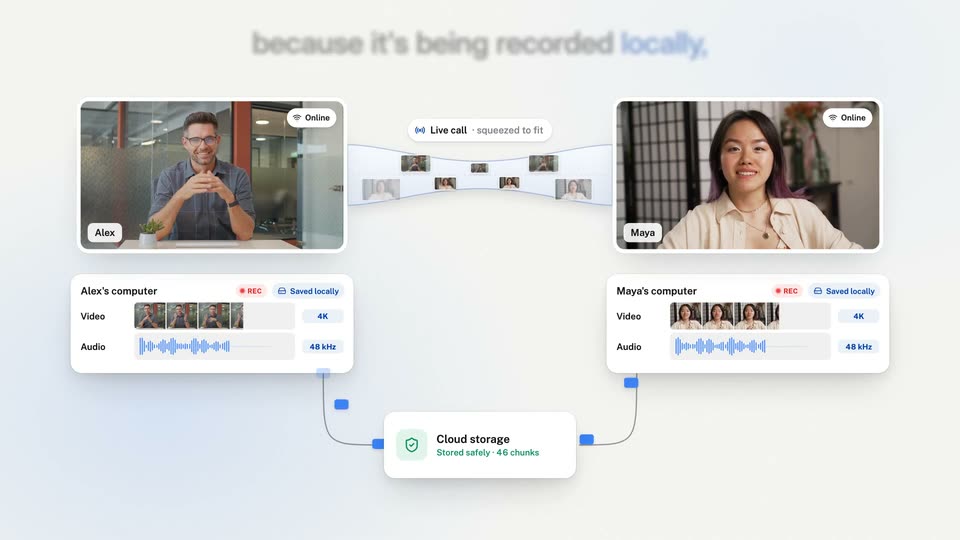
A light diagram pairs two video-call tiles (Alex, Maya) with computer cards below; their video and audio rows fill as REC badges light up, and a curved call strip sits between. Blue packets flow along curved lines into a Cloud storage card under a word-by-word headline.
On-screen text: “now openside starts recording each person's video and audio locally on their pc, and then sends it off to be stored safely. because it's being recorded locally,”, “the recording quality doesn't depend on your internet.”
Techniques: Kinetic type
Camera: Static
17 · Feature reveal · 0:48–0:51
Two tiles of the same woman sit side by side: the left is a blurry 360p feed, the right a sharp recording. The headline types word by word, then reads 'up to 4K recordings.' as the 1080p tag becomes a 4K badge, and the frame fades to white.
On-screen text: “and that's how you get high quality”, “What the live call sends”, “360p”, “What Openside records”, “1080p”, “up to 4K recordings.”, “4K”
Techniques: Kinetic type, Split screen
Camera: Static
18 · Demo · 0:51–0:55
A row of rounded video cards, each with a REC timer and 4K badge, scrolls left across a pale background. Above, the headline types in word by word in black, then 'podcasts, interviews,' in blue.
On-screen text: “so if you want to record high quality”, “podcasts, interviews,”
Techniques: Kinetic type
Camera: Pan
19 · Demo · 0:55–0:56
Rounded video-call cards float on a pale background; the center card swaps between a bearded man, a woman and a bald man as the side cards slide. A blue headline above adds its final words in sequence.
On-screen text: “podcasts, interviews, testimonials, or calls.”
Techniques: Kinetic type
Camera: Pull out
20 · CTA · 0:56–0:56
A blue-and-black headline sits above two rounded video cards, one with a bearded man holding a mug, one a close-up of a doll face. The cards fade out as the word “you” and a hub of four people thumbnails around an OpenSide card fade in.
On-screen text: “podcasts, interviews, testimonials, or calls,”, “you”
Camera: Static
21 · CTA · 0:56–0:57
A 3x3 grid of video-call tiles shows eight people on camera around a central white card bearing the OPENSIDE logo. Above the grid, the headline builds word by word from 'you need' to 'you need this right now.' while the tiles play live footage.
On-screen text: “you need this right now.”
Techniques: Kinetic type
Camera: Static
22 · CTA · 0:57–0:58
A 3x3 grid of video tiles shows eight people on calls around a center tile holding the Openside logo. Thin red borders and small REC indicators appear on the outer tiles.
On-screen text: “you need this right now.”
Techniques: Split screen
Camera: Static
23 · Pricing · 0:58–1:00
A GitHub repository page for openside pans horizontally, revealing the file list, a green Code button and the About section. Above it, a blue headline types out word by word. A cursor rests at the right edge.
On-screen text: “open source and self-hostable,”
Techniques: Kinetic type
Camera: Push in
24 · Pricing · 1:00–1:01
A tilted GitHub repo mockup floats on a gray field beneath a heading that types out “add your own keys.” The window then flattens and zooms into the README, landing on the Features list with one line highlighted in yellow.
On-screen text: “add your own keys”
Techniques: 3D mockup, Kinetic type, UI zoom
Camera: Pull out
25 · Pricing · 1:01–1:02
A centered black headline above a flat browser window reads add your own keys and it's, then the blue word free appears. The browser shows a GitHub repository page for Openside with a bulleted feature list.
On-screen text: “add your own keys and it's free.”
Techniques: Kinetic type
Camera: Static
26 · Outro · 1:02–1:06
A centered white OPENSIDE logo and wordmark hold over a pixel-art coastal landscape. The tagline and two pill-shaped URLs remain static below in a locked-off frame.
On-screen text: “OPENSIDE”, “The open-source recording studio”, “openside.pro”, “github.com/rinkitadhana/openside”
Camera: Pull out