
0:22
Explore
00:00:00 / 00:56:03
- Length
- 0:56
- Scenes
- 39 · 1.4 s avg
- Product on screen
- 0:02
- Voiceover
- Yes
- Views
- 6K on X
as of November 14, 2026
Opal’s 0:56 launch film runs 39 scenes, about 1.4 s each. The product shows up at 0:02. There is no explicit call to action; a voiceover carries the film. The video cuts fast, about 36 cuts per minute, between a direct-to-camera presenter in a warm living room, black grainy motion-graphics cards, and phone mockups resting on dark wrinkled fabric, all paced to a 110 bpm pulse. Its signature moves are word-by-word caption builds, 3D card fans and phone screens scaling in over a swirling particle vortex, and a green-to-red YOU versus AI split.
Footage neededEstimated needs: 5 capture groups — your screens or recordings · 1 official logo — reused across the film · 10 filmed passages — shoot, supply or replace · 1 graphic passage — draw or supply · 12 3D passages — build or supply
Is this your launch? to your site or press kit.
More like this




Opal - Introducing Brain Games: Puzzles that make you smarter, before you sc, scene by scene
· 39 scenes as text
01 · Problem · 0:00–0:00
A man in a green sweater stands centered in a softly lit living room, speaking to the camera as a white caption appears at the bottom of the frame.
On-screen text: “Brain rot is everywhere.”
Camera: Push in
02 · Problem · 0:00–0:02
A man in a green sweater stands centered in a living room, speaking to camera. He spreads both hands outward in a shrug as a white caption scales in at the bottom of the frame.
On-screen text: “Brain rot is everywhere.”
Techniques: Kinetic type
Camera: Static
03 · Product intro · 0:02–0:03
A comic-style illustration of a hand holding a black phone on a blue background cuts to a man gripping a game controller, leaning toward the camera in a dim room.
Camera: Static
04 · Product intro · 0:03–0:06
Centered white headline scales down over a dark swirling particle vortex, swapping from “Introducing” to “Brain Games” while the Opal logo holds below. A small lavender brain icon fades in at center as the caption “our” appears at the bottom.
On-screen text: “Introducing”, “Brain Games”, “our”
Techniques: Kinetic type, Particles
Camera: Pull out
05 · Product intro · 0:06–0:08
On a black grainy background, a purple brain icon floats above a single MEMORY card. The card fans out into five game cards in a 3D arc, the top icon turns into a white brain, and the caption builds word by word at the bottom.
On-screen text: “our newest feature from Opal.”
Techniques: 3D mockup, Kinetic type, Morph
Camera: Static
06 · Product intro · 0:08–0:09
A glowing app icon sits centered above a fan of five tilted cards on black. The cards, labeled MEMORY, WORDS, MATH, MATH BATTLE and AVERAGE, each carry a neon icon and a colored glow, and they spread apart slightly.
On-screen text: “our newest feature from Opal.”
Techniques: 3D mockup
Camera: Static
07 · Product intro · 0:09–0:12
On a black field, scattered letters snap into the centered line Solve puzzles, hold, then blur away. That make you fades in at center, then swaps to smarter.
On-screen text: “Solve puzzles”, “That make you”, “smarter”
Techniques: Kinetic type
Camera: Static
08 · Product intro · 0:12–0:13
A bearded man's face fills the frame in warm tones as white serif math equations float across it, then the view tightens to an extreme close-up of his eyes while the symbols drift. The pace is slow and the framing stays locked.
On-screen text: “smarter”
Camera: Push in
09 · Product intro · 0:13–0:16
On a black grainy background, the phrase “Before you” sits static in lavender on the left. To its right, the word “scroll” stacks in a vertical column that scrolls upward behind a thin rule, the repetitions multiplying as the column fills the frame.
On-screen text: “Before you scroll”
Techniques: Kinetic type
Camera: Static
10 · Demo · 0:16–0:17
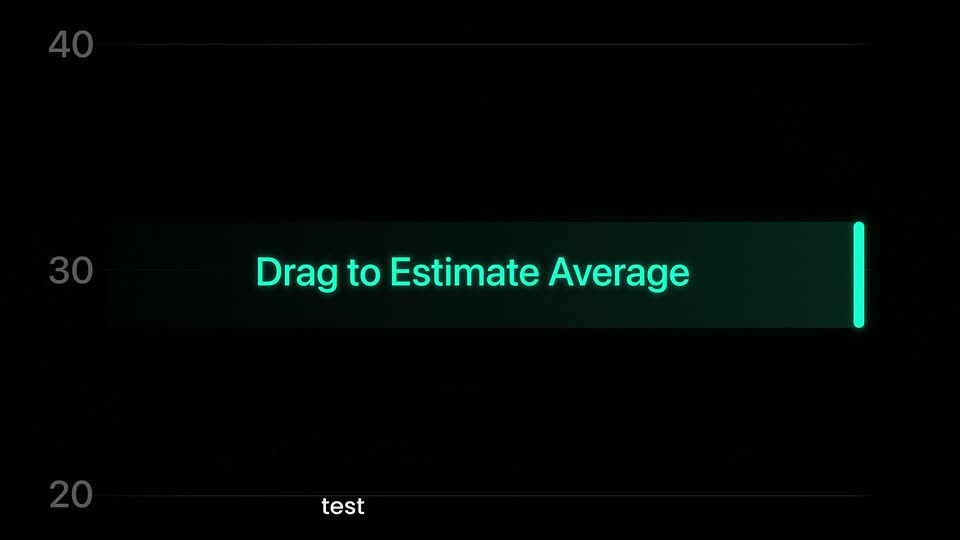
A teal slider on a dark axis reads “Drag to Estimate Average” with a glowing handle, while a white caption appears word by word below. The scene then cuts to a person in a blue sweater holding a phone showing the same prompt with numbers 16, 16, 19.
On-screen text: “test yourself with averages.”
Camera: Static
11 · Demo · 0:17–0:18
Over-the-shoulder shot of a person in a blue sweater holding a phone with both hands; the screen shows a math quiz with the numbers 16, 16, 19 and a drag slider. A caption at the bottom reads “test yourself with averages.”
On-screen text: “test yourself with averages.”
Camera: Push in
12 · Demo · 0:18–0:19
A front-facing phone mockup rests centered on a black textured surface, its screen showing a green glowing orb with a checkmark and a dopamine confirmation message. White overlay text scales in over the dark frame.
On-screen text: “16-16-19”, “You versus Al,”
Techniques: Kinetic type
Camera: Static
13 · Demo · 0:19–0:20
A dark green-to-red gradient with fine speckles holds a tilted smartphone mockup showing a math quiz. Green YOU and red AI flank a glowing white VS that scales in over the phone, while a caption reads You versus AI, at the bottom.
On-screen text: “YOU”, “VS”, “AI”, “You versus AI,”
Techniques: Kinetic type, 3D mockup
Camera: Static
14 · Demo · 0:20–0:22
A phone mockup of a math game fades in at center on a starry black field, its screen brightening to show a 13 minus 7 equation with answer tiles. A small white caption reads at the bottom, then a huge YOU VS AI title scales in over the device.
On-screen text: “You versus AI,”, “YOU”, “Vs”, “AI”
Techniques: 3D mockup, Kinetic type
Camera: Static
15 · Demo · 0:22–0:23
A dense grid of white letters on a near-black background scrambles and re-randomizes, with a soft purple glow highlighting one letter near the center. A small lowercase caption types out at the bottom edge.
On-screen text: “words,”, “words, and”
Techniques: Particles
Camera: Push in
16 · Demo · 0:23–0:24
A front-facing phone mockup sits centered on a dark starfield, its screen showing a word-search puzzle where the letters F O C U S glow purple inside a letter grid. A white caption appears word by word along the bottom edge.
On-screen text: “words, and many more.”
Techniques: Kinetic type
Camera: Static
17 · Demo · 0:24–0:24
A flat phone mockup sits centered on a black starfield, showing a word-search screen. The target word switches from FOCUS, with its letters highlighted in the grid, to TASK as the progress bar advances. A still caption reads 'Here's how it works.'
On-screen text: “Here's how it works.”
Camera: Static
18 · Demo · 0:24–0:25
A man in a green sweater speaks to the camera in a sunlit living room, gesturing with both hands. Framed art hangs on the wall behind him. A white subtitle line sits at the bottom of the locked-off medium shot.
On-screen text: “Here's how it works.”
Camera: Static
19 · Demo · 0:25–0:25
A front-facing phone on black shows a profile screen with a row of glowing gems and the caption Here's how it works. The screen then scrolls up to a You're an Opal Pro card with a View Benefits button as the phone nudges upward.
On-screen text: “Here's how it works.”
Camera: Static
20 · Demo · 0:25–0:26
A 3D phone mockup on a dark textured background shows the Opal preferences screen. The list scrolls down past rows like Notifications, Customize Waiting Room, and Parental Controls, while a purple 'You're an Opal Pro' banner slides up out of view.
Techniques: 3D mockup
Camera: Pull out
21 · Demo · 0:26–0:29
A dark phone settings list sits on black; a purple outline highlights the Customize Waiting Room row while white captions build at the bottom, then the outline fades and the list scrolls up to the Opal Pro banner.
On-screen text: “First, you turn on Brain”, “from your profile in”, “Opal like this.”
Techniques: UI zoom
Camera: Pull out
22 · Demo · 0:29–0:31
A front-facing phone on a black starfield shows the Waiting Room settings list. The Math Games toggle flips from off to on around the middle of the clip, while the Breathing Exercises toggle stays on.
Camera: Static
23 · Demo · 0:31–0:32
A man in a green sweater sits before a green couch and a wall of framed art, speaking to camera while gesturing with both open hands. A white subtitle reads Now, at the bottom.
On-screen text: “Now,”
Camera: Static
24 · Demo · 0:32–0:33
A phone mockup sits centered on a black textured fabric, its home screen showing a top widget and a grid of app icons. The frame stays locked-off while a white caption builds word by word along the bottom edge.
On-screen text: “Now, when you try”
Techniques: Kinetic type
Camera: Static
25 · Demo · 0:33–0:34
A front-facing phone mockup sits centered on a dark, wrinkled fabric backdrop, its screen showing an Opal notification card reading “Instagram Was Blocked by Opal” with several lines of body copy. A white caption builds word by word along the bottom edge of the frame.
On-screen text: “Now, when you try to take a break, you can choose which”
Techniques: Kinetic type
Camera: Static
26 · Demo · 0:34–0:36
A phone mockup floats centered on a dark textured background. The home screen shows a small tap highlight, then blurs as the Opal app card scales in over it. A white caption runs along the bottom edge.
On-screen text: “break, you can choose which”, “Brain Game you”
Techniques: 3D mockup
Camera: Static
27 · Demo · 0:36–0:36
A front-facing phone mockup rests on a black fur-like texture, its dark screen showing the Opal app's 100 Million Hours Saved view. Beneath the device, a white caption types in word by word, momentarily doubling the word to before settling.
On-screen text: “Brain Game you want to play.”
Techniques: Kinetic type
Camera: Static
28 · Demo · 0:36–0:38
A front-facing phone mockup sits centered on a dark, textured backdrop. The screen opens dimmed behind a floating Opal card reading 100 Million Hours Saved, then brightens as the card fades out and the home screen apps unblock beneath an active Opal widget.
Camera: Static
29 · Demo · 0:38–0:39
A front-facing iPhone mockup rests on a dark, speckled fabric surface. Three iridescent egg-shaped orbs glow and pulse on the screen, while a thin white ring drifts across the interface.
Camera: Static
30 · Demo · 0:39–0:40
A phone rests flat on a dark woven background. Its screen shows the Opal dashboard with a Focus Fiesta timer and a Break button, then the view changes to a game picker with two cards, CONNECT and WORDS, each holding a thin line icon.
Camera: Static
31 · Demo · 0:40–0:43
A person in a blue sweater holds a phone over a counter, filmed over the shoulder. The screen shows a word-search grid, then a green checkmark and countdown button. A white subtitle line builds word by word at the bottom.
On-screen text: “If you succeed, go ahead, scroll.”
Techniques: Kinetic type
Camera: Push in
32 · Demo · 0:43–0:45
A front-facing iPhone mockup sits centered on a dark textured surface. Its screen dissolves from the home screen into an open Instagram post by withdrawal, while the caption Congrats. fades in along the bottom edge.
On-screen text: “Congrats.”
Techniques: UI zoom
Camera: Static
33 · Demo · 0:45–0:46
A front-facing smartphone mockup sits centered on a black grainy background, showing a social feed. The post video swaps between two shots of commuters on a train while a caption below the device changes from Congrats. to You've earned it.
On-screen text: “Congrats.”, “You've earned it.”
Camera: Static
34 · Demo · 0:46–0:48
On a dark gradient background, the white equation 12 × 2 − 5 = scales up at center, followed by a blue-outlined rounded square whose number rolls from 1 to 16 as the outline shifts to purple. A small white caption If you lose, fades in at the bottom.
On-screen text: “12 × 2 - 5 =”, “If you lose,”
Techniques: Kinetic type
Camera: Static
35 · Demo · 0:48–0:48
A front-facing iPhone on a dark textured background shows a Study Hours app with the equation 12 x 2 - 5 = 16, the answer boxed in pink, and a numeric keypad below. A white caption reading If you lose, sits at the bottom of the frame while the phone stays still.
On-screen text: “If you lose,”
Camera: Static
36 · Demo · 0:48–0:49
A man in a green sweater stands in a bright living room, framed mid-shot against a wall of framed art, and gestures with one hand while speaking. A white subtitle line builds word by word along the bottom as he talks, the camera held still.
On-screen text: “If you lose, then get back to work.”
Techniques: Kinetic type
Camera: Static
37 · Demo · 0:49–0:51
A grainy, locked-off shot of an office cubicle. A man in a white shirt sits at a desk with an old monitor, printer and phone, leaning forward and shifting slightly. The footage has a greenish, low-resolution archival look. A small caption sits at the bottom edge.
On-screen text: “If you lose,”
Camera: Static
38 · Outro · 0:51–0:54
On a dark, grainy black field, the Brain Games wordmark forms in the center as the two words slide out from behind the rounded brain icon. A white caption assembles word by word along the bottom.
On-screen text: “Brain Games”, “Welcome to the smartest way to scroll.”
Techniques: Kinetic type
Camera: Static
39 · Outro · 0:54–0:56
A dark starfield drifts slowly behind the centered Brain Games wordmark, a rounded square brain icon between the two words. A small gray tagline sits at the bottom edge of the frame.
On-screen text: “Brain”, “Games”, “Welcome to the smartest way to scroll.”
Techniques: Particles
Camera: Static