2:17

New Apple child safety features help parents keep kids safe online
Apple · Hardware · Sep 2026
Google · Oct 2016 · 1:35 · AI-annotated
Google’s 1:35 launch film runs 17 scenes, about 5.6 s each. The product is on screen from the first frame. There is no explicit call to action; a voiceover carries the film. A white-field launch film built from flat vector shapes: brand open, problem beat, product reveal, a run of use-case demos, a trust beat, and a tagline close. Slow, steady pacing with long holds; signature moves are the wordmark morphing into the four Assistant dots, speech bubbles typing questions, and result cards popping in under the dots.
Is this your launch? to your site or press kit.
Apple · Hardware · Sep 2026
Karumi · B2B · Aug 2026
Figma · Design · Mar 2025
On a white field, the multicolor Google wordmark types in letter by letter above a thin line that expands into an empty search box with a blinking caret. The logo and box then scale down toward the center as the shot holds.
Techniques: Kinetic type
Camera: Static
A white Google search page sits center frame: a blue circular avatar, the multicolor Google logo, and an empty search box with a blinking cursor. Tiny gray icons of papers, pins and notes drift slowly across the background.
Techniques: Particles
Camera: Push in
A small blue circular avatar with a stylized person sits centered on a white field, scaling up gently. Dozens of tiny icons, Google apps and gray device and document glyphs, pop in around it and drift slowly, filling the frame by the end.
Techniques: Particles
Camera: Push in
On a plain white background, a blue circular person avatar sits left of the Google wordmark, which morphs into the four colored dots of the Assistant logo. Speech bubbles alternate between the two, and small result cards, a schedule, a map route, restaurant ratings, pop in under the dots.
On-screen text: “Hi Aimee, how can I help?”, “OK Google, what do I have to do today?”, “How long will it take to get to downtown Chicago from home?”, “What restaurants are there?”
Techniques: Morph, Kinetic type
Camera: Static
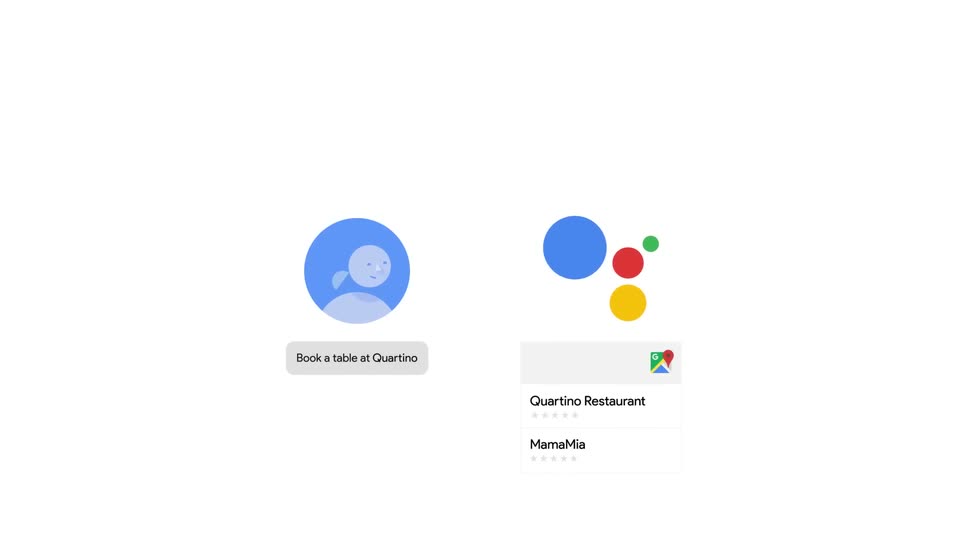
On white, two flat illustrations sit side by side. Left, a blue circular avatar of a person sits above a pill whose label types out the booking phrase. Right, a cluster of blue, red, yellow and green dots drifts downward above a card listing two restaurants with star ratings and a map icon.
Techniques: Kinetic type
Camera: Static
On a white field, a flat blue avatar circle and a cluster of blue, red, green and yellow dots drift and the avatar scales up. A small white card labeled 'Your reservation / Quartino Restaurant' holds at the lower right, then the brand name and a caption lock in to close the beat.
On-screen text: “Your reservation”, “Quartino Restaurant”, “MamaMia”, “Book a table at Quartino Restaurant.”
Camera: Static
A flat gray phone mockup hovers over a blue assistant avatar, a cluster of blue, red, green and yellow dots, and a small white reservation card. The shot zooms into the phone, reframing on its lower screen and navigation buttons as the other elements exit the frame.
Techniques: UI zoom
Camera: Pan
A flat phone mockup sits centered on white. A chat bubble with the question fades in top right, then small colored dots appear at left. A map card slides in below, drawing a blue route to a red pin, the station name and time filling in.
Camera: Static
A phone mockup with a gas station map result exits, revealing a white 3D smart speaker with four colored dots above it. Gray musical notes rise from the speaker, then it slides left as a second phone with a movie chat enters from the right.
Techniques: 3D mockup
Camera: Pan
A phone mockup rotates gently in 3D on a white background. Its chat shows a message asking Google about movies, and a results card expands beneath it, listing three titles with showtimes and colored icons.
Techniques: 3D mockup
Camera: Static
A flat phone mockup holding two chat bubbles slides down out of frame, leaving a blue assistant avatar and the four-color Google dots floating on a white background.
Camera: Static
On a plain white background, a blue circular avatar icon sits left of a small cluster of dots. A thin white ring pulses on and off around the large blue dot, while the red, green, and yellow dots remain still.
On-screen text: “:”
Camera: Static
A blue person avatar and a cluster of colored dots face each other on white. A gray padlock shield pops in between them, then fades. A bubble reads 'Remember my bike combo is 3-2-6.' under the avatar, then 'Got it.' under the dots, as the icons drift together.
On-screen text: “Remember my bike combo is 3-2-6.”, “Got it.”
Camera: Static
Colored dots drift and reposition above a thin brace as a row of gray device icons (phone, speaker, watch, monitor, car) fades in below. The dots settle into the Google logo, the wordmark slides in from the right, and a search bar outline appears.
Techniques: Morph
Camera: Pan
The Google wordmark and search bar scale in on white, then collapse into four colored dots. The dots bounce as a speech bubble appears with “Hi, how can I help?”, then the dots rise and the caption “Meet your personal Google Assistant.” fades in.
On-screen text: “Hi, how can I help?”, “Meet your personal Google Assistant.”
Techniques: Morph, Kinetic type
Camera: Static
The four-dot Google Assistant logo holds center on a white field while the gray tagline fades in beneath it. The text then fades out and the dots shrink and slide into a tight horizontal row, dissolving to white.
On-screen text: “Meet your personal Google Assistant.”
Camera: Static
The multicolor Google logo holds centered on a plain white background, then fades to empty white over the clip. A small static tagline stays in place throughout the shot.
On-screen text: “Meet your personal Google Assistant.”
Camera: Static