
0:34
Explore
Pablo Omeñaca - Text-only agents are dead. We’re launching a multimedia AI agent tha
Karumi · Aug 2026 · 0:40 · AI-annotated
- Length
- 0:40
- Scenes
- 15 · 2.7 s avg
- Product on screen
- 0:06
- Features shown
- 2
- Call to action
- 0:35 · 87%
- Voiceover
- No
00:00:00 / 00:40:17
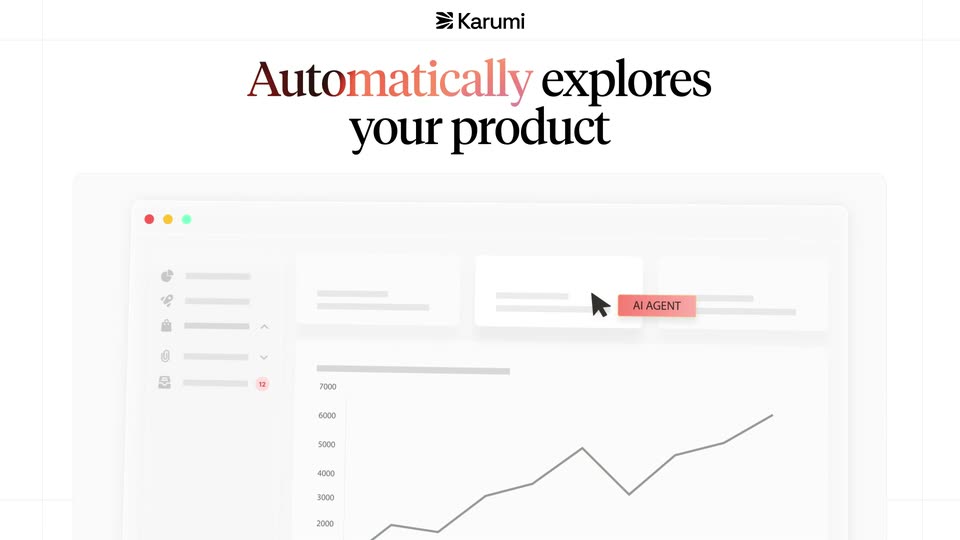
Karumi’s 0:40 launch film runs 15 scenes, about 2.7 s each. The product shows up at 0:06 and 2 features are revealed. The call to action lands at 0:35 (87% in). The video alternates full-frame serif headline cards with UI mockups tilted into 3D perspective, each feature introduced by a single-line claim and then proven in a short scripted cursor demo. Signature moves include headlines that resolve from blur or a red-to-purple gradient wash, cursors tagged with the AI agent pill, and a consistent peach accent on a near-white grid.
No filming indicatedEstimated needs: 2 capture groups — your screens or recordings · 1 official logo — reused across the film · 1 graphic passage — draw or supply · 3 3D passages — build or supply
Is this your launch? to your site or press kit.
More like this
2:14
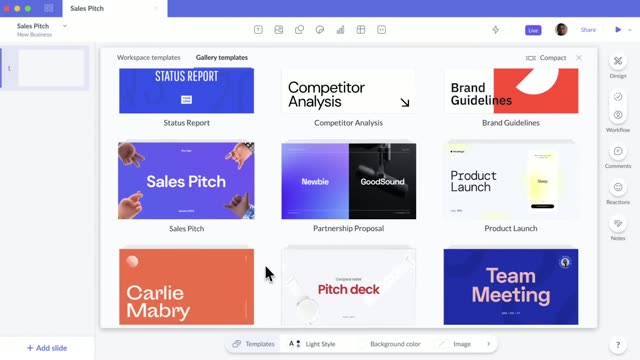

Pitch: Collaborative presentation software for teams.
Pitch · Productivity · Oct 2020
2:17

New Apple child safety features help parents keep kids safe online
Apple · Hardware · Sep 2026
Pablo Omeñaca - Text-only agents are dead. We’re launching a multimedia AI agent tha, scene by scene
· 15 scenes as text
01 · Problem · 0:00–0:02
Two lines of serif text fade in at the center of a plain off-white frame, the word “chatbots” in a red-to-purple gradient, then fade out. A small Karumi logo sits at top center throughout.
On-screen text: “Traditional chatbots”, “only answer with text”
Camera: Static
02 · Problem · 0:02–0:06
A centered chat widget mockup types out a bot reply while a gray dashboard wireframe fades in behind it. A black cursor appears at the card's top-right corner as red thumbs-down icons pop in scattered around the frame.
Techniques: Particles
Camera: Pull out
03 · Product intro · 0:06–0:07
A white field with the Karumi mark at top. A two-line serif headline resolves from a soft blur and scattered pink blobs into sharp text, the words 'a better way' tinted pink. The first line scales in, the second holds still.
On-screen text: “But there's a better way to handle product questions”
Techniques: Kinetic type
Camera: Static
04 · Product intro · 0:07–0:08
Plain white card with the Karumi logo top-center. A serif headline reads in, the phrase 'a better way' set in red, scaling up with a soft right-edge echo. It then swaps to a gray serif line stating Karumi generates screenshots, same echo on the right.
On-screen text: “But there's a better way to handle product questions”, “Karumi generates screenshots”
Techniques: Kinetic type
Camera: Static
05 · Product intro · 0:08–0:11
A white card holds the black serif line “Karumi generates” while the word below cycles from screenshots to videos to guides in a red gradient. The frame then cuts to a flat chat interface titled “Ask about Workday HCM” with three suggestion buttons and a Virtual CSM input.
On-screen text: “Karumi generates screenshots”, “Karumi generates videos”, “Karumi generates guides”
Techniques: Kinetic type
Camera: Static
06 · Demo · 0:11–0:21
A white chat widget runs a scripted demo: a cursor taps the 'Show me an HCM overview' chip, the bot types a reply with an embedded video, then 'show me payroll command center' is sent and a second video plays as the thread scrolls to new chips.
Techniques: Cursor demo
Camera: Pull out
07 · Demo · 0:21–0:22
A front-facing tablet frame on a white grid holds an AI chat panel titled 'Ask about Workday HCM'; the panel's content (chat bubble and suggestion pills) clears away, leaving a blank white screen with a small loading spinner, while the Karumi logo stays fixed at the top.
On-screen text: “ps://apps.karumi.ai/menu/Q4skp0g2Dh025yYi”
Camera: Static
08 · Demo · 0:22–0:24
A laptop mockup in 3D perspective on a white grid background shows a dark blue Workday demo page. The left plays a video of a woman at a desk; the right holds a headline, an email field with a blinking cursor, and a Start Now button.
On-screen text: “Karumi”
Techniques: 3D mockup
Camera: Static
09 · Feature reveal · 0:24–0:27
A Workday video-call modal fades out as a serif headline slides up, then a dashboard mockup with a line chart fades in and the camera zooms into it while two labeled cursors move across the panels; the mockup tilts into 3D perspective at the end.
On-screen text: “Automatically explores your product”
Techniques: Kinetic type, Cursor demo, UI zoom, 3D mockup
Camera: Pan
10 · Feature reveal · 0:27–0:29
A dashboard mockup with sidebar, stat cards and a line chart sits tilted in 3D perspective on a light background. A cursor glides left across the top row and an AI AGENT pill appears beside the sidebar. The frame stays locked off.
On-screen text: “AI AGENT”
Techniques: 3D mockup, Cursor demo
Camera: Static
11 · Feature reveal · 0:29–0:32
A flat illustration pairs a pink circular K mark on the left with a browser mockup on the right, joined by a dashed line. A cursor tagged AI AGENT slides across the bottom row as a search field types Ok, this changed.
On-screen text: “Always up to date.”, “No manual re-recording”
Techniques: Cursor demo
Camera: Push in
12 · Other · 0:32–0:35
A faint “No manual re-recording” line fades at the top as the serif headline “Increase user activation” scales into the center, the word “crease” in coral; it then switches to “Reduce support tickets” in black. The Karumi logo stays at top.
On-screen text: “No manual re-recording”, “Increase user activation”, “Reduce support tickets”
Techniques: Kinetic type
Camera: Static
13 · CTA · 0:35–0:37
A plain off-white card holds the serif headline “Reduce support tickets”, the first word tinted rust-red with a soft offset, under a small Karumi wordmark. It cuts to “Try at” beside a white pill reading “karumi.ai”.
On-screen text: “Reduce support tickets”, “Try at”, “karumi.ai”
Camera: Static
14 · CTA · 0:37–0:38
On a white background, the serif phrase Try at sits beside a white pill reading karumi.ai. A soft peach circle swells over the text, blurring it, then dissolves, while a pink cursor glides up from the lower right to the pill's edge.
On-screen text: “Try at”, “karumi.ai”
Techniques: Cursor demo
Camera: Static
15 · Outro · 0:38–0:40
The black Karumi icon and wordmark sit centered on a white field with a soft peach gradient glow across the top. The frame is locked off and the logo holds still.
On-screen text: “Karumi”
Camera: Static