1:57
Explore
kyzo - meet One, the new way for talking with your agents • see questions f
One · Oct 2026 · 0:31 · AI-annotated
- Length
- 0:31
- Scenes
- 21 · 1.5 s avg
- Product on screen
- 0:05
- Features shown
- 4
- Voiceover
- No
00:00:00 / 00:31:33
One’s 0:31 launch film runs 21 scenes, about 1.5 s each. The product shows up at 0:05 and 4 features are revealed. There is no explicit call to action. The film alternates cinematic live-action plates with flat light-gray UI stages, and each feature is introduced by a bold left-aligned headline that holds while a dark panel tilts into 3D on the right. Pacing runs at about 13 cuts a minute, with keycap props and a two-eyed cloud mascot carrying continuity into the sunflower-field closer.
Footage neededEstimated needs: 5 capture groups — your screens or recordings · 1 official logo — reused across the film · 2 filmed passages — shoot, supply or replace · 2 graphic passages — draw or supply · 4 3D passages — build or supply
Is this your launch? to your site or press kit.
More like this

kyzo - meet One, the new way for talking with your agents • see questions f, scene by scene
· 21 scenes as text
01 · Hook · 0:00–0:01
A macro shot of an orange and white banded agate crystal fills the frame on a light gray backdrop. The white Claude Code wordmark with a starburst icon fades in at center, framed by four small dots, while the camera stays locked off.
On-screen text: “Claude Code”
Camera: Static
02 · Hook · 0:01–0:01
A 3D render of Earth from space, with a swirling storm over the ocean, fills the locked-off frame. The white OpenAI mark and the word Codex sit centered and scale gently, while four small white bars pulse into dots at the corners.
On-screen text: “Codex”
Techniques: Kinetic type
Camera: Static
03 · Hook · 0:01–0:02
A sunlit monstera canopy drifts past the lens while the white wordmark and square mark hold still at center. Four corner focus marks shrink from dashes to dots around the lockup.
On-screen text: “OpénCode”
Camera: Static
04 · Hook · 0:02–0:02
A distant rocket lifts off from a launch pad, billowing smoke across the horizon under a dusk sky. The white Grok logo and wordmark sit centered in the sky, framed by four small toggle bars that contract and flip.
On-screen text: “Grok”
Camera: Static
05 · Problem · 0:02–0:05
On a light gray grid, the labels Claude Code and Codex hold center as four blue corner dots and monospace terminal lines fade in around them. A blue highlight block grows over the top-right terminal text.
On-screen text: “CLAUDE CODE”, “CODEX”, “you@mac:~/web$ claude”, “you@mac:~$ ssh vps”, “you@vps:~$ codex”, “you@vps:~/api$ opencode”, “OPENCODE”, “you@mac:~/app$ co”
Camera: Static
06 · Product intro · 0:05–0:07
On a light grid, scattered blue dots orbit the word 'Every' as it reveals, then the full headline 'Every agent. One inbox.' holds centered while the grid fades. A black device edge with a row of blue icons slides in from the right.
On-screen text: “Every agent. One inbox.”
Techniques: Kinetic type
Camera: Static
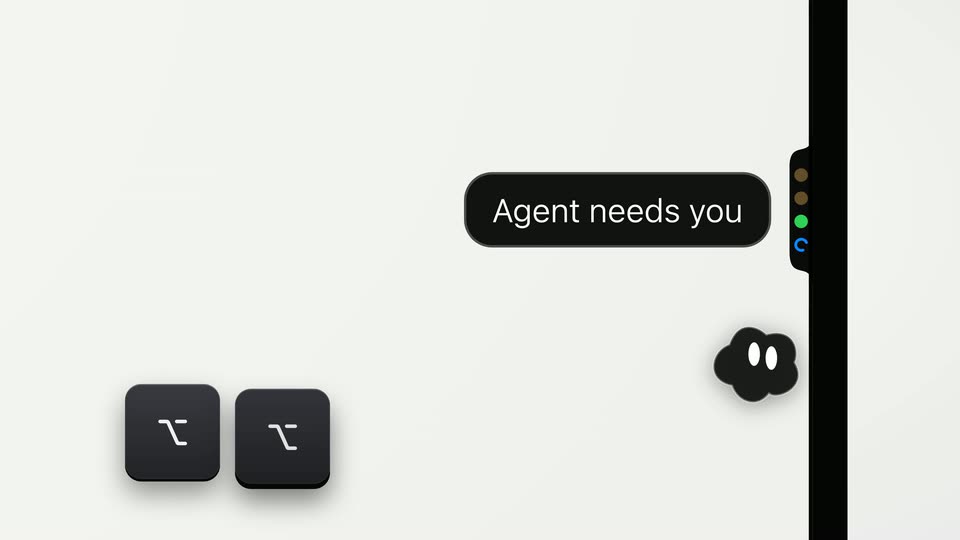
07 · Feature reveal · 0:07–0:08
On a light gray field, a black pill bubble reading 'Agent needs you' slides in beside a vertical black bar with colored dots. A small black cloud mascot with white eyes drifts right, and a rounded black app icon with a white zigzag mark drops in at lower left.
On-screen text: “Agent needs you”
Techniques: Kinetic type
Camera: Static
08 · Feature reveal · 0:08–0:09
A dark chat panel floats on a light gray field beside the black headline Answer in a keystroke. The camera pushes in and the panel tilts into 3D perspective, centering the pricing-layout question and its three numbered options.
On-screen text: “Answer in a keystroke.”
Techniques: UI zoom, 3D mockup
Camera: Static
09 · Feature reveal · 0:09–0:10
A dark chat window tilted in 3D on the right swaps between two short conversations, each closing on a green-checked option. Left of it, a bold black headline reads “Answer in a keystroke.” above a keycap that switches from 1 to K.
On-screen text: “Answer in a keystroke.”, “1”, “K”
Techniques: 3D mockup
Camera: Static
10 · Feature reveal · 0:10–0:11
A tilted dark chat window in 3D sits right of a black headline and a square app icon. The second option row lights up green with a checkmark while the input bar collapses into an Answer sent confirmation with a blue underline.
On-screen text: “Answer in a keystroke.”
Techniques: 3D mockup
Camera: Static
11 · Feature reveal · 0:11–0:12
A dark agent panel on a cream background types the word push into its input line as the next-steps list below it collapses out of view. A black space keycap rests beneath a static headline on the left.
On-screen text: “Answer in a keystroke.”
Camera: Static
12 · Feature reveal · 0:12–0:13
A dark chat panel on cream sends “push to prod”, revealing a green check and blue progress bar. The black headline “Answer in a keystroke.” on the left gives way to the gray word “Press”, while a cursor hovers on the dark app icon at bottom left.
On-screen text: “Answer in a keystroke.”, “Press”
Techniques: Kinetic type, Cursor demo
Camera: Push in
13 · Feature reveal · 0:13–0:16
On a cream background, a black pill slides in a voice command, then swaps to a green check and sent confirmation. Left, the headline “Press to talk.” and a gray subline scale in, and a right icon rail shows a red mic.
On-screen text: “Press to talk.”, “One routes the message to the right agent.”
Techniques: Kinetic type
Camera: Static
14 · Feature reveal · 0:16–0:19
A dark rounded panel listing agent tasks sits on a light gray field; the headline resolves from blurred letters at left. A blue cursor taps mic icons down the list, rows turn green as they complete, and the panel drifts upward as the status column fills with green dots.
On-screen text: “See every agent.”, “On your Mac and your VPS.”
Techniques: Kinetic type, Cursor demo
Camera: Push in
15 · Feature reveal · 0:19–0:21
A black card with a white headline and a terminal prompt sits beside a phone edge; the frame pulls back to reveal the full white smartphone lock screen showing a remote vps notification.
On-screen text: “Something's still waiting.”, “And you're away from your Mac.”
Camera: Push in
16 · Feature reveal · 0:21–0:22
A dark laptop screen and a phone mockup overlap on a gray backdrop. The headline fades in word by word above a terminal that dissolves into a Database Migration row, while the phone's Run it button gains a green check and Answer sent.
On-screen text: “Take it with you anywhere.”
Techniques: Kinetic type
Camera: Static
17 · Feature reveal · 0:22–0:22
A dark card on the left shows the headline Take it with you anywhere. above a highlighted row, beside a phone mockup with a chat prompt. The card swaps to a longer list while the phone slides down and a second phone with microphone icons enters from the top.
On-screen text: “Take it with you anywhere.”
Camera: Static
18 · Demo · 0:22–0:23
A dark task-list card with green status dots and a vertical pill dock of mic, camera and status controls slides down and to the right as a cursor moves to a tray icon at the top of the dock.
Techniques: Cursor demo
Camera: Pan
19 · Demo · 0:23–0:25
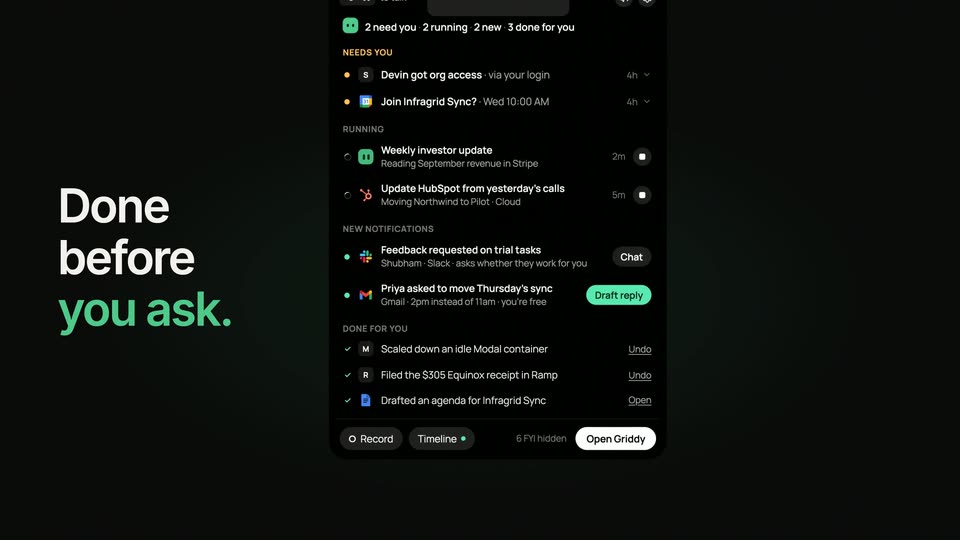
A dark rounded inbox card sits on a cream background with a white two-eyed cloud icon, the line “Nothing needs you.” and gray subtext. The view zooms in to fill the frame with the card, cropping out the side toolbar holding chat, mic and camera icons.
Techniques: UI zoom
Camera: Push in
20 · Demo · 0:25–0:26
A light gray inbox card with white text and a black cloud icon with two white oval eyes empties out: the words scale and slide away, and the icon drifts to the center of the plain background.
Camera: Static
21 · Outro · 0:26–0:31
A low-angle camera drifts through a sunflower field beneath a blue, cloud-streaked sky. The white One logo holds centered in frame, and the tagline and URL fade in below it.
On-screen text: “Never keep an agent waiting.”, “getone.one”
Camera: Static