
0:38
Explore
Oasive for Municipal Bonds
Oasive · Nov 2026 · 0:44 · Full motion · AI-annotated
- Length
- 0:44
- Scenes
- 10 · 4.4 s avg
- Product on screen
- 0:00
- Features shown
- 5
- Call to action
- 0:37 · 85%
- Voiceover
- No
- Views
- 46 on YouTube
as of November 27, 2026
00:00:00 / 00:44:01
- Length
- 0:44
- Scenes
- 10 · 4.4 s avg
- Product on screen
- 0:00
- Features shown
- 5
- Call to action
- 0:37 · 85%
- Voiceover
- No
- Views
- 46 on YouTube
as of November 27, 2026
Oasive’s 0:44 launch film runs 10 scenes, about 4.4 s each. The product is on screen from the first frame and 5 features are revealed. The call to action lands at 0:37 (85% in). The video opens on a brand card, states the problem, then walks through five numbered features in a consistent two-column layout, each pairing a serif headline with a flat interface demo, and closes on a call-to-action card. Its style is defined by a pale grid-paper backdrop, restrained teal accents, and slow, deliberate type-and-draw animations that let the product UI do the talking.
No filming indicatedEstimated needs: 6 capture groups — your screens or recordings · 1 official logo — reused across the film
Is this your launch? to your site or press kit.
More like this




Similar soundtrack
Films whose music sounds like this one, voice left out
0:19
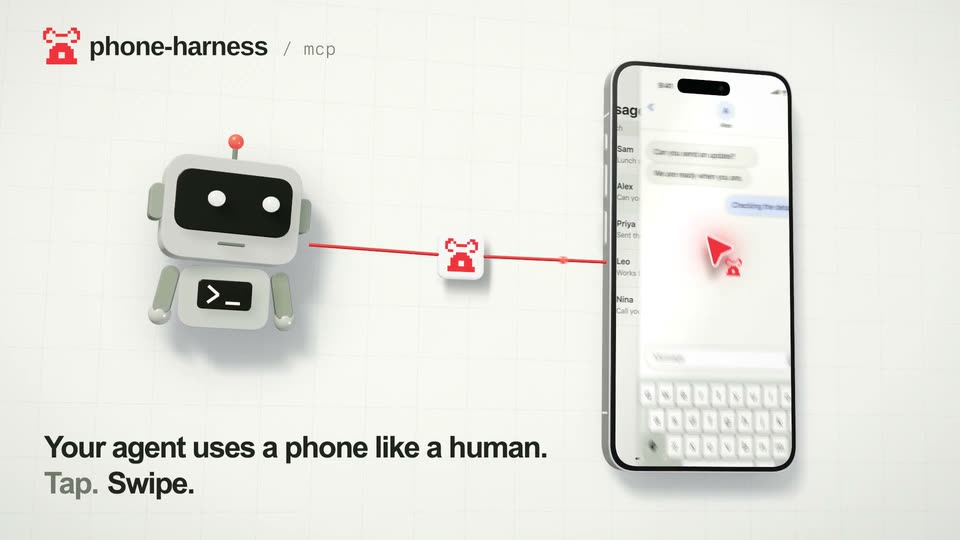

shawn - Introducing: Phone Harness MCP 🔌 Any agent that supports MCP can now
Phone Harness · Electronic, lo-fi hip-hop, chillwave
2:54

Introducing Helix
Figure AI · Electronic, Ambient
2:10
Vision V Showcar: Meet the future of first-class limousines by Mercedes-Benz
Mercedes-Benz · Cinematic electronic, ambient, and trailer music
Oasive for Municipal Bonds, scene by scene
· 10 scenes as text
01 · Product intro · 0:00–0:04
On a pale grid-paper background with faint yield-curve and DXY line drawings, the Oasive logo sits above a small teal tagline. A large serif headline fades in with 'Munis' in teal, then a 'Backed by Y Combinator' line appears below; the locked-off card holds and fades out.
On-screen text: “OASIVE FOR MUNIS”, “Today I'm launching Oasive for Munis”, “Backed by”, “Combinator”
Techniques: Kinetic type
Camera: Static
02 · Problem · 0:04–0:09
Left-aligned text introduces a problem while four document cards float on the right. The cards converge into a single stack, and a new line of text appears. The scene cuts to a clean search bar interface with a new headline.
On-screen text: “THE PROBLEM”, “Muni credit is scattered.”, “Annual reports, disclosures, board meetings and local news, one issuer at a time.”, “Oasive puts it on one page per issuer.”, “01 · SEARCH”, “Thousands of issuers, one search.”
Techniques: Kinetic type, Morph
Camera: Static
03 · Feature reveal · 0:09–0:13
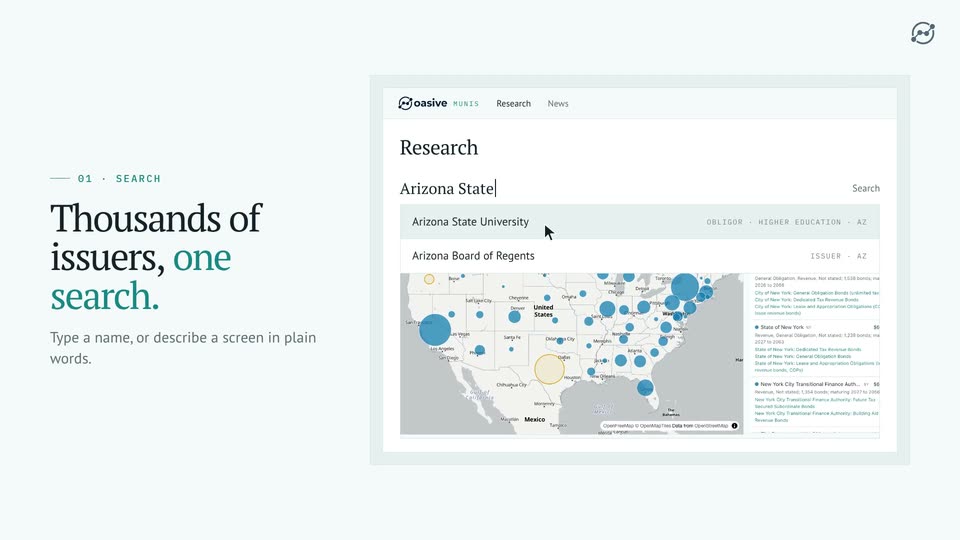
A static headline sits left while the Oasive Research screen on the right types “Arizona State” into the search bar; a two-item suggestion dropdown opens and a cursor hovers the first result. The US map and bond list update behind it.
On-screen text: “01 · SEARCH”, “Thousands of issuers, one search.”, “Type a name, or describe a screen in plain words.”
Techniques: Cursor demo
Camera: Static
04 · Feature reveal · 0:13–0:19
A serif headline block on the left and a browser window of the MUNIS issuer page on the right fade in from blur. Metric cards and line charts draw in; a cursor hovers a card, opening a dark tooltip, then clicks the source link before the scene blurs out.
On-screen text: “02 · ISSUER PAGE”, “Key credit metrics, sourced.”, “Five years of each metric from the audited reports, with the page it came from.”
Techniques: Cursor demo
Camera: Static
05 · Feature reveal · 0:19–0:26
A left column fades in with a teal kicker, a serif headline and a gray caption. On the right, a flat app panel shows a Board meetings page; four timestamped quote rows appear in sequence, then a cursor hovers one and a tooltip pops in.
On-screen text: “03 · BOARD MEETINGS”, “Board meetings, summarized.”, “Credit-relevant moments with timestamped quotes, next to the news.”
Techniques: Cursor demo
Camera: Static
06 · Feature reveal · 0:26–0:27
A two-panel layout: on the left a teal section tag and a serif headline with a gray subline fading in, on the right a flat news interface in which two dated items with colored category pills populate the list.
On-screen text: “04 · NEWS”, “News for each credit you hold.”, “Budget, distress and state-oversight events flagged apart from the rest.”
Camera: Static
07 · Feature reveal · 0:27–0:30
A two-column layout holds a serif headline with teal accents on the left and a flat news-feed interface on the right. The third news row fades in to complete the list, then the whole frame blurs out.
On-screen text: “04 · NEWS”, “News for each credit you hold.”, “Budget, distress and state-oversight events flagged apart from the rest.”
Techniques: Split screen
Camera: Static
08 · Feature reveal · 0:30–0:31
Two-column layout on a pale grey field. Left, a serif headline assembles word by word, 'cited' in teal italic, above a small teal label, then a grey caption fades in. Right, the Oasive Munis panel fades from ghosted to solid, showing a tooltip and input field.
On-screen text: “05 · ASK”, “Ask a question, get a cited answer:”, “Answers link to the source, down to the minute of the meeting.”
Techniques: Kinetic type
Camera: Static
09 · Feature reveal · 0:31–0:37
Left side holds a static serif headline and gray subhead; right side shows a flat Oasive interface where an answer types out line by line, then two citation links fade in beneath it.
On-screen text: “05 · ASK”, “Ask a question, get a cited answer.”, “Answers link to the source, down to the minute of the meeting.”
Camera: Static
10 · CTA · 0:37–0:44
A light end card on a faint grid background with thin line graphs in the corners. The Oasive Munis logo sits above the serif headline, then a Y Combinator badge, a dark Request a demo button and the URL oasive.ai fade in below, holding before the frame clears.
On-screen text: “Your credits, monitored.”, “Backed by Y Combinator”, “Request a demo”, “oasive.ai”
Camera: Static