2:40

Music Education Software Explainer Video | MusicFirst x MotionCue
MusicFirst · Oct 2026
MusicFirst · Sep 2023 · 1:16 · Full motion · AI-annotated
MusicFirst’s 1:16 launch film runs 27 scenes, about 2.8 s each. The product shows up at 0:05 and 4 features are revealed. The call to action lands at 1:05 (85% in), over a voiceover. Flat vector classroom illustrations alternate with 2D and 3D UI mockups, each feature announced by a typed serif headline over a peach backdrop with drifting notes. Diagonal white slashes cut between panels, a recurring tablet mockup anchors the product shots, and the closing logo card types out the URL before fading to black.
Is this your launch? to your site or press kit.
Films whose music sounds like this one, voice left out
Monid · Upbeat electronic
DJI · Modern electronic
Mozilla · Electronic, Orchestral, Pop
A flat illustration of a music class fades in from black. Four children with instruments sing on the left while a teacher holds a green folder on a stage at right. A wall monitor shows a lesson page with a sloth, and notes drift around.
Camera: Static
A flat vector classroom scene: four children play cymbals, ukulele and flute while a teacher in purple stands on a platform holding a green book. A monitor behind shows a lesson page with a sloth on a night sky; small notes drift and the figures bob gently.
Camera: Static
Flat-color illustration of a music classroom: four children play a triangle, guitar and flute while a teacher holds a green book, a lesson screen glowing behind them. A diagonal band wipes across to reveal a second classroom with a new group of children and a wall clock.
Techniques: Masking
Camera: Static
A flat vector illustration of a music classroom. A teacher stands at left holding a bag of markers while four children sing at right, one with arms raised. The wall shows instrument outlines, bunting and a rainbow; a keyboard and speaker sit at right. Figures bob gently.
Camera: Static
Three flat-illustration panels, divided by white diagonal slashes, show teachers in music classrooms. The panels slide left while the figures idle with small arm and head movements.
Techniques: Split screen
Camera: Static
A flat illustration of a classroom shows three teachers standing, separated by two diagonal white bars, with a rainbow, bunting and a pencil bag in the background. A white card carrying the headline and tagline slides down from the top over the art.
On-screen text: “MusicFirst Elementary”, “Everything you need to cultivate a lifelong love of music in your students”
Techniques: Kinetic type
Camera: Pan
A flat vector classroom: a whiteboard with the MusicFirst logo and a rainbow staff band hangs on a peach wall, children stand at a table in the foreground. A dark serif title and teal tagline sit centered below the board. The framing eases out slightly.
On-screen text: “MusicFirst Elementary”, “Everything you need to cultivate a lifelong love of music in your students”
Camera: Pan
A tilted tablet mockup showing the MusicFirst Elementary dashboard rotates slowly in 3D over a peach backdrop with flat white music notes and clouds. A dark serif headline and teal tagline sit on a white band below, both fading out near the end.
On-screen text: “MusicFirst Elementary”, “Everything you need to cultivate a lifelong love of music in your students”
Techniques: 3D mockup
Camera: Push in
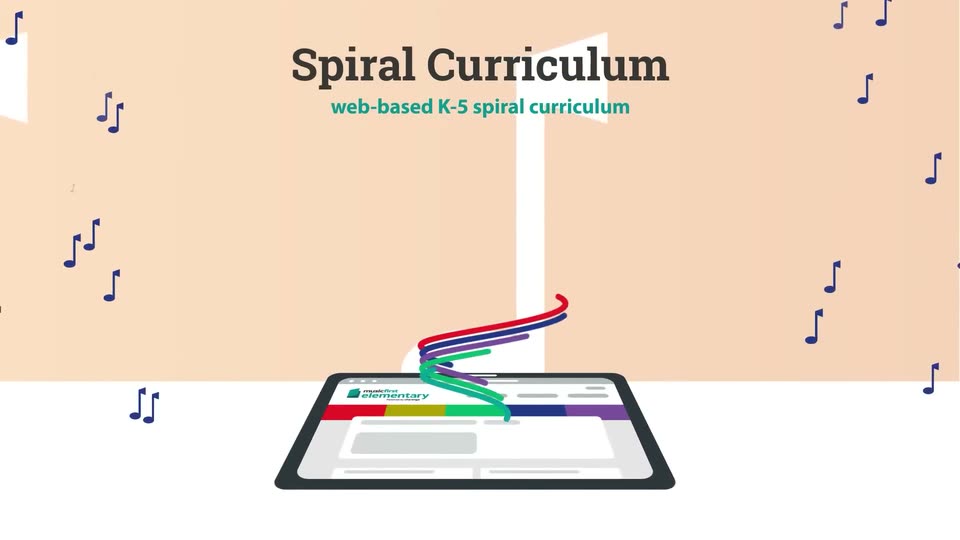
A tablet on a white table tilts from upright to flat against a peach wall, a white eighth note rising behind it. The headline types in above, then a red, blue, purple and green spiral unwinds up from the screen as purple notes float in and two staves appear.
On-screen text: “Spiral Curriculum”, “web-based K-5 spiral curriculum”
Techniques: 3D mockup, Kinetic type, Particles
Camera: Static
A flat peach panel holds the title over three musical staves that slide in from the left and settle. A teal spiral line draws itself across the staves, linking them above a tablet mockup showing a web page. Purple notes drift across the background.
On-screen text: “Spiral Curriculum”, “web-based K-5 spiral curriculum”
Camera: Static
On a peach illustrated stage, a flat tablet mockup in perspective sits at the bottom. The title 'Spiral Curriculum' dissolves into 'National Core Arts Standards', which scales in, while the teal strands line types in below and a teal spiral line draws across as the frame eases out.
On-screen text: “Spiral Curriculum”, “based K-5 spiral curriculum”, “National Core Arts Standards”, “Creating • Performing • Responding • Connecting”
Techniques: Kinetic type, 3D mockup
Camera: Static
A tablet in 3D perspective hovers over a flat illustrated classroom as the camera tilts down, revealing a student's legs on a green rug and figures at the edges. A dark brown headline scales at the top above a teal subtitle.
On-screen text: “National Core Arts Standards”, “Creating • Performing • Responding • Connecting”
Techniques: Kinetic type, 3D mockup
Camera: Pan
Three flat-illustration panels divided by white diagonal bands show a teacher and a child holding a ukulele, a bearded man standing in a music classroom, and a woman at an office desk. The figures shift subtly in place while music notes and bunting hang above the middle panel.
Techniques: Split screen
Camera: Static
Three flat-illustration panels divided by white diagonal bars show a boy playing guitar beside a teacher and sloth, a bearded man in a rainbow classroom, and a woman at a desk. A child with raised arms pops into the right panel.
Techniques: Split screen
Camera: Pan
Flat vector classroom scene: a boy plays a triangle and a girl strums a ukulele before a teacher holding a green book, while a display behind them shows a lesson plan with a starry sky and a sloth. The shot settles in from a crossfade of the previous scene.
Camera: Pan
A flat 2D classroom scene: two children, one with a triangle and one with a guitar, perform in front of a teacher and a screen showing a Twinkle, Little Star slide. The camera zooms in on the two performers as they play and sing.
Camera: Push in
Flat vector illustration: hands type a query into a laptop search bar on a classroom desk. The screen shows a loading spinner, then the MusicFirst Elementary website, while the headline and teal subhead type in above the laptop.
On-screen text: “Creativity tools”, “10,000 pages of documentation, lesson plans, and sheet music”
Techniques: Kinetic type
Camera: Static
A flat classroom illustration shows a laptop on a desk, ringed by six circular music icons that drift around it. A hand cursor points at the page, which then loads into a grayed-out audio editor, and the headline wipes out at the end.
On-screen text: “Creativity tools”, “10,000 pages of documentation,”, “lesson plans, and sheet music”
Techniques: Cursor demo, Masking
Camera: Static
A flat laptop illustration on a desk shows a DAW timeline with a violin video clip and waveforms, ringed by six rotating music icons. A hand points at the screen, the camera zooms into the interface, and a diagonal white wipe reveals sheet music and the real app UI.
On-screen text: “YuStudio”, “Digital audio workstation”, “Creativity tools”
Techniques: Light sweep, UI zoom, Masking
Camera: Push in
A bold dark serif headline eases down into place above three angled app screens on a white background. A music staff, the yuStudio track view and the quickbeats step sequencer slide left through diagonal cutouts, revealing the sequencer grid.
On-screen text: “Music learning, creation, assessment, sharing, and exploration”
Techniques: Masking, Split screen
Camera: Pan
A white headline sits above a long horizontal strip of the QuickBeats step-sequencer interface. The strip pans left, sliding past dark and light grid panels divided by white diagonal bars, revealing a piano-roll view at the right.
On-screen text: “Music learning, creation, assessment, sharing, and exploration”
Techniques: Parallax
Camera: Pan
A dark serif headline sits above three angled panels of the music app, each showing a different view: a colored drum grid, a note grid with red cells, and standard sheet music. The panels pan slowly left while the headline stays fixed.
On-screen text: “Music learning, creation, assessment, sharing, and exploration”
Techniques: Split screen
Camera: Pull out
A flat illustration strip pans left under a centered two-line serif headline. A young man in a teal shirt sits on a purple cushion holding a tablet beside sheet music and a plant; the slide reveals a second panel of a woman at a green chalkboard with a laptop on a desk.
On-screen text: “Music learning, creation, assessment, sharing, and exploration”
Techniques: Kinetic type
Camera: Pan
A flat vector classroom illustration pans right, revealing two students on a teal couch with a laptop, beside a seated man, a teacher at a green screen, and a laptop showing sheet music. The top headline swaps from one line to two.
On-screen text: “Music learning,”, “Single annual subscription per school”, “Affordable for most schools' budgets”
Camera: Pull out
A white band holds two headline lines above a row of tilted flat-illustration panels of students and teachers with tablets in different settings. The second line fills in word by word, then the panel strip slides left, revealing a classroom group and kids singing outdoors.
On-screen text: “Single annual subscription per school”, “Affordable for most schools' budgets”, “ginnnn”
Techniques: Kinetic type
Camera: Pull out
The pricing line slides out left while “Free 30 day trial” slides in from the right above three slanted panels of illustrated kids singing in a classroom and a park. The panels settle into place, then the Musicfirst Elementary logo with a green treble clef appears as the sign-off.
On-screen text: “Single annual subscription per school”, “Affordable for most schools' budgets”, “Free 30 day trial”, “musicfirst”, “elementary”, “Powered by charanga®”
Techniques: Kinetic type
Camera: Pull out
The Musicfirst Elementary logo lockup sits centered on white as a bright classroom background dissolves away. Below it, the tagline Free 30 day trial holds while musicfirst.com types in letter by letter with a blinking cursor, then the frame dims to gray and fades to black.
On-screen text: “Free 30 day trial”, “musicfirst.com”
Techniques: Kinetic type
Camera: Static