0:44


Fireflies.ai - 🎉 We’ve reimagined meetings beyond note-taking. Introducing Fireflie
Fireflies.ai · Apr 2025
Moving Atoms · Oct 2026 · 0:13 · AI-annotated
Moving Atoms’s 0:13 launch film runs 9 scenes, about 1.5 s each. The product shows up at 0:01 and 3 features are revealed. The call to action lands at 0:12 (92% in). The video is a linear pipeline: a cinematic aerial descent, a scan to BIM reveal on a black void with climbing HUD counters, a side by side scan/model split, a DCC export tour, and a locked logo card. Signature moves are the photo to point cloud dissolve, the counter that ticks to completion, and the thin vertical divider that splits the frame.
Is this your launch? to your site or press kit.
A 3D aerial model of Zurich pushes in toward the Letzigrund stadium as the camera descends. A white caption block sits lower left, and a vertical line wipes across the right edge to reveal a point counter.
On-screen text: “moving atoms”, “Letzigrund Stadion”, “ZÜRICH SWITZERLAND”, “AERIAL IMAGERY & SURFACE MODEL © SWISSSTOPO”, “57,238,289 LEGAL POINTS”
Techniques: Masking
Camera: Push in
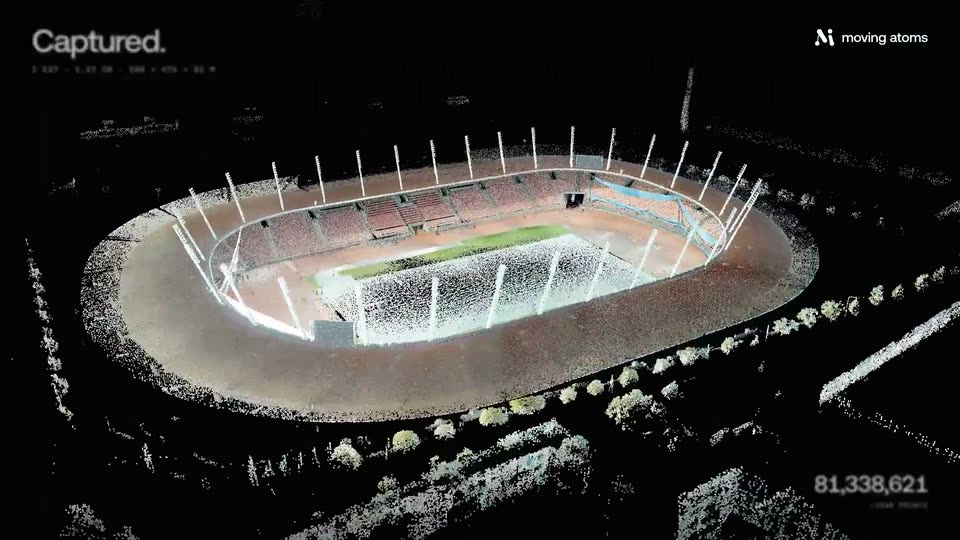
A vertical split shows a real aerial photo of a stadium beside its white LiDAR point cloud; the photo dissolves as the scan fills the frame and colors in while the point counter climbs. 'Captured.' gives way to 'Generate the BIM.' top left.
On-screen text: “Captured.”, “81,338,621”, “Generate the BIM.”
Techniques: Split screen, Parallax
Camera: Push in
A 3D stadium model assembles on a black void as the camera dollies in over the green pitch; red seats and light poles resolve from point clouds while the element counter in the corner counts up to full.
On-screen text: “Generate the BIM.”, “NATIVE REVIT FAMILIES · PLACED BY THE AGENT”, “moving atoms”, “3,190 / 3,190”, “ELEMENTS PLACED”
Techniques: 3D mockup
Camera: Push in
A low-poly 3D stadium with orange seats and a green field glides across a black void. A corner counter ticks up to 3,190 elements placed, then a white particle burst flares along the right edge.
On-screen text: “732 chair rows.”, “ONE NATIVE FAMILY EACH”, “3,190 / 3,190”, “ELEMENTS PLACED”
Techniques: Particles
Camera: Push in
A split screen compares a stadium: left a clean 3D model with red seats and green pitch, right the same stadium as a white point cloud. A thin vertical line divides the two halves while the camera slowly pans across the structure.
On-screen text: “Scan vs model.”, “SAME LENS - SIDE BY SIDE”
Techniques: Split screen
Camera: Push in
A 3D stadium model with red seats and a green pitch sits in a dark void, captioned top left, with a white export pill and cursor at the bottom. It cuts to the Autodesk Revit interface, where the same stadium model fills the 3D viewport and a cursor hovers over the stands.
On-screen text: “Scan vs model.”, “Export to Revit, IFC, USD.”, “LETZIGRUND-STADION-ZÜRICH | .RVT | .IFC | .USD”, “Export Revit · IFC · USD”
Techniques: 3D mockup, Cursor demo
Camera: Static
A 3D stadium model with red seating and a green pitch sits in a perspective viewport. The view crossfades from a Revit interface to a Blender interface, both displaying the same model with side panels.
Techniques: 3D mockup
Camera: Static
The perspective viewport of a simulation app holds a 3D stadium model with red seating and a pale field. The camera orbits from a high angle to a side view while the right panel lists its components and properties.
Camera: Static
A locked-off black frame centers the white moving atoms logotype, which scales gently. Below it, the tagline “Bring a scan. Get the model.” and a small letter-spaced URL line sit still.
On-screen text: “Bring a scan. Get the model.”, “MOVINGATOMS.AI - YC S26”
Techniques: Kinetic type
Camera: Static