0:47
Explore
wei-wei - Introducing Mo, the world's first AI QA engineer Point it at your ap
Momentic AI · Sep 2026 · 1:29 · AI-annotated
- Length
- 1:29
- Scenes
- 18 · 5.0 s avg
- Product on screen
- 0:00
- Features shown
- 3
- Call to action
- 1:18 · 88%
- Voiceover
- Yes
- Views
- 79K on X
as of November 18, 2026
00:00:00 / 01:29:06
- Length
- 1:29
- Scenes
- 18 · 5.0 s avg
- Product on screen
- 0:00
- Features shown
- 3
- Call to action
- 1:18 · 88%
- Voiceover
- Yes
- Views
- 79K on X
as of November 18, 2026
Momentic AI’s 1:29 launch film runs 18 scenes, about 5.0 s each. The product is on screen from the first frame and 3 features are revealed, with social proof. The call to action lands at 1:18 (88% in), over a voiceover. The video alternates locked-off founder shots in a sunlit office with flat, grid-backed UI mockups, using oversized light sans type and monospace labels to carry the claims. Its signature moves are the white panel wipes that split the frame, the pale grid that closes over live footage, and the lime-green highlights that trace each product action.
Footage neededEstimated needs: 4 capture groups — your screens or recordings · 1 official logo — reused across the film · 9 filmed passages — shoot, supply or replace
Is this your launch? to your site or press kit.
More like this



Similar soundtrack
Films whose music sounds like this one, voice left out
2:32

TryNearby Launch Video
TryNearby · Promotional / Tech Launch
1:47

Introducing the Google News Initiative
Google · Cinematic electronic and orchestral hybrid
1:52

Dipole Labs - The most expensive computers ever built spend half their time waiting
Dipole Labs · Electronic
wei-wei - Introducing Mo, the world's first AI QA engineer Point it at your ap, scene by scene
· 18 scenes as text
01 · Product intro · 0:00–0:14
Two men in dark t-shirts sit at a wooden table in a bright office, the left one gesturing as he talks. Oversized white type overlays the locked-off shot in turn: “Mo”, “The AI QA engineer.”, “4x more bugs”, “9x bugs / hour”, “-51% cost / bug”.
On-screen text: “Today we're launching Mo, the AI QA engineer.”, “Mo”, “The AI QA engineer.”, “In our evals, Mo found four times as”, “[CODEX + GPT-5.6 SOL + PLAYWRIGHT MCP]”, “4x more bugs”, “many bugs as Codex with GPT-5.6 Sol with”, “Playwright MCP.”, “Nine times more bugs per hour at half”, “9x bugs / hour, the cost per bug.”
Techniques: Kinetic type
Camera: Static
02 · Problem · 0:14–0:20
Two men sit in a bright office; the left one speaks and gestures while a white name caption appears at left and captions run along the bottom. A monitor behind them loops red and green blobs. A grid of white panels closes over the frame to end the shot.
On-screen text: “We spent the last two years making tests”, “Wei-Wei Wu”, “CO-FOUNDER & CEO”, “easier to write with Momentic.”, “Now you never have to touch them again.”, “[CODEX + GPT-5.6 SOL + PLAYWRIGHT MCP]”, “-51% cost/bug”, “the cost per bug.”
Techniques: Masking
Camera: Static
03 · Demo · 0:20–0:20
A 4x3 grid of pale squares overlays a locked-off shot of a man in a dark shirt; the tiles start translucent so his face and shoulder show through, then turn opaque and hide him. A bottom caption swaps from one line to the next.
On-screen text: “Now you never have to touch them again.”, “All you have to do is point Mo”
Camera: Static
04 · Demo · 0:20–0:25
A pale grid backdrop frames a centered command bar with Web, iOS and Android tabs. Text types itself into the input field, then a hand cursor taps the lime-green send button. A dark caption bar at the bottom carries the narration.
On-screen text: “All you have to do is point Mo”, “at your app, whether it's web, iOS, or”, “Android, and tell it what matters.”
Techniques: Cursor demo
Camera: Static
05 · Demo · 0:25–0:30
Full-screen view of the Momentum app. The center chat pane adds task lines while the right panel's bug list populates and its counters tick up. A dark caption bar at the bottom swaps subtitle lines. A cursor arrow rests near the bottom.
On-screen text: “Android, and tell it what matters.”, “Then it goes off and bug bashes literally”, “every single nook and cranny.”
Camera: Static
06 · Feature reveal · 0:30–0:35
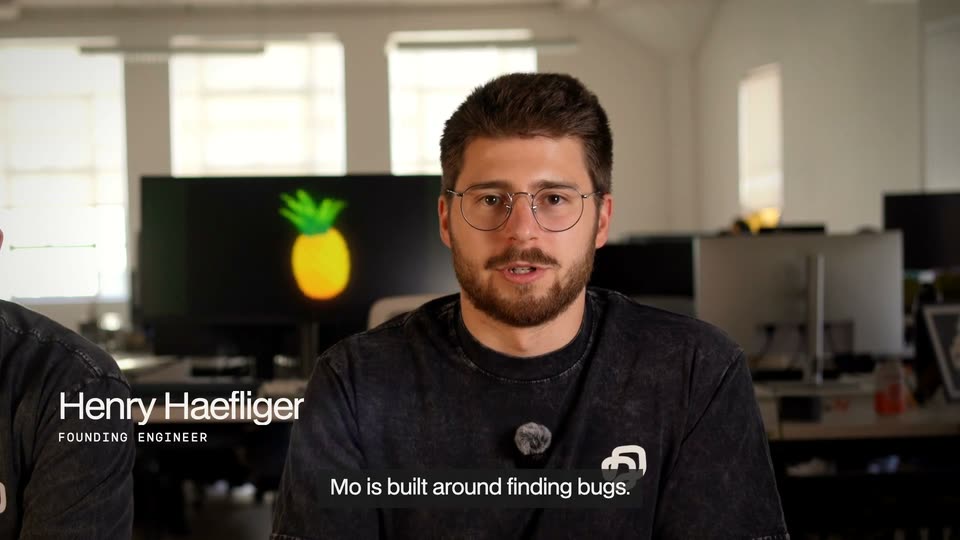
A bearded man in glasses and a dark tee sits in a bright office, speaking to camera in a locked-off medium close-up. A pineapple illustration glows on a blurred monitor behind him. A lower-third name caption and bottom subtitles are overlaid.
On-screen text: “Most agents and models are trained to write”, “Henry Haefliger”, “FOUNDING ENGINEER”, “code.”, “Mo is built around finding bugs.”
Camera: Static
07 · Feature reveal · 0:35–0:40
Split screen: the right half holds a man in a dark tee talking to camera in a bright office; the left white panel wipes in and fills with rows of test case chips labeled Explore or Bug bash, scrolling upward as new rows append. Subtitles run along the bottom.
On-screen text: “Mo is built around finding bugs.”, “Every session spins up parallel explore agents”, “to map your app and decide what needs”, “testing.”
Techniques: Split screen, Masking
Camera: Pan
08 · Feature reveal · 0:40–0:45
Split screen: left, a light UI panel fades from a long checklist to three test cases with spinner icons, then a bug report card and a reproducer section with a browser screenshot and steps appear. Right, a bearded man in glasses talks in an office. Subtitles run along the bottom.
On-screen text: “Every test case is delegated to a bug basher.”, “Every bug report gets sent to a bug”
Techniques: Split screen
Camera: Static
09 · Feature reveal · 0:45–0:48
Split screen with a presenter on the right and a bug reproducer panel on the left. The browser mockup replays steps, the cart drawer slides in, a red Reproduced badge pops in, then the view widens to two side-by-side reproduced windows.
On-screen text: “This way, every time Mo reports a bug,”
Techniques: Split screen
Camera: Push in
10 · Feature reveal · 0:48–0:50
A flat browser mockup of a product page, framed by a monospace title and a red status tag, sits above a four-step legend. It then switches to a structured bug-report card. A dark caption box at the bottom updates its white text.
On-screen text: “[BUG REPRODUCER]”, “Reproduced”, “1 View product page”, “2 Select White / M”, “3 Click “Add to cart””, “4 Verify cart drawer is visible”, “you know it’s reproducible.”, “Authentication states, exact repro steps, console”
Camera: Static
11 · Feature reveal · 0:50–0:53
A bug report card scrolls down through its sections. The repro steps highlight green while a browser mockup of the product page appears on the right, then a console log panel slides in below. A dark caption bar sits at the bottom.
On-screen text: “Authentication states, exact repro steps, console”
Techniques: UI zoom
Camera: Pan
12 · Feature reveal · 0:53–0:56
A flat browser mockup of a T-shirt store sits above a logs panel that switches from a console list to a network table. A bright green highlight box moves from the panel to the browser view. A dark caption bar at the bottom lists the features.
On-screen text: “logs, network logs,”, “and video are all things you get.”
Camera: Static
13 · Feature reveal · 0:56–1:07
A flat dark terminal panel fills the frame. A command types itself at the prompt, then agent log lines stream in and scroll up: a file update, a bug-bash report with red and green diff lines, and a verified fix. White captions swap at the bottom.
On-screen text: “Mo plugs into your coding agent to close”, “the loop.”, “Your agent writes the code, Mo bug bashes”, “it and reports the bugs, and your agent”, “fixes them and runs Mo again.”
Techniques: Cursor demo
Camera: Pan
14 · Social proof · 1:07–1:09
Two men in dark gray t-shirts sit at a table in a bright office; the left one talks and gestures, the right one sits still with hands clasped. A lit candle and two small figurines sit on the table, with subtitles at the bottom.
On-screen text: “In the past 30 days for our beta”, “customers, Mo caught”
Camera: Static
15 · Social proof · 1:09–1:10
A man in a gray shirt and glasses speaks in a bright office. A white vertical panel wipes across, revealing a second man with a beard and glasses so the two share the frame. White caption boxes at the bottom carry the spoken words.
On-screen text: “customers, Mo caught”, “3,500 bugs across”
Techniques: Masking
Camera: Static
16 · Social proof · 1:10–1:18
A man in glasses speaks to camera on the left while a white panel on the right counts up two stats, 3,500 bugs and 1,100 bug bashes, then swaps to the words Available today. He gestures as he talks; the camera stays locked off.
On-screen text: “[BETA]”, “3,500”, “3,500 bugs across”, “bugs”, “1,100”, “1,100 bug bashing sessions.”, “bug bashes”, “Available”, “today.”, “We're making Mo generally available today and giving everyone who signs up”
Techniques: Split screen, Kinetic type
Camera: Static
17 · CTA · 1:18–1:25
A man with glasses in a gray sweater talks to camera on the left of a split screen. On the right, a white panel swaps “Available today.” for a large “$250”, then stacks “in free Mo credits.”, “Kick off your first bug bash.”, and “momatic.ai” below it.
On-screen text: “Available”, “today.”, “giving everyone who signs up”, “$250”, “$250 in free Mo credits.”, “in free Mo credits.”, “Go kick off your first bug bash today”, “Kick off your first bug bash.”, “at momentic.ai.”, “momatic.ai”
Techniques: Split screen
Camera: Static
18 · Outro · 1:25–1:29
A cream card with a thin gray grid holds the sign-off. The momentic logo sits top left, a large two-line headline reads left, and the URL sits in the bottom right cell. All text fades up from low opacity to full contrast in the first second, then the frame holds still.
On-screen text: “momentic”, “Mo, the”, “AI QA engineer.”, “Catch bugs before they ship.”, “$250”, “in free Mo credits.”, “Kick off your first bug bash.”, “at momentic.ai.”, “momentic.ai”
Camera: Static