
2:44
Explore
Punchcard in Excel: Verify agent work like a formula
Punchcard · Nov 2026 · 1:47 · AI-annotated
- Length
- 1:47
- Scenes
- 19 · 5.7 s avg
- Product on screen
- 0:00
- Features shown
- 2
- Call to action
- 1:38 · 91%
- Voiceover
- Yes
00:00:00 / 01:47:23
Punchcard’s 1:47 launch film runs 19 scenes, about 5.7 s each. The product is on screen from the first frame and 2 features are revealed. The call to action lands at 1:38 (91% in), over a voiceover. Presenter-led walkthrough: flat blue title and concept cards bookend a long UI demo where a corner webcam stays pinned while the spreadsheet blurs, sharpens and zooms. Signature moves are highlight boxes tracing numbers to source documents, floating white reasoning cards, and step chips that fill in as the voiceover lists them.
No filming indicatedEstimated needs: 5 capture groups — your screens or recordings · 1 official logo — reused across the film
Is this your launch? to your site or press kit.
More like this
2:36


Waybill - Take your supply chain for granted.
Waybill · B2B · Aug 2026
2:08


Semble launch film
Semble · B2B · Nov 2026
Punchcard in Excel: Verify agent work like a formula, scene by scene
· 19 scenes as text
01 · Product intro · 0:00–0:03
A white rounded-square grid logo and two-line headline sit centered on a flat blue background, then the blue panel slides up to reveal a blurred laptop showing an Excel sheet with a circular headshot of a smiling man.
On-screen text: “Punchcard in Excel:”, “Verify agent work like a formula”
Techniques: Masking
Camera: Pan
02 · Product intro · 0:03–0:08
A blurred spreadsheet interface fills the frame. A circular video inset of a man in a navy shirt speaks to camera at center-left, while a white rounded name card sits to his right with his name and title. The frame stays locked-off as he talks.
On-screen text: “Danny Alberson”, “Co-founder & CEO, Punchcard”
Camera: Static
03 · Problem · 0:08–0:24
Spreadsheet workpaper fills the frame. The view zooms into the sample table as a pill steps through General ledger, Invoices, Bank statements. It zooms out; blue boxes trace the Purpose, Testing Attributes and Tickmark Legend blocks with label chips, ending on a Filled in by Punchcard tag.
On-screen text: “General ledger”, “Invoices”, “Bank statements”, “Testing attributes”, “Tickmark legend”, “Conclusion”, “Filled in by Punchcard”
Techniques: UI zoom, Kinetic type
Camera: Static
04 · Feature reveal · 0:24–0:29
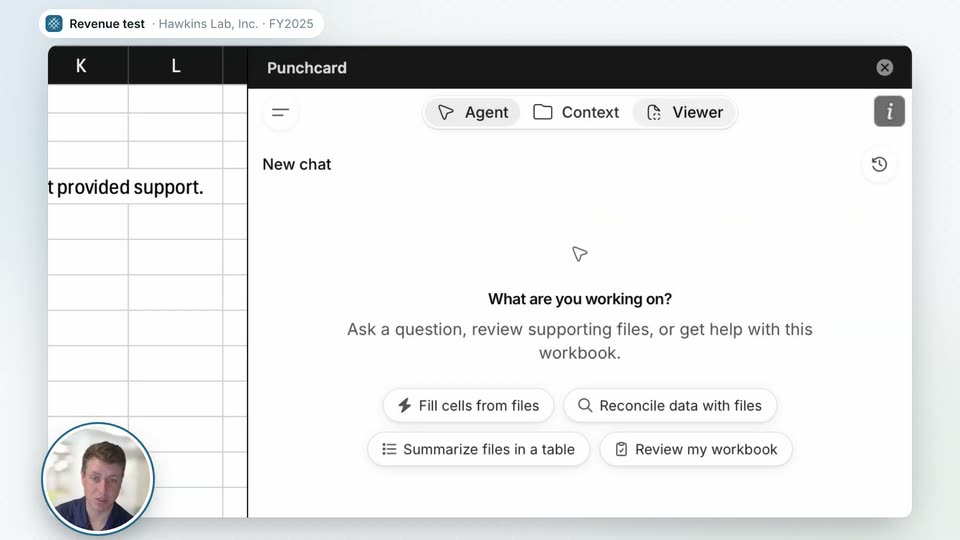
A blurred spreadsheet sits behind a white headline that builds word by word, with a presenter's webcam circle in the corner. The blur lifts, the view zooms into the Punchcard panel, and a cursor moves to the Viewer tab and a suggestion chip.
On-screen text: “Revenue test · Hawkins Lab, Inc. · FY2025”, “How do I trust what's filled in?”
Techniques: Kinetic type, UI zoom, Cursor demo
Camera: Push in
05 · Feature reveal · 0:29–0:33
A cursor clicks the Viewer tab on the right-hand Punchcard panel. The invoice scrolls down to its Reasoning block as the spreadsheet beside it pans to a check-and-X validation table, then a white card pops up over a highlighted cell repeating the traced-to-cash text.
Techniques: Cursor demo, UI zoom
Camera: Pull out
06 · Feature reveal · 0:33–0:41
A white reasoning card floats over a blurred spreadsheet, headlined 'Traced to cash' with cited dollar figures. A yellow highlight slides behind the heading, then blue boxes pop around each number. The frame reframes to the full audit table, reasoning panel docked right.
Techniques: UI zoom
Camera: Static
07 · Feature reveal · 0:41–0:50
A product UI splits the frame: a left column lists a sampled-revenue card, then an invoice card and a cash-batch card stack in with green check pills, while a right-hand punchcard window shows the matching invoice, its total outlined in blue.
Techniques: Split screen
Camera: Static
08 · Feature reveal · 0:50–0:54
Left: three linked cards with green check labels; right: a Punchcard window loading a cash receipts table. A blue outline highlights the 55,189.05 amount, then the 98,609.30 batch total, as a bank statement card fades in. A circular webcam of a man sits at lower left.
Camera: Static
09 · Feature reveal · 0:54–0:55
A two-panel screen: left, four document cards with dollar amounts; right, a Punchcard window loading a bank statement. A green “Every number cited to its source” badge fills in, a large “0 sec” counter pops over the document, and a small webcam circle of a man sits lower left.
On-screen text: “Every number cited to its source”, “0 sec to review a cited document in cash”
Techniques: Kinetic type
Camera: Static
10 · Feature reveal · 0:55–0:58
A white card floats over a blurred audit software screen. A blue progress ring fills clockwise as a large number counts up from 0 to 15 beside “sec” and the caption “to review a cited tie-out to cash.” A circular presenter video sits in the lower left corner.
On-screen text: “0 sec”, “to review a cited tie-out to cash”, “15 sec”
Techniques: Kinetic type
Camera: Static
11 · Demo · 0:58–1:08
Blurred interface sharpens as a 15 sec timer overlay fades, revealing a revenue test grid beside a bank statement. A cursor clicks a green check, a Validated banner and cell tag pop in, then the cursor rings a red Cutoff cell.
On-screen text: “15 sec”, “to review a cited tie-out to cash”
Techniques: Kinetic type, Cursor demo
Camera: Pull out
12 · Demo · 1:08–1:10
A split audit screen shows a spreadsheet of checkmarks and red X marks on the left and a Bill of Lading document with a Reasoning note on the right. A cursor hovers over a red Cutoff cell while a small webcam feed of a man sits in the lower left.
Techniques: Cursor demo
Camera: Push in
13 · Demo · 1:10–1:12
A light workspace holds two panels: a cutoff timeline card on the left marking Dec 30 against a dashed year-end line, and a bill of lading document on the right that crossfades from a doubled state into place. A small circular webcam of a presenter sits in the lower-left corner.
Camera: Static
14 · Demo · 1:12–1:18
A split product screen: the left card's Dec 30 to Jan 6 timeline gains a FOB Destination note and a red Cutoff exception chip, while the right viewer flips from the Bill of Lading to the Invoice. A yellow auditor follow-up note slides in and a test spreadsheet appears.
Camera: Pull out
15 · Demo · 1:18–1:20
A spreadsheet view of a revenue test document stays static while a blue “Your instruction” badge pops in beside the highlighted Cutoff row. A small circular video-call avatar of a man sits in the lower left corner throughout.
On-screen text: “Your instruction”
Camera: Static
16 · Feature reveal · 1:20–1:21
A spreadsheet fills the frame with a small circular video-call avatar in the lower corner. A white agent panel slides in from the right, dimming the sheet behind it, while a bold black headline appears on the left over the faded grid.
On-screen text: “Do it differently? Just tell the agent.”
Techniques: Masking, Split screen
Camera: Static
17 · Feature reveal · 1:21–1:34
A split layout pairs a bold headline and three-step list on the left with a Punchcard agent panel on the right. Steps highlight in turn as chips and typed text fill the input, then a result card appears. The scene fades to a blue field reading WE CALL THIS.
On-screen text: “Do it differently? Just tell the agent.”, “Select cells”, “Add documents to context”, “Set the reasoning format”, “WE CALL THIS”
Techniques: Split screen
Camera: Static
18 · Other · 1:34–1:38
A teal card holds small tracked uppercase “WE CALL THIS” over a large white “Co-auditing” that fades in. “AI does the work.” fades in below, then “You own the judgment.” scales up in yellow. A circular video of a talking man sits in the bottom left corner.
On-screen text: “WE CALL THIS”, “Co-auditing”, “AI does the work.”, “You own the judgment.”
Techniques: Kinetic type
Camera: Static
19 · CTA · 1:38–1:47
On a pale gray field, the Punchcard logo anchors a circular video of a man that slides up from the lower left. A bold black headline appears beside it, then a white email pill and a gray caption fade in below.
On-screen text: “Start a free pilot.”, “[email protected]”, “Meet our team of recovering auditors.”
Techniques: Kinetic type
Camera: Static