
3:00
Explore
Miro Talktrack: Async Work Feels Like Together-Work with Miro Recordings
Miro · Feb 2023 · 1:43 · Full motion · AI-annotated
- Length
- 1:43
- Scenes
- 31 · 3.3 s avg
- Product on screen
- 0:00
- Features shown
- 1
- Voiceover
- Yes
- Views
- 4.7K on YouTube
as of November 28, 2026
00:00:00 / 01:43:22
- Length
- 1:43
- Scenes
- 31 · 3.3 s avg
- Product on screen
- 0:00
- Features shown
- 1
- Voiceover
- Yes
- Views
- 4.7K on YouTube
as of November 28, 2026
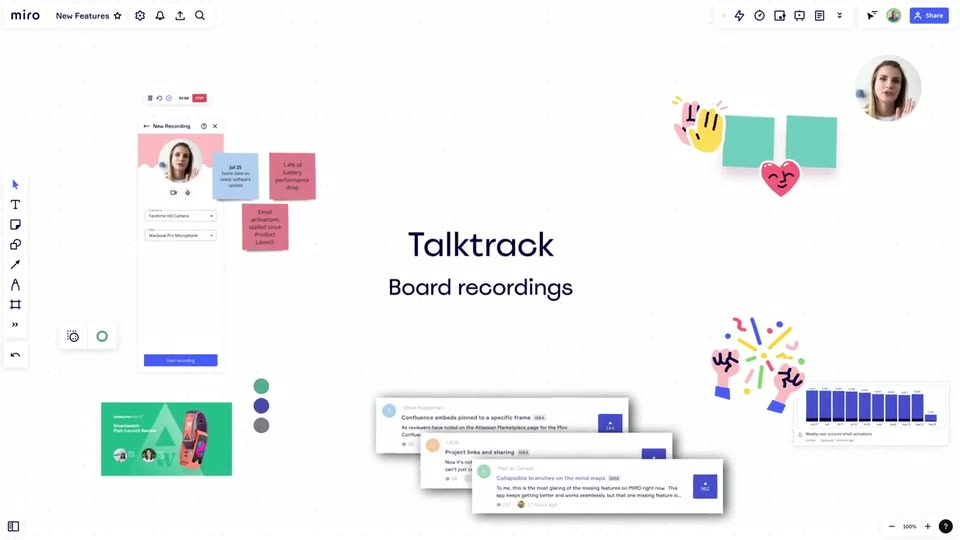
Miro’s 1:43 launch film runs 31 scenes, about 3.3 s each. The product is on screen from the first frame and 1 feature is revealed. There is no explicit call to action; a voiceover carries the film. The video plays as one continuous Miro board: a title card, a presenter recording a talk track, a viewer playing it back, and a closing tagline card. Its signature moves are slow pans and zooms across the canvas, cursor driven UI actions, and playful stickers placed on flat color slides.
No filming indicatedEstimated needs: 3 capture groups — your screens or recordings · 2 graphic passages — draw or supply · 1 3D passage — build or supply
Is this your launch? to your site or press kit.
More like this
1:00

Theo Now Offers Online Bookings on All Plans
Theo · B2B · Nov 2026
0:26

Update: Spline Viewer - A new way to embed 3D on websites
Spline · Design · Mar 2023
Similar soundtrack
Films whose music sounds like this one, voice left out
4:32

Qantum · L'ERP financier IA natif · Présentation
Qantum · Modern electronic corporate background
1:18
Vorelios (YC F26) Launch Video
Vorelios · Cinematic, Orchestral, Electronic
0:26
Limnion Teaser
Limnion · Electronic
Miro Talktrack: Async Work Feels Like Together-Work with Miro Recordings, scene by scene
· 31 scenes as text
01 · Feature reveal · 0:00–0:02
A Miro whiteboard canvas holds a recording panel, waving-hand and heart emojis, sticky notes, comment cards and a bar chart arranged around a centered black headline. The camera then zooms into the board, dropping the headline and framing the recording panel.
On-screen text: “Talktrack”, “Board recordings”
Techniques: UI zoom
Camera: Push in
02 · Feature reveal · 0:02–0:03
The Miro whiteboard interface loads with a dotted grid canvas. A purple presentation slide sits centered, showing the awesomewatch logo, a headline, a smartwatch illustration and a presenter chip, while a left toolbar and a right agenda list frame the view.
Camera: Push in
03 · Feature reveal · 0:03–0:05
A presentation app screen shows a purple slide with a 3D orange smartwatch and white headline text. The view zooms in slightly, cropping the slide and pushing the adjacent agenda off the right edge.
Techniques: UI zoom
Camera: Pan
04 · Feature reveal · 0:05–0:05
A horizontal pan moves right across a Miro board, sliding the agenda slide out of frame to the left. A white 3D grid structure fills the center as a pink Sophia cursor label appears on it.
Camera: Pan
05 · Feature reveal · 0:05–0:13
A Miro board shows an agenda slide next to a grayscale building photo. A pink cursor opens a recording panel with a woman's webcam preview, hovers the mic dropdown, then the panel slides out and a white countdown circle appears mid-canvas.
Techniques: Cursor demo
Camera: Static
06 · Feature reveal · 0:13–0:16
A Miro whiteboard shows an agenda slide with a green title and four numbered items. A white circle at the center counts down 3, 2, 1, then reads Let's go!, while a circular webcam of a woman with a pink Sophia cursor appears top right.
Techniques: Kinetic type
Camera: Static
07 · Feature reveal · 0:16–0:17
A Miro board in presentation mode shows an agenda slide with a white “Let's go” circle; the view pans right to reveal a “The problem” slide with bullet points, while a presenter's video circle stays top right.
Techniques: UI zoom
Camera: Pan
08 · Feature reveal · 0:17–0:18
A coral slide titled 'The problem' with three white bullets and a colorful smiley sticker sits on a white canvas. A circular webcam feed of a woman speaks at top right while a cursor hovers over the bottom navigation.
Techniques: Cursor demo
Camera: Pan
09 · Feature reveal · 0:18–0:19
A Miro whiteboard displays green and red sticky notes on battery life and sync failures next to a purple panel. The headline User feedback and two numbered bullets animate in word by word. A circular video-call avatar stays in the top right while the board pans slightly left.
Techniques: Kinetic type
Camera: Pan
10 · Feature reveal · 0:19–0:19
A Miro whiteboard shows a purple canvas titled Timeline with a month axis from OCT to JAN and blue sticky notes above and below it. The view reframes from a doubled, offset layout to a centered single canvas. A circular video-call avatar sits in the top right corner.
Techniques: UI zoom
Camera: Static
11 · Feature reveal · 0:19–0:20
A Miro whiteboard pans right across a purple canvas, moving from a monthly timeline with blue sticky notes to a Resources section of pink notes, while a cursor clicks the End button at the bottom.
Techniques: Cursor demo
Camera: Pan
12 · Feature reveal · 0:20–0:25
A purple slide titled Resources holds three pink notes tagged available, released, and coming soon, plus a blue megaphone sticker. In the top-right corner, a circular webcam feed shows a presenter raising a glass and taking a sip of water.
Camera: Static
13 · Feature reveal · 0:25–0:26
A Miro board slides left from a purple slide titled Resources, holding three pink notes and a blue megaphone sticker, to a white slide titled Questions with a grid of blue notes. A circular video call avatar stays fixed in the top right corner.
Camera: Pan
14 · Feature reveal · 0:26–0:31
A Miro board with an orange Questions? heading and scattered blue sticky notes sits flat on screen. A white Recordings panel slides in from the right listing avatars and titles, and a red Sophia cursor moves into it to rename an entry.
Techniques: Cursor demo
Camera: Static
15 · Feature reveal · 0:31–0:33
A white Recordings list card floats in 3D perspective on a dotted gray field, tilted diagonally, then eases upright. A pink speech bubble labeled Sophia pops in over the list and fades as the card settles.
On-screen text: “Sophia”
Techniques: 3D mockup
Camera: Static
16 · Demo · 0:33–0:40
A purple training slide with the awesomewatch logo and a 3D orange smartwatch on the right fills a presentation canvas. A webcam tile of the presenter sits in the top right corner while a participant cursor labeled Gabriel drifts down the slide.
On-screen text: “awesomewatch™”, “Smartwatch Battery Life Support Training”
Techniques: 3D mockup
Camera: Static
17 · Demo · 0:40–0:41
A presentation player fills the frame: a purple slide shows a 3D orange smartwatch beside a white headline, while a white agenda panel slides in from the right listing four numbered topics. A circular webcam feed of the presenter sits top right and a playback bar with progress and a close button runs along the bottom.
On-screen text: “Smartwatch Battery Life Support Training”, “The agenda”, “01 The problem”, “02 User feedback”, “03 Timeline”, “04 Resources”
Techniques: 3D mockup, Split screen
Camera: Pan
18 · Demo · 0:41–0:48
A white agenda card with a green heading and four numbered items sits beside a building photo, the presenter's webcam circle top right, a player bar below. A green cursor label drifts at the bottom, then the deck slides left to a coral slide titled The problem.
Camera: Pan
19 · Demo · 0:48–0:53
A coral “The problem” slide with three bullets slides in from the right onto a dotted board. A circular video of a woman with a “FIX THIS” sticker sits top right, a white 3D building left, chat bubbles on the right edge, a bottom player bar shows the recording playing.
Camera: Pan
20 · Demo · 0:53–0:54
A horizontal pan glides right across a digital whiteboard, moving from a problem board with orange notes and a FIX THIS sticker to a User feedback panel listing two issues. A round video call bubble and a bottom playback bar stay fixed in frame.
Camera: Pan
21 · Demo · 0:54–1:00
A whiteboard screen shows green and red sticky-note clusters beside a purple 'User feedback' panel. A circular video of a woman tagged 'Gabriel' slides from the top-right corner down the right edge and back up, while a player bar with pause and progress controls stays fixed at the bottom.
Camera: Pan
22 · Demo · 1:00–1:01
A video player pans horizontally across three panels: a coral one with a smiley sticker, a white one with green and red chat bubbles, and a purple one with feedback text and a webcam circle. A follow pill and player controls stay fixed at the bottom.
Camera: Pan
23 · Demo · 1:01–1:03
Two chat bubbles float and rotate on a light gray dotted grid, locked-off frame. A blue pill reading Follow Sophia back with a triangle icon tilts gently, while a smaller green pill reading Gabriel drifts above and to its right.
Techniques: Kinetic type
Camera: Static
24 · Demo · 1:03–1:08
A locked-off presentation board titled Timeline shows a white month axis from OCT to JAN with four blue note cards. A woman speaks from a circular webcam at the bottom right; a green name pill and a follow tooltip sit along the bottom.
Camera: Pan
25 · Demo · 1:08–1:14
A green Resources slide with three pink status cards sits in a video player frame. A circular webcam feed of a presenter fills the bottom right, her mouth moving as she talks. The player's progress bar advances along the bottom.
Camera: Static
26 · Demo · 1:14–1:15
A green slide titled Resources with three pink sticky notes and a blue megaphone illustration slides left, revealing a white Questions? slide with scattered teal and blue sticky notes. A circular webcam feed of a presenter sits in the bottom right corner throughout.
On-screen text: “Resources”, “Questions?”
Camera: Pan
27 · Demo · 1:15–1:24
A presentation board titled “Questions?” holds scattered blue sticky notes; a green “Gabriel” comment bubble hops across the board while “Thank you so much, Sophia!” is typed onto one note. A circular webcam of the presenter sits bottom right, with a player bar below.
Techniques: Kinetic type
Camera: Static
28 · Demo · 1:24–1:25
A whiteboard view holding a Questions? card of blue sticky notes and a purple thanks panel zooms out to reveal the surrounding browser window. A cursor tagged Gabriel drifts across the lower right.
Techniques: UI zoom, Cursor demo
Camera: Pull out
29 · Demo · 1:25–1:39
A Miro board shows a purple slide with a large white 'thanks' word and a 3D gradient blob beside blue sticky notes. A green cursor named Gabriel opens a Recordings panel listing past sessions, hovers over a play button, then closes the panel.
Techniques: Cursor demo
Camera: Static
30 · Outro · 1:39–1:40
The headline “Miro is a space for all people” fills the frame in light gray on a white dotted grid, then darkens to indigo and scales down to a small centered line as a blue dot marker fades in at the top left.
On-screen text: “Miro is a space for all people”
Techniques: Kinetic type
Camera: Static
31 · Outro · 1:40–1:43
The Miro whiteboard fills the frame, a dark headline 'Miro is a space for all people' centered with a blue hand-drawn circle around the last words. A yellow sticky note, a video-call tile, and a pink Sophia cursor surround it. The view zooms out to reveal the toolbars.
Techniques: UI zoom
Camera: Pull out