1:59
Explore
00:00:00 / 00:30:15
- Length
- 0:30
- Scenes
- 19 · 1.6 s avg
- Product on screen
- 0:25
- Call to action
- 0:27 · 90%
- Voiceover
- No
- Views
- 152K on X
as of November 14, 2026
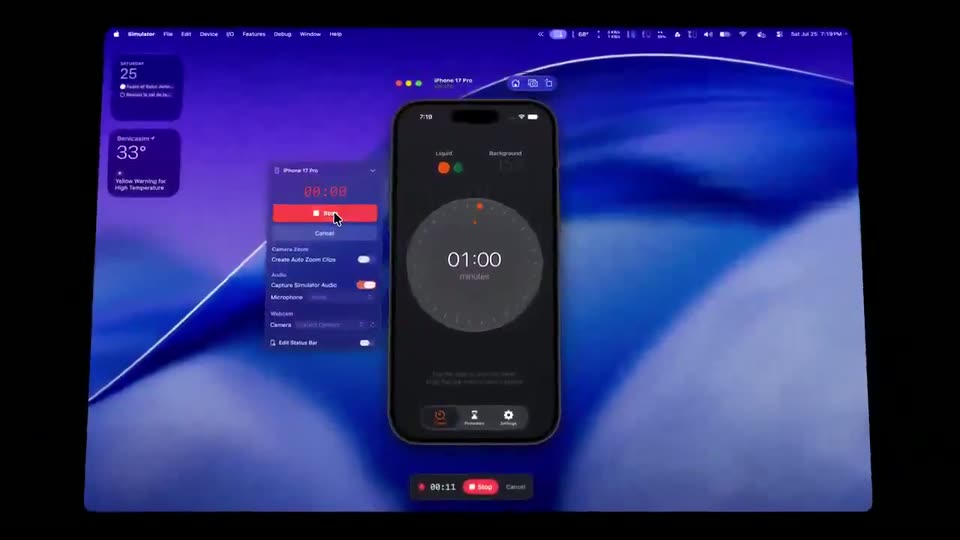
Matte’s 0:30 launch film runs 19 scenes, about 1.6 s each. The product shows up at 0:25, with social proof. The call to action lands at 0:27 (90% in). A rapid montage of tight 3D device renders and UI animations on plain white, each shot a macro or perspective turn that builds to the matte.app homepage and URL. The style is defined by rack focus, slow device rotations, and orange accents that punctuate a neutral silver-and-white palette.
No filming indicatedEstimated needs: 3 capture groups — your screens or recordings · 1 official logo — reused across the film · 15 3D passages — build or supply
Is this your launch? to your site or press kit.
More like this


1:31

Yusan Lin - AI slop isn't just tacky and uninspired. It can get you sued. Genera
MirrorMirror · Oct 2026
1:03

A Fresh Look for Gem | UI Animation & Sound Design
Gem · Sep 2026
Matte - Introducing Matte 2.0 Beta Capture & edit your screen and iOS ap, scene by scene
· 19 scenes as text
01 · Hook · 0:00–0:00
A macro shot of the rounded corner of a silver aluminum laptop against a white background. The brushed metal surface and the seam between the two halves stay in sharp focus while the body blurs. The camera orbits slowly, bringing a small port on the edge into view.
Techniques: 3D mockup
Camera: Static
02 · Hook · 0:00–0:02
Low macro angle on a silver laptop's front edge against a white background. The camera tilts up and racks focus from the chassis to the black keyboard, then to the screen, where multicolored vertical bars pulse like an audio graph.
Techniques: 3D mockup
Camera: Pan
03 · Hook · 0:02–0:04
A dark analytics dashboard fills the frame at an angle with shallow focus. A white cursor glides along a teal area chart, popping value tooltips at each point while the camera drifts right across the month labels.
Techniques: Cursor demo
Camera: Push in
04 · Demo · 0:04–0:06
A desktop screen sits in 3D perspective on a blue gradient backdrop, showing an iOS simulator with a phone timer at 01:00 and a settings panel. The view eases from a tilted angle to a flatter, closer framing while a cursor rests on the orange Record button.
Techniques: 3D mockup, Cursor demo
Camera: Push in
05 · Demo · 0:06–0:08
A tilted phone screen fills the frame, showing a dark circular dial. A white arrow cursor drags an orange marker around its edge while the center number counts from 01:00 to 09:00 minutes. Blurred editor panels sit at the left and right edges; the view slowly zooms in.
Techniques: Cursor demo, UI zoom
Camera: Push in
06 · Demo · 0:08–0:12
Close-up of a circular timer dial on an iPhone screen, a gray knob glides along the ring. The camera pulls back as the dial shrinks into a small 09:00 pill, then the phone rotates in 3D while the timer counts down to 08:58.
Techniques: UI zoom, Morph, 3D mockup
Camera: Pull out
07 · Demo · 0:12–0:12
A silver iPhone floats in 3D perspective on a white background, rotating from a three-quarter angle to face the camera. Its dark lock screen shows orange particles drifting down past a central 08:58 time widget above an orange pool at the base.
Techniques: 3D mockup
Camera: Static
08 · Demo · 0:12–0:13
A silver phone's rear camera module, with three black lenses on a square plate, rotates from a three-quarter angle to face the camera on a pale gray background. Two small time labels, 08:58 and 7:36, stay locked in the frame.
On-screen text: “08:58”, “7:36”
Techniques: 3D mockup
Camera: Push in
09 · Demo · 0:13–0:13
A close-up of an orange phone back on white shows the triple-camera module. The lenses darken from gray to black while the phone stays still.
Techniques: 3D mockup
Camera: Static
10 · Demo · 0:13–0:14
A locked-off close-up of the top corner of an iPhone shows the dual camera bump and flash on a white background. The body color shifts from light blue to lavender across the shot.
Camera: Static
11 · Demo · 0:14–0:15
A white phone is shown from the back at a three-quarter angle on a plain white background, its single camera lens and flash set on a raised oval island. The device turns slowly to reveal the side buttons and the curved metal frame.
On-screen text: “8”
Techniques: 3D mockup
Camera: Pull out
12 · Demo · 0:15–0:15
A rose gold smartwatch back is held at an angle against a white background, the black circular optical sensor and engraved case lettering in sharp focus. The frame stays locked off, the device static.
Camera: Pull out
13 · Social proof · 0:15–0:21
A split screen pairs a phone mockup on the left with a video call of a man holding the phone on the right. The app's year counts down from 2026 to 1850 as the footage ages, the phone scales up, and the call window shrinks before both slide off left.
Techniques: Split screen, UI zoom
Camera: Pull out
14 · Demo · 0:21–0:22
A white phone slides in from the left edge on a plain white background. The frame then tracks right, revealing a tilted phone showing a map screen and a large orange phone back in the foreground.
Techniques: 3D mockup, Parallax
Camera: Static
15 · Demo · 0:22–0:24
Two smartphone mockups float in 3D perspective, the left showing a street map and the right a camera viewfinder with an orange retro readout. The white backdrop folds into a tilted card over a warm orange gradient as the pair rotates in space.
Techniques: 3D mockup
Camera: Pull out
16 · Demo · 0:24–0:25
A silver iMac rotates in 3D from its front screen to its aluminum back, the Apple logo settling into frame, while a tablet edge slides in from the right. The turn is quick with motion blur on a plain white background.
Techniques: 3D mockup
Camera: Static
17 · Product intro · 0:25–0:27
A black-framed phone mockup displays the matte.app homepage in a browser on a white background. The phone drifts down and tilts into 3D perspective while the hero lines slide and reveal, and the page scrolls past the download button to the update note.
On-screen text: “Polished app demos”, “and screen recordings”, “in minutes”, “Matte 1.5 is the biggest update yet.”
Techniques: Kinetic type, 3D mockup
Camera: Push in
18 · CTA · 0:27–0:28
A tablet in 3D perspective shows the Matte landing page with its headline “Polished app demos and screen recordings in minutes”. The frame tilts up and the device slides down, its browser bar lingering at the bottom edge, as the gray URL “matte.app” sits centered on the light background.
On-screen text: “matte.app”
Techniques: 3D mockup
Camera: Push in
19 · Outro · 0:28–0:30
A plain off-white field holds the black lowercase wordmark matte.app, centered and static, with no motion across the locked-off frame.
On-screen text: “matte.app”
Camera: Static