0:38
Explore
Microsoft Surface - Introducing Surface Laptop Ultra. Built for world makers. Designed f
Microsoft Surface · Jun 2026 · 0:51 · AI-annotated
- Length
- 0:51
- Scenes
- 35 · 1.5 s avg
- Product on screen
- 0:27
- Features shown
- 1
- Call to action
- 0:44 · 88%
- Voiceover
- Yes
00:00:00 / 00:51:02
Microsoft Surface’s 0:51 launch film runs 35 scenes, about 1.5 s each. The product shows up at 0:27 and 1 feature is revealed. The call to action lands at 0:44 (88% in), over a voiceover. A 51 second teaser cut at roughly 30 cuts per minute over a 136 bpm pulse, built as a single accelerating argument: a cold open command, an under-the-hood hardware montage, then a fast product reveal that lands on a terminal-style spec card and a URL. The style is monochrome 3D and macro product photography on pure black, with thermal cyan-green accents reserved for the chip, and every caption set in a glitching pixel monospace that types on with a block cursor, so the signature moves are the X-
Footage neededEstimated needs: 1 capture group — your screens or recordings · 1 official logo — reused across the film · 3 filmed passages — shoot, supply or replace · 3 graphic passages — draw or supply · 25 3D passages — build or supply
Is this your launch? to your site or press kit.
More like this
1:50

Amandeep Singh - We’re incredibly excited to share what we’ve been building over the p
Scalar Field · Fintech · Aug 2026
1:24


Stoa - The market behind AI hardware
Stoa · Fintech · Jul 2026
Microsoft Surface - Introducing Surface Laptop Ultra. Built for world makers. Designed f, scene by scene
· 35 scenes as text
01 · Hook · 0:00–0:00
A solid black frame fills the screen for the full clip, with no text, graphics, or motion present.
Camera: Static
02 · Hook · 0:00–0:01
From pure black, the faint dark-gray blades of a fan or impeller emerge, radiating from a central hub. A tiny glint of light appears at the center as the form slowly resolves.
Camera: Static
03 · Hook · 0:01–0:07
A black turbine spins up at center frame, its blades blurring as it accelerates. White monospace text types in with a glitch flicker, then clears. A defocused code panel fades in over the spinning fan.
On-screen text: “THROTTLE=OFF -- EXECUTE”
Techniques: Kinetic type
Camera: Pull out
04 · Demo · 0:07–0:08
White line-art circuit schematic on black, a radial fan pattern at the center, the frame fading up from darkness as faint monospaced text on the left edge dissolves.
Camera: Pull out
05 · Demo · 0:08–0:10
The frame is almost entirely black, with a faint blurry ring glowing briefly in the center. Then a thin white line traces the rounded corner of a dark device, revealing its edge, a small circular detail and a sliver of a grille below.
Techniques: Light sweep
Camera: Pull out
06 · Demo · 0:10–0:11
On a black background, a small gray pixelated icon assembles in the center, pixels locking into a compact shape with two dot-like marks and a horizontal dash beneath. The build-up is slow and steady across the clip.
Camera: Pan
07 · Demo · 0:11–0:12
On a black background, an exploded vertical stack of a device's internal layers, separated by gaps, slides together and compresses into a single closed dark slab with a faint center glow.
Techniques: 3D mockup
Camera: Static
08 · Demo · 0:12–0:14
A top-down X-ray view of a laptop's internals sits on black, two radial fans flanking a central processor and dense circuit traces. The monochrome render holds still while its glow pulses brighter and dimmer across the clip.
Camera: Static
09 · Demo · 0:14–0:14
A dark 3D environment of curved metallic beams and a glossy floor recedes in depth, with a glowing white slatted disc anchoring the foreground. The view sweeps laterally, the disc sliding left as a dark dome rises into focus.
Techniques: Parallax
Camera: Push in
10 · Demo · 0:14–0:15
Extreme macro of a black glossy surface with a ribbed stripe pattern and a smooth rounded dome. Highlights trace the curves as the framing drifts slowly across the form.
Camera: Push in
11 · Demo · 0:15–0:16
A fast 3D flythrough glides along a dark curved surface, bright streaks of light tracing its edge. A rounded black form rests at the lower right while the blurred background streams past, the whole shot saturated with motion blur.
Camera: Push in
12 · Demo · 0:16–0:17
A low camera rushes along a dark wet road at night, motion blur streaking the lane lines and distant lights into white lines, a pale vehicle hood occupying the lower right corner.
Camera: Push in
13 · Demo · 0:17–0:19
A grayscale 3D corridor flies forward at high speed, the edges blurring into streaks, then eases off as it approaches a low rectangular platform centered in the dark hall.
Techniques: Speed ramp
Camera: Push in
14 · Demo · 0:19–0:20
A dark corridor streaks with white light trails as the camera rushes forward toward a flat green chip resting on a reflective floor, ending on a close-up of its circuit surface.
Techniques: 3D mockup, Parallax
Camera: Static
15 · Demo · 0:20–0:22
A glowing rectangular panel floats in a blue 3D space, framed by dark wavy cables in the foreground. Its border shifts from green to red while the interior glow warms from cyan to yellow, surrounded by small pixelated data blocks.
Camera: Static
16 · Demo · 0:22–0:23
A code editor view flips from a green field to a dark one. The text stays blurred and drifting, then a green highlight box appears around the token PROTOCOL_ in the middle line, isolating it from the surrounding code.
Camera: Static
17 · Demo · 0:23–0:24
A top-down 3D render of a processor die, its four-quadrant grid in yellow and blue, flanked by columns of teal blocks. The camera pulls back to reveal the dark blue circuit board and thin white traces around the chip.
Techniques: 3D mockup
Camera: Pull out
18 · Demo · 0:24–0:24
A gold processor chip sits centered on a dark blue circuit board, its grid of traces glowing teal. A bright white flash bursts from the chip at the start, then the frame settles into a dimmer top-down view while the camera holds still.
Techniques: Light sweep
Camera: Pull out
19 · Demo · 0:24–0:25
A teal abstract tunnel of dark wavy vertical strands frames a glowing orange-bordered rectangle at center. The panel shifts from a bright cyan glow to a grainy green texture as the scene darkens.
Camera: Static
20 · Demo · 0:25–0:25
A frontal thermal close-up centers a bright rectangular component behind dark vertical wires; the heat-map palette of cyan and yellow fades to flat grayscale by the end of the clip.
Camera: Static
21 · Demo · 0:25–0:26
A bright yellow-green rectangle glows at the center of a blue thermal field, then the view resolves into a dark top-down laptop interior where the same chip pulses teal between two fans and a battery outline.
Techniques: 3D mockup
Camera: Static
22 · Demo · 0:26–0:27
A top-down X-ray view of a laptop's internal layout, drawn in thin white wireframe lines on black, with grey smoke rising from the upper half. The glowing circuitry and fan hold for a beat, then the whole image dissolves to black.
Camera: Static
23 · Product intro · 0:27–0:28
A top-down view of a dark laptop lid with a small four-pane Windows logo inside a white square frame pulls back and tilts, revealing the white frame as a 3D box resting on a black background.
Techniques: 3D mockup
Camera: Pull out
24 · Product intro · 0:28–0:29
A closed dark laptop with a four-square logo rests on a glowing white plinth in a black void. The camera tilts and pulls back, angling the plinth and revealing a faint circular ring behind it.
Techniques: 3D mockup
Camera: Static
25 · Product intro · 0:29–0:30
A closed dark laptop rests on a white table against a black fabric backdrop, shot from a low side angle. The frame opens tight on the row of side ports, then eases back to widen the view of the edge and the table corner.
Camera: Pull out
26 · Product intro · 0:30–0:32
A macro close-up of a dark laptop's brushed metal edge resting on a light gray surface, showing a USB-C port, two oval ports and a round headphone jack. The camera pans slowly right along the edge with shallow depth of field.
Camera: Pull out
27 · Product intro · 0:32–0:33
A dark 3D Windows logo sits centered on a textured navy surface. A white bar wipes across the middle, revealing the pixel-font headline in the center, ending with a block cursor at the right.
On-screen text: “A NEW KIND OF POWER”
Techniques: Masking
Camera: Static
28 · Product intro · 0:33–0:34
A dark macro shot of a black laptop keyboard, centered on the Fn, Windows and Alt keys with shallow depth of field. White pixel-style text types out character by character across the lower third, reading FOR A NEW KIND OF MAKERI.
On-screen text: “FOR A NEW KIND OF MAKERI”
Techniques: Kinetic type
Camera: Pull out
29 · Product intro · 0:34–0:36
Extreme close-up of a matte dark-metal device edge, showing a USB-C port and a speaker grille. A soft highlight rests on the rounded corner while the frame drifts slowly left. The caption sits centered across the surface.
On-screen text: “FOR A NEW KIND OF MAKER”
Camera: Static
30 · Product intro · 0:36–0:36
A macro close-up of a dark blue device edge shows a USB-C port and a speaker slot. A white pixel-font caption, FOR A NEW KIND OF MAKER, sits in the lower third with a block cursor, then clears.
On-screen text: “FOR A NEW KIND OF MAKER”
Camera: Static
31 · Feature reveal · 0:36–0:37
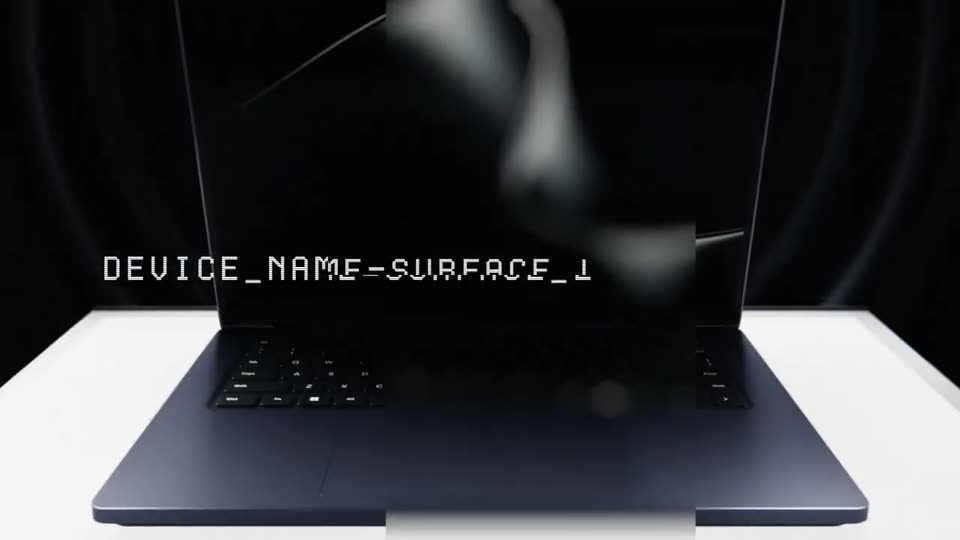
A dark laptop sits open on a white surface against a black backdrop, its screen showing a glossy abstract shape. A white monospace line types out on the left, reading DEVICE_NAME=SURFACE_LAPTOP_ULTRA.
On-screen text: “DEVICE_NAME=SURFACE_LAPTOP_ULTRA”
Techniques: 3D mockup, Kinetic type
Camera: Pull out
32 · Feature reveal · 0:37–0:41
A dark blue laptop stands open on a white table against a black backdrop, its screen showing a glossy monochrome swirl. A monospace caption reveals through a horizontal scanline mask, then a second line types out letter by letter with a blinking block cursor.
On-screen text: “DEVICE_NAME=SURFACE_LAPTOP_ULTRA”, “ACCELERATED_BY=NVIDIA_RTX_SPARK”
Techniques: 3D mockup, Masking, Kinetic type
Camera: Pull out
33 · Feature reveal · 0:41–0:44
A black field holds a single centered line of white terminal monospace text with a solid block cursor. The line types out ACCELERATED_BY=NUIDIA_RTX_SPARK, then swaps to COMING=FALL_2026, where a gray bar wipes over the year and glitches the line.
On-screen text: “ACCELERATED_BY=NUIDIA_RTX_SPARK”, “COMING=FALL_2026”
Techniques: Kinetic type
Camera: Static
34 · CTA · 0:44–0:46
A dark laptop, half open, floats on a black background as the camera orbits from a side profile showing the ports to a top-down view of the lid. A soft light sweep crosses the surface, revealing the centered Windows logo.
Techniques: 3D mockup, Light sweep
Camera: Static
35 · CTA · 0:46–0:51
On a black field, a four-square logo glows at center while two lines of text type in beneath it, then the whole composition fades to black.
On-screen text: “LEARN MORE AT”, “WWW.MICROSOFT.COM/ULTRA”
Camera: Static