0:53

LTX.io - Introducing Dubbing and Captions in LTX Studio. Now available for en
LTX Studio · Mar 2026
Maket · Oct 2026 · 0:13 · Full motion · AI-annotated
Maket’s 0:13 launch film runs 8 scenes, about 1.7 s each. The product shows up at 0:03 and 1 feature is revealed. There is no explicit call to action. The video pairs a static left-aligned headline with an animated floor plan on the right, cutting on each new caption from the pastel opening straight to the logo lockup. Signature moves are the sliding headline swap, room tiles that shuffle and snap into place, a before/after wipe divider, and the left-to-right wordmark wipe with a NOW LIVE pop.
Is this your launch? to your site or press kit.
LTX Studio · Mar 2026
Versine · Nov 2026
A black headline sits centered on a soft pastel gradient, then slides right and fades as a gray headline with a blue first word enters from the left, two rounded room cards fading in on the right.
On-screen text: “Revision fees?”, “Never heard of them.”
Techniques: Kinetic type
Camera: Static
On a soft pastel gradient, the headline Never heard of them. holds on the left while a floor plan of blue room tiles on the right shuffles: Bedroom 1 and Bedroom 2 swap places and Kitchen and Living slide into their slots.
On-screen text: “Never heard of them.”
Camera: Static
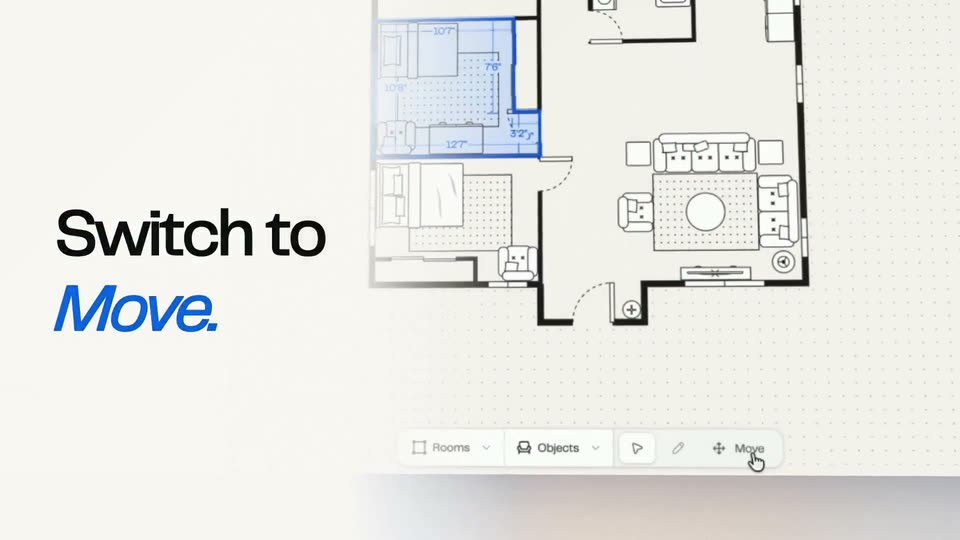
A floor plan editor shows a bedroom highlighted in blue. The cursor clicks the Move tool in the bottom toolbar, and blue room labels pop in across the plan as the view zooms out, while the still caption “Switch to Move.” holds on the left.
On-screen text: “Switch to”, “Move.”
Techniques: Cursor demo, UI zoom
Camera: Push in
On a dotted cream background, a blue blueprint floor plan on the right swaps its Office and Bedroom 2 rooms via a crosshair cursor, while the static headline 'Grab any room.' holds on the left.
On-screen text: “Grab any room.”
Techniques: Cursor demo
Camera: Static
A light dotted background holds a blue house floor plan on the right, its rounded room blocks snapping into alignment. A small cursor hovers at the center. On the left, the headline sits static in black and blue.
On-screen text: “Drop it anywhere.”
Techniques: Cursor demo
Camera: Static
A floor plan on a white card sits right of the static headline. The plan starts with blue room highlights, then a blue divider with a round handle slides left, wiping the tinted before layout into a clean after layout under BEFORE and AFTER labels.
On-screen text: “BEFORE”, “See variations”, “instantly.”, “AFTER”
Techniques: Masking
Camera: Static
A line-drawn apartment floor plan sits on a white card at right under a small blue AFTER tag, then the card fades out and the blue cube logo forms on a faint isometric wireframe grid. A large two-line headline reads See variations instantly. on the left.
On-screen text: “See variations”, “instantly.”, “AFTER”
Techniques: Masking
Camera: Static
A blue isometric cube icon sits left of the lowercase wordmark maket on a pale isometric grid. The wordmark wipes in from left to right while background cubes pulse, then a NOW LIVE label with a dot pops in at the bottom right.
On-screen text: “MOVE ROOMS”, “NOW LIVE”
Techniques: Masking
Camera: Static