1:15

Figma - Introducing Figma Sites Take your designs straight to the web. With
Figma · Design · May 2025
Magnific · Mar 2026 · 0:26 · AI-annotated
Magnific’s 0:26 launch film runs 23 scenes, about 1.2 s each. The product shows up at 0:03 and 3 features are revealed. There is no explicit call to action; a voiceover carries the film. A 26 second product launch for FREEP!K 3D Scenes, built as a fast feature montage: a question hook, a glossy logo sting, then four rapid feature blocks (images to 3D model, camera control, prompt to scene, any location as set) and a logo lockup. The edit runs at a 129 bpm pulse with about 45 cuts per minute, so each feature gets only a few seconds and the rhythm carries the story.
Is this your launch? to your site or press kit.
Figma · Design · May 2025
Perplexity · AI · Apr 2026
On black, the exploded parts of a mirrorless camera fly together and assemble into a complete lens and body beside the headline on the left. The shot then cuts to a tight close-up of the assembled camera as the text Meet 3D fades in at center.
On-screen text: “What if your photo studio lived on your desk?”, “Meet 3D”
Techniques: 3D mockup
Camera: Push in
On a black field, a small white 'Meet' sits above a large bold '3D'. Below, 'Scenes' scales in as a glossy blue 3D script while the '3D' fill shifts from white to orange.
On-screen text: “Meet”, “3D”, “Scenes”
Techniques: Kinetic type
Camera: Static
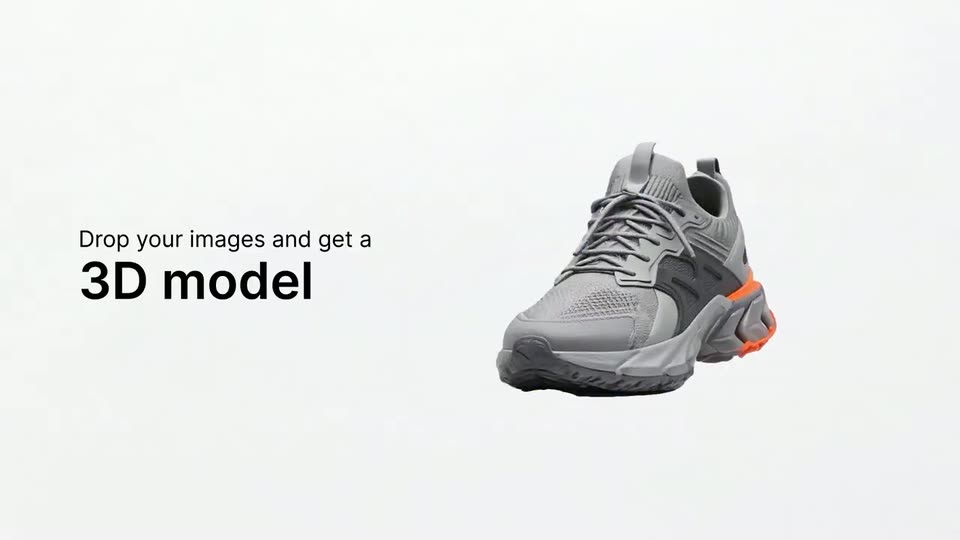
A gray sneaker with an orange heel accent floats on the right of a plain white background, rotating gently in 3D, while two lines of black text stand still on the left.
On-screen text: “Drop your images and get a”, “3D model”
Techniques: 3D mockup
Camera: Static
A blue wireframe mesh of a sneaker rotates on a light gray background while it fills in with color, becoming a finished 3D shoe. A two-line headline sits to the left.
On-screen text: “Drop your images and get a”, “3D model”
Techniques: Morph, 3D mockup
Camera: Static
A gray and orange sneaker floats inside a white curved 3D studio. The camera pulls back to reveal side galleries with product displays and a 360-degree image strip along the bottom, while the headline sits on the left.
On-screen text: “Drop your images and get a”, “3D model”
Techniques: 3D mockup
Camera: Pull out
A 3D rendered retail set with a green marble wall, wood paneling and a gray sneaker hovering over a round platform. A strip of small reference thumbnails runs along the bottom, sliding in a staggered reverse sequence.
Techniques: 3D mockup
Camera: Static
A 3D showroom with marble walls, a copper panel and glowing ceiling panels; a gray sneaker with orange accents floats over a marble plinth. Along the bottom edge, three small inset images of sets and the room slide left in a horizontal strip.
Techniques: 3D mockup
Camera: Static
A 360-degree white studio with a floating gray sneaker fills the top of the frame, while a thumbnail bar with a cursor over a Select images button sits below. The view then zooms in on the sneaker.
Techniques: Cursor demo, 3D mockup
Camera: Push in
A blank white screen cuts to the app interface, framing a 3D photo studio with a floating sneaker, a softbox and a light stand. A gray headline reads “Control the camera like you’re on set” on the left.
On-screen text: “Control the camera like you’re on set”
Camera: Static
A gray sneaker with a red sole floats above a white cyclorama in a 3D studio between softbox lights. The camera pulls back and pans to reveal the full set and a clapperboard in the foreground.
On-screen text: “Control the camera”, “like you're”, “on set”
Techniques: 3D mockup
Camera: Static
A 3D photo studio with a white cyclorama, softbox and spotlight frames a floating sneaker. The camera dollies back and orbits through the set, demonstrating free movement, while a bold headline holds on the left and a small laptop mockup sits bottom right.
On-screen text: “Control the camera like you're on set”
Techniques: 3D mockup
Camera: Static
A white 3D studio set with softboxes and a shoe on a low platform; a 3D camera model floats mid-air and rotates slightly as the view drifts. Bold black headline text sits on the left, a Compose/Shoot toggle sits top left, and a small shoe preview sits bottom right.
On-screen text: “Control the camera”, “like you're on set”
Techniques: 3D mockup
Camera: Static
A 3D product-photo studio fills the screen, a sneaker floating before a white backdrop flanked by a softbox and a spot light. The camera zooms into the bottom settings panel as a prompt types itself: Forest scene, butterfly, cinematic mist.
Techniques: UI zoom
Camera: Push in
The product's shoot interface shows a 3D scene with a rule-of-thirds grid. It opens on a bright studio set, then switches to a misty forest with a grey sneaker on a mossy log as the settings bar shrinks to the bottom and the top tabs scale in.
Techniques: UI zoom
Camera: Pull out
A dark camera app viewfinder overlays a misty forest with a rule-of-thirds grid. The left Subject panel lists a sneaker, a car and a backpack. A preview thumbnail on the right shows the sneaker on a log, then the sneaker appears centered in the frame as the scene sharpens.
Camera: Pull out
A camera-app interface fades in over a misty forest where a sneaker hangs from a mossy branch. A subject list with a shoe, car and backpack sits on the left, a settings bar runs along the bottom, and two preview thumbnails show the shoe in water on the right.
Camera: Pull out
A gray sneaker with an orange sole sits on a mossy branch in a foggy 3D forest, an orange butterfly on its tongue. A left-side UI tag marks it as Subject with a thumbnail; a car and backpack float below. The camera drifts slowly.
Techniques: 3D mockup
Camera: Pull out
A misty forest with a mossy branch; a white sneaker with orange accents rests on the branch while smoke rises. A vertical Subject list on the left shows a sneaker, an orange car in a selected frame, and a backpack; the sneaker drops off the branch.
On-screen text: “Any visual or real location becomes your set”
Techniques: 3D mockup
Camera: Pull out
A copper-orange car drives along a dirt track in a misty forest with a waterfall behind. Thumbnails of a sneaker, car, and backpack sit under a Subject label on the left; white headline text sits on the right.
On-screen text: “Subject”, “Any”, “visual or”, “real location”, “becomes your set”
Techniques: 3D mockup, Parallax
Camera: Pull out
An orange 3D car sits on a mossy forest floor as the camera arcs from front to side view. A left panel lists a sneaker, a car and a backpack thumbnail, the last boxed in white. A white right-side headline states any visual or real location becomes your set.
On-screen text: “Any”, “visual or”, “real location”, “becomes your set”
Techniques: 3D mockup
Camera: Pull out
A low tracking shot glides through a mossy forest by a stream, a blue hiking pack on a rock. A left column of product thumbnails, the pack in a white selection box, sits under the label Subject. A large white headline, Photo-shooting made simple, holds fixed on the right.
On-screen text: “Subject”, “Photo-shooting”, “made simple”
Camera: Pull out
A forest stream photo serves as the backdrop; a teal pack rests on a rock at right, while a sneaker, an orange car and a boxed small pack float as cutouts at left under the Subject label. White text reads Photo-shooting made simple on the right.
On-screen text: “Photo-shooting”, “made simple”
Camera: Static
A black background holds the centered white FREEP!K wordmark with the AI Suite tagline to its right; the mark appears and locks off with no further motion.
On-screen text: “FREEP!K”, “AI Suite”
Camera: Static