0:16
Lovable - Introducing Lovable Payments. Describe what you want to sell. Test i
Lovable · Developer tools · Apr 2026
LottieFiles · Jun 2024 · 1:09 · AI-annotated
LottieFiles’s 1:09 launch film runs 25 scenes, about 2.8 s each. The product is on screen from the first frame and 2 features are revealed. There is no explicit call to action. The video opens with a glow-lit title card and robot mascot, then alternates feature title cards with 3D-tilted mockups of the chat panel where typed prompts animate objects on a canvas, and closes on a tagline and logo lockup. Pacing is moderate with quick cuts, and its signature moves are the typing prompt field, the teal cursor, and neon glows on near-black.
Is this your launch? to your site or press kit.
Lovable · Developer tools · Apr 2026
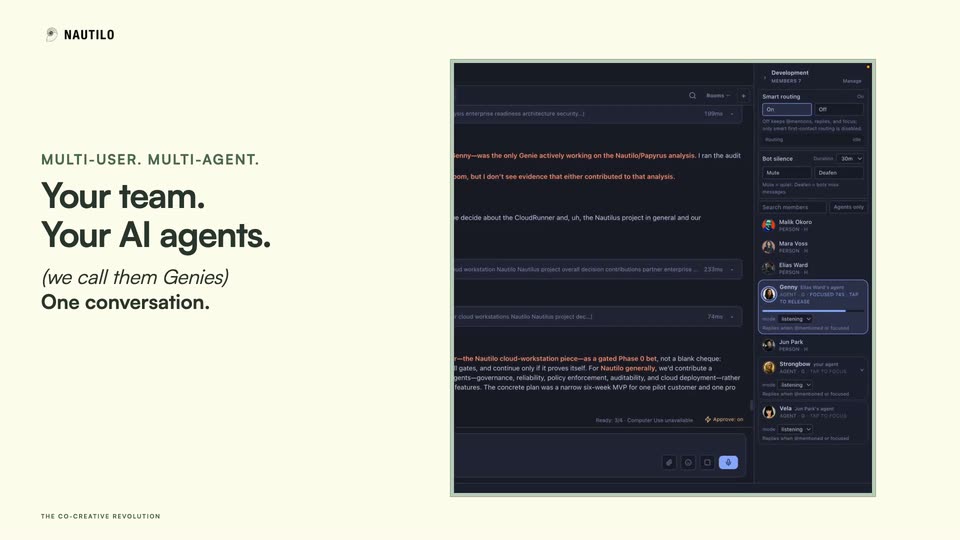
Nautilo (by AgentSea) · Sep 2026
Figma · Design · May 2025
The word Introducing assembles in the center of a black screen, letters resolving from blur to sharp in a left-to-right reveal, then holding still on a locked-off frame.
On-screen text: “Introducing”
Techniques: Kinetic type
Camera: Static
A stylized green and blue robot head with hourglass eyes floats above a glowing cyan line on a dark background, while the white text Motion Copilot sits centered below it. Both fade in from black and hold for a short, static beat.
On-screen text: “Introducing”, “Motion Copilot”
Camera: Static
A teal and blue 3D robot head hovers above a glowing cyan line on a dark blue gradient, the title Motion Copilot centered beneath it. The head drifts slowly downward while the text stays fixed.
On-screen text: “Motion Copilot”
Camera: Static
A mint-green 3D robot head with a black face screen floats on black while thin purple streaks fall. A teal-outlined caption box types out the instruction, then vanishes as the head rocks left and right.
On-screen text: “Move it side to side”
Techniques: 3D mockup, Kinetic type
Camera: Static
A dark rounded card with a green glow at the bottom holds the brand lockup and a yellow sparkle icon; the white headline 'AI assisted creation' scales in below. The camera slowly pans right, letting the brand label drift off the right edge.
On-screen text: “Motion Copilot”, “AI assisted”, “creation”
Techniques: Kinetic type
Camera: Static
A soft green and magenta glow drifts on a black field behind centered white text. The phrase builds word by word, ending on the full title, then holds still.
On-screen text: “Prompt to Keyframes”
Techniques: Kinetic type
Camera: Static
A dark Motion Copilot chat panel floats at an angle over the editor. A green cursor types a prompt into the input field and clicks send; the message posts and the cursor clicks apply animation. The camera pulls back to reveal the What's new list and timeline.
On-screen text: “Prompt to Keyframes”
Techniques: 3D mockup, Cursor demo
Camera: Pull out
A tilted 3D view of a design app pans right across a dark interface. A green preview window plays a looping illustration of a pink hand holding green rings among leaves, while a keyframe timeline with a moving playhead runs along the bottom.
Techniques: 3D mockup
Camera: Push in
A dark Motion Copilot chat panel overlays a colorful flat illustration; a green cursor types a prompt and clicks a preview, while the selected object on the canvas switches from mint coins to swaying leaves as the panel shifts to the right side.
Techniques: Cursor demo
Camera: Static
A flat illustration shows a pink hand holding a stack of mint coins on a dark green field. A coin drops from above and lands on the stack, while stylized blue, green and yellow leaves, small flowers and white sparkles sway gently around the hand.
Camera: Pull out
A dark Motion Copilot panel sits in a 3D perspective room beside a magenta ball in a blue selection box. A cursor types 'make the ball bounce on the spot' into the input field while the panel fades to solid.
Techniques: 3D mockup, Cursor demo
Camera: Pull out
Left of frame, a pink ball bounces on a blue floor in a colorful 3D room; right, a dark Motion Copilot chat panel. A teal cursor clicks previews and types prompts, and the ball spins and turns orange as the panel slides out.
Techniques: Split screen, Cursor demo
Camera: Static
A flat-color 3D corridor with an orange ceiling and blue floor holds a still black back wall. An orange sphere marked with a white squiggle bounces lightly in the left foreground above a black oval shadow, while a small white four-point star glints once at the far end.
Techniques: Light sweep
Camera: Static
A soft green-and-purple glow sits at the center of a black frame. The line “Ask your AI anything” reveals word by word, each word brightening from dim gray to full white, left to right.
On-screen text: “Ask your AI anything”
Techniques: Kinetic type
Camera: Static
A vertical stack of rounded pill boxes with multilingual animation prompts scrolls upward on a black background. The centered box lights up in bright teal while the others dim to gray, and each highlighted box performs the motion named in its text.
On-screen text: “Ask your AI anything”, “Rotate this 360 degrees clockwise for 3 second”, “Beat like a heart”, “Pulse animate the opacity from 100% to 20%”, “Dramatic scale up 300% like an aura expanding”, “तेजी से घुमाएं और धीरे-धीरे धीमा करें”, “Anima esto como un bote balanceándose en las olas”, “불투명도를 변경하고 빛을 깜박이게 하세요.”
Techniques: Kinetic type
Camera: Static
A teal-outlined input field with a blinking white cursor sits on a dark green gradient. Mint text types out behind the cursor, the field stretches to full width, and the line slides left to keep the cursor in view.
On-screen text: “How can I make”, “my animations look”, “Anima esto como un bote balanceándose en las olas”
Techniques: Kinetic type
Camera: Static
A black background with a bottom green glow frames a green rounded rectangle outline. Mint green text scrolls left and scales up inside the outline, ending with a vertical cursor bar.
On-screen text: “make my animations look smoother?”
Techniques: Kinetic type
Camera: Static
A dark glass card with a teal AI icon and the title Motion Copilot holds on a black background with a green glow, then slides down and fades as a large white headline scales in.
On-screen text: “ions look smoother?”
Techniques: Kinetic type
Camera: Static
A dark card with a green glow holds a question label above a Motion Copilot answer block. The label brightens and scales in while the answer body types out line by line, settling into a static frame.
On-screen text: “How do I apply gradients?”
Techniques: Kinetic type
Camera: Static
Centered white text “Animate with” holds on a black field with a soft purple glow at the right edge. The text dims and disappears while a small green logo with a purple outline and a dark two-eyed face fades in at the left.
On-screen text: “Animate with”
Camera: Static
A teal robot helmet icon with X-shaped eyes sits left of the wordmark on a dark gradient. The green glow fades to purple as the mint 'Motion Copilot' swaps to a white 'Think Motion' tagline.
On-screen text: “Motion Copilot”, “Think Motion”
Camera: Static
The white Think Motion wordmark sits centered on a dark purple gradient, holding still as a closing sign-off.
On-screen text: “Think Motion”
Camera: Static
On a locked-off dark gradient shifting from green to purple, the green square LottieCreator icon and white wordmark lock in at center. The 'Creator' letters begin blurred and overlapping, then resolve into a crisp, still mark.
On-screen text: “Think Motion”
Camera: Static
The LottieCreator lockup, a green rounded square with a white curve beside the white wordmark, sits centered on a dark gradient that blends teal and purple. The frame stays locked off with no motion on the logo.
On-screen text: “LottieCreator”
Camera: Static
A static LottieCreator logo, a green rounded square with a white curve beside the white wordmark, holds center on a black background. The frame is locked off with no motion.
Camera: Static