1:21
All the launches at Config 2025 | Figma
Figma · Design · May 2025
Nautilo (by AgentSea) · Sep 2026 · 1:28 · AI-annotated
Nautilo (by AgentSea)’s 1:28 launch film runs 33 scenes, about 2.7 s each. The product is on screen from the first frame and 9 features are revealed. There is no explicit call to action; a voiceover carries the film. The film opens on a brand promise montage, then runs a chain of feature blocks, each pairing a pinned headline card with a live UI demo, and closes by spiraling into the logo. Pacing holds near twenty cuts per minute, with hard cuts between cream panels and dark screens, and signature moves like the shattering terminal and the vortex swallow.
Is this your launch? to your site or press kit.
Figma · Design · May 2025
Lovable · Developer tools · Apr 2026
Manus AI · Sep 2026
A static hero frame in a dim workshop set: a woman and a man sit at a table flanked by a blue creature and a teal faceted figure. A cream and orange headline spans the top, a small white caption sits at the bottom.
On-screen text: “AI GOES MULTIPLAYER”, “Multi-user. Multi-agent.”
Camera: Static
A dark green pixel terminal shows a robot labeled YOU and a boxed face labeled AGENT, joined by a dashed line. A bright flash hits the center, cracks spread outward, and the display shatters into offset fragments.
On-screen text: “ONE PLAYER. ONE AGENT.”, “Single-user. Isolated.”
Camera: Pull out
A cream radial light burst flashes and resolves into a 3D sunset desert where a row of stylized characters stands, a robed elder, a woman in a blue jumpsuit, and a teal furry creature. The white headline holds at the top.
On-screen text: “1P”, “AI goes multiplayer.”
Camera: Pull out
A 3D desert arena at dusk holds a row of stylized characters, a wizard with glowing hands, a woman in overalls, a figure with a purple electric head, and a teal blob, while the camera pulls back to reveal more figures and a blurred pink foreground.
On-screen text: “AI goes multiplayer.”
Techniques: Parallax
Camera: Pull out
A wide 3D fantasy landscape with stylized people, creatures, and glowing crystals around a central platform. The camera pulls back to reveal more of the orange sky and terrain while the headline and caption stay fixed.
On-screen text: “AI goes multiplayer.”, “Your whole organization. One harness.”
Camera: Pull out
A colorful 3D illustrated game world fills the frame, packed with small avatars, glowing pillars and a dragon on the left. The camera pulls back to a wide map view as a golden vortex swirls open at the center. A static white headline sits on top, with a smaller caption at the bottom.
On-screen text: “AI goes multiplayer.”, “Your whole organization. One harness.”
Camera: Pull out
A 3D isometric fantasy map fills the frame under a starry sky, a white nautilus spiral logo glowing at its center in a burst of light, with a headline above and a caption below. The scene cuts to a dark agent-list interface highlighting one agent card.
On-screen text: “AI goes multiplayer.”, “Your whole organization. One harness.”, “THE CO-CREATIVE REVOLUTION”
Camera: Static
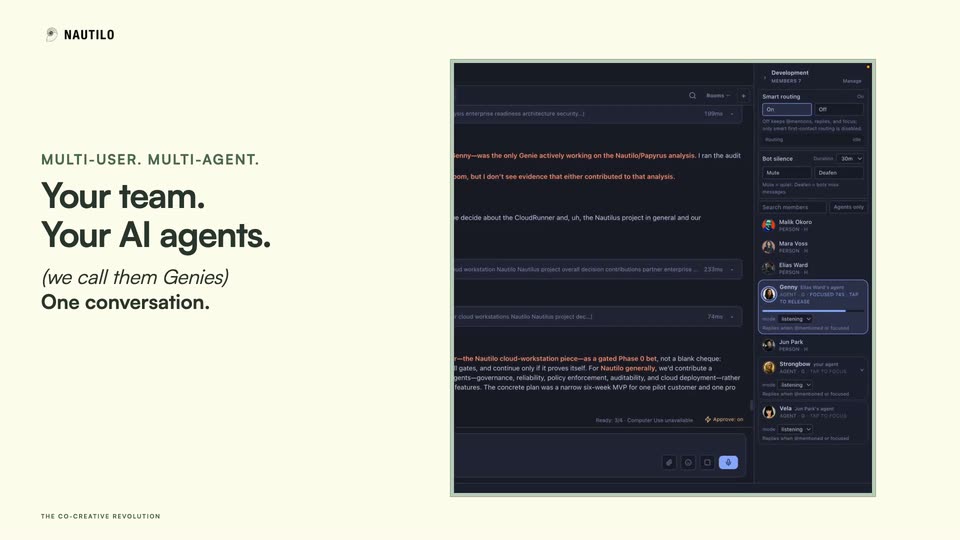
Left: a headline block fades in on a cream field. Right: a dark member-list card crossfades into the full chat app, the highlighted Genny agent card holding position through the transition, while conversation text scrolls and new messages type in.
On-screen text: “THE CO-CREATIVE REVOLUTION”, “MULTI-USER. MULTI-AGENT.”, “Your team.”, “Your AI agents.”, “(we call them Genies)”, “One conversation.”
Techniques: Morph
Camera: Static
A dark chat interface fills the frame, showing a security report and a voice input bar with an animated waveform. A white card slides in from the left carrying the headline “Just talk naturally.” while a bottom caption displays the user's spoken question.
On-screen text: “What Genies were looking at the Nautilo analysis”, “NATURAL CONVERSATION”, “Just talk naturally.”
Camera: Static
A dark chat app's Development room settings panel fills the screen, with a white card reading No @ necessary. pinned top-left. The camera pushes in toward the Smart routing toggle as the background text blurs, while a caption at the bottom tracks the voiceover.
On-screen text: “No @ necessary.”, “What genies were looking at the Nautilo analysis earlier in the chat?”
Techniques: Parallax, UI zoom
Camera: Push in
A dark two-pane interface holds still. A white card reading No @ necessary. overlays the top-left of a chat panel showing a search bar and partial text, while the right pane displays a Development settings view with Smart routing set to On and a Bot silence card.
On-screen text: “SMART ROUTING”, “No @ necessary.”
Techniques: Split screen
Camera: Static
A dark contact list scrolls slowly upward, settling on the highlighted Genny agent card with its listening mode row. A cream headline card sits top left and a small status pill rests bottom left over ghosted code text.
On-screen text: “SMART ROUTING”, “The right Genie wakes up automatically.”, “Genny · Listening”, “The right Genie is active”
Camera: Pan
A browser window on the left and an AI chat panel on the right sit side by side. The browser page switches from a teapot grid to a product detail page while two dark caption boxes stay fixed in the left corners.
On-screen text: “CO-CREATIVE CONTROL”, “Tell your Genie what you want.”, “She controls the browser.”, “YOUR REQUEST”, “Open the Tenmoku teapot.”
Camera: Static
A browser window on the left shows a teapot product page while a chat panel on the right logs the assistant's tool calls. Dark caption boxes overlay the left with the headline and the user request. The page then updates, adding a breadcrumb and a strip of teapot thumbnails.
On-screen text: “CO-CREATIVE CONTROL”, “Tell your Genie what you want.”, “She controls the browser.”, “YOUR REQUEST”, “Open the Tenmoku teapot.”
Camera: Static
A design-tool canvas shows a flat illustration of a pelican riding a red bicycle over a teal ground band. The cursor drags the selected PELICAN EXPRESS text box downward until it sits inside the band. A cream headline panel sits at the top left.
On-screen text: “CO-CREATIVE CONTROL”, “Take over whenever you want.”
Techniques: Cursor demo
Camera: Static
A Google Sheets interface fills the frame, showing a data table above a blue horizontal bar chart titled Top Models by Intelligence Score. A cursor rests at the chart title as a white headline fades in across the top.
On-screen text: “You bring the sheet. Your Genie builds the charts.”
Techniques: Cursor demo
Camera: Static
A Google Sheets view shows a data table scrolling up as a horizontal bar chart of model scores grows with new rows; a cursor hovers over the chart. A black caption bar reads “Oh man, that is beautiful.”
On-screen text: “You bring the sheet. Your Genie builds the charts.”, “Oh man, that is beautiful.”
Techniques: Cursor demo
Camera: Static
A Google Sheets table fills the frame with a cursor over the cells, then the view zooms out to reveal the full window and a right-hand chat panel that finishes typing a summary. A black headline bar sits at the top and a caption bar at the bottom.
On-screen text: “You bring the sheet. Your Genie builds the charts.”, “Oh man, that is beautiful.”
Techniques: UI zoom
Camera: Pull out
A dark chat interface fills the frame while a white headline card slides down from the top. Inside the Codex panel, the agent's response types out line by line, the working timer ticking up from 20.9s to 24.9s.
On-screen text: “CODING AGENTS · CODEX SHOWN”, “Put Codex, Claude and Hermes to work.”
Techniques: Kinetic type
Camera: Static
A dark product interface fills the screen, showing a chat thread and a right-hand agent panel. A white card with a serif headline sits top-left over the UI. The chat content scrolls down through code and probe results while the card stays fixed.
On-screen text: “YOUR GENIE DIRECTS THE CODING AGENT”, “Your Genie runs the job.”, “Right inside Nautilo.”
Camera: Static
Left column fades in the heading “Send your Genie to ask a coworker.” beside a dark chat window with Rook’s message and file attachment. At 3.5s the text switches to “She has the conversation.” with a call bar and caption, while the right zooms out to the full app.
On-screen text: “ROOK → ELIAS”, “Send your Genie to ask a coworker.”, “THE CO-CREATIVE REVOLUTION”, “ELIAS → ROOK”, “She has the conversation.”, “Yeah, I'll read through it and get back to you.”
Techniques: Kinetic type, UI zoom
Camera: Pull out
A cream panel on the left carries the headline beside a dark chat window on the right that shows Rook reporting Elias's edit feedback. The frame sharpens out of a soft blur, then a cursor hovers over the message icons.
On-screen text: “ROOK → YOU”, “She brings the answer back to you.”, “Rook • Reporting back”, “Feedback from your coworker”, “Elias suggests a tighter edit.”, “THE CO-CREATIVE REVOLUTION”
Techniques: Cursor demo
Camera: Static
A cream panel fades in the headline “Get Nautilo.” with a green kicker and store line, beside a dark phone chat screen. A keyboard slides up over the “Choose a Genie” sheet, “Ve” is typed in the search, the list filters to Vela, and the keyboard drops.
On-screen text: “ANDROID + iPHONE”, “Get Nautilo.”, “Google Play + App Store”, “THE CO-CREATIVE REVOLUTION”
Techniques: Cursor demo
Camera: Static
A cream panel on the left holds the NAUTILO wordmark and a large black headline that fades in, swapping from “Connect to your server.” to “Keep the conversation going.”, while a dark phone chat on the right scrolls new messages into view.
On-screen text: “ANDROID + IPHONE”, “Connect to your server.”, “THE CO-CREATIVE REVOLUTION”, “Keep the conversation going.”
Techniques: Split screen, Kinetic type
Camera: Static
A cream panel holds the static headline “Keep the conversation going.” beside a dark phone mockup. Inside the mockup, a chat thread types out a long agent message, then an action toolbar slides in.
On-screen text: “ANDROID + iPHONE”, “Keep the conversation going.”, “Genny · Your agent”, “Catching you up”, ““Welcome back.””, “THE CO-CREATIVE REVOLUTION”
Techniques: Split screen
Camera: Static
A split layout: a cream panel on the left holds the bold headline while a phone on the right shows a document editor. The markdown text inside the phone scrolls upward at a steady pace through several paragraphs, the left side staying static.
On-screen text: “ANDROID + iPHONE”, “Edit your docs on the go.”, “THE CO-CREATIVE REVOLUTION”
Techniques: Split screen
Camera: Pan
A dark file-picker dialog fills the frame, showing a grid of colorful Genie avatar thumbnails with a search bar and an Open button. A cursor hovers over the grid as the list scrolls up one row. A white caption card sits in the top left.
On-screen text: “VIDEO GENERATION - INSIDE NAUTILO”, “Make a video with your Genie.”
Techniques: Cursor demo
Camera: Static
A cream caption card titled “Make a video with your Genie.” sits over an open file dialog of avatar thumbnails. A cursor hovers on the highlighted avatar-34 tile; the dialog and the document behind remain static.
On-screen text: “VIDEO GENERATION · INSIDE NAUTILO”, “Make a video with your Genie.”
Techniques: Cursor demo
Camera: Static
A dark Nautilo workspace with a file tree and chat panel fills the screen, a white card in the top left reading “Made in Nautilo. Hit play.” The view zooms into the video player as the cursor moves to the play button and clicks it.
On-screen text: “VIDEO GENERATION · IN THE APP”, “Made in Nautilo. Hit play.”
Techniques: UI zoom, Cursor demo
Camera: Push in
Four cartoon characters fade into view inside puffs of colored smoke on a dark backdrop: a blue-haired elf, a woman in teal, a bearded man in a hat, and a one-eyed teal monster, all framed by a video player bar.
Camera: Static
A group of stylized characters, a blue dragon, a teal-haired elf, a woman, an old man, an electric-headed man and two teal creatures, hovers in colored mist. They spiral into a rotating teal and magenta vortex that swallows them, leaving only the swirl.
On-screen text: “Watch your imagination move.”, “100% open source.”, “Server. Desktop. Web. Mobile.”
Techniques: Parallax
Camera: Pull out
A white wireframe spiral shell sits center on a near-black background as a magenta and teal ribbon of light swirls around it, tightening from a diffuse glow into a clean arc. White text holds at the bottom.
On-screen text: “100% open source.”, “Server. Desktop. Web. Mobile.”
Techniques: Light sweep
Camera: Static
A glowing white nautilus shell spiral sits centered on a dark background, light rays radiating from its core. The top headline holds still while the bottom caption swaps from the open source line to Meet Nautilo.
On-screen text: “The co-creative revolution.”, “100% open source.”, “Server. Desktop. Web. Mobile.”, “Meet Nautilo.”
Camera: Static