0:42

White Circle - Introducing Halo, the best framework for post-training of open-source
White Circle · Sep 2026
Linear · Jun 2023 · 1:53 · Full motion · AI-annotated
Linear’s 1:53 launch film runs 13 scenes, about 8.7 s each. The product is on screen from the first frame and 3 features are revealed. The call to action lands at 1:41 (89% in), over a voiceover. Built as a single continuous screen recording: a named title card, three back to back feature beats (navigate, edit, create) shown by one drifting cursor, then a pull back to the full canvas for the call to action and a logo card. Pacing is slow and deliberate, with long takes, smooth zooms into frames, and a dark UI punctuated by green accents and a soft RGB fringe on the bookend title and logo.
Is this your launch? to your site or press kit.
White Circle · Sep 2026
Haladir · B2B · Nov 2026
Astor · Fintech · Aug 2025
Films whose music sounds like this one, voice left out
Akool Inc · Electronic
OpEra · Corporate electronic
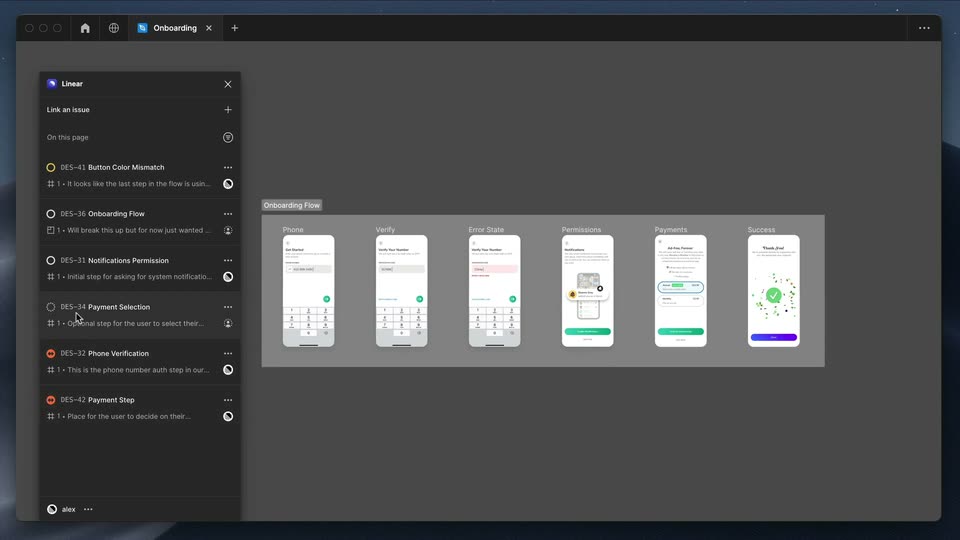
The title Linear x Figma holds centered on a dark navy radial gradient with a soft RGB-split fringe. A Figma interface then fades in behind it, showing a Linear issue list on the left and a row of mobile onboarding screens on the canvas.
On-screen text: “Linear x Figma”
Camera: Static
A dark Figma canvas shows the Linear plugin panel on the left listing linked issues, while six phone screens sit in a row on the canvas. The cursor drifts to the list and clicks an issue, zooming the view into the selected frame.
Techniques: Cursor demo, UI zoom
Camera: Static
A design tool window shows a Linear issue list on the left and two phone mockups. A cursor moves down the list and selects the Payment Selection issue, and the center mockup switches to a payment screen with a green checkmark.
Techniques: Cursor demo
Camera: Static
A dark design-tool workspace shows an issue list on the left and three phone mockups on the canvas. The cursor glides down the issue list, pausing on entries, while the center payments screen stays selected inside a blue frame.
Techniques: Cursor demo
Camera: Static
A Figma canvas shows a mobile Thank You screen with a green check and drifting confetti, while the Linear plugin panel on the left is operated by a cursor that opens status and assignee menus. The selected Done button on the canvas switches from a blue-purple to a green gradient.
Techniques: UI zoom, Cursor demo, Particles
Camera: Static
A dark Linear issue list fills the locked-off frame, grouped into In Review, In Progress and Todo sections. The cursor glides from the center to rest on the DES-41 Button Color Mismatch row.
Techniques: Cursor demo
Camera: Static
A dark issue-tracker screen sits in a browser window. A cursor glides across the page, pausing on the description, then on the right-side fields for status, SLA and assignee, before resting on the link row and its open-link icon, which pops a small tooltip.
Techniques: Cursor demo
Camera: Static
A design tool window shows a dark Linear issue list on the left and a phone mockup in the center with a Thank You success screen, a green checkmark and scattered confetti. A cursor drifts across the canvas and becomes a hand as the dimmed overlay lifts.
Techniques: Cursor demo
Camera: Static
A browser window shows a design canvas of mobile onboarding screens with a Linear panel open. The view zooms onto the error-state screen, then into the panel as a cursor types a title, picks status and assignee, selects the frame, and clicks Create issue; a toast confirms the link.
Techniques: UI zoom, Cursor demo
Camera: Push in
The view starts tight on a mobile onboarding screen inside Figma, then pulls back to reveal the full canvas with several phone frames and the open Linear plugin panel, a Linked to Linear tooltip pinned at the bottom.
Techniques: UI zoom
Camera: Static
A Figma board of mobile onboarding screens sits behind a dark Linear plugin panel. The view zooms out to reveal the full flow as a cursor hovers across the screens, and a small “Linked to Linear” tooltip appears at the bottom.
Techniques: UI zoom, Cursor demo
Camera: Pull out
A browser window shows the Linear app, its left sidebar listing design issues and a row of phone screens across the center. The interface dims to near black, and the Linear logo with the linear.app wordmark fades in at the center as a sign-off.
On-screen text: “linear.app”
Camera: Static
A white circular logo with three diagonal stripes and the URL linear.app below it sit centered on a dark navy field. The mark fades in from black, holds with a soft glow and faint color fringing, then fades out to black.
On-screen text: “linear.app”
Camera: Static