0:36
Explore
00:00:00 / 01:29:28
- Length
- 1:29
- Scenes
- 27 · 3.3 s avg
- Product on screen
- 0:00
- Features shown
- 2
- Call to action
- 1:09 · 77%
- Voiceover
- Yes
- Views
- 76K on X
as of November 18, 2026
Keystroke’s 1:29 launch film runs 27 scenes, about 3.3 s each. The product is on screen from the first frame and 2 features are revealed. The call to action lands at 1:09 (77% in), over a voiceover. The edit alternates handheld dusk parking-lot talking-head shots with tilted 3D product mockups on light gray, cutting at about 14 cuts per minute to a fast track. Signature moves are word-by-word scattered type that flips into competitor logos, prompts that type themselves letter by letter inside depth-of-field UI windows, and hard-cut meme inserts for comic punctuation.
Footage neededEstimated needs: 1 capture group — your screens or recordings · 1 official logo — reused across the film · 9 filmed passages — shoot, supply or replace · 9 3D passages — build or supply
Is this your launch? to your site or press kit.
More like this
1:08

Aravind Srinivas - We're introducing hybrid compute for all users of the Perplexity Mac
Perplexity · AI · Sep 2026
0:59

Rippling: BankingSizzle FullLength
Rippling · Jun 2026
Similar soundtrack
Films whose music sounds like this one, voice left out
3:23

Introducing GPT-6 Astra for developers
OpenAI · Modern electronic
1:42

Cursor now shows you demos, not diffs
Cursor · Electronic
3:13

Introducing Mistral OCR 4
Mistral AI · Corporate Tech / Electronic
Blake Rouse - Introducing Keystroke: an n8n alternative built for Cursor, Claude Co, scene by scene
· 27 scenes as text
01 · Product intro · 0:00–0:06
A presenter stands center in a parking lot holding a microphone, gesturing as white text fills the frame word by word in a scattered layout. The words then swap for the Cursor, Claude Code, and Codex logos placed around him.
On-screen text: “Keystroke is”, “an n8n”, “alternative”, “specifically”, “built for”, “teams”, “that”, “use coding”, “agents”, “CURSOR', 'CLAUDE CODE', 'CODEX”
Techniques: Kinetic type
Camera: Push in
02 · Product intro · 0:06–0:11
A man in a black tee stands in a dusk parking lot in front of a brick ECHO ULTRASOUND building, holding a small black USB dongle between his fingers and gesturing while talking. The handheld camera drifts slowly around him as subtitle lines swap at the bottom.
On-screen text: “instead of having to drag blocks”, “around a canvas...”, “you can just tell your coding agent”
Camera: Pull out
03 · Feature reveal · 0:11–0:16
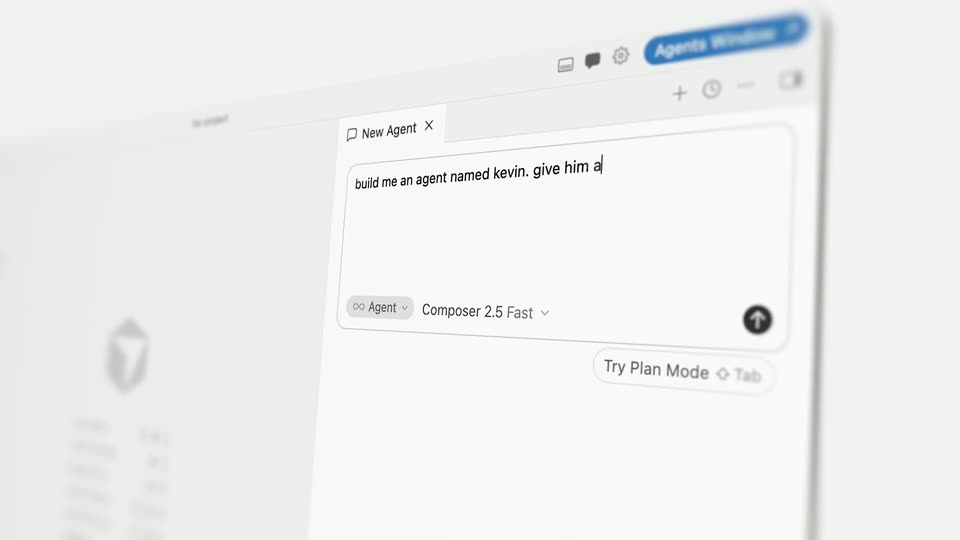
A white app window sits tilted in 3D perspective with soft depth of field, locked off. Inside a New Agent panel, a prompt types out letter by letter into the input box while a mouse pointer rests below. The model pill reads Composer 2.5 Fast.
Techniques: 3D mockup, Cursor demo
Camera: Static
04 · Feature reveal · 0:16–0:20
A tilted 3D mockup of a chat interface rests on a light background, sharp on the right and blurred on the left. A prompt types itself into the composer box as the frame holds still.
Techniques: 3D mockup, Cursor demo
Camera: Static
05 · Feature reveal · 0:20–0:23
A white agent-builder interface tilts in 3D perspective on a light gray background, its left edge blurred. A prompt types itself into the input box, then the tab flips to Agent Kevin setup and a reply with code snippets fills in below.
Techniques: 3D mockup, Kinetic type
Camera: Static
06 · Feature reveal · 0:23–0:37
A blond man in a black t-shirt stands in a dusk parking lot, holding a small black USB device and speaking to the camera. The handheld shot orbits him, panning across brick storefronts and distant mountains. White subtitle lines swap at the bottom.
On-screen text: “that's a really simple example”, “but the point is that”, “you can just describe any kind of agent”, “automation or Al system”, “keystroke gives your coding agent”, “everything it needs to build it”, “in actual type script”
Camera: Static
07 · Feature reveal · 0:37–0:42
A blond man in a black tee holds a small black wireless mic at his chest and talks as the camera orbits him in a dusk parking lot, mountains behind. White caption lines swap at the bottom center.
On-screen text: “it can actually write tests”, “and”, “run typechecks”
Camera: Pull out
08 · Feature reveal · 0:42–0:44
A tilted 3D view of an agent setup window. A prompt box holds the user's request, and below it a response types out tool calls and a setup summary. The left edge blurs with shallow depth of field.
Techniques: 3D mockup
Camera: Pull out
09 · Feature reveal · 0:44–0:44
A code editor interface tilts in 3D perspective, its left edge blurred by depth of field, showing a chat panel titled Agent Kevin setup with a typed prompt and a bulleted list of integrations.
Techniques: 3D mockup
Camera: Static
10 · Feature reveal · 0:44–0:46
A smiling man in a dark suit and orange tie stands before a black curtain as a blurred figure crosses in front of him. He then leans forward and hurls an object with a sweeping arm motion, turning his back to the camera.
Camera: Pan
11 · Demo · 0:46–0:49
A man in a black shirt and khaki shorts stands in a parking lot, gesturing with his hands. A white pickup truck is parked to his left, with a brick building and mountains in the background.
Camera: Static
12 · Demo · 0:49–0:51
The Keystroke page for the agent Kevin opens as a fanned 3D stack of interface panels that flattens into a single view, then the prompt “Hey Kevin, write me the key” is typed into the chat field.
Techniques: 3D mockup
Camera: Pan
13 · Demo · 0:51–0:52
A product UI window resolves from a brief overlapping crossfade into a clean Keystroke agent screen. The view scales up slightly on a light gray background, showing the Kevin assistant page, a question in the input field, and recent chats.
Camera: Push in
14 · Demo · 0:52–0:52
A 3D perspective of a chat interface for an agent named Kevin. The text 'Hey Kevin, when is the keystroke launch scheduled?' types out in the input field.
Techniques: 3D mockup
Camera: Push in
15 · Demo · 0:52–0:54
A tilted 3D mockup of the Keystroke app on a light background, showing a left sidebar and a workflow canvas with a Trigger node. The view pushes in slightly while a cursor moves toward the Manual/API node.
Techniques: 3D mockup, UI zoom, Cursor demo
Camera: Static
16 · Demo · 0:54–0:54
The Keystroke interface fills the frame in flat 2D, showing a left nav rail, a History list of agent runs, and a right panel with a run conversation and usage stats. A hand cursor hovers over the top row of the list. The screen holds still.
Techniques: Cursor demo
Camera: Static
17 · Demo · 0:54–0:55
A flat three-column interface fills the frame: a left navigation rail, a central History list of runs, and a right detail panel showing a conversation log and usage stats. The view stays static for the duration.
Camera: Static
18 · Feature reveal · 0:55–1:02
A man in a black t-shirt stands before a brick office building, holding a small black transmitter and gesturing as he talks. The camera slowly arcs around him, revealing the building's side and a parked white van. White captions run along the bottom, and a large headline pops in over his face.
On-screen text: “natively supports”, “over 1,000 integrations”, “but if we don't have an integration”, “that you need”, “you can just ask your coding agent”
Techniques: Kinetic type
Camera: Pan
19 · Feature reveal · 1:02–1:06
A white editor window sits tilted in 3D perspective, its left code panel out of focus. In the right tab a prompt is typed out letter by letter, then the input box collapses and a short status line fades in below.
On-screen text: “you can just ask your coding agent”
Techniques: 3D mockup
Camera: Static
20 · Feature reveal · 1:06–1:08
A 3D-tilted mockup of a code editor with an agent panel streams task steps under a user prompt, then hard-cuts to a man in a black tee holding a phone in a bright parking lot.
Techniques: 3D mockup
Camera: Static
21 · Feature reveal · 1:08–1:09
A young man in a black t-shirt stands in a parking lot, holding a small black card with a blue light and gesturing toward the camera while talking. A white caption sits at the bottom center of the locked-off frame.
On-screen text: “Attio integration with... X”, “in seconds”, “keystroke is officially in open alpha”
Camera: Pan
22 · CTA · 1:09–1:14
A blond man in a black t-shirt holds a small black device up to a handheld camera that orbits him in a parking lot. A red SUV and storefronts pass behind. A white caption sits at the bottom, then large white lines scale in across the frame.
On-screen text: “keystroke is officially in open alpha”, “get started”, “for free at”, “keystroke.ai”
Techniques: Kinetic type
Camera: Pull out
23 · CTA · 1:14–1:18
A black screen holds a centered three-line white headline reading get started for free at keystroke.ai. The top two lines pulse gently in scale while the URL line stays fixed, each letter carrying a soft gray offset shadow.
On-screen text: “get started”, “for free at”, “keystroke.ai”
Techniques: Kinetic type
Camera: Pull out
24 · CTA · 1:18–1:20
White lowercase text on a black background reads get started for free at keystroke.ai across three centered lines. The top two lines scale gently while the URL line stays fixed.
On-screen text: “get started”, “for free at”, “keystroke.ai”
Techniques: Kinetic type
Camera: Static
25 · Outro · 1:20–1:22
A black field holds the white KEYSTROKE wordmark centered and still, the sign-off card. The tagline words get started and for free at scale in around it before the shot ends.
On-screen text: “get started”, “KEYSTROKE”, “for free at”
Camera: Static
26 · Outro · 1:22–1:26
A white stylized wordmark reading KEYSTROKE sits centered on a solid black background. It holds completely still for the entire duration, serving as a static sign-off card with no motion or reveal.
On-screen text: “KEYSTROKE”
Camera: Static
27 · Outro · 1:26–1:29
A white Keystroke wordmark with an ornate calligraphic K holds centered on a black background, static for the entire shot.
On-screen text: “KEYSTROKE”
Camera: Static