0:55

OpenAI - Introducing ChatGPT Images, powered by our flagship new image generat
OpenAI · AI · Dec 2025
Jitter · Jan 2023 · 0:20 · AI-annotated
Jitter’s 0:20 launch film runs 29 scenes, about 0.7 s each. The product is on screen from the first frame. There is no explicit call to action. A 20 second brand reel that runs the same ten second montage twice, opening on the tagline, hard cutting through editor screens, type specimens, and 3D stings, and closing on the assembling wordmark. Its signature moves are elements sliding and settling into place, counters ticking up, and rapid hard cuts against flat color fields.
Is this your launch? to your site or press kit.
OpenAI · AI · Dec 2025
Supermemory · Jul 2026
A white Jitter editor screen assembles: the headline 'Motion design' shrinks and gains a blue 'made simple' line inside a selection box, while a dot pill, a lettered panel, and a bottom toolbar slide into place.
On-screen text: “Motion design”, “made simple”
Techniques: Kinetic type
Camera: Static
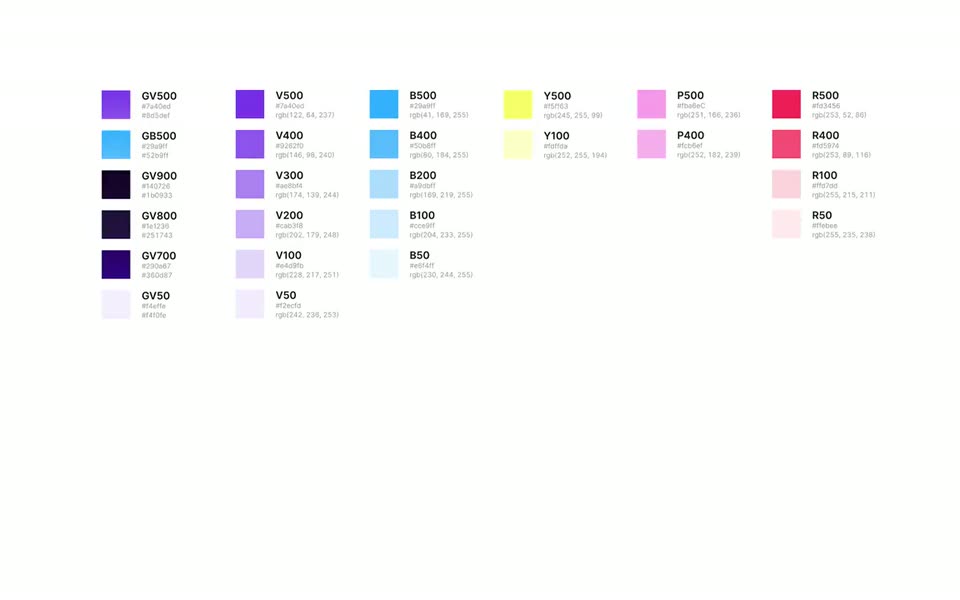
A blue rounded-square icon with three white crescent marks sits on a blue grid, then the frame cuts to a white color chart of labeled swatches with hex and RGB values. The shot is locked off and static throughout.
Camera: Static
A 3D-style avatar with purple hair and freckles holds center on a light gray field as a blue ring draws closed around it and small colored squares drift; a blue LIVE badge sits below.
On-screen text: “LIVE”
Techniques: Particles
Camera: Static
A dark software interface displays a video editing workspace. A central canvas shows a clip of two people, which scales up slightly. Side panels list scene layers and animation settings, while a bottom timeline shows the playhead moving from one to two seconds.
On-screen text: “LIVE”
Camera: Static
A dark Jitter homepage with two feature panels cuts to a bright yellow type specimen sheet showing a large black Aa and a font spec table.
Camera: Static
A flat rectangle of wavy horizontal stripes in yellow, blue, pink and purple sits centered on a dark purple field. The bands scroll vertically within the block, with a vertical seam down the middle and a stepped notch at the lower right edge.
Camera: Static
On a white background, a fanned stack of flat design template cards swaps its front sheets: a pink portrait poster is replaced by a purple gradient poster and a blue Spring Summer poster, while a grey 2022 MÚSICA poster holds on the right.
Camera: Static
A frosted glass card with a yellow-to-white gradient panel floats centered over a blue sky with clouds. Inside, the word HELLO in heavy black type animates in letter by letter, each scaling up and settling into a horizontal line.
On-screen text: “HELLO”
Techniques: Kinetic type
Camera: Static
The Jitter website interface is shown in a locked-off frame, cutting from a lavender homepage to a blue What's new page. A large HELLO scales in over the layout while a small jitter.video URL stays still.
On-screen text: “jitter.video”, “HELLO”
Techniques: Kinetic type
Camera: Static
A red rounded badge, glowing, tilts in from a 3D angle and rotates flat on a white background. Inside, three white counters for comments, likes and followers tick up to 12, 23 and 16.
Techniques: 3D mockup
Camera: Static
A dark browser window shows the Jitter hero page: the headline “Collaborate with your team” has two avatar faces in place of letters, with named collaborator cursors floating nearby. The view cuts to the timeline editor, the playhead at 01:20 and the “Hero image - Slide in” row highlighted purple.
Camera: Static
A hand holds a phone showing the Jitter pricing screen against a purple field, then the frame cuts to a black tote bag with purple straps on a black background, printed with the brand tagline.
On-screen text: “Make your mooove.”
Techniques: 3D mockup
Camera: Static
Eight purple line icons of layout and text tools sit in a grid on a lavender checkerboard. The background turns pink and a white browser window holding a Hello onboarding form with name fields and a blue Continue button appears in the center.
Camera: Static
A front-facing monitor on a stand shows a light blue export screen. A large blue percentage counts up from 98 to 99 while a thin progress ring sits at the lower right.
Techniques: 3D mockup, Kinetic type
Camera: Static
The black jitter wordmark assembles letter by letter on a white background, then the frame cuts to the editor interface, where the headline Motion design made simple scales up inside a blue selection box with toolbars around it.
On-screen text: “jitter.video”, “Motion design”, “made simple”
Techniques: Kinetic type
Camera: Static
The blue Jitter icon with white crescent marks on a blue grid cuts to a white interface showing a color palette, swatches and hex values in columns. A large two-line headline scales in.
On-screen text: “Motion design”, “made simple”
Techniques: Kinetic type
Camera: Static
A purple-haired Memoji face with freckles sits centered on a light gray background, surrounded by small multicolor confetti squares. A blue arc draws itself around the avatar, closing into a full circle above a blue LIVE badge.
Camera: Static
The Showeet editor window is centered on a dark purple background. In the canvas, a photo of two women scales down and takes on a blue selection border while the URL www.com3.com fades in across the middle.
On-screen text: “www.com3.com”
Camera: Static
A dark Jitter homepage with two feature cards cuts to a bright yellow typography specimen page. The second screen shows a large black Aa at the bottom and a small spec table listing Inter weights and sizes.
Camera: Static
Two side-by-side rectangular panels sit on a dark purple field, each filled with wavy horizontal stripes in blue, pink, purple and yellow. The stripes scroll vertically, shifting the wave pattern between the two frames.
Camera: Static
A fanned stack of colorful design cards slides across a white background. The pink playlist card tilts and exits left, revealing a blue Spring Summer card and a purple cocktail card, while a gray music card holds the right edge.
Techniques: Parallax
Camera: Static
A frosted glass card floats over a cloudy blue sky. Inside its yellow-to-white panel, the word HELLO reveals letter by letter in a staggered wave, the last O then turning into a yellow ring.
On-screen text: “HELLO”
Techniques: Kinetic type, Morph
Camera: Static
The Jitter homepage swaps its hero from a lavender screen with the dark headline “Never start from scratch again.” and a row of template cards, to a light blue screen with the blue headline “What’s new.” and an editor window mockup below.
Camera: Static
A small tilted red speech-bubble icon with white chat and heart glyphs sits centered on white, then stretches into a wide rounded bar showing three white metric groups: a chat bubble with 12, a heart with 23, and a person with 16, wrapped in a soft red glow.
Techniques: Morph
Camera: Static
A dark browser window shows the Jitter landing page, its headline with emoji faces inside the letters and three named collaborator cursors. The view then cuts to the Jitter editor, where the purple Hero image layer is selected on the timeline under a red timecode pill.
Camera: Static
A hand holds a smartphone on a purple field, its screen showing a Jitter pricing page, then the frame cuts to a black tote bag with purple straps on a black background, printed with the white tagline Make your mooove. and the Jitter wordmark.
Camera: Static
A pale checkerboard holds eight purple line icons for text, layout and time, then cuts to a pink screen with a white onboarding card titled Hello, showing name fields, two dropdowns and a blue Continue button.
Camera: Static
A black monitor on a gray stand holds a light blue export screen; a large blue percentage counts from 98 to 99 while a thin circular spinner sits at the lower right. The frame stays locked-off.
Techniques: 3D mockup
Camera: Static
On a plain white background, the black Jitter wordmark assembles with its letters sliding and settling into place, then the mark scales up to read jitter.video, centered in frame.
On-screen text: “jitter.video”
Techniques: Kinetic type
Camera: Static