1:34
Dan Roth - LLMs lie. We build models that tell the truth. Today, we're excited t
Scaled Cognition · Jun 2026
Jasmine · Nov 2026 · 0:44 · Full motion · AI-annotated
Jasmine’s 0:44 launch film runs 22 scenes, about 2.0 s each. The product shows up at 0:07 and 3 features are revealed, with social proof. The call to action lands at 0:38 (87% in). The video is built as a rapid run of locked-off typographic cards and animated data charts, each cut on a 120 bpm grid with short holds. Its signature moves are glitchy text assembly (dotted dissolves, pixel squares, scanline wipes) over a halftone dot field with drifting green and violet bands, with bright lime green reserved for the brand mark, counters and winning bars.
Is this your launch? to your site or press kit.
Scaled Cognition · Jun 2026
Films whose music sounds like this one, voice left out
A5 Labs · Electronic dance music (Eurodance/Trance style)
Buildkit · Electronic
Composio · Electronic dance music, Eurodance, Trance
On a dark halftone-dot background, a small gray monospace line appears above a large white headline reading 'Your agent writes code.' The headline then switches to 'Where does it run?', which types in with a block cursor and a dotted dissolve at its edge.
On-screen text: “agent > wrote analyze.py, 214 lines”, “Your agent writes code.”, “Where does it run?”
Techniques: Kinetic type, Masking
Camera: Static
A white bold question reads “Where does it run?” centered over a black background of green and purple halftone dot bands. A green block cursor sits after the question mark. The frame stays locked and still.
On-screen text: “Where does it run?”
Camera: Static
On a black halftone background of green and purple dot fields, the line Your laptop? un-glitches into white text as a green dashed scan line crosses it, then Production? appears below with its own dashed line.
On-screen text: “Your laptop?”, “Production?”
Techniques: Kinetic type, Masking
Camera: Static
On a dark halftone-dot background, two gray lines, Your laptop? and Production?, hold still with green scanline bars through them. The third line, A shared container?, assembles out of white pixel squares, then a green scanline settles across it.
On-screen text: “Your laptop?”, “Production?”, “A shared container?”
Techniques: Masking
Camera: Static
Three stacked lines of gray text hold on a dark halftone field washed with blurred green and purple streaks. A green dashed strikethrough line crosses each line, flickering like a glitch.
On-screen text: “Your laptop?”, “Production?”, “A shared container?”
Camera: Static
A lime-green halftone field of black dots, crossed by a pink diagonal stripe, drifts slowly across the frame. A small white shape with rounded lobes fades in at the stripe's center.
Camera: Static
A white five-petal flower icon with a green center sits above the wordmark Jasmine on a black halftone-dotted field. Blurred green and purple shapes drift behind the dots as the white text and icon fade up to full opacity.
On-screen text: “Jasmine”
Camera: Static
A white five-petal flower mark with a green center sits above the bold white wordmark “Jasmine” on black, over green and violet halftone dots. The green tagline resolves in with a pixelated left-to-right wipe.
On-screen text: “Jasmine”, “A microVM for every agent task.”
Techniques: Masking
Camera: Static
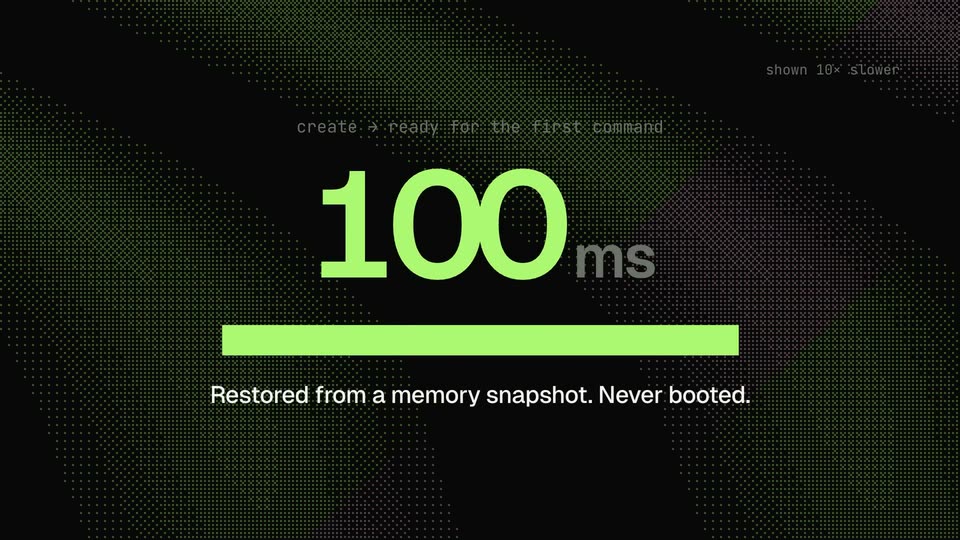
A black halftone field of green and purple dots holds a large counter that ticks from 000 to 100 ms in green as a green bar fills left to right, then a white caption fades in beneath.
On-screen text: “create → ready for the first command”, “shown 10× slower”, “100 ms”, “Restored from a memory snapshot. Never booted.”
Techniques: Kinetic type
Camera: Static
A black dotted halftone background holds a centered stat: small gray header, a large green 100 with gray ms, a green underline bar that shrinks in width, and a white caption below. The corner note reads shown 10x slower.
On-screen text: “shown 10× slower”, “create → ready for the first command”, “100”, “ms”, “Restored from a memory snapshot. Never booted.”
Camera: Static
A dark terminal window on a dotted black backdrop types Python code, the prompt completing 'sbx = Jasmine().create()' with a green 'ready in 0.10 s' note, then the window cuts to a white headline over a benchmark list where Jasmine, Docker, gVisor and Kata all read 0 ms.
On-screen text: “Same machine. Same image. Same limits.”, “fairbench · node:22-bookworm · 1 vCPU · 512 MB · Median of interleaved rounds”, “Jasmine 0 ms”, “Docker 0 ms”, “gVisor 0 ms”, “Kata 0 ms”
Techniques: Kinetic type
Camera: Static
Under a white headline, a dark halftone benchmark chart animates: a bright green bar fills for Jasmine while gray bars stretch for Docker, gVisor and Kata as ms values count up; the green metric label types create to first command, then retypes run a command with updated figures.
On-screen text: “Same machine. Same image. Same limits.”, “fairbench · node:22-bookworm · 2 vCPU / 4 GiB · median of interleaved rounds”, “create → first command”, “run a command”
Camera: Static
A white headline and gray monospace caption sit on a dark dotted grid. A green bar and three gray bars form a horizontal chart while their millisecond values tick. A gray footnote fades in at the bottom.
On-screen text: “Same machine. Same image. Same limits.”, “fairbench · node:22-bookworm · 2 vCPU / 4 GiB · median of interleaved rounds”, “run a command”, “Wins 9 of 18 metrics. Docker cold start is 9.1x slower.”
Camera: Static
A dark benchmark chart on a dotted grid shows four horizontal bars, Jasmine in bright green at 4.1 ms against Docker, gVisor and Kata in gray, under a bold white headline. The gray takeaway line at the bottom fades in over the static bars.
On-screen text: “Same machine. Same image. Same limits.”, “fairbench · node:22-bookworm · 2 vCPU / 4 GiB · median of interleaved rounds”, “run a command”, “Wins 9 of 18 metrics. Docker still wins raw CPU and disk.”
Camera: Static
A rounded sandbox card on a black dotted background pauses, its status flipping to paused under the label sbx pause(), captioned Pause between turns. It then duplicates into four running copies under start × 4, captioned Snapshot. Start copies., before fading out as a large green #1 appears.
On-screen text: “sbx pause()”, “Pause between turns.”, “start × 4”, “Snapshot. Start copies.”, “#1”
Camera: Static
A dark locked-off frame holds a large green #1 beside bold white text on 12 of 25 metrics, over a faint dotted grid. A small gray monospace caption sits below, then a pink monospace line, And we publish where we lose, fades in beneath it.
On-screen text: “#1 on 12 of 25 metrics”, “aisandboxbench's open-source harness, against 13 hosted providers · self-run”, “And we publish where we lose.”
Camera: Static
A locked-off stat card on black with a halftone dot texture and soft green and pink glows. A large green monospace #1 sits beside white bold text, a small gray monospace caption runs below, and a pink italic line closes the card. All text holds still.
On-screen text: “#1”, “on 12 of 25 metrics”, “aisandboxbench's open-source harness; against 13 hosted providers · self-run”, “And we publish where we lose.”
Camera: Static
On a black field of diagonal green and magenta dot patterns, the white line Open source. is uncovered by a sliding white square, then the green line Apache-2.0. appears below as the square drops away.
On-screen text: “Open source.”, “Apache-2.0.”
Techniques: Masking
Camera: Static
Three left-aligned lines of copy sit over a dark halftone field with blurred green and purple patches drifting slowly. The text stays locked in place for the full shot.
On-screen text: “Open source.”, “Apache-2.0.”, “Any Linux box with KVM.”
Camera: Pull out
A white five-petal flower mark with a green center sits left of the word Jasmine in white, scaling up into place. Behind it, a black field carries diagonal bands of green and purple halftone dots.
On-screen text: “Jasmine”
Techniques: Kinetic type
Camera: Static
The Jasmine flower mark and wordmark scale in and hold center on a dark halftone field of green and purple dots. A terminal box types the install command, then a small tagline fades in below.
On-screen text: “Jasmine”, “$ curl -fsSL tryjasmine.dev/install | sudo sh”, “tryjasmine.dev · open source · Apache-2.0”
Techniques: Kinetic type
Camera: Static
A white six-petal flower logo and the bold wordmark Jasmine sit centered on a black field of slowly drifting green and purple dots. A green-bordered terminal box holds the install command, with a gray URL line beneath. The lockup and text fade out at the end.
On-screen text: “Jasmine”, “$ curl -fsSL tryjasmine.dev/install | sudo sh”, “tryjasmine.dev · open source · Apache-2.0”
Camera: Static