1:01

Motion Graphics Explainer Video for AI Platform | Arvist
Arvist · Sep 2026
Composio · Nov 2026 · 1:04 · AI-annotated
Composio’s 1:04 launch film runs 24 scenes, about 2.7 s each. The product shows up at 0:11, with social proof. The call to action lands at 0:58 (92% in). The video is one continuous Claude conversation: a dark hook and problem statement, a cream interface tour that audits answers, publishes a page and tallies the AIs that now cite it, then a data-card close. Pacing is quick with locked-off frames, typewriter text, zoom punches on data, and a blue dot field that morphs between sections.
Is this your launch? to your site or press kit.
Arvist · Sep 2026
F4 · Jun 2026
JobWriter · May 2026
A dark interface displays a central input field where the query “best project management tool?” is typed out, then the field animates upward to transition into a new “Ask anything” state.
On-screen text: “01”, “best project management tool?”
Techniques: Kinetic type
Camera: Static
A dark ChatGPT chat screen, locked-off, trades short messages about project management tools. The input field types each question character by character while the thread scrolls up to reveal the next reply, ending on a black dot-grid.
Techniques: Kinetic type
Camera: Push in
White text phrases of varying sizes appear sequentially in the center of a dark dotted background, with the final phrase scaling in.
On-screen text: “Your customers”, “you are”, “not”, “in the answer.”
Techniques: Kinetic type
Camera: Static
A close-up of the Claude chat interface on a cream background. A message bubble on the right types out a line with a blinking caret, while a large white headline 'in the answer.' scales in over a dark frame at the opening.
On-screen text: “in the answer.”
Techniques: Kinetic type
Camera: Static
In a Claude chat, a user bubble asks for Taskloom in the answer, then a comparison table reveals row by row, checks filling the Linear column while Taskloom stays empty. The view zooms in, a peach band highlights Taskloom, and tallies read 4 of 5 against 0 of 5.
On-screen text: “Taskloom in AI answers”
Techniques: Masking, UI zoom
Camera: Push in
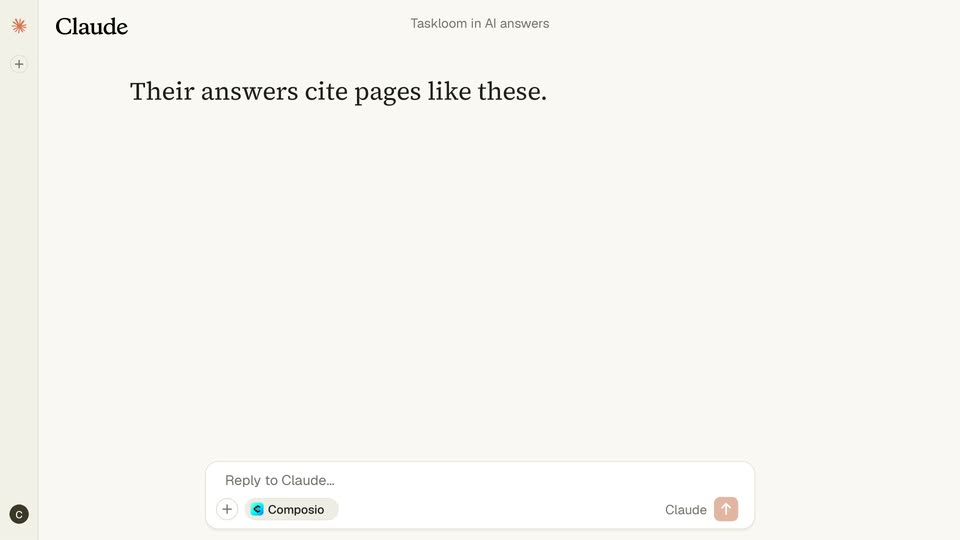
A blurred answer-comparison list in the Claude chat window dissolves as a serif headline fades in over the empty cream canvas. The reply box stays pinned at the bottom.
On-screen text: “Their answers cite pages like”
Camera: Static
A Claude chat shows a 2x2 grid of cited page cards. A blue highlight steps card to card, each leaving a red No Taskloom pill and a small blue dot burst. The frame zooms in, and Taskloom isn't on any of them. appears below, with isn't in red.
Techniques: Particles, UI zoom
Camera: Push in
A Claude chat screen shows a serif headline appearing word by word above a white card. The card holds a Google search query and a blue line chart that draws a flat-then-climbing trend, then the frame zooms to the highlighted peak point.
On-screen text: “On Google, searches are climbing.”
Techniques: Kinetic type, UI zoom
Camera: Push in
The frame starts on three stat cards and zooms out to a full Claude chat screen. A search trend chart sits on the left, a two-color summary line completes below, and a reply field appears at the bottom.
Techniques: UI zoom
Camera: Pull out
A cream Claude answer card fills the frame: a Google search bar with a rising blue line chart on the left, three stat tiles (590 searches, $36 per click, 22/100 difficulty) on the right, and a green-and-red serif caption that slides into place below.
Camera: Static
On black, the words “a page” fade in centered, then swap to “AI will cite.” with “AI” in blue. The scene cuts to the Claude interface, where the full serif headline “The fix: a page AI will cite.” sits above a browser mockup. Camera is locked off throughout.
On-screen text: “a page”, “AI will cite.”, “The fix: a page AI will cite.”
Techniques: Kinetic type
Camera: Static
A Claude chat screen shows a browser preview of an article ranking project management tools. A detail column slides in beside the list, a green Published button appears and a cursor clicks it, then the screen dissolves to black through a grid of white squares.
On-screen text: “The fix: a page AI will cite.”
Techniques: Cursor demo, Masking
Camera: Pull out
A tilted 3D browser mockup sits on a dark grid background, showing a ranked list of project management tools with Taskloom highlighted at number one. A large white serif caption, “A week later.”, fades in and rises above the window.
On-screen text: “A week later.”
Techniques: 3D mockup, Kinetic type
Camera: Static
Dark dotted backdrop with a white serif headline over a browser mockup of a tools article. A blue scan line sweeps the window as AI reader pills (ChatGPT, Claude, Perplexity, Gemini) slide across, each leaving a 'read it' tag. The scene dims; the Taskloom row glows blue.
On-screen text: “A week later.”, “Published 7 days ago”
Techniques: Light sweep, UI zoom
Camera: Static
Dark ChatGPT chat: a user bubble asks 'best project management tool?'; the reply 'Have you tried Taskloom ?' fades in, 'Taskloom' boxed in blue, as a 'THE GOAL' counter bottom-left ticks from 1 to 2 of 10 AIs.
On-screen text: “THE GOAL 1 of 10 AIs”, “THE GOAL 2 of 10 AIs”
Techniques: Kinetic type
Camera: Static
A cream chat view holds a user bubble asking what a 10-person startup should use, with the answer set in large serif type below, the word Taskloom highlighted in blue. A dark pill badge sits in the lower left.
On-screen text: “THE GOAL 2 of 10 AIs”
Camera: Static
A cream Perplexity answer view fills a plain background: the query 'Best PM software for startups', three source pills, and 'Taskloom' in a blue highlight box. A dark badge 'THE GOAL 3 of 10 AIs' sits lower left. The frame is locked off and static.
On-screen text: “THE GOAL 3 of 10 AIs”
Camera: Static
A dark Gemini chat screen shows a prompt pill and the line “1. Taskloom Best for startups.” The prompt text and its pill fade out, leaving the blue-highlighted Taskloom line. A small caption “THE GOAL 4 of 10 AIs” stays in the bottom-left corner.
On-screen text: “THE GOAL 4 of 10 AIs”
Camera: Static
A flat Google search page shows an AI Overview naming Taskloom as the top pick, then cuts to a Copilot chat where a prompt bubble asks which PM tool to pick and the reply reads Go with Taskloom. A corner counter ticks from 5 to 7 of 10 AIs.
On-screen text: “THE GOAL 5 of 10 AIs”, “THE GOAL 6 of 10 AIs”, “THE GOAL 7 of 10 AIs”
Camera: Static
On a black field, the line Use Taskloom. Ship faster. holds center, the word Taskloom boxed in blue. The Grok logo sits top-left, a chat bubble right, and a small THE GOAL 7 of 10 AIs pill bottom-left. The frame is static and locked-off.
On-screen text: “Use Taskloom. Ship faster.”, “THE GOAL 7 of 10 AIs”
Camera: Static
A mock chat screen cycles through AIs at high speed: the brand mark in the top left swaps between Meta AI, Grok and Le Chat, the prompt bubble in the top right alternates between two questions, and the answer line flips between “Try Taskloom” and “Choose Taskloom” with the brand name boxed in blue. A dark tally pill in the bottom left counts up to 10 of 10 AIs.
On-screen text: “THE GOAL 8 of 10 AIs”, “THE GOAL 10 of 10 AIs”, “THE GOAL 2 of 10 AIs”, “THE GOAL 10 of 10 AIs”
Camera: Static
Blue squares drift outward over a black dot grid as a central blue pill shrinks to a dot, then the white headline One prompt. fades in, followed by the line Checked, fixed and published. and a white pill badge reading Live data, only 13¢.
On-screen text: “One prompt.”, “Checked, fixed and published.”, “Live data — only 13¢”
Techniques: Particles
Camera: Pull out
Gray headline and subline sit over a sparse field of blue and white squares on black. The text fades out while the squares condense into dense horizontal bands and a wavy blue data line along the bottom.
On-screen text: “One prompt.”, “Checked, fixed and published.”, “Live data — only 13¢”
Techniques: Particles
Camera: Pan
A light grid background with blue dots undulating along the bottom. The Composio logo and headline “Claude for AEO & SEO” fade in, then a white URL pill and a blue CTA pill appear below; the frame holds locked off.
On-screen text: “Composio”, “Claude for AEO & SEO”, “composio.dev/instant”, “Try it today — $2 free credit”
Techniques: Particles
Camera: Static