4:21

Introducing the Codex app
OpenAI · AI · Feb 2026
IronLedger.ai · Jul 2025 · 0:46 · AI-annotated
IronLedger.ai’s 0:46 launch film runs 14 scenes, about 3.3 s each. The product is on screen from the first frame and 2 features are revealed. The call to action lands at 0:38 (83% in), over a voiceover. Clean, light product explainer built on a cream field with a faint grey line-art skyline, a blue-and-red ledger mark, and black sans-serif type. It opens with a 3D logo sting and a presenter card, states the value prop in assembling text, then tours the web app and an SMS thread in flat-to-3D mockups, and closes on a spoken call to action and a logo lockup.
Is this your launch? to your site or press kit.
OpenAI · AI · Feb 2026
Ramp · Finance · Jul 2026
DealPath · Jun 2026
Films whose music sounds like this one, voice left out
ClickUp · Upbeat electronic
Windsurf · Upbeat electronic
Cal.com · Upbeat electronic
A blue document icon with a red tab spins in 3D and glides from the lower right to the left of center, sharpening as it slows to a stop. The black wordmark then fades in beside it on a cream background.
On-screen text: “IronLedger.ai”
Techniques: Speed ramp
Camera: Static
A talking-head video of a bespectacled man in a grey jacket plays inside a vertical phone-shaped frame on the right, while the IronLedger.ai logo, tagline, and contact email sit on a white field with faint building line-art.
On-screen text: “IronLedger.ai”, “Automate your property accounting.”, “Reach out to [email protected]”
Techniques: Split screen
Camera: Static
A washed-out, near-white photo of skyscrapers seen from below fills the frame. The black headline assembles in the center: words start spread apart at mixed sizes, tighten into one line, then “faster” fades in at the end.
On-screen text: “We close your books faster”
Techniques: Kinetic type
Camera: Static
A washed-out low-angle view of skyscrapers fills the frame while a dark gray headline reads “We close your books faster”, then swaps to “And save you hundreds of hours” with its words spread wide across the screen.
On-screen text: “We close your books faster”, “And save you hundreds of hours”
Techniques: Kinetic type
Camera: Static
Black sans-serif text reads “And save you hundreds of hours” over a faded, near-white cityscape of skyscrapers. The line opens with wide letter spacing, then the words tighten and settle into a centered lockup.
On-screen text: “And save you hundreds of hours”
Techniques: Kinetic type
Camera: Static
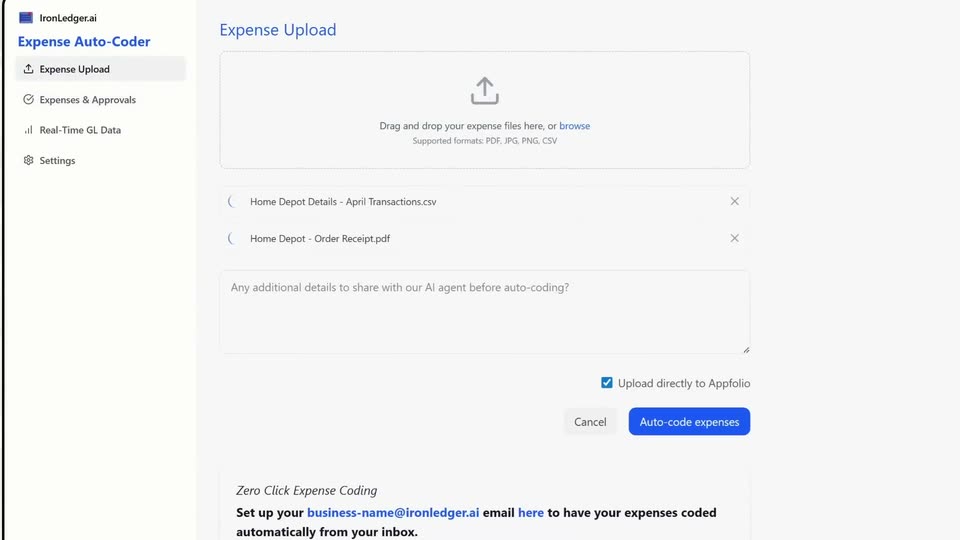
The Expense Upload interface sits in a laptop frame under a grey headline; chat and mail icons pop in at right, then the view zooms flat into the screen as two file rows load and turn to green checkmarks.
On-screen text: “And save you hundreds of hours”
Techniques: 3D mockup, UI zoom
Camera: Push in
A tablet mockup in 3D perspective shows the IronLedger expense approvals page, then the camera zooms into the interface, filling the frame with the filter bar and transaction list. A small logo badge sits at the lower right corner.
Techniques: 3D mockup, UI zoom
Camera: Push in
A light expense interface displays a transaction header, category tags, and line items. A cursor moves down the right side of the list, hovering near the item rows.
Techniques: Cursor demo
Camera: Push in
A dark Similar Items panel overlays a transaction list, listing past plumbing purchases. A cursor hovers on the info icon beside the Caulk Kwikseal line, holding the view steady.
Techniques: Cursor demo
Camera: Static
A close-up of an expense list keeps a dark Similar Items popover open over dimmed rows while the cursor hovers the info icon. The framing then pulls back to a 3D mockup of the full Expenses & Approvals screen on a white grid.
Techniques: Cursor demo, UI zoom, 3D mockup
Camera: Pull out
A front-facing phone mockup sits centered over a faded line-art city skyline, showing the ironLedger.ai mobile site with a blue hero section and two buttons. A notification banner slides in from the right at the top, previewing a text about a card purchase.
Camera: Static
A front-facing phone mockup sits centered over a faint 3D city backdrop. An SMS thread with IronLedger.ai plays out: a receipt photo drops in, the user types a property split and a maintenance note, and the bot replies with a coded expense breakdown. The chat scrolls up as bubbles appear.
Camera: Static
A man in glasses and a gray jacket speaks to camera inside a rounded video frame on the right. To the left, a blue document logo sits beside the bold title IronLedger.ai and a tagline, over a faded line drawing of buildings. A contact line anchors the bottom left.
On-screen text: “IronLedger.ai”, “Automate your property accounting.”, “Reach out to [email protected]”
Camera: Static
A small 3D ledger icon spins in from the right, motion-blurred, on a cream field, then snaps into the flat blue book mark beside the IronLedger.ai wordmark. The lockup holds centered as the sign-off.
On-screen text: “IronLedger.ai”, “Automate your property accounting.”, “Reach out to [email protected]”, “IronLedger.ai”
Techniques: Morph, 3D mockup
Camera: Static