0:52


SaaS Launch Video & Motion Design | Pulse
Pulse · Oct 2026
Intelligence · Aug 2026 · 0:27 · AI-annotated
Intelligence’s 0:27 launch film runs 38 scenes, about 0.7 s each. The product is on screen from the first frame. The call to action lands at 0:22 (82% in). A 28 second hard-cut montage of analog meters, control rooms and data readouts that builds around the typed question What's the limit? before resolving on the brand card. Signature moves are the locked-off macro dials, the white letter-spaced caption held fixed while the background swaps, and the dot-grid overlay that stitches the footage to the brand mark.
Is this your launch? to your site or press kit.
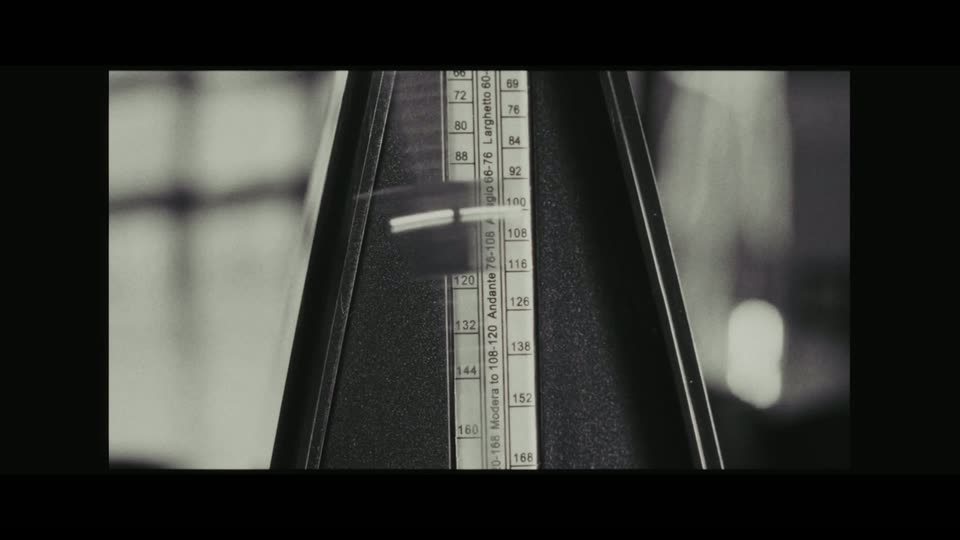
A defocused wall of small lights, graded blue to amber, holds the white brand mark and the word Intelligence centered. The shot cuts to a black-and-white close-up of a swinging metronome pendulum against its numbered tempo scale.
On-screen text: “Intelligence”
Camera: Static
Black-and-white close-up of a hand turning a rotary dial, cutting to an extreme close-up as the numbered dial rotates and the digits grow larger in frame.
Camera: Static
Black and white close-up of hands pressing a steel ruler against a drilled engine block, then a white tick-mark scale with handwritten numbers fades over the ruler, dimming the metal behind it.
On-screen text: “25|65”, “30|60”, “2°30'”, “3”
Techniques: Morph
Camera: Static
Extreme close-ups cut rapidly: a vintage radio tuning dial with frequency scale and station names, a white mechanical counter reading 250 over 3, then a black panel studded with round white dots. The frames blur and overlap as the sequence flashes by.
Camera: Static
A swirling gray smoke texture fills the frame, then clears to reveal a black-and-white close-up of a tape deck control panel. Five rectangular buttons sit in a row under printed labels, the frame locked and still.
Camera: Static
A locked-off, grainy close-up of a vintage VU tuning meter. The thin needle rests near the right end of the curved arc scale, framed by black letterbox bars above and below the dial.
Camera: Static
A tight close-up of a curved modulation meter with a resting needle cuts to a black-and-white rectangular meter showing segmented blocks and numbers.
Camera: Static
Grainy black-and-white archival footage cuts from a computer room, where two operators work a UNIVAC console beside a wall of tape drives, to a tight close-up of a bespectacled man in headphones speaking into a microphone. The shot is static and the pace is slow.
On-screen text: “10520245”
Camera: Pan
Close-up of a vintage analog radio receiver with a Cyrillic frequency dial. A hand enters from the right and turns the lower tuning knob. The frame stays locked off and static.
Camera: Static
A black-and-white grid chart of white numbers holds on a locked-off frame, then cuts to a tight close-up of a mixing console as a hand slides a fader across the channel strips.
Camera: Static
A locked-off close-up shows a dark audio spectrum screen with a frequency scale and a Processing Focus slider, a cursor resting at the bottom, then a hard cut to a round lens on a grid overlaid with terminal text.
Camera: Static
A grayscale iris shape with a vertical slit overlays a square grid and faint body text. The grid and a terminal file listing fade in to the front as the dark slit fades out.
Camera: Static
A black and white close-up shows a hand gripping a metal toggle switch on a brushed panel, flipping it up from off to on. The engraved labels POWER, ON and OFF sit beside the switch as the thumb pushes the lever.
Camera: Static
On a dark field, tilted white bars form a stepped wave, then the view shifts to a grayscale mixing console with knobs and a waveform, and finally a 3D multi-channel mixer recedes into perspective.
Techniques: 3D mockup
Camera: Static
A grainy black and white shot of a man in a shirt and tie, with a frequency response curve and axis labels overlaid across his face. The curve and its numbers dissolve out, leaving the man in plain view.
Camera: Static
Grainy black-and-white archival footage holds a tight close-up on a bearded man, his face framed by a second person's profile at left and a draped flag at right. Film scratches and flicker run across the frame as the shot stays steady.
Camera: Static
Black and white archival footage, letterboxed with black bars. A man in a white shirt and headset leans forward on a table, hands clasped, gazing off to the right. Blurred figures and dark equipment fill the control-room background.
Camera: Static
A grayscale axial brain MRI scan fills a pale screen. The scan gives way to a monospaced prompt line that types and scales into place, locking off on the question.
On-screen text: “->What's the”
Techniques: Kinetic type
Camera: Static
A grainy archival control room fills the frame, rows of consoles with small monitors and men in white shirts at work, a large plotted graph on the back wall. The camera stays locked off. Large text 'What's the' scales in over the footage.
On-screen text: “What's the”
Techniques: Kinetic type
Camera: Static
An operator in a white shirt sits at a control console, seen from behind, pressing a grid of lit buttons. The shot cuts to a macro of his finger on a single button. Vintage film grain and warm color grade.
Camera: Static
A close-up of a grid of crew nameplates in muted green and orange fills the frame. A faint glint flickers across the middle row, brightening one plate and dimming the next.
Techniques: Light sweep
Camera: Static
Close-up of a metal counter panel with red glowing digits. The seconds digits flip from 59 to 00 while the minutes hold at 00. Printed labels read MINUTES and SECONDS above a row of black knobs and the words MANUAL ADVANCE and IDENTIFICATION DATA. The frame stays static.
Camera: Static
A macro close-up of a dark grid of numbered circular pads, each holding a small red dot. A thin crosshair and grid overlay mark the center, then the view reframes tighter and softer, holding on the repeating pattern.
Camera: Static
A close-up of a bespectacled man in a light shirt looks upward, then the shot cuts to a control room where seated staff in white shirts clap, smoke and watch a glowing monitor.
Camera: Static
Archival footage of men in headsets, seen in profile, cuts to a green and yellow wireframe grid curving in 3D perspective on black, with a column of coordinate readouts stacked on the right.
Camera: Static
A dark screen lists green monospace coordinate readouts beside horizontal plot lines. The view zooms into an LED dot-matrix panel showing the Y and Z values in glowing green digits.
Techniques: UI zoom
Camera: Static
A tight close-up of a dot-matrix readout holds the figure 2167.5 in pixel dots. The frame inverts from a bright white field to a dark one, the dots shifting to green and white, with a thin red vertical line at the left edge.
Camera: Static
A dark close-up of a bespectacled man with a mustache clapping cuts to a wide shot of a seated audience applauding and smiling in a brightly lit room.
Camera: Static
Grainy letterboxed archival footage of a rocket launch. A crowd of people stands on a dry field, one raises both arms, a film camera sits on a tripod at left, and a pale smoke column climbs into a washed-out sky.
Camera: Static
A defocused curved highlight racks into sharp focus on a green-tinted analog meter dial, the needle resting at zero, held in tight close-up with purple edge fringing.
Camera: Static
Rapid cuts: glitch static flashes to six glowing white dots with red and blue fringes on black, then to a macro view of a dark circuit board with gold traces and small components.
Camera: Static
A dark drone hovering over trees dissolves into the app's interface: a map with green markers on the left and a grid of landscape video clips on the right. The white headline text stays left while a second word appears center.
On-screen text: “WHAT'S”, “THE”
Techniques: Kinetic type
Camera: Static
A dim workshop shot with a crouching figure and a cursor on a wire cuts to aerial solar panels, then a hand reaching up. A white letter-spaced caption 'WHAT'S THE' stays locked in the lower center throughout.
On-screen text: “WHAT'S THE”
Camera: Static
A dark, blurred background cuts from a tilted tablet showing colorful graphics to an aerial map marked with green route lines. The white line WHAT'S THE LIMIT? stays fixed across the center of the frame.
On-screen text: “WHAT'S”, “THE”, “LIMIT?”
Camera: Static
A pale statue stands in a dark server room, then the frame cuts to a macro of a blue-glowing processor. The white caption WHAT'S THE LIMIT? stays fixed across both shots.
On-screen text: “WHAT'S THE LIMIT?”
Camera: Static
White letter-spaced caps reading WHAT'S THE LIMIT? hold centered over a field of teal binary digits, then the background cuts to Earth's curved horizon with a low sun flare.
On-screen text: “WHAT'S THE LIMIT?”
Camera: Static
Black screen, locked-off frame. Centered white text INTELLIGENCE.AI with wide letter spacing holds static. A smaller line, CREATORS OF with a small white emblem and Design Arena, fades in beneath it.
On-screen text: “INTELLIGENCE.AI”, “CREATORS OF Design Arena”
Camera: Static
A centered white four-petal logo and the serif word Intelligence sit over a blurred, darkened outdoor scene of trees and sky, all under a fine dot-grid overlay. The frame is locked off and static.
On-screen text: “Intelligence”
Camera: Static