1:33


Kimi.ai - Meet Kimi K3.1 Pro, our most capable 3T-class model.
Moonshot AI · Oct 2026
Insta360’s 2:16 launch film runs 99 scenes, about 1.4 s each. The product is on screen from the first frame and 18 features are revealed. The call to action lands at 2:06 (93% in), over a voiceover. The video is built as a rapid feature reel: each feature opens on a bold centered title card (black text on white, or white on black) with orange accent words, then cuts to a 3D product render and a live-action demo, all synced to a 115 bpm rap track at roughly 25 cuts per minute. Style is defined by the hard alternation of dark cinematic renders and clean white studio shots, 3D type that scales and slides into place, orange glow accents, green tracking brackets over faces, and split-screen Hand
Is this your launch? to your site or press kit.
Films whose music sounds like this one, voice left out
Versine · Lo-fi, EDM, Trap, Post-punk
H.I.M · Electronic Dance Music (EDM), Punjabi Pop, Hardstyle
Samsung · Cinematic electronic pop
A dark 3D render of a camera rig with two mounts is shown from a first-person perspective. The Insta360 logo is centered in the frame.
On-screen text: “Insta360”
Techniques: 3D mockup
Camera: Static
A dark 3D render of a camera gimbal with coiled springs and metal mounts fills the frame. The camera pushes through the assembly with heavy motion blur while the white Insta360 wordmark stays fixed in the center.
On-screen text: “Insta360”
Techniques: 3D mockup
Camera: Static
A black camera lens assembly renders in 3D, the view rotating from a spring-loaded mechanism to a front lens with a red dot and white ring. The white Insta360 wordmark holds centered over the moving device.
On-screen text: “Insta360”
Techniques: 3D mockup
Camera: Pull out
A black puck-shaped device with a perforated top grille and an M emblem sharpens from a dark blur, as white text Your everyday slides in above it. The frame then crossfades to a front view of a circular camera lens with the Insta360 logo centered.
On-screen text: “Your everyday”, “* Creative expression only, does not refer to actual product.”, “Insta360”
Techniques: Kinetic type, 3D mockup
Camera: Static
A black 3D motor stator with glowing copper windings spins against a black background, its translucent housing fading in. Large orange block letters slide in from the left and right edges, partially framing the rotor.
On-screen text: “*Creative expression only, does not refer to actual product.”
Techniques: 3D mockup, Kinetic type
Camera: Pull out
A 3D light bulb with an exposed copper filament stands before large orange AI letters on black. The bulb rotates and blurs, its internal coils fading into a smooth gray shell while the letters soften out of focus.
On-screen text: “AI”, “* Creative expression only, does not refer to actual product.”
Techniques: 3D mockup
Camera: Pull out
A matte 3D render of a handheld microphone-like tool with a ribbed collar and embossed logo turns slowly on a black background. The centered white label 'filming tool' holds, then swaps to 'Flow' as the model rotates to a new angle.
On-screen text: “filming tool”, “Flow”
Techniques: 3D mockup
Camera: Push in
The word Flow in white bold sans sits centered on a black background, held static for the full clip.
On-screen text: “Flow”
Camera: Static
The white word “Flow” holds centered on a black field while a gray “22” slides in from the right edge, soft and blurred with motion.
On-screen text: “Flow”, “22”
Techniques: Kinetic type
Camera: Static
An orange 'Flow 2' title on white, the 2 sliding in with motion blur, cuts to a black studio where two hands plug a smartphone into a white drone controller.
On-screen text: “Flow 2”
Techniques: Kinetic type
Camera: Static
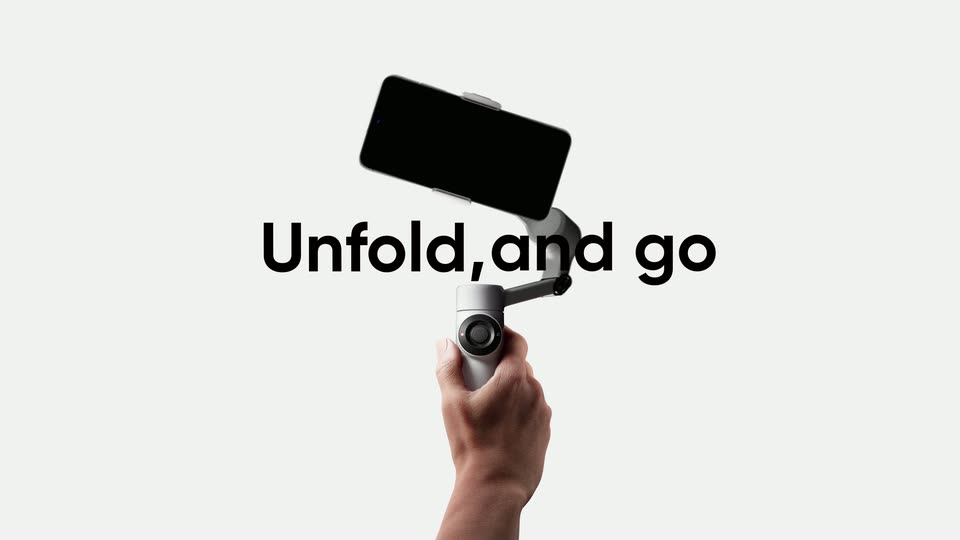
Two hands unfold a gray handheld gimbal from a folded bar into an upright rig with a phone mounted on top, against a plain light background. The black centered headline sits behind the device the whole time.
On-screen text: “Unfold, and go”
Camera: Static
A hand grips a phone gimbal on a white background, the phone screen playing a dancer. The black headline sits centered over the device. The camera zooms in on the gimbal, scaling the device and cropping the headline to the lower edge.
On-screen text: “Unfold,and go”
Camera: Push in
A woman in a yellow top and white pants dances on a lawn, waving a white flag, while a man in a black shirt crouches beside her, filming her with a phone on a gimbal.
Camera: Static
A woman in a yellow top and white crop top dances in a sunlit courtyard, a red building and white slatted fence behind her. The low-angle handheld camera tilts and follows her arm and head movements.
Camera: Pan
A white smartphone gimbal holding an iPhone spins in 3D against a pale gray backdrop, orange glow arrows circling each joint. The caption “Super smooth shots” slides in behind it and locks off, the word “smooth” in orange.
On-screen text: “Super smooth shots”
Techniques: 3D mockup
Camera: Static
A white handheld gimbal holding a smartphone tilts and pans against a plain light backdrop. The phone screen plays a video of a cyclist on a path, the gimbal tracking the rider to keep them centered.
Techniques: 3D mockup
Camera: Static
A 3D phone mockup on a textured surface plays a cyclist clip, then the view opens to a split screen: a blurry handheld shot on the left, the steady Insta360 Flow 2 shot on the right, with two pill labels sliding in at the bottom.
On-screen text: “Insta360 Flow 2”, “Handheld”
Techniques: 3D mockup, Split screen
Camera: Pan
A split screen compares two takes of a kid riding a BMX bike around a dirt pump track. The left half is shaky handheld footage, the right half smooth stabilized footage. Black and orange pill badges labeled Handheld and Insta360 Flow 2 slide in at the bottom.
On-screen text: “Handheld”, “Insta360 Flow 2”
Techniques: Split screen
Camera: Pan
A white NFC pad on a gimbal arm is shown in 3D as a hand brings a phone to tap it. The phone's home screen lights up and the product title slides in at the bottom.
On-screen text: “Insta360 Flow 2”, “Handheld”
Techniques: 3D mockup, Kinetic type
Camera: Pull out
A hand holds a landscape phone before a white gimbal arm. The screen cuts from a video call to a recorded clip as the white 3D words just tap scale up and rotate from transparent to solid diagonally across the top.
On-screen text: “just tap”
Techniques: Kinetic type, 3D mockup
Camera: Static
A hand holds a landscape phone clamped to a white gimbal on a plain white background. The screen shows a camera app framing a woman on a street. White 3D text just tap scales across the phone and disappears.
On-screen text: “just tap”
Techniques: Kinetic type, 3D mockup
Camera: Static
White bold text reading “and shoot instantly” sits centered on a near-black background, framed by two green corner brackets like a camera viewfinder. The frame is locked and the text stays still.
On-screen text: “and shoot instantly”
Camera: Static
White text with green corner brackets fades out, revealing a 3D mockup of a phone on a gimbal. The phone screen shows a camera interface with a woman walking on a street.
On-screen text: “and shoot instantly”
Techniques: 3D mockup
Camera: Static
A white articulated hand holds a smartphone in landscape against a blurred street. The screen shows a camera app framing a woman walking past an orange bus. The phone rotates gently from a tilt to level.
Techniques: 3D mockup
Camera: Push in
A white selfie stick with a phone clipped to the top is framed end-on on a light gray background. Built-in and selfie stick slide in on either side of the pole and lock into place as thin orange lines radiate outward.
On-screen text: “Built-in”, “selfie stick”
Techniques: 3D mockup, Kinetic type
Camera: Static
A 3D selfie stick holds a phone whose screen plays a family video, seen from a low angle. The words Built-in selfie stick flank the pole on the ground plane as the camera pushes forward, the letters growing larger while orange rays streak out behind the phone.
On-screen text: “Built-in selfie stick”
Techniques: 3D mockup, Parallax
Camera: Static
Three friends hold a wide selfie outdoors, grinning and raising peace signs toward the lens. A curved road and a red train sit in the sunny background. Handheld framing shakes slightly as they lean in.
Camera: Static
A white 3D tripod stands on a plain surface as the camera moves down toward the ground, causing the black text 'All-metal tripod' to scale up rapidly.
On-screen text: “All-metal”, “tripod”
Techniques: Kinetic type, 3D mockup
Camera: Push in
The camera tilts up along a white handheld device, moving from its splayed chrome tripod legs to a small screen at the top. Bold black text 'All-metal tripod' lies flat on the white ground plane, shrinking in perspective as the device rises.
On-screen text: “All-metal”, “tripod”
Techniques: 3D mockup
Camera: Static
A white phone gimbal stands on a railing post by a river, a bridge and city skyline blurred behind it. The caption fades in across the lower third, the second word sharpening from a soft blur.
On-screen text: “Hands-free anywhere”
Techniques: Kinetic type
Camera: Pull out
A phone on a gimbal stabilizer stands on a riverside railing, its screen showing a recording view of a bridge and skyline. The shot pushes in on the phone screen while the caption “Hands-free anywhere” holds centered.
On-screen text: “Hands-free anywhere”
Techniques: UI zoom
Camera: Static
A wide view of a city skyline across a river, a suspension bridge spanning the left side. The camera drifts slowly over the rippling water as sunlight glints off the towers under a pale blue sky.
Camera: Pan
Centered on a black background, the small word “AI-powered” scales up as radial beams of purple and orange light burst outward from behind it.
On-screen text: “AI-powered”
Techniques: Kinetic type, Light sweep
Camera: Static
A purple radial burst snaps into black as the word AI-powered scales up beside a glowing four-point star. The type settles left of center with a soft red and purple echo behind it.
On-screen text: “AI-powered”
Techniques: Kinetic type
Camera: Static
A white title card holds the product name centered, with the word Track in orange inside orange viewfinder corner brackets and a small purple sparkle. The brackets flash a deeper orange for a beat, then settle back to a lighter tone on the locked-off frame.
On-screen text: “AI-powered”, “Deep Track 4.0”
Camera: Static
A white smartphone gimbal hovers half-faded above the title Deep Track 4.0, the word Track framed by red corner brackets. The title gives way to Tap once as a hand closes around the handle.
On-screen text: “Deep Track 4.0”, “Tap once”
Techniques: Kinetic type
Camera: Push in
A hand grips a white phone gimbal against a plain light background, the index finger pressing a button on the handle as the words Tap and once sit either side of the finger, sliding and scaling in sync with the press.
On-screen text: “Tap once”
Techniques: Kinetic type
Camera: Push in
A silver phone mounted on a white robotic arm projects a blue scan cone across a plain light backdrop. The caption reads to start tracking as its final letters fill in orange one by one.
On-screen text: “Tap”, “once”, “to start tracking”
Techniques: Kinetic type, 3D mockup
Camera: Static
A woman in a yellow dress tilts her head back in a sunlit field as a hand holds a phone on a gimbal, its screen showing her live view. Green face-tracking brackets frame her head and a green X icon slides in at the top left.
Camera: Pull out
A woman in a yellow dress walks between trees and turns to face the camera as green corner brackets track her face and a green close button hovers above her head.
Camera: Pull out
A hand holds a phone on a white gimbal in a field; the screen shows a person walking with a dog, and a finger taps the screen as a tracking box locks on. The caption switches from “Near or far” to “stay locked in”.
On-screen text: “Near or far”, “stay locked in”
Techniques: Kinetic type, UI zoom, Cursor demo
Camera: Push in
A phone on a handheld gimbal films two people running on grass; a finger taps the orange record button, turning it red. The shot then cuts to a full-screen camera interface where a green tracking box follows the runners.
On-screen text: “stay locked in”
Camera: Pan
Three runners sprint left to right on a sunlit grassy hill, a soccer ball rolling ahead. A translucent app UI overlays the shot: a green bounding box tracks the runner in the yellow jacket, a vertical speed column marks 5x in yellow, and a red record button with a 00:00 timer sit at the edges.
Camera: Pan
Three people run across a sunlit grassy slope with a soccer ball, filmed in live action. An editing overlay tracks the child's head with a green box, a right-side speed selector highlights 5x, a red stop button sits beside it, and an orange timer counts up at the bottom.
Camera: Pan
Three women stand in front of a gray and blue wall. The woman in the yellow top lifts her hand and draws a shape in the air, a glowing orange line tracing her fingers. The white title Gesture control holds at the top of the frame.
On-screen text: “Gesture control”
Camera: Static
A white smartphone on a gimbal stands on asphalt in the foreground, its screen mirroring five women dancing on a sunlit street behind it. A green corner-bracket tracking frame scales in around the dancers, an X icon scales in at its top-right, and the caption slides across the top.
On-screen text: “to start Multi-Person Tracking”, “X”
Techniques: 3D mockup
Camera: Static
Four women dance in sync on a street in front of a pastel storefront. White tracking boxes lock onto each dancer inside a larger frame with green corner markers and an X icon, while the caption slides in.
On-screen text: “to start Multi-Person Tracking”
Techniques: Kinetic type
Camera: Pan
A hand holds a horizontal phone gimbal; the screen shows a woman walking toward the camera with Tokyo Tower behind, and a finger taps the display as the green tracking grid jumps to a new square. The white headline 'Pro Framing Grid' scales in above the device.
On-screen text: “Pro Framing Grid”
Techniques: Kinetic type
Camera: Push in
A phone held in a hand shows the camera viewfinder with a framing grid and a green tracking box on a woman. The phone frame drops away to reveal the same scene full screen as the headline changes.
On-screen text: “Pro Framing Grid”, “Track with perfect composition”
Techniques: Kinetic type, UI zoom
Camera: Push in
A woman in a striped sweater and jeans walks toward the camera along a park path, arms out, with Tokyo Tower and a temple roof behind her. A green tracking box frames her head. White headline text holds over the blue sky.
On-screen text: “Track with”, “perfect composition”
Camera: Push in
A black circular camera with the Insta360 wordmark on its top face hovers at center on a white field, tilting slightly, while large orange italic words Mic and Air fade in on either side of it.
On-screen text: “Mic”, “Air”
Techniques: 3D mockup, Kinetic type
Camera: Static
A black round lens cap bearing the Insta360 logo sits centered on white, flanked by orange words. A hand rises from below and lifts the cap between two fingers, holding it up to the camera.
On-screen text: “Mic”, “Air”
Techniques: Kinetic type
Camera: Static
Close-up of a person's chest in a white shirt and apron. A hand taps a small black circular mic clipped to the fabric. A red timer badge and the caption 'Record with a tap' fade in.
On-screen text: “00:01”, “Record with a tap”
Camera: Static
A chef in a yellow apron holds a pastry and gestures in a bright kitchen, filmed by a phone on a white gimbal at the counter. The caption “Pro-level audio” scales in below the phone, then a top-down cut shows the rig on a wooden board on grass.
On-screen text: “Pro-level audio”
Techniques: Kinetic type
Camera: Pan
A white phone stabilizer on a tripod holds a smartphone in a grassy park. The phone swings from a tilted angle to a level horizontal frame, its screen showing the camera view of the trees. A blurred group of people sits on the grass in the background.
Camera: Pull out
A diagonal split screen shows two views of the same park. Left, a hand holds a phone in landscape with its camera app open, a finger tapping the screen. Right, a white phone gimbal on a small tripod films the couple on the grass, its head panning to follow them.
Techniques: Split screen
Camera: Static
A blurred family sits on camping chairs in a park while a white gimbal with a phone stands on a box in front. An orange dotted beam links the phone to a member holding a phone, and the headline “No photographer needed” scales with “No” flashing orange.
On-screen text: “No photographer needed”
Techniques: 3D mockup, Kinetic type
Camera: Static
A family of five sits on a park lawn taking a group selfie with a phone, a tent and picnic table behind them. The white headline scales in over the shot, then the frame zooms out into a rounded-corner card on a white background.
On-screen text: “No photographer needed”, “Captures your family”, “in one shot”
Techniques: Kinetic type
Camera: Pull out
Close-up of a white drone against a gray wall. A finger presses the button on its side and the drone tilts and rotates in a barrel roll. The caption One-tap barrel roll appears centered over the device.
On-screen text: “One-tap barrel roll”
Techniques: Kinetic type
Camera: Static
A hand holds a white phone gimbal in the left foreground as a woman in a white dress and pink top turns and walks through a curved metal corridor. The caption One-tap barrel roll appears centered and scales up over the scene.
On-screen text: “One-tap barrel roll”
Techniques: Kinetic type
Camera: Pull out
A woman in a pink top and white overalls poses in a curved metal corridor, shot on a fisheye lens. The frame rolls and tilts around her body, then levels out as she raises a hand. The caption One-tap barrel roll scales up over the action.
On-screen text: “One-tap barrel roll”
Techniques: Kinetic type
Camera: Pull out
A hand holds a landscape smartphone, its camera viewfinder framing a woman in a white dress before a temple by water. Behind, a blurred woman and ornate blue architecture fill the frame. The screen shows a grid, focus brackets and a red record button.
Camera: Static
A hand holds a phone on a gimbal in the foreground, orbiting a woman in pale blue and green traditional dress who turns by a lake. A white Naga statue and temple sit across the water, the phone screen mirroring her. Static text labels sit on the frame.
On-screen text: “Dolly Zoom”, “Slow Motion”
Camera: Pull out
A woman in a pale blue Thai dress spreads a flowing white cloth, then turns her back to face a white temple and serpent statue across a lake. The words Dolly and Zoom hold across the frame. A green light burst wipes into a 3D tunnel of glowing rays.
On-screen text: “Dolly”, “Zoom”
Techniques: Kinetic type, Morph
Camera: Static
A translucent 3D device with a glowing green battery inside floats centered on white, easing into place as the headline 10-hour battery life slides in from the sides.
On-screen text: “10-hour”, “battery life”
Techniques: Kinetic type, 3D mockup
Camera: Pull out
A phone clipped to a white folded drone shows a green charging ring with a lightning bolt and 100% Charged, a cable linking it to the body. The camera pulls back to reveal the full drone as the caption Emergency power bank fades in at lower left.
On-screen text: “Emergency power bank”
Techniques: 3D mockup
Camera: Pull out
A white camera body with a triangular cutout rotates into view against a black background. The lighting rises from darkness, and a green glint sits in the round lens on the right as the camera orbits the device.
Techniques: 3D mockup, Light sweep
Camera: Pull out
A white six-axis robotic arm rotates in 3D on a black background, turning to reveal its joints and a small camera lens on the wrist. The label AI Tracker slides in beneath the arm.
On-screen text: “AI Tracker”
Techniques: 3D mockup
Camera: Pull out
A white robotic arm holds a smartphone in 3D perspective against a dark background. The phone screen shows a woman recording a video with a city skyline behind her. The arm's spotlight shifts from warm orange to cool blue as the caption with built-in spotlight appears around it.
On-screen text: “with built-in”, “spotlight”
Techniques: Kinetic type, 3D mockup
Camera: Static
A landscape phone in 3D perspective shows a woman in a video call against a night city skyline. A white robotic arm below it raises a spotlight that brightens, washing light over the screen. The phrase with built-in spotlight sits beneath the phone, the words settling into focus.
On-screen text: “with built-in”, “spotlight”
Techniques: 3D mockup, Kinetic type, Light sweep
Camera: Push in
Colorful app icons for Zoom, Facebook, WhatsApp, Instagram, YouTube, TikTok, and others float on a white background and grow as the view zooms. A 3D robot arm holding a smartphone rises from the bottom edge into the center, passing in front of the headline.
On-screen text: “Track in any phone, any app”, “*Apps shown are compatible with Insta360 AI Tracker but do not imply any partnership or affiliation with Insta360.”, “*UI for reference only.”
Techniques: Kinetic type, 3D mockup
Camera: Push in
A white robotic tracker arm holds a phone showing a video call with a man in an orange shirt, while Meet, Zoom, LINE, Snapchat and WhatsApp icons float around it. The arm rotates to reveal the phone's back, and the bold black title “Video calls” scales in below the phone.
On-screen text: “Video calls”, “Apps shown are compatible with Insta360 AI Tracker but do not imply any partnership or affiliation with Insta360.”, “UI for reference only.”
Techniques: 3D mockup
Camera: Push in
A white robotic arm holds a smartphone in 3D perspective on a plain white background. The phone screen shows a live stream of a rock climber, and app icons for X, Facebook, Instagram, YouTube and Twitch float around it. The headline Live streaming sits below the device.
On-screen text: “Live streaming”, “*Apps shown are compatible with Insta360 AI Tracker but do not imply any partnership or affiliation with Insta360. *UI for reference only.”
Techniques: 3D mockup
Camera: Static
A white robotic arm holds a smartphone that rotates between portrait and landscape, its screen playing a live tracking feed of a person then a dog with green markers. App icons for Meet, Zoom and Instagram float around the device above the caption “And so much more”.
On-screen text: “And so much more”, “Apps shown are compatible with Insta360 AI Tracker but do not imply any partnership or affiliation with Insta360. *For reference only.”
Techniques: 3D mockup
Camera: Static
A phone on a gray robotic tracker arm sits center frame on a blurred outdoor basketball court, its screen showing a live hoop game. White 'Hoop Mode' text holds below the phone while green viewfinder brackets and a close button draw on around the scene.
On-screen text: “Hoop Mode”, “Apps shown are compatible with Insta360 AI Tracker but do not imply any partnership or affiliation with Insta360.”
Techniques: 3D mockup
Camera: Static
Outdoor basketball footage plays under a camera HUD with score chips, a first-half tag and a timer. A large white headline sits mid-frame, then the clip shrinks into a white rounded frame as the edges dim, and a ball arcs into the hoop with a glowing trail.
On-screen text: “Hoop Mode”
Techniques: Masking
Camera: Pull out
A live basketball clip plays inside a white rounded frame with a home/guest scoreboard, a first-half tag and a 01:27 timer. A green detection box outlines the hoop. The caption Auto saves highlights. sits centered in white.
On-screen text: “Auto saves highlights.”
Camera: Static
A gradient “AI” mark with two four-pointed stars morphs into the wordmark “Alediting” on a white field, a soft radial glow blooming behind the letters.
On-screen text: “AI”, “Alediting”
Techniques: Morph, Kinetic type
Camera: Static
A dark purple gradient backdrop holds the headline “AI editing” in a purple gradient, sliding in at the top. Below, a filmstrip of rounded video clips slides in from the left over a white audio waveform, like an editing timeline.
On-screen text: “AI editing”
Techniques: Kinetic type, Masking
Camera: Pull out
A dark background features the text “AI editing” above a row of five glowing video thumbnails and a waveform timeline.
On-screen text: “AI editing”
Techniques: Kinetic type, Light sweep
Camera: Static
A dark purple backdrop holds the headline above scattered video thumbnails. The clips slide into a tidy horizontal row of five, each paired with a pulsing audio waveform bar beneath, while the title scales up and recenters.
On-screen text: “AI editing”
Techniques: Kinetic type
Camera: Push in
A white smartphone gimbal sits centered on a plain white backdrop, unfolding from a folded grip into a fully extended arm holding a phone. Feature labels in pink and orange float around it on both sides, sliding into place as the device deploys.
On-screen text: “Multi-Person Tracking”, “Dolly Zoom”, “Built-in Tripod”, “One-Step Deploy”, “Magnetic Design”, “Barrel Roll”, “AI Editing Suite”, “Apple Watch Remote Control”, “SmartWheel”, “3-Axis Stabilization”
Techniques: 3D mockup
Camera: Pull out
A white handheld gimbal with a mounted phone floats in the center of a plain white background. A large black headline sits behind the device, with the phone screen showing a video of a person.
On-screen text: “Your all-in-one tool”
Techniques: 3D mockup
Camera: Static
A white phone gimbal stabilizer spins and flips in 3D on a plain white background, the phone swinging from front to back. The black headline sits behind the device and scales down as it rotates.
On-screen text: “Your all-in-one tool”
Techniques: 3D mockup
Camera: Pull out
A woman in a yellow-and-white crop top and white shorts holds a white drone in one hand and a silver phone with a round mount in the other. She lowers both items to her hips, tucking them down at her sides.
Camera: Static
A low-angle shot looks up at a person in a dark blue jacket and denim, holding a white device in an outstretched hand against an overcast sky. The hand and device shift slightly as the person tilts their head upward. Tree tops frame the bottom edge.
Camera: Static
A person at a camp table holds a small white cylindrical device and lowers it into a black pouch on their lap. A metal tray with tongs, a knife and a rosemary sprig rests in the foreground; a black pot sits on a folding table behind.
Camera: Static
Inside a striped bag, a hand lowers a black camera toward the lens while a face peers over the rim against a bright sky. The device grows until its dark silhouette fills the frame.
Camera: Static
A white robotic arm holds a black-screen tablet with a small white action camera clipped to a bracket below it, set against a plain light gray backdrop. The shot fades in from dark, and the arm rotates slightly as the camera reframes.
Techniques: 3D mockup
Camera: Pull out
A white handheld gimbal holds a phone with a dark screen and a dangling earbud in close-up on a pale background. The view widens to a lock-off as the phone screen shows a clip of people and gray headline text appears at left.
On-screen text: “Insta360 Flow 2”, “All-in-one.”, “All day long.”, “$109.99”, “Standard Bundle”
Techniques: 3D mockup
Camera: Static
Two white gimbals in 3D render stand on the right, one holding a phone vertically, the other holding a phone horizontally that plays a family video. The left phone rotates from landscape to portrait early on. Left-aligned text lists the name, tagline, and price.
On-screen text: “Insta360 Flow 2”, “All-in-one.”, “All day long.”, “$109⁹⁹”, “Standard Bundle”, “*Price shown represents Standard Bundle. Accessories may be offered in different bundles or sold separately.”
Techniques: 3D mockup
Camera: Static
White end-card: the black tagline “Think bold.” sits centered, then the black Insta360 wordmark fades in above it while the tagline drops into place beneath, holding the lockup to the end.
On-screen text: “Think bold.”, “Insta360”
Camera: Static
A woman in an orange dress poses among trees while a hand holds a camera on a selfie stick, a green face-tracking frame over her head. White SUBSCRIBE and LEARN MORE labels with play arrows sit on the right over the darkened footage.
On-screen text: “Think bold.”, “Insta360”, “SUBSCRIBE”, “LEARN MORE”
Camera: Pull out
A dimmed live-action shot of a woman in a yellow dress walking through a grassy field between tree trunks, turning from back view to face the camera. Green and yellow focus brackets hover around her head. White SUBSCRIBE and LEARN MORE labels with play arrows stay locked on the right.
On-screen text: “SUBSCRIBE”, “LEARN MORE”
Camera: Static
A woman in a gray romper with pink straps stands in a curved concrete tunnel, shot through a rolling, tilted lens that keeps the frame blurred and spinning. Two white labels with arrow markers hold still on the right side.
On-screen text: “SUBSCRIBE”, “LEARN MORE”
Camera: Static
A woman holds a phone sideways, filming a dancer in white against a waterfront, the whole shot softly blurred. Two white labels with arrow icons sit on the right, SUBSCRIBE above and LEARN MORE below, both static.
On-screen text: “SUBSCRIBE”, “LEARN MORE”
Camera: Static
A dimmed live-action clip shows a person on a selfie stick filming a woman in a pale dress by a lake, a crocodile sculpture behind her. Two white labels with play arrows, SUBSCRIBE and LEARN MORE, hold static on the right.
On-screen text: “SUBSCRIBE”, “LEARN MORE”
Camera: Static
A dimmed, blurred live shot of a woman in a pale dress standing by a lake with a temple behind her. Two white text links, SUBSCRIBE and LEARN MORE, each with a play icon, sit fixed on the right side of the frame.
On-screen text: “SUBSCRIBE”, “LEARN MORE”
Camera: Push in
A black frame holds two white labels, SUBSCRIBE and LEARN MORE, each followed by a small play triangle, stacked on the right side. The text stays perfectly still throughout the shot.
On-screen text: “SUBSCRIBE”, “LEARN MORE”
Camera: Static