1:13

LottieFiles - Day 1 is in motion: Lottie AI is live. 🚀 Describe an animation. Get
LottieFiles · Nov 2026
HyperFrames · Oct 2026 · 0:59 · AI-annotated
HyperFrames’s 0:59 launch film runs 28 scenes, about 2.1 s each. The product shows up at 0:51 and 5 features are revealed. The call to action lands at 0:54 (92% in). Built as one continuous prompt-to-finish workflow on a near-black field, with the pink mascot as the through-line and a blurred rainbow streak bookending the open and close. Each capability is a short 4-to-8 second beat driven by chat bubbles, UI screen recordings and flat vector props (phone, piano), cut at a steady ~92 bpm with motion-blur spins and zooms as the signature transitions.
Is this your launch? to your site or press kit.
LottieFiles · Nov 2026
Google · AI · May 2026
BigMotion.ai · Apr 2026
A dark prompt input card floats over a blurred rainbow light streak. The card slowly scales up as the placeholder copy is replaced by typed text, “We are launching a new project.,” with a blinking caret.
Techniques: UI zoom, Cursor demo
Camera: Static
A dark chat input bar on a black background with blurred rainbow light streaks. A prompt types out character by character, then the frame zooms out to reveal the full rounded input card, and a mouse cursor appears at the right.
Techniques: Kinetic type, UI zoom, Cursor demo
Camera: Static
A dark prompt field on a black background with a blurred iridescent ring holds a launch prompt; a white cursor taps the send button and the field morphs into a light pill, the text reflowing to two lines.
Techniques: Cursor demo, Morph
Camera: Static
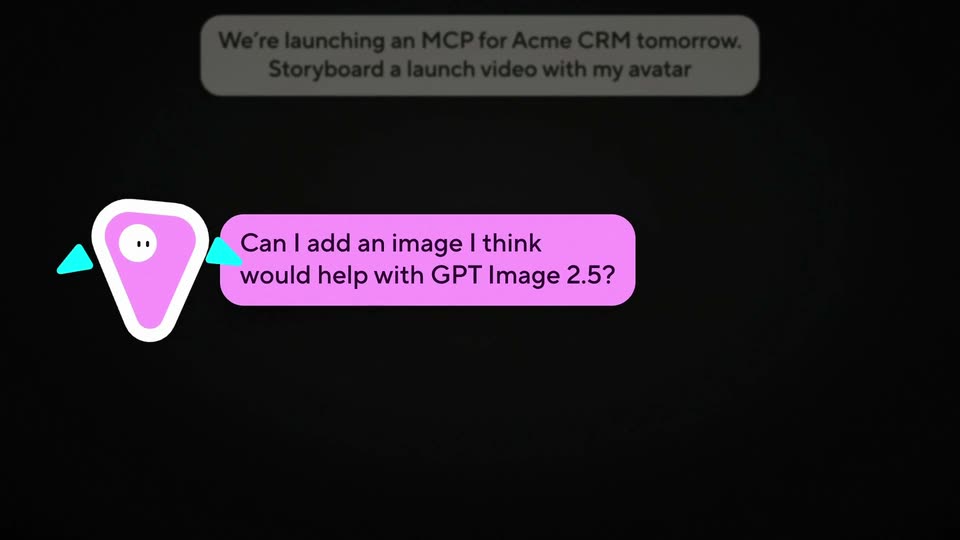
On a black field a pink triangular mascot with round glasses and a magnifying glass bounces beneath a white chat bubble. It shrinks to a plain face at left as a pink reply bubble slides in, then a small white 'go ahead' bubble pops in at right.
On-screen text: “We're launching an MCP for Acme CRM tomorrow. Storyboard a launch video with my avatar”, “Can I add an image I think would help with GPT Image 2.5?”, “go ahead”
Camera: Pan
On a black chat view, pink and white message bubbles slide in from the top and right. A pink rounded-triangle mascot with a pause icon pops to center above a white Generate button, then spins with motion blur as the button swaps to a GPT Image 2.5 chip.
Camera: Static
A sunset cityscape image card with a GPT Image 2.5 label and a white Generate button sit on black. A pink pin-shaped mascot with a white face and cyan triangles blurs upward across the top of the card.
Camera: Static
A 3D grid of six cards tilts in perspective, then levels to flat as the cards fill with a man at a mic, a skyline, dashboards, and a landing page. A pink teardrop mascot bounces across the grid while a Generate button pops in over the top card and vanishes.
Techniques: 3D mockup
Camera: Static
A two-by-three grid of product screenshots sits on a black field: a video call, a skyline tagged GPT Image 2.5, an analytics dashboard, a grid of white tiles, a dark table, and a blue Acme MCP card. The grid blurs and pulls back as a dark interface with rows of text fades in behind it.
Techniques: Split screen
Camera: Static
A dark storyboard interface fills the frame, its center panel listing acts and a grid of scene thumbnails. A cursor appears and hovers over the top-right city-skyline thumbnail.
Techniques: Cursor demo
Camera: Static
A dark editor UI shows a sunset city skyline in its central video preview. A comment box with a green border and a white arrow cursor overlay the footage, and the layout holds still for the second.
Camera: Push in
A close-up of a comment field over a city skyline clip types out a request, a green numbered badge pops in, then the view zooms out to the full editor where a cursor drags the timeline playhead.
Techniques: UI zoom, Cursor demo
Camera: Pull out
A screen recording of a video editor shows a dark CRM app in the central preview. A cursor moves across the preview, a comment popup pops up then closes, and the cursor drags the timeline scrubber forward.
Techniques: Cursor demo
Camera: Push in
A blurred CRM deals table fills the background as a centered comment box with a green outline types out the text in its field. A left panel shows partial transcript lines, and the box carries a 00:11 time tag plus Cancel and Comment buttons.
Techniques: Cursor demo
Camera: Push in
A comment box floats over a dark CRM dashboard. The typed question sits in a green-outlined field with a blinking caret, then the field shrinks and the Comment button flips to a white pill with a green check. A deal table and a watched-deals list stay in the background.
Camera: Static
A flat pink-and-white cone icon with a magnifying glass and two cyan triangles holds on the left of a black frame; three white note bubbles blur in on the right, then a purple 'on it' bubble scales in.
On-screen text: “2 notes on frames 2 and 5”, ““can this be a grassy hill? more aesthetic””, ““can we see a real rep using it?””, “on it”
Camera: Static
On a black background, a pink rounded-triangle badge with cyan side tabs spins in 3D as three white note bubbles and a pink reply pill drift upward. A green rotary-dial phone icon rises into view below, all with motion blur.
On-screen text: “2 notes on frames 2 and 5”, “can this be a grassy hill? more aesthetic”, “can we see a real rep using it?”, “on it”
Techniques: 3D mockup, Parallax
Camera: Static
A flat vector illustration on black shows a green retro phone with a pink triangular handset. The handset lifts off the base, the coiled cord stretches, then it settles to the left while the dial turns pink and a cyan play triangle shifts right.
Camera: Push in
A mint-green cartoon rotary phone on black spins its dial, a blue pointer jumping between labeled nodes. A dark Calling badge in the top right swaps names as white light streaks shoot right, and the phone tilts into 3D at the end.
On-screen text: “Calling HeyGen Avatar”, “Calling HeyGen Video 1”, “Calling Nano Banana 2”, “Calling MiniMax H3 Max”, “Calling Seedance 2.5”
Techniques: Light sweep
Camera: Pan
Light trails pull the camera through a glowing node graph on black; five model labels scale into a row under a pink mascot, then video thumbnails pop in beneath each. The thumbnails converge toward the center and the graph morphs into the editor screen with preview, timeline and file list.
On-screen text: “Seedance 2.5”, “MiniMax H3 Max”, “Nano Banana 2”, “HeyGen Video 1”, “HeyGen Avatar”
Techniques: Parallax, Kinetic type, Particles, Morph
Camera: Pull out
A dark video editor interface fills the frame: a preview window shows a grassy hill with the title Acme MCP, a chat panel sits left, a file list right, and a labeled timeline runs along the bottom. A white cursor drifts over the playback controls as the timecode counts down.
On-screen text: “HeyGen Avatar”
Techniques: Cursor demo
Camera: Push in
A rounded video-player card on black plays a clip that cuts from a green hill to a brick town square as its progress bar fills. The white serif title fades out, and a grey caption pill with a line of text appears below the card.
On-screen text: “Acme MCP”, “oh we need some fun background music”
Camera: Static
A street scene with brick buildings and parked cars sits in a rounded frame on a black background. The view zooms in on a corner building with a green awning while a progress bar fills along the frame's bottom edge. A white caption bubble below reads the line.
On-screen text: “oh we need some fun background music”
Techniques: UI zoom
Camera: Push in
A pink rounded-triangle character with a dot face and cyan triangle limbs sits beside a white upright piano on black. The scene starts dim and blurred, then snaps into focus as a purple bubble with “cool” pops in top left.
On-screen text: “oh we need some fun background music”, “cool”
Camera: Pan
Flat illustration on black: a white upright piano with cyan triangles bouncing on its keys while white notes float up, beside a pink triangle device and two pill labels. At 3s it cuts to the app timeline, a pink music track under video clips, with a prompt bar at the bottom.
On-screen text: “cool”, “Lyria 3 Pro”
Camera: Pan
A video-editor timeline fills the frame as a teal-and-pink scissors cuts left to right, trailed by a pink blob mascot. The view tracks the cut, then pushes in and blurs as the mascot scales to fill the screen. A white bubble at the bottom carries the user's request.
On-screen text: “faster please, cut the gaps between my sentences”
Techniques: UI zoom
Camera: Pull out
A pink rounded-triangle mascot with a white ring and two black dots sits centered, flanked by two cyan triangles. It flattens into a wide bar, then blurs and stretches vertically as it fades, over a dark field with horizontal rainbow glitch bands.
Techniques: Morph
Camera: Static
The HyperFrames wordmark and green play-button mark sit centered on a black field with a blurred rainbow gradient. A pink rounded triangle bearing a pause icon pops in at the top right, then bounces around the wordmark, while cyan triangles and a pink U shape fade out.
On-screen text: “HyperFrames”
Techniques: Morph
Camera: Static
On black with blurred rainbow streaks, the HyperFrames wordmark types in a green box, then Studio pops in green and the box drops. A pink blob mascot slides right, and a Create assets chip pops in below, ringed by small model tags that vanish.
On-screen text: “HyperFrames Studio”, “# Create assets”
Techniques: Kinetic type
Camera: Static