
1:09
Explore
00:00:00 / 00:42:23
- Length
- 0:42
- Scenes
- 10 · 4.3 s avg
- Product on screen
- 0:00
- Call to action
- 0:31 · 73%
- Voiceover
- Yes
- Views
- 631K on X
as of November 14, 2026
HeyGen’s 0:42 launch film runs 10 scenes, about 4.3 s each. The product is on screen from the first frame. The call to action lands at 0:31 (73% in), over a voiceover. The video names the product in the first second, then follows one presenter through four use case thumbnails before the frame expands into the HyperFrames editor, and it closes with a typed CLI command and a developer end card. Signature moves are line-by-line headline builds that blur out, pop-in rounded thumbnails, and the live action frame being revealed as a clip inside the dark editor UI.
Footage neededEstimated needs: 2 capture groups — your screens or recordings · 5 filmed passages — shoot, supply or replace
Is this your launch? to your site or press kit.
More like this


HeyGen - Cinematic_avatar api is live keep your likeness, add cinematic range, scene by scene
· 10 scenes as text
01 · Product intro · 0:00–0:06
A woman in a cream blazer talks to camera in a bright home as large text blocks pop in beside her: green 'API' under 'CINEMATIC AVATAR', 'IS NOW AVAILABLE', then 'AND IT WORKS WITH ANY AI CODING AGENT.' with five agent icons. The background shifts from living room to kitchen.
On-screen text: “CINEMATIC AVATAR”, “API”, “Cinematic Avatar API”, “IS NOW AVAILABLE”, “is now available”, “AND IT WORKS WITH ANY AI CODING AGENT.”, “and it works with any”, “AI coding agent.”, “Here's how we used it”
Techniques: Kinetic type
Camera: Pan
02 · Demo · 0:06–0:08
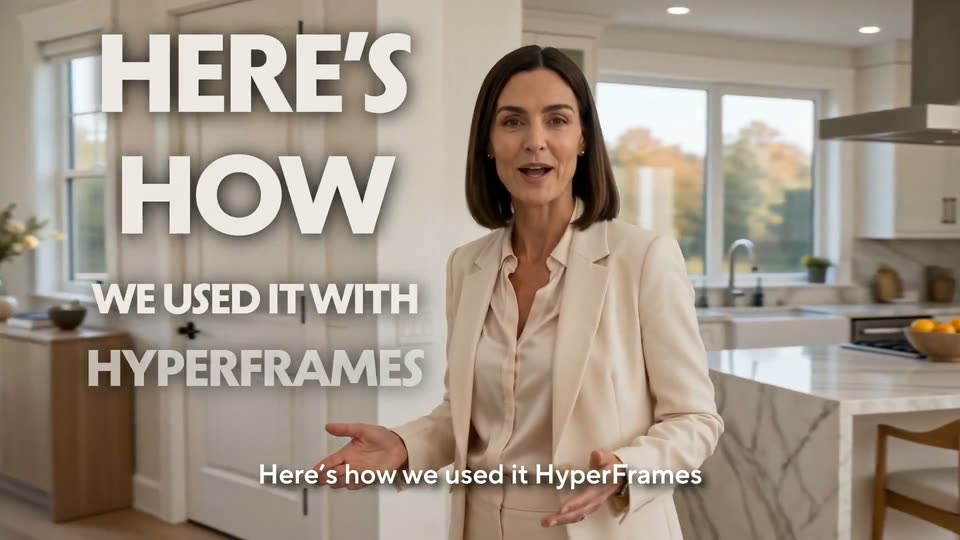
A woman in a cream blazer talks to camera in a bright kitchen while the camera slowly arcs around her. A large white headline builds line by line on the left, then blurs out as she continues, with white captions running along the bottom.
On-screen text: “HERE'S”, “HOW”, “WE USED IT WITH”, “HYPERFRAMES”, “Here's how we used it HyperFrames”, “to create content for”
Techniques: Kinetic type
Camera: Static
03 · Demo · 0:08–0:15
A woman in a cream blazer stands in a bright dining room, speaking to camera. Rounded video thumbnails pop in around her in sequence, labeled FINANCIAL REPORTS, HEALTH AND WELLNESS, EDUCATIONAL VIDEOS, HOME TOURS, with matching captions below. The home tour thumbnail expands to fill the frame.
On-screen text: “Financial reports”, “FINANCIAL REPORTS”, “Health an wellness”, “HEALTH AND WELLNESS”, “Educational videos”, “EDUCATIONAL VIDEOS”, “and even home tours”, “HOME TOURS”
Techniques: Split screen, Morph
Camera: Push in
04 · Demo · 0:15–0:16
A woman in an olive blazer walks through a sunlit modern home, talking to camera, as the camera tracks her past the living room and kitchen. A small white caption sits at the bottom of the frame.
On-screen text: “Located in the Hollywood hills”
Camera: Pan
05 · Demo · 0:16–0:20
A woman in a green blazer presents a sunlit luxury kitchen. Gold outline serif text “1490 BEVERLY CREST” holds left, white subtitles roll below, a spec list fades in right, then the frame is revealed as a clip in a dark video editor with side panels and a timeline.
On-screen text: “1490 BEVERLY CREST”, “Located in the Hollywood hills”, “this luxurious home”, “features 6 bedroom”, “6 BEDROOMS”, “8 BATHROOMS”, “2 ACRES”, “2-CAR GARAGE”, “6,000 SQ FT”, “2018 YEAR BUILT”
Camera: Pull out
06 · Demo · 0:20–0:31
The HyperFrames editor fills the screen: project list left, presenter preview center, timeline below. Captions swap in phrase by phrase under the preview while data panels animate over her, then a blue cursor glides to the Export button and the frame blurs out.
On-screen text: “Whever you build”, “you can now create”, “Cinematic A Roll”, “Motion Graphics”, “and run your entire”, “editing pipeline locally”, “All in one place.”
Techniques: Kinetic type, Cursor demo
Camera: Push in
07 · CTA · 0:31–0:36
Black headline “HeyGen Cinematic Avatar API is live” on an off-white background scales up from center, then cuts to the single line “Try via the HeyGen CLI”. A soft blue-purple gradient blur rests along the bottom edge.
On-screen text: “HeyGen Cinematic Avatar API is live”, “Try via the HeyGen CLI”
Techniques: Kinetic type
Camera: Static
08 · CTA · 0:36–0:39
A dark macOS terminal window floats on a black background crossed by thin green light beams. The prompt types the command 'heygen video create...' letter by letter behind a blinking block caret, while the window eases and tilts slightly.
Techniques: Cursor demo
Camera: Static
09 · Outro · 0:39–0:42
On a plain off-white background, the bold black title 'HeyGen for Developers' sits centered with a green gradient play mark to its right. The word 'Developers' scales in while a soft blue-purple gradient blur rests along the bottom edge.
On-screen text: “HeyGen for”, “Developers”
Techniques: Kinetic type
Camera: Static
10 · Outro · 0:42–0:42
A white field holds the small line “HeyGen for” locked in place while the larger word “Developers” scales up beneath it, building the headline.
On-screen text: “HeyGen for”, “Developers”
Techniques: Kinetic type
Camera: Static