1:51
Explore
SpaceX Super Intelligence - Grok Imagine Video 1.5 is here Our new image-to-video model with sha
Grok · Jun 2026 · 0:36 · AI-annotated
- Length
- 0:36
- Scenes
- 13 · 2.8 s avg
- Product on screen
- 0:00
- Features shown
- 3
- Call to action
- 0:27 · 75%
- Voiceover
- Yes
00:00:00 / 00:36:03
Grok’s 0:36 launch film runs 13 scenes, about 2.8 s each. The product is on screen from the first frame and 3 features are revealed. The call to action lands at 0:27 (75% in), over a voiceover. The video opens on a mosaic of generated clips that zooms into one shot, then presents each feature as a drifting grid of video tiles on black, announced by a sliding caption, and closes on a static wordmark card. Pacing is steady at roughly 112 bpm: slow tile drifts and reflows, captions sliding in from the edges, and a zoom from the mosaic to a single clip as the signature moves.
Footage neededEstimated needs: 3 capture groups — your screens or recordings · 1 official logo — reused across the film · 7 filmed passages — shoot, supply or replace
Is this your launch? to your site or press kit.
More like this

1:14


Perplexity - We are excited to launch the next version of Introducing login, threa
Perplexity · AI · Apr 2023
0:14

SpaceX Super Intelligence - Grok Imagine Video 1.5 is here Our new image-to-video model with sha, scene by scene
· 13 scenes as text
01 · Product intro · 0:00–0:03
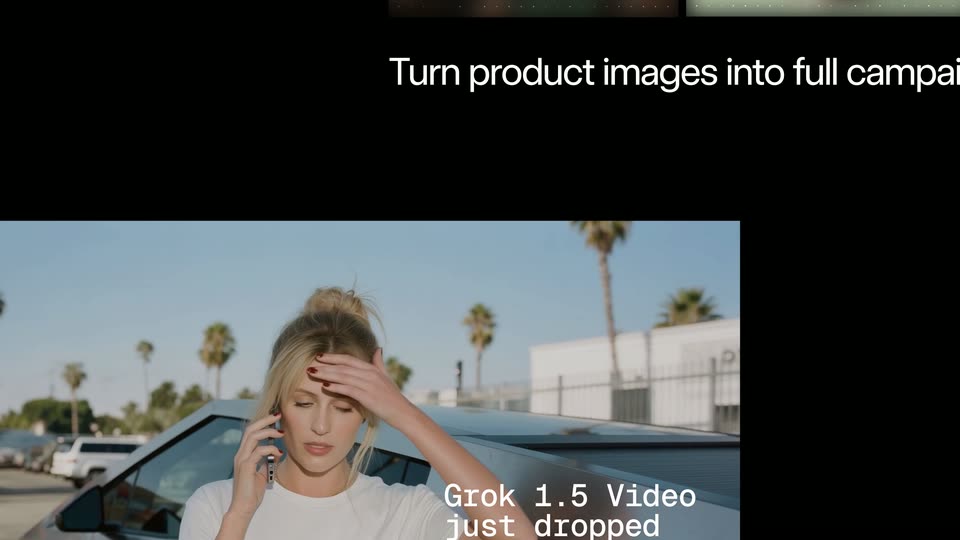
A mosaic of small clips on black; the center clip, a woman on the phone beside a silver car, zooms to full frame. White monospace captions appear on the right: “You gotta see this” scales in, then “Grok 1.5 Video just dropped” slides in.
On-screen text: “You gotta”, “see this”, “Grok 1.5 Video”, “just dropped”
Techniques: Split screen, Kinetic type
Camera: Push in
02 · Feature reveal · 0:03–0:04
A live-action clip of a blonde woman on a phone in a sunny parking lot shrinks into a small window at the bottom of a black frame, while a white monospace headline slides in above it.
On-screen text: “Grok 1.5 Video just dropped”, “Turn product images into full campaign”
Camera: Pan
03 · Feature reveal · 0:04–0:06
A 3x2 grid of generated campaign photos for a coffee brand sharpens in from a blurred, dotted state on black, while a live video tile at the bottom left slides out. The white headline sits below the grid and the whole composition fades to dark at the end.
On-screen text: “Turn product images into full campaigns”
Camera: Pan
04 · Feature reveal · 0:06–0:07
A 2x3 grid of coffee campaign images (mason jars, cookies, a bag, two women) fills the frame on black. A white caption slides left along the bottom as a white panel enters from the right edge, revealing new text.
On-screen text: “Turn product images into full campaigns”, “Higher quality at almost twice the speed (now ~25s, at 720p)”
Techniques: Kinetic type
Camera: Pan
05 · Feature reveal · 0:07–0:08
A six-image coffee campaign montage scrolls left, revealing a white studio where a woman in a black jacket and tan pants walks across. A bottom caption slides out as a right caption slides in.
On-screen text: “product images into full campaigns”, “Higher quality at almost twice the speed (now ~25s, at 720p)”
Techniques: Masking, Split screen
Camera: Pan
06 · Feature reveal · 0:08–0:11
A masonry grid of generated video clips on a black background: coffee product shots with cats on the left, fashion models in black hoodies on a white studio set in the center and right. The panels scroll and reflow as a white caption slides in at the top right.
On-screen text: “of full campaigns”, “Higher quality at almost twice the speed (now ~25s, at 720p)”
Camera: Pan
07 · Feature reveal · 0:11–0:15
A grid of video clips on a black background shows models in black hoodies posing and laughing in a studio. The panels drift slowly across the frame while a caption slides in below the center clip.
On-screen text: “Improved realistic behavior & motion”
Techniques: Split screen
Camera: Pan
08 · Feature reveal · 0:15–0:16
A black field holds a grid of video clips showing models in black hoodies sitting, standing and smiling. The tiles drift at different speeds and directions while the white caption slides in at center left.
On-screen text: “Improved realistic behavior & motion”
Techniques: Parallax
Camera: Pan
09 · Feature reveal · 0:16–0:17
A mosaic of video clips on black shows people in hoodies and a skateboarder rolling down a street, while a white headline slides in at the bottom left and a prompt card with body text slides in from the right.
On-screen text: “Improved realistic behavior & motion”
Techniques: Split screen
Camera: Pan
10 · Feature reveal · 0:17–0:27
A grid of video panels on black surrounds a center clip of a suited, sunglasses-wearing man skating down a San Francisco street, with a dark Prompt card of white text to the right. Outer panels drift at a different speed than the center as the skater grinds a rail.
On-screen text: “Prompt”, “He's yelling, excited, about how the new Grok Imagine 1.5 video model allows for natural speech and can help both business owners and creators make anything the”, “grok.com/imagine. He yells with excitement as he”
Techniques: Split screen, Parallax
Camera: Push in
11 · CTA · 0:27–0:31
A black screen holds the centered white line “Try it now on grok.com/imagine”, then cuts to the centered “Grok Imagine” wordmark, with “Grok” in bold and “Imagine” in a light weight.
On-screen text: “Try it now on grok.com/imagine”, “Grok Imagine”
Camera: Static
12 · Outro · 0:31–0:35
A locked-off black frame centers the white wordmark, with 'Grok' in bold and 'Imagine' in a regular weight. A small white caption line reads 'Try it now on grok.com/imagine'. The composition stays static for the full duration.
On-screen text: “Grok Imagine”, “Try it now on grok.com/imagine”
Camera: Static
13 · Outro · 0:35–0:36
The white text Grok Imagine sits centered on a solid black background. The shot is a static, locked-off frame with no movement.
On-screen text: “Grok Imagine”
Camera: Static