3:45


EcoVadis Ratings Solution Overview - About Page
Ecovadis · Nov 2020
Grep AI · 2:05 · AI-annotated
Grep AI’s 2:05 launch film runs 28 scenes, about 4.5 s each. The product is on screen from the first frame and 6 features are revealed. The call to action lands at 1:56 (93% in), over a voiceover. The video opens with a host and a product title card, then moves through a problem beat and a stage by stage workflow demo, each stage announced by a bold headline and shown in flat UI mockups, before a results grid and a closing call to action. Its style is a cream blueprint aesthetic with a recurring purple asterisk, scramble type reveals, and a square grid that fills to show progress.
Is this your launch? to your site or press kit.
Ecovadis · Nov 2020
Userlens · Nov 2026
A bald man in black glasses and a dark jacket speaks to camera, centered before a white line-art map, a potted plant and a vertical light bar. Large white words type in over his chest, synced to his speech, with a purple asterisk.
On-screen text: “Grep AI presents”, “GREP.AI”, “SWARMS”, “SWARMS / FOR YOUR BIGGEST BOTTLENECK”, “GREP.AI / LAUNCH NOTES”, “IF YOU'RE NOT*”, “ACCELERATING YOUR BUSINESS *”, “WITH AI AGENTS,*”, “YOU'RE GOING TO GET BEATEN BY SOMEONE ELSE THAT IS.*”
Techniques: Kinetic type
Camera: Static
A bald man in thick black glasses and a dark shirt talks to camera against a wall with a white line-drawn city map, a plant at left and a vertical light bar at right. A bold white caption types out across his chest, word by word, ending with a purple asterisk sparkle that trails the text.
On-screen text: “Grep AI presents”, “SWARMS / FOR YOUR BIGGEST BOTTLENECK”, “GREP AI / LAUNCH NOTES”, “BY SOMEONE ELSE THAT IS.”, “SO HOW DO YOU CATCH UP?*”
Techniques: Kinetic type
Camera: Static
A bald man with glasses talks to camera in a room with a plant and a line-drawn map wall. Bold white captions swap over his chest: “TODAY,*” then a horizontal-line wipe reveals “A HEAD START” with a purple asterisk. A top-left bug and a bottom bar stay locked off.
On-screen text: “Grep AI presents”, “SWARMS / FOR YOUR BIGGEST BOTTLENECK”, “GREP AI / LAUNCH NOTES”, “TODAY,*”, “A HEAD START”
Techniques: Kinetic type, Masking
Camera: Static
A blueprint-style diagram on cream grid paper: concentric circles and crosshairs shrink away, leaving two purple asterisks at center, with a corner title block reading 'SWARMS / GREP AI'. Static headlines 'A HEAD START' and 'AGENT SWARMS*' sit over the locked-off frame.
On-screen text: “A HEAD START”, “AGENT SWARMS*”
Techniques: Morph
Camera: Static
On a cream blueprint grid, a bold title scrambles through random glyphs at center, then a purple asterisk scales up. A numbered spiral diagram draws in with a top header line, then the title reappears at the top above a small asterisk.
On-screen text: “AGENT SWARMS*”, “SWARMS / GREP AI”, “DWG 01 · 312 LEADS”, “5 AGENTS · 1 SWARM”
Techniques: Kinetic type
Camera: Push in
A cream screen with a top bar and a large black headline that completes to 'AGENTS THAT WORK TOGETHER.' beside a purple asterisk. Below, purple lines draw outward from a center hub to eight agent cards, and small green squares travel along the lines.
On-screen text: “SWARMS / GREP AI”, “HOW A SWARM WORKS”, “AGENTS THAT WORK TOGETHER.”
Techniques: Kinetic type, Particles
Camera: Pull out
A bold black headline scrambles in over a two-panel diagram. Left, eight agent nodes link to a hub, then fade to a purple asterisk; right, a funnel of beige squares passes one dark square at a time as a backlog counter climbs from 90 to 312.
On-screen text: “SWARMS / GREP AI”, “HOW A SWARM WORKS”, “YOUR BIGGEST BOTTLENECK.”, “BACKLOG: 90 WAITING”, “YOUR TEAM - ONE AT A TIME”
Techniques: Kinetic type
Camera: Static
A cream screen holds a Salesforce leads card under the headline YOUR BIGGEST BOTTLENECK. A pixel grid of gray squares with a purple sparkle covers the card, then both fade as the card resolves into a clean two-row list and the sparkle lifts above it.
On-screen text: “SWARMS / GREP AI”, “HOW A SWARM WORKS”, “YOUR BIGGEST BOTTLENECK.”, “LEAD STATUS: 312 OPEN”
Techniques: Masking, Morph
Camera: Static
A Salesforce leads table on cream sits under a bold condensed headline that scrambles into HUNDREDS OF NEW ACCOUNTS. The open count ticks from 192 to 312, status pills and Trade Show labels fill purple, and the card duplicates into two side-by-side copies.
On-screen text: “SWARMS / GREP AI”, “LEAD STATUS: 312 OPEN”, “HUNDREDS OF NEW ACCOUNTS.”
Techniques: Kinetic type, Split screen
Camera: Pan
A flat product mockup under a bold black headline: a Salesforce open-leads list on the left, a checklist card on the right whose four lines type out word by word. At the end, a small caption and a giant orange × 312 pop in at the bottom right.
On-screen text: “SWARMS / GREP AI”, “LEAD STATUS: 312 OPEN”, “HUNDREDS OF NEW ACCOUNTS.”, “EVERY LEAD, BY HAND.”, “× 312”
Techniques: Kinetic type
Camera: Static
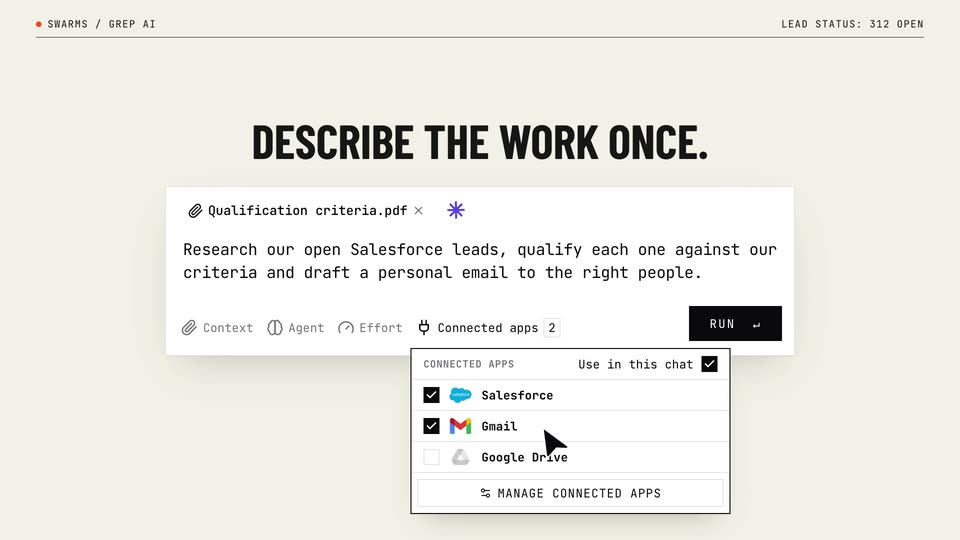
On a cream screen, a black headline sits above a white prompt card. A research prompt types itself out, a PDF chip appears, then a cursor checks Salesforce, Gmail and Google Drive in a dropdown and rests on a blue RUN button as the frame blurs.
On-screen text: “DESCRIBE THE WORK ONCE.”
Techniques: Cursor demo
Camera: Push in
On a lavender field, a node diagram assembles: a dark backlog card links by thin lines to three agent cards and a column of file icons, while a blue line with a traveling square marker runs between them. Above, the headline appears word by word.
On-screen text: “SWARMS / GREP AI”, “AGENTS ON DUTY: 3”, “THREE AGENTS. ONE TEAM.”
Techniques: Kinetic type
Camera: Static
A light dashboard card on a dotted grid shows three stage cards in a row. The first, outlined in purple, counts up from 12 to 312 leads as small purple squares travel the arrow to the next card. A solid purple panel wipes in from the left edge.
On-screen text: “SWARMS / GREP AI”, “STAGES RUNNING: 1 OF 3”
Techniques: Masking
Camera: Push in
A flat indigo field holds a centered white line that assembles word by word into “PULLED FROM SALESFORCE.”, then a small asterisk pops in above it. Both elements hold still for the rest of the clip.
On-screen text: “PULLED FROM SALESFORCE.”
Techniques: Kinetic type
Camera: Static
A flat white backlog card sits on a solid indigo field, listing a Salesforce lead job with a grid of pending, processing and success cells. Above it, a bold white headline reads THE BACKLOG, OR *, then completes to THE BACKLOG, ORGANIZED. as a small asterisk drifts to the lower right.
On-screen text: “THE BACKLOG, OR *”, “THE BACKLOG, ORGANIZED.”
Techniques: Kinetic type
Camera: Pull out
A cream dashboard: the headline builds word by word to “ONE AGENT. EVERY LEAD. AT ONCE.” while one account card multiplies into a wall of 312 cards that flip green as jobs complete. A dark tooltip captions one card.
On-screen text: “ONE AGENT. EVERY LEAD. AT ONCE.”, “Northwind Freight · Priority: opening two EU warehouses”
Techniques: Kinetic type
Camera: Pull out
A white Channel card on a beige screen lists northwind-freight facts as rows appear; the headline above completes to THE RIGHT PEOPLE. THE RIGHT FIT. Two rows highlight in lavender as a purple asterisk tracks them, a fit row lands, then the frame zooms in and defocuses.
On-screen text: “THE RIGHT PEOPLE. THE RIGHT FIT.”
Techniques: Kinetic type, UI zoom
Camera: Static
A white email draft card under a bold black headline types itself out word by word to a head of operations, a purple highlight marking the key line. A second draft for a CTO slides in beside it as the headline becomes NOT THE SAME PITCH.
On-screen text: “SWARMS / GREP AI”, “DRAFTS WRITTEN: 566”, “AN EMAIL FOR EVERY PERSON.”, “NOT THE SAME PITCH.”
Techniques: Kinetic type
Camera: Pull out
A beige product screen shows a message form with a Channel label, a To: Everyone field and a SEND button, fading into focus. Above it, a bold black headline types out the words THEY SHARE NOTES, capped with a purple sparkle.
On-screen text: “THEY SHARE NOTES”
Techniques: Kinetic type
Camera: Static
A beige page holds the bold headline above a white channel card. The card scrolls up as new agent messages and small boxed status chips appear, while a purple asterisk hops to the latest line.
On-screen text: “THEY SHARE NOTES AS THEY WORK.”
Camera: Pan
A cream dashboard shows three agent cards with progress bars filling and counters ticking to 312 done. The headline “FOLLOW EVERY STEP.” types in above while a purple sparkle hops from card to card as each agent completes, and the step counter climbs to 3 of 3.
On-screen text: “FOLLOW EVERY STEP.”
Techniques: Kinetic type
Camera: Static
The three-card workforce interface, with its bold headline, fades out onto a plain cream background. As it dissolves, a grid of small blue and gray squares slides in from the right edge.
On-screen text: “FOLLOW EVERY STEP.”
Camera: Static
A grid of green, blue and purple squares on a cream field reflows as a horizontal cream band widens across the center, revealing the bold black headline THE RESULT? with a small purple asterisk to its right.
On-screen text: “THE RESULT?”
Techniques: Masking
Camera: Push in
A grid of green squares on a cream field frames a centered black text block. Two lines hold still while three more type in beneath, one by one, ending with a purple asterisk.
On-screen text: “THE RESULT?”, “RESEARCHED ACCOUNTS.”, “QUALIFIED LEADS.”, “MAPPED STAKEHOLDERS.”, “EMAILS IN YOUR VOICE. *”
Techniques: Kinetic type
Camera: Static
A flat product UI on a cream background shows a green 'Swarm completed' banner over two deliverable rows with download buttons. The whole panel then slides right with a ghosting echo and fades out as a transition.
Camera: Static
A Salesforce leads table sharpens from blur as fit tags and draft counts fill row by row and a counter ticks to 312. Above it the headline LESS PREP. MORE CONVERSATIONS. types out, then an orange ALL 312 READY. stamp slams in rotated at the lower right.
On-screen text: “LESS PREP. MORE CONVERSATIONS.”, “ALL 312 READY.”
Techniques: Kinetic type
Camera: Static
A flat Salesforce leads table lists five companies with fit labels and draft counts beneath a bold black headline. An orange tilted stamp reading ALL 312 READY. overlaps the lower right corner as the whole frame drifts slowly downward.
On-screen text: “SWARMS / GREP AI”, “LEAD STATUS: 312 READY”, “LESS PREP. MORE CONVERSATIONS.”, “ALL 312 READY.”
Camera: Static
A purple eight-point star spins on a cream field while the headline “AGENT SWARMS ARE HERE.” pops in letter by letter and the subline types on. A lower rule draws in, “STATUS: LIVE” joins the header, and the URL plus GREP AI logo land at the bottom.
On-screen text: “SWARMS / GREP AI”, “BUSINESS CONTINUITY NOTICE”, “AGENT SWARMS ARE HERE.”, “To accelerate your business.”, “STATUS: LIVE”, “Try Swarms at grep.ai”, “GREP AI”
Techniques: Kinetic type
Camera: Static