
0:21
Explore
00:00:00 / 01:18:01
- Length
- 1:18
- Scenes
- 14 · 5.6 s avg
- Product on screen
- 0:00
- Features shown
- 1
- Call to action
- 1:08 · 88%
- Voiceover
- Yes
- Views
- 9.3K on YouTube
as of November 27, 2026
GitHub’s 1:18 launch film runs 14 scenes, about 5.6 s each. The product is on screen from the first frame and 1 feature is revealed. The call to action lands at 1:08 (88% in), over a voiceover. The video alternates between a neon-lit host intro and full-screen dark-mode GitHub screen recordings, cutting on a steady ~103 bpm pace. Signature moves include a sliding lower third, a cursor-driven step-by-step tutorial, and a closing handle card that mirrors the readme content.
Footage neededEstimated needs: 1 capture group — your screens or recordings · 2 filmed passages — shoot, supply or replace
Is this your launch? to your site or press kit.
More like this




README Profile for your Org: Introducing Organisation Profile READMEs, scene by scene
· 14 scenes as text
01 · Product intro · 0:00–0:11
A woman in a pink sweatshirt talks to camera in a room with a neon 'ship it' sign and a bookshelf, gesturing. A purple lower third with the GitHub Octocat logo slides in from the left with her name and title, then exits; a faint GitHub interface fades in.
On-screen text: “Michelle Mannering”, “Developer Advocate”
Camera: Static
02 · Feature reveal · 0:11–0:13
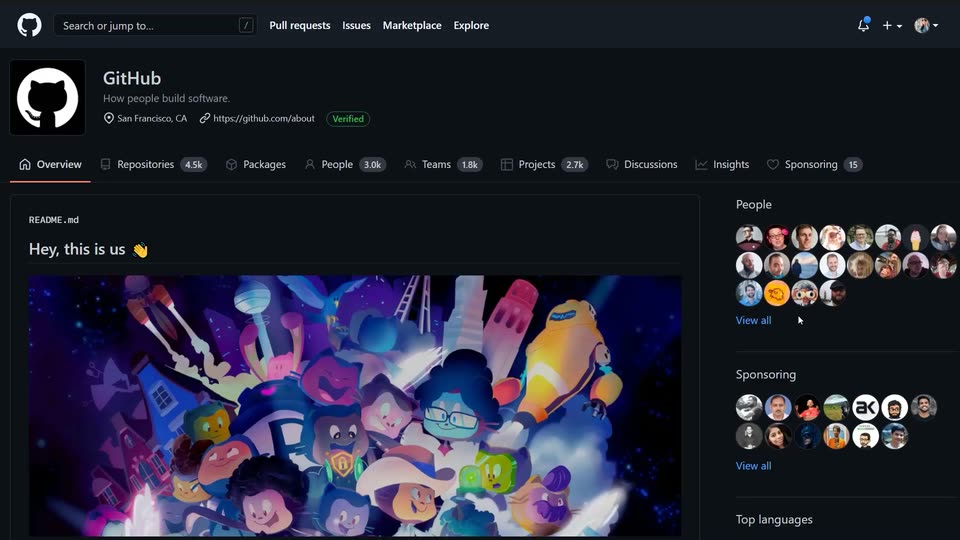
A dark GitHub organization overview page fills the frame, showing the README heading and a colorful illustration of cartoon characters. A mouse cursor rests near the People section in the right sidebar. The view holds static throughout.
Camera: Static
03 · Feature reveal · 0:13–0:15
A GitHub organization profile page fills the frame, dark theme. The main panel shows the README heading and a colorful illustration of cartoon characters, with body copy below. A right sidebar lists people avatars, sponsoring avatars and top languages. A white cursor hovers near the Sponsoring heading while the page stays still.
Camera: Static
04 · Feature reveal · 0:15–0:18
A GitHub org homepage fills the frame: a README heading 'Hey, this is us' above a colorful cartoon illustration of characters, with avatar rows in the right sidebar. The org banner scrolls out of the top and a mouse cursor hovers by the Sponsoring section.
Techniques: Cursor demo
Camera: Static
05 · Feature reveal · 0:18–0:28
A dark-mode GitHub README page scrolls down past a colorful crowd of cartoon characters and community text, then cuts to an empty repository overview titled The Royal Kingdom with an Invite someone button.
Camera: Pan
06 · Feature reveal · 0:28–0:32
A dark organization overview page lists two repositories beneath a search bar and a green New button. A cursor slides in from the right side, pauses over the New button, and clicks it.
Techniques: Cursor demo
Camera: Static
07 · Feature reveal · 0:32–0:44
A GitHub create-repository form fills in as a cursor types .github into the name field, triggering a green secret-repo notice. The page scrolls down, Public is selected, the README box is checked, and the Create button is pressed, changing to Creating repository.
Techniques: Cursor demo
Camera: Static
08 · Feature reveal · 0:44–0:49
A GitHub repository page for VariantX/.github fills the frame. The cursor moves from the top navigation to the green Add profile README button and clicks it, then the view crossfades into the new file editor.
Techniques: Cursor demo
Camera: Static
09 · Feature reveal · 0:49–1:00
A dark GitHub editor fills the frame. A red arrow points at the Code tab, then Markdown text is typed line by line into the README field. The view scrolls to the commit form, and a file explorer window appears over the right edge.
Camera: Static
10 · Feature reveal · 1:00–1:00
A screen recording splits the view: a GitHub README editor on the left with a commit box, and a Windows file explorer on the right showing sticker thumbnails. A cursor hovers over the images and a copy tooltip pops up in the editor.
Techniques: Split screen, Cursor demo
Camera: Static
11 · Feature reveal · 1:00–1:03
A dark GitHub README editor fills the screen, showing the VariantX/.github repository with a green info banner and a markdown code block. A cursor drifts across the top of the page as large white callout labels fade out at the start.
Techniques: Cursor demo
Camera: Static
12 · Feature reveal · 1:03–1:06
A dark GitHub file editor page scrolls down, moving from the README code view to the commit panel, where a green Commit changes button and a red Cancel button sit below the message field.
Techniques: UI zoom
Camera: Static
13 · Feature reveal · 1:06–1:08
A dark GitHub organisation page for The Royal Kingdom scrolls down, bringing a large grey VARIANT X wordmark and a chibi anime girl with a crown and sticker-covered laptop into full view.
Camera: Pan
14 · CTA · 1:08–1:18
A woman in a pink cat sweatshirt stands in a neon-lit room, gesturing as she signs off. At the end, her username XVARIANTX slides in large across the frame, and a short bio caption scales in beneath it.
On-screen text: “XVARIANTX”, “The ruler of this Kingdom is a fun, creative, and very bubbly gamer. She also likes to learn how to code, you'll often find her teaching others”
Techniques: Kinetic type
Camera: Static