0:44
Zaid Rahman - We conquered the US over the last 3 years. Flex grew to a $1.2B+ val
Flex (Flex Global) · Jul 2026
Gemini’s 0:33 launch film runs 16 scenes, about 2.1 s each. The product shows up at 0:29 and 1 feature is revealed. There is no explicit call to action; a voiceover carries the film. The video is built as a slow reveal: tone-tagged greetings on black, then a tour of the directing interface rendered as dark cards that tilt in 3D and settle to frontal over a drifting blue starfield, with two blue-and-white headlines marking the feature beats, ending on the product name and a closing tagline. Its signature moves are blur-to-focus text swaps, tilt-and-settle card entrances, and a constant slow drift of blue particles, all held at a steady, unhurried pace.
Is this your launch? to your site or press kit.
Flex (Flex Global) · Jul 2026
DJI · Hardware · Jul 2025
Mercury · Finance · Sep 2026
White text on a black field. “Hello.” opens large and scales down to center, then “[positive surprise]” slides in before it. The line blurs and re-forms as it swaps to “[enthusiastic] Bonjour.”
On-screen text: “Hello.”, “[positive surprise] Hello.”, “[enthusiastic] Bonjour.”
Techniques: Kinetic type
Camera: Static
On a black field, white centered text reads [enthusiastic] Bonjour. The words blur-swap to [friendly] こんにちは, then the line gives way to a dark gray angular wedge with a blurred white dash and blue streaks.
On-screen text: “[enthusiastic] Bonjour.”, “[friendly] Bonjour.”, “[friendly] こんにちは.”
Techniques: Kinetic type, Particles
Camera: Static
A dark rounded card labeled Text floats in 3D perspective over drifting blue star dots; its field swaps tone-tagged greetings, こんにちは., Hola., then مرحبا, while the view eases from a blurred tilt to a frontal angle.
Techniques: 3D mockup, Particles, Speed ramp
Camera: Pull out
A dark rounded card floats in 3D perspective over a black starry background, settling from a tilted blur into a locked-off frame. The Text label scales in above an input field showing [informative] and an Arabic greeting, while a Run Ctrl chip fades in at the bottom right.
Techniques: 3D mockup
Camera: Pull out
A dark settings panel with a RUN ON AI button slides up and out of frame over a black starfield, leaving a 3D toggle pill labeled Text and Composer centered; the pill eases forward as the Composer label scales up.
Techniques: 3D mockup, Particles
Camera: Static
A dark pill-shaped toggle with two segments, Text and Composer, floats in 3D against black, tilting gently. The Composer segment sits on a lighter disc and its white label scales up. A swirl of small blue particles drifts around the left edge.
Techniques: 3D mockup, Particles
Camera: Pull out
A dark gray form card with two fields, Scene and Sample Context, floats tilted in 3D over a black field of drifting blue particles. White text types out character by character in the lower field behind a blinking cursor.
Techniques: 3D mockup, Particles
Camera: Pull out
Dark starfield background with a left panel titled Scene and Sample Context holding two description boxes. Two speaker cards, Zephyr and Puck, slide in from the left to the right of the panel, each showing a name, speaker number and pitch note.
Techniques: Kinetic type
Camera: Pull out
A dark rounded transcript card with a speaker badge and one line of text tumbles in 3D against a black starfield. It tilts from a steep angle to near-frontal and back, with a faint reflection beneath the card.
Techniques: 3D mockup
Camera: Push in
Two dark interface panels rotate from a tilted 3D angle into a flat view over a black starry field. A cursor clicks the Accent dropdown, opening a list of accent options it then moves down.
Techniques: 3D mockup, Cursor demo
Camera: Pull out
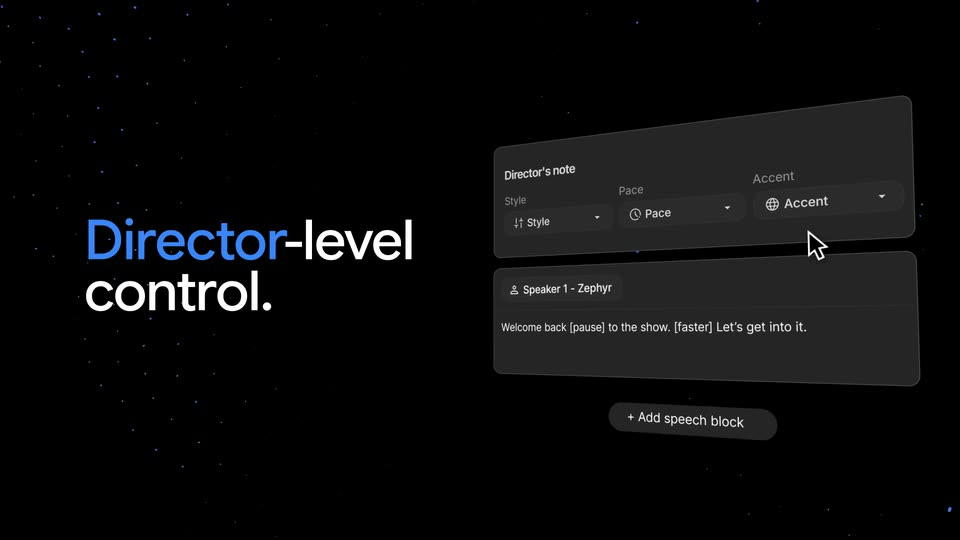
A dark starfield holds a tilted 3D interface panel on the right showing director note controls and a speech block, while the headline fades in on the left. A cursor hovers near the accent dropdown as the composition brightens from black.
On-screen text: “Director-level control.”
Techniques: 3D mockup
Camera: Static
A tilted 3D interface panel sits on a dark starfield, showing a Director's note card with Style, Pace and Accent dropdowns above a speech block. The headline 'Director-level control.' sits left in blue and white. The panels rotate and slide off right with motion blur as the headline fades.
On-screen text: “Director-level control.”
Techniques: 3D mockup, Particles
Camera: Static
A dark script panel, tilted in 3D, floats left over a black starfield with drifting blue particles while the headline 'Style, pace and delivery.' sits right, 'delivery.' in blue. The panel eases from blur into focus, then the scene fades to black.
On-screen text: “Style, pace and delivery.”
Techniques: 3D mockup, Particles
Camera: Pull out
A dark app window titled Playground tilts into a 3D perspective over a black starfield, sharpening from a soft blur. The interface shows a text prompt and a grid of template cards, with blue particles drifting in the background.
Techniques: 3D mockup, Particles
Camera: Static
On a black starfield of small blue dots, the title 'Gemini 3.1' in blue and white and 'Flash TTS' in white scale down from a large blurred state to a locked-off center frame.
On-screen text: “Gemini 3.1”, “Flash TTS”
Techniques: Kinetic type
Camera: Static
On a black starfield, the headline scales up from a blue blur into sharp focus, with the second word in white. The brand line with its icon fades in below while small blue dots drift across the frame.
On-screen text: “Direct it.”, “Google AI Studio”
Techniques: Kinetic type, Particles
Camera: Pull out