
1:55
Explore
00:00:00 / 01:04:12
- Length
- 1:04
- Scenes
- 37 · 1.7 s avg
- Product on screen
- 0:00
- Features shown
- 3
- Voiceover
- No
- Views
- 127K on X
as of November 22, 2026
Gamma’s 1:04 launch film runs 37 scenes, about 1.7 s each. The product is on screen from the first frame and 3 features are revealed. There is no explicit call to action. The video bookends three feature segments with the same 3D night landscape, each segment opening on a painted title card and then demonstrating the feature in a clean light UI. Pacing is quick at about 21 cuts per minute, with zooms, scrolls and 3D tilts carrying the eye between interface states and keeping the demos readable.
No filming indicatedEstimated needs: 4 capture groups — your screens or recordings · 1 official logo — reused across the film · 2 graphic passages — draw or supply · 7 3D passages — build or supply
Is this your launch? to your site or press kit.
More like this
Gamma - Gamma 5 is here! It's a complete overhaul of Gamma to create the most, scene by scene
· 37 scenes as text
01 · Product intro · 0:00–0:02
A 3D-rendered night landscape of pink-lit mountain peaks over a still lake under a starry aurora sky holds steady. A small white 'Introducing' sits centered, then the large 'GAMMA5' wordmark scales up and fades in beneath it.
On-screen text: “Introducing”, “GAMMA5”
Techniques: Kinetic type
Camera: Push in
02 · Product intro · 0:02–0:03
A 3D night landscape of pink-lit peaks and a starry sky holds the static white title Introducing GAMMA5; the title fades out as a white toolbar rises from the bottom edge.
On-screen text: “Introducing”, “GAMMA5”
Camera: Pan
03 · Demo · 0:03–0:04
A white product window on a blurred blue field zooms into a flat close-up of the interface. A cursor drops a small PDF file into the blue-ringed prompt box, above a row of category pills and five template thumbnails.
Techniques: UI zoom, Cursor demo
Camera: Push in
04 · Demo · 0:04–0:05
A light product screen shows a prompt box holding a PDF file and an image thumbnail. The view zooms in on the box as typed text completes and a cursor moves to the blue send button. Pill buttons line the bottom.
On-screen text: “Your taste is all you need”
Techniques: UI zoom, Cursor demo
Camera: Push in
05 · Demo · 0:05–0:10
A light chat interface scrolls upward as an assistant processes a request. A PDF card and status lines appear, a response bubble types out, web source cards slide in then collapse, and a second bubble finishes before a setup form opens.
Camera: Push in
06 · Demo · 0:10–0:12
A white form interface shows questions for tailoring a guide, with a cursor moving across the numbered options. The page scrolls down past design thumbnails to reveal more questions and a blue Create outline button.
Techniques: Cursor demo
Camera: Pan
07 · Demo · 0:12–0:14
A light onboarding form lists two questions with numbered options; the cursor clicks the first option under 'What should it focus on?', then presses the blue Create outline button. The screen zooms out to a small summary card showing the chosen look, length and focus beside a document mockup.
Techniques: Cursor demo, UI zoom
Camera: Static
08 · Demo · 0:14–0:15
On a pale background, two settings cards on the left fade out as a centered stack of white skeleton cards settles above the status text Working... and a blue progress bar. The frame stays locked-off.
Camera: Static
09 · Demo · 0:15–0:16
A white chat and document interface appears on a blue background. The left panel holds a conversation and prompt, while the right panel populates with a travel plan under Review the plan.
Camera: Static
10 · Demo · 0:16–0:19
A close-up of a numbered travel-plan outline scrolls upward, then a blue Generate button pops in as a cursor hovers over it. The view zooms out to reveal the full app window, chat sidebar and document, on a blue gradient backdrop.
Techniques: Cursor demo, UI zoom
Camera: Push in
11 · Demo · 0:19–0:21
A two-panel interface fills in as an agent builds a deck. The left chat log streams setup steps and a ready card, while the right slide editor populates from one placeholder to five styled slides, each with photos and a map.
Techniques: Split screen
Camera: Push in
12 · Demo · 0:21–0:24
Inside the editor, a travel itinerary page scrolls down from a cove hero image to a map with pinned photo cards, then back to the top. The heading One long blue day scales in over the map while the script line five stops slides in at the hero.
Camera: Push in
13 · Demo · 0:24–0:27
The canvas shows a slide titled Seven days, five stops, the second line sliding in, with three photos and a wave strip; the view then zooms out to the left panel, where a cursor types a prompt into the input box and hovers the send button.
Techniques: UI zoom, Cursor demo
Camera: Push in
14 · Demo · 0:27–0:28
The app screen settles from an overlapping transition into a two-pane view. The left chat log shows the agent confirming a collage edit; the right document lays out three photos in a row beneath the heading “Seven days, five stops.”
Camera: Pull out
15 · Demo · 0:28–0:30
A two-pane product interface: an agent chat log on the left scrolls upward as new messages and an edited slide thumbnail appear, while the right pane holds a presentation slide titled Seven days, five stops with a polaroid photo collage.
Camera: Static
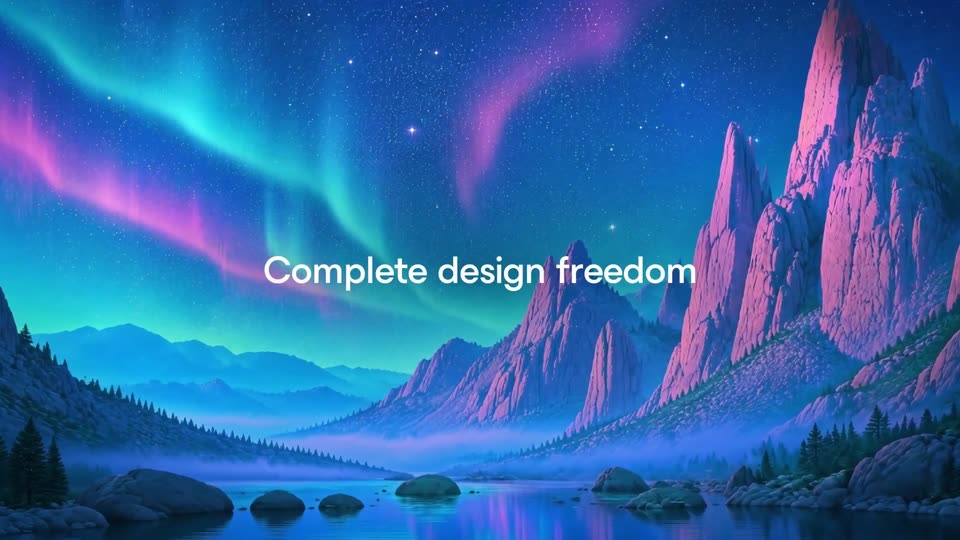
16 · Feature reveal · 0:30–0:31
A painted night landscape shows pink-lit rock spires and a calm lake under a starry sky with green and magenta aurora bands. The white title fades in at the center of the frame.
On-screen text: “Complete design freedom”
Camera: Push in
17 · Feature reveal · 0:31–0:34
A design tool interface: the cursor opens the Layouts menu, selects a suggested layout, and the slide photos rearrange into a bottom collage row while the chat panel logs the change. The view then zooms in on the updated slide.
On-screen text: “Complete design freedom”
Techniques: Cursor demo, UI zoom
Camera: Push in
18 · Feature reveal · 0:34–0:35
A presentation editor's top bar is reframed close on the right. A cursor clicks the purple Freeform button, opening a three-item dropdown, then moves down to hover the middle option, which highlights in pink.
Techniques: UI zoom, Cursor demo
Camera: Push in
19 · Feature reveal · 0:35–0:36
A presentation app screen shows a slide with an aerial water photo and serif title. A cursor clicks a menu item, the dropdown closes, and a dark toast with an Undo link slides in at the top left.
On-screen text: “AME 0002-A”, “Cala Brava, day 3”
Techniques: Cursor demo
Camera: Static
20 · Feature reveal · 0:36–0:37
In a slide editor, a cursor drags a selected polaroid photo with two figures from left to right across an aerial ocean slide. The surrounding chat panel and toolbar stay fixed while selection handles follow the moving frame.
On-screen text: “AME 0002-A”, “Cala Brava, day 3”
Techniques: Cursor demo
Camera: Static
21 · Feature reveal · 0:37–0:39
A design canvas shows an aerial beach photo. A Polaroid card with a blue selection border and corner handles hovers center-right under a cursor, then slides right as a small icon toolbar appears above it. White serif '03 The Coast' sits top right over magenta crop lines.
Techniques: Cursor demo
Camera: Static
22 · Feature reveal · 0:39–0:40
A 3D-rendered night landscape: a pink-lit stone arch rises over a still lake beneath a starry teal sky. The camera slowly pushes in toward the arch while the white caption fades in at center.
On-screen text: “Effortlessly import and export”
Camera: Push in
23 · Feature reveal · 0:40–0:43
A two-pane product interface fills the frame as the right canvas populates with purple slides and charts, then the whole window tilts into a 3D mockup on a blue gradient.
On-screen text: “Effortlessly import and export”
Techniques: 3D mockup
Camera: Pull out
24 · Feature reveal · 0:43–0:44
A presentation editor window fills the frame, its main slide showing a blue-to-orange gradient with a hand-drawn white Tectonik logo and a two-line headline. A mouse cursor glides from the logo up to the top toolbar.
Techniques: Cursor demo
Camera: Static
25 · Feature reveal · 0:44–0:44
A close-up of a white app toolbar with Styles, Share, and a blue Present button sits above a peach slide. A mouse cursor hovers and shifts near the Share button. The frame stays locked off.
Techniques: Cursor demo
Camera: Static
26 · Feature reveal · 0:44–0:46
A white share dialog sits over a dimmed slide editor. The cursor clicks Export in the left menu, the right panel swaps from invite controls to export options, then the cursor hovers over Export to PowerPoint.
Techniques: Cursor demo
Camera: Static
27 · Feature reveal · 0:46–0:48
A close-up of an export settings panel lists quality and type options. A cursor hovers over the PowerPoint row as its status label switches from Exporting to Downloaded.
Techniques: Cursor demo
Camera: Static
28 · Feature reveal · 0:48–0:50
A 3D-rendered mountain range rises above a sea of clouds under a starry sky with a green aurora on the horizon. The white headline sits centered and static as the view drifts slowly right across the layered landscape.
On-screen text: “Create using all your tools”
Techniques: Parallax
Camera: Push in
29 · Feature reveal · 0:50–0:53
A light app home screen with a search bar and tool chips. The cursor clicks Connectors in the left panel, opening a submenu and the Available connectors list, then flips the ClickUp switch on. The framing drifts and zooms across the interface as a colorful 3D shape floats above.
On-screen text: “Create using all your tools”
Techniques: UI zoom, Cursor demo
Camera: Push in
30 · Feature reveal · 0:53–0:53
A white chat composer on a pale lavender field types a prompt line under a Notion page chip, a caret at the end. Two slides then appear below: a white title card and a blue slide holding a pink 3D iris bloom.
Camera: Static
31 · Feature reveal · 0:53–0:55
A Notion card at the top swaps its text from a product spec to a brand template, while a row of three presentation slides slides left to reveal a new red-titled slide on the right, on a soft pink gradient background.
Camera: Static
32 · Feature reveal · 0:55–0:57
A white chat input card floats at the top, its file chip and prompt line swapping through three examples. Beneath it, a row of colorful design cards slides sideways and refreshes, while the gradient backdrop shifts from peach to pink.
Camera: Static
33 · Feature reveal · 0:57–0:58
A white prompt bar on a pink screen holds a PDF chip and the instruction to turn Bologna notes into a food journal. Below, two cards sit side by side: a red cover with repeated serif BOLOGNA and a pasta plate, and a cream recipe page with ingredient icons.
Camera: Static
34 · Feature reveal · 0:58–1:00
A tilted grid of design posters and editorial mockups fills the frame on a blue field, the plane panning and tilting slowly. A red pasta poster, a pink iris and an aerial swimmer shot stand out among the drifting tiles.
Techniques: 3D mockup
Camera: Pull out
35 · Feature reveal · 1:00–1:01
A wall of colorful design cards on a dark blue field tilts into 3D perspective, the grid rotating so the left side grows larger and the right recedes.
Techniques: 3D mockup
Camera: Static
36 · Outro · 1:01–1:03
A stylized 3D night landscape with pink-lit peaks, a misty lake, and a starry sky holds a locked-off frame. The white wordmark GAMMA5 fades in at center, then the tagline scales in beneath it.
On-screen text: “GAMMA5”, “The next evolution of presentations”
Techniques: Kinetic type
Camera: Push in
37 · Outro · 1:03–1:04
On a black background, the white GAMMA5 wordmark sits centered and still while the smaller tagline beneath it scales up into place. The frame stays locked off throughout the short shot.
On-screen text: “GAMMA5”, “The next evolution of presentations”
Techniques: Kinetic type
Camera: Static