
0:58
Explore
Localization: AI Style
Framer · Nov 2023 · 3:39 · Full motion · AI-annotated
- Length
- 3:39
- Scenes
- 12 · 18.3 s avg
- Product on screen
- 0:32
- Features shown
- 2
- Voiceover
- Yes
- Views
- 5.4K on YouTube
as of November 28, 2026
00:00:00 / 03:39:10
- Length
- 3:39
- Scenes
- 12 · 18.3 s avg
- Product on screen
- 0:32
- Features shown
- 2
- Voiceover
- Yes
- Views
- 5.4K on YouTube
as of November 28, 2026
Framer’s 3:39 launch film runs 12 scenes, about 18 s each. The product shows up at 0:32 and 2 features are revealed. There is no explicit call to action; a voiceover carries the film. The video is built as a slow screen-recording walkthrough: a floating mockup teaser, then the localization table, AI Style and Automatic Locale, each shown with zoom-ins and a 3D tilt over a glowing gradient, closing on a browser test and the Framer mark. Pacing is deliberate at about half a cut per minute, letting each UI action land before the camera moves.
No filming indicatedEstimated needs: 5 capture groups — your screens or recordings · 1 official logo — reused across the film · 1 3D passage — build or supply
Is this your launch? to your site or press kit.
More like this



Localization: AI Style, scene by scene
· 12 scenes as text
01 · Hook · 0:00–0:05
A dark band website mockup sits on the left over a blurred blue-purple gradient, listing tour dates beside a pink abstract graphic. A small AI Style panel slides in on the right with a text field where a prompt is typed, ending on a blue Save button.
Camera: Static
02 · Hook · 0:05–0:22
A flat dark band-website mockup and a small AI Style panel float on a blurred blue and pink gradient. The site headline and tour list re-translate in place from English to Dutch, then to dog-speak, as the panel prompt is retyped, then reset to English.
Camera: Static
03 · Problem · 0:22–0:32
A dark web editor window is centered over a blurred blue and magenta gradient. Its canvas shows a black Cottonwood page with a thin white headline that slides in and a tour date list. A cursor clicks the top bar and the view cuts to a Dutch-English localization table.
Techniques: Cursor demo
Camera: Static
04 · Feature reveal · 0:32–0:56
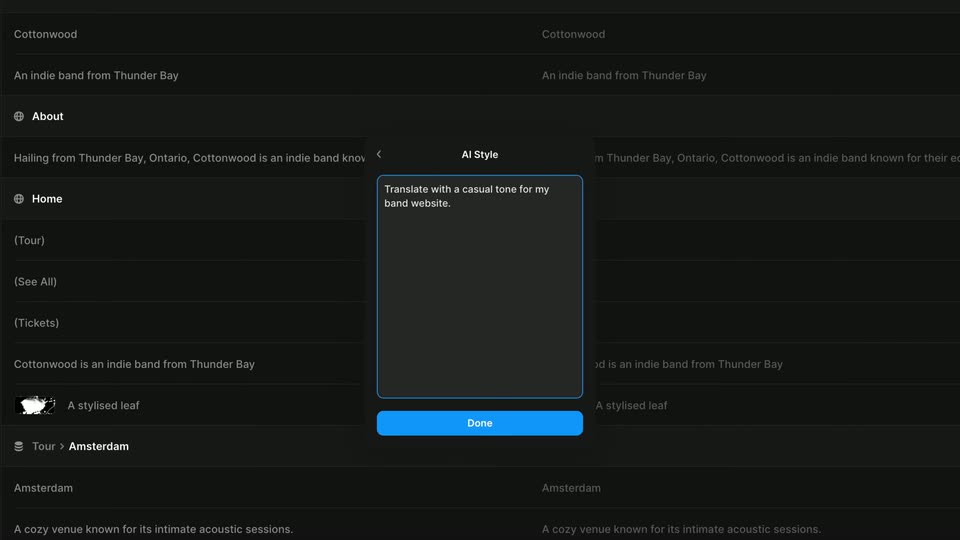
A dark localization screen shows a two-column item list. A cursor clicks the Options tab, opening a centered Locale Options panel, then the view zooms in. The cursor opens the AI Style field and types a casual-tone instruction, then clicks Done to save it as a chip.
Techniques: Cursor demo, UI zoom
Camera: Static
05 · Feature reveal · 0:56–2:09
A dark localization dashboard floats in 3D perspective over a blurred purple-blue gradient. A cursor clicks AI icons to translate rows, opens a style prompt panel, runs a batch translation with a progress bar, then filters the list, as the camera zooms in and out on the right column.
Techniques: 3D mockup, UI zoom, Cursor demo
Camera: Pull out
06 · Feature reveal · 2:09–2:36
A dark web editor frames a black band site with a pink splatter graphic and a tour list. A cursor moves to the language flag at the bottom, opens a small menu, and selects Dutch; the headline and tour list switch to Dutch, then revert to English.
Techniques: Cursor demo
Camera: Static
07 · Feature reveal · 2:36–2:57
Dark site-settings screen in a browser window on a purple gradient. The cursor selects General, scrolls past the analytics card, flips the Automatic Locale toggle blue, clicks Publish, then Update; a toast confirms the update and the cursor opens the live band page in a new tab.
Techniques: Cursor demo
Camera: Static
08 · Feature reveal · 2:57–3:00
A flat browser window on a glowing blue and pink gradient shows the Cottonwood site: a black page with a large thin white outlined headline, a pink ink splatter graphic, and a list of tour dates with ticket links. The frame stays locked off.
Camera: Static
09 · Feature reveal · 3:00–3:01
A flat Chrome window floats on a blurred pink and blue gradient. The page shows the Cottonwood band site with a thin outline headline and a tour list, then the view switches to the browser Settings page with the Languages section selected. A cursor rests on the right.
On-screen text: “Cottonwood is an indie band from Thunder Bay”, “[TOUR]”
Techniques: Cursor demo
Camera: Static
10 · Feature reveal · 3:01–3:05
A dark Chrome window floats on a blurred purple and blue gradient. The Languages settings page is shown, a cursor rests near the Dutch entry, then the cursor moves to the new-tab button and a Google new-tab page fades in over the dimmed settings.
Techniques: Cursor demo
Camera: Static
11 · Feature reveal · 3:05–3:07
A dark-mode Chrome window sits on a pink and blue gradient. A URL is typed into the address bar, opening an autocomplete dropdown beneath it.
Techniques: Cursor demo
Camera: Static
12 · Outro · 3:07–3:39
A browser window floats over a blurred blue and magenta gradient, showing a dark band site in Dutch. A cursor clicks the language globe, the page switches to English, then refreshes to keep it. The scene fades to black and a white geometric logo mark holds center.
Techniques: Cursor demo
Camera: Static