
1:20


Qlo - AI agents that run commercial underwriting
Qlo · Fintech · Aug 2026
Touchmark’s 0:44 launch film runs 17 scenes, about 2.6 s each. The product shows up at 0:10 and 4 features are revealed. There is no explicit call to action. The video is built as a chain of single-idea title cards over a black field, each pairing a bold sans-serif headline with one data-viz or UI element that decodes into place, then a centered recap and a logo sting. Its signature moves are the self-drawing white demand curve, the hatched reserved-capacity band, and the hourly pricing grid that reflows from a bar chart into a clickable schedule, all in a restrained black, white, red and mint palette.
Is this your launch? to your site or press kit.
Qlo · Fintech · Aug 2026
Greypoint Industries · Industrials · Jul 2026
Cekura · B2B · Jan 2026
A white bell curve draws itself left to right across a black field above a faint time axis, while the headline fades in at the top left. A hatched gray block and a thin line labeled RESERVEX ξππωθρα fade in beneath the curve.
On-screen text: “Your demand is a curve.”, “RESERVEX ξππωθρα”
Camera: Static
On a black background, a demand curve: a white line arcs over a gray hatched reserved-capacity band, the excess area filled red. A bold white headline and gray subline sit above; a red bordered tag reading SERVED ON-DEMAND appears at the peak, then fades out.
On-screen text: “Everything above your reservation is on-demand.”, “You have to pay the on-demand price and have no capacity guarantee.”, “SERVED ON-DEMAND”, “LIST PRICE · NO GUARANTEE · NO SLA”
Camera: Static
A white usage curve arcs over a dark grid on black. A red fill highlights the area below the reserved-capacity line under the headline. The text crossfades to a second line, and the red fill turns into outlined bars inside the band.
On-screen text: “Below it, you pay for hours you never use.”, “Reserve the hour. Dedicated throughput.”
Techniques: Masking
Camera: Static
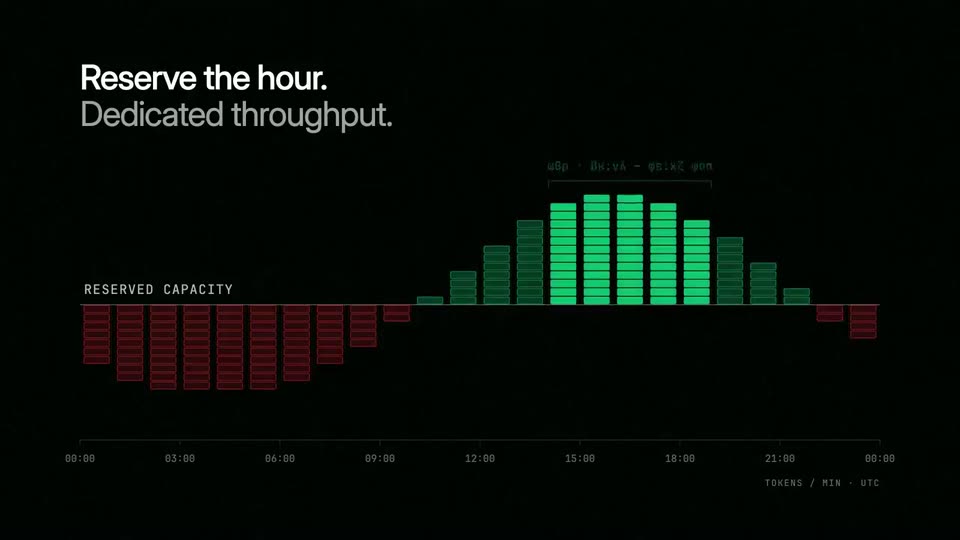
A white headline sits top left over a black field; a bell-curve bar chart builds from outlines into stacked red and green segments, then the central green bars light up bright mint under a bracketed BUY callout while a red caption decodes in at the bottom left.
On-screen text: “Reserve the hour.”, “Dedicated throughput.”, “BUY · 14:00 - 19:00 UTC”, “LIMIT SELL ORDERS · UNUSED CAPACITY”
Camera: Static
A dark scheduling grid fills the lower half, with a green bell-curve bar chart above it. The top-left headline reads “Reserve the hour.” then swaps to “1 MTok/min, one hour at a time.” as the chart fades and the grid reflows into a day-by-day schedule.
On-screen text: “Reserve the hour.”, “Dedicated throughput.”, “1 MTok/min, one hour at a time.”, “Priced below on-demand.”
Camera: Static
A dark pricing schedule grid fills the lower frame under a white headline. The view zooms into the grid as a cursor moves across the Monday row, clicking five afternoon cells that turn green with checkmarks.
On-screen text: “1 MTok/min, one hour at a time.”, “Priced below on-demand.”
Techniques: UI zoom, Cursor demo
Camera: Push in
A black pricing grid fills the lower half, columns labeled AM and PM with hourly cells of dollar values; five cells in one row glow green with checkmarks. Above, a white headline sits over the dark space.
On-screen text: “1 MTok/min, one hour at a time.”, “Priced below on-demand.”
Camera: Static
A dark hourly pricing grid fills the lower frame, its cells shaded by time of day. Green cells with checkmarks mark a selected row. Top-left headlines swap between two pairs of lines while a 40-block region highlights with a total and buy button.
On-screen text: “1 MTok/min, one hour at a time.”, “Priced below on-demand.”, “Price fixed when you buy.”, “Capacity held for you.”
Camera: Pull out
On a dark hourly pricing grid, a summary panel lists a 40 hour block total and a white BUY button. The cursor clicks it; the panel closes and a row of cells turns green with checkmarks under a held tag. The headline text stays fixed in the top left.
On-screen text: “Price fixed when you buy.”, “Capacity held for you.”
Techniques: Cursor demo
Camera: Static
A tilted 3D service-levels card fades in on black; its rows fill in one by one as values decode into place, then the card fades out. A two-line headline holds top left.
On-screen text: “Your SLA, in the contract.”, “Availability. Time to first token.”
Techniques: 3D mockup
Camera: Static
The scene fades in from black: a two-line white headline appears above a dark dashboard panel whose header shows the current time and the next-hour countdown, while the panel body stays dim.
On-screen text: “Served on your existing API key”, “the moment the hour starts.”
Camera: Static
A dark terminal window below a two-line headline types a curl command. Code lines and a green progress bar then appear and fill. The scene blurs out at the end.
On-screen text: “Served on your existing API key the moment the hour starts.”
Camera: Static
A dark grid of hourly dollar prices scrolls horizontally across the lower frame. A white headline fades in at the top left, then a red-bordered callout card with limit-ask details appears on the right. Five green cells with checkmarks mark the selected hours.
On-screen text: “Don't need the hour? Sell it back.”, “LIMIT ASK · RESTING ON THE BOOK”, “MON 26 OCT · 18:00 UTC”, “8 hour blocks · $0.45 per MTok”
Camera: Push in
A dark price grid with AM and PM columns fills the bottom, four center cells lit green with checkmarks. A red-outlined box on the right states the limit ask, and a white headline spans the top left. The frame holds still.
On-screen text: “Don’t need the hour? Sell it back.”
Camera: Static
A black screen holds, then the phrase Dedicated throughput. fades in centered in gray sans-serif and stays still for the rest of the clip.
On-screen text: “Dedicated throughput.”
Camera: Static
On a plain black background, three centered lines of text appear one after another. The first two lines fade in solid white, then the third line materializes from a thin outline into a solid fill.
On-screen text: “Dedicated throughput.”, “No long-term reservation.”, “Below the on-demand price.”
Techniques: Kinetic type
Camera: Static
On a black background, the headline fades in centered, then the touchmark logo with its thin curve mark and wordmark fades in below it, followed by a small letter-spaced tagline. The frame stays locked and the elements hold.
On-screen text: “Reserved throughput. Live now.”, “touchmark”, “MARKET FOR RESERVED INFERENCE”
Techniques: Kinetic type
Camera: Static