0:11


Suno - Introducing Suno MCP Beta Create songs from wherever you get inspire
Suno · AI · Oct 2026
FlowManual · 2:02 · Full motion · AI-annotated
FlowManual’s 2:02 launch film runs 14 scenes, about 8.7 s each. The product is on screen from the first frame and 5 features are revealed. The call to action lands at 1:57 (96% in), over a voiceover. The video is one unbroken screen-recording of the FlowManual web app, narrated by a co-founder whose circular webcam stays pinned to the lower left, with cuts landing only when the demo switches features. Its visual style is a calm, UI-first walkthrough: mostly static or slowly scrolling panels on a warm off-white canvas, a cursor that performs each action, and accents of green and terracotta for data and flags.
Is this your launch? to your site or press kit.
Suno · AI · Oct 2026
Linear · Productivity · Sep 2024
Loom · Productivity · Oct 2021
A static screen recording of the FlowManual dashboard in a browser, with stat tiles, a green bar chart, and project lists. A circular webcam of the presenter sits in the lower left as he speaks, and the cursor drifts across the page, hovering a project row.
Techniques: Cursor demo
Camera: Static
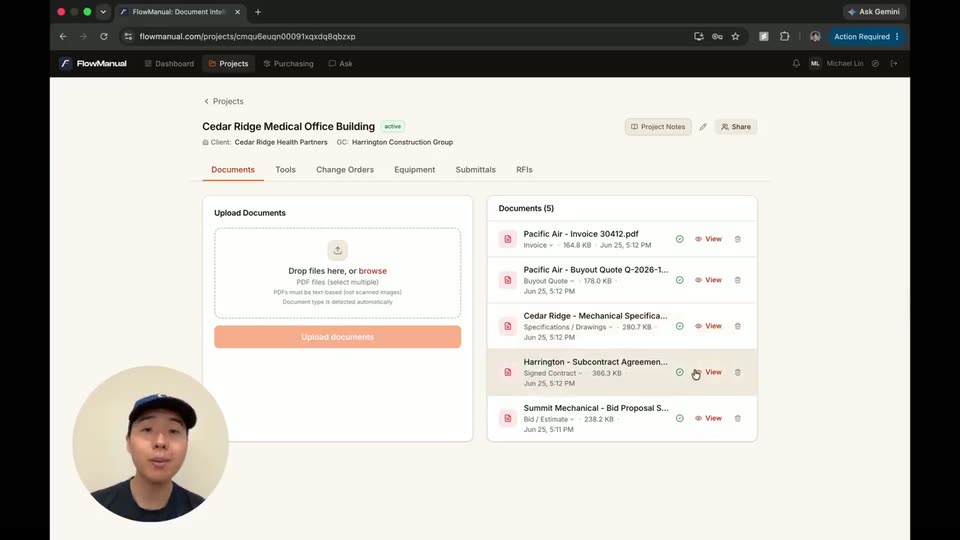
A browser window shows a project documents page: an upload panel left, a list of five PDF files right. A circular video call of a man in a cap sits in the lower left. The cursor glides to the fourth row and hovers its View button, tinting the row.
Techniques: Cursor demo
Camera: Static
A screen recording of a contract-review app: a PDF page on the left flips from page 1 to 2 to 4 while the right-hand annotations list scrolls through color-coded risk tags. A cursor hovers over entries; a circular webcam of the presenter in a cap sits bottom-left.
Techniques: Cursor demo
Camera: Static
A FlowManual project page lists five documents, then the view cuts to a contract-versus-bid comparison table flagging scope gaps and dollar impacts. A small circular video of the presenter in a cap stays pinned to the lower left corner.
Camera: Static
A browser window shows the FlowManual comparison view; the page scrolls down a list of contract issue rows tagged HIGH, MEDIUM, LOW with dollar values, while a small circular webcam of a man in a cap talks in the lower left. The cursor then moves to the Side-by-Side tab.
Techniques: Cursor demo
Camera: Static
A document comparison tool fills the screen, two PDF panes scrolling down in sync while a red-flagged changes list scrolls at right. A cursor hovers over highlighted clauses; a circular avatar of a man in a blue cap sits in the lower left.
Techniques: Cursor demo
Camera: Static
A screen recording of the FlowManual web app shows a project's Documents tab; a cursor moves down the PDF list and clicks a buyout quote, opening a document viewer with an Annotations sidebar. A circular webcam of the presenter sits in the lower-left corner.
Techniques: Cursor demo
Camera: Static
A locked-off screen capture of a document app shows a buyout quotation PDF beside a right sidebar. The cursor clicks the Prices tab; a brief spinner gives way to a list of vendor price trends with green percentages, while a small presenter webcam sits in the corner.
Techniques: Cursor demo
Camera: Static
A browser window shows the FlowManual project page for Cedar Ridge Medical Office Building, with an upload panel on the left and a five-row document list on the right. A small circular webcam feed of a man in a blue cap sits in the bottom left corner. A cursor glides to the View link on the first invoice row, which highlights as it is selected.
Techniques: Cursor demo
Camera: Static
A split view pairs a PDF invoice on the left with a vendor price panel on the right. A cursor glides down the line-item list, pausing on the rooftop unit row, beside a small circular webcam of a presenter. An orange Extract Prices button appears top right.
Techniques: Cursor demo
Camera: Static
A browser window shows a project page with a documents list and an upload panel. A cursor glides across the top navigation bar, hovering over the Purchasing tab. A circular webcam of a man in a blue cap sits in the lower-left corner.
Techniques: Cursor demo
Camera: Static
A browser window shows the FlowManual purchasing dashboard scrolling down past stat cards, a data-quality bar, and savings flag cards, then charts and a benchmark table. A presenter in a baseball cap talks from a circular video overlay in the lower left.
Camera: Pan
A screen recording of the FlowManual app with a circular webcam of the presenter in the lower left. The cursor opens the Ask tab and a new chat, types a question about added scope, and the AI streams a long answer with tables as the page scrolls.
Techniques: Cursor demo
Camera: Static
The FlowManual dashboard sits static in a browser window, showing stat cards, a green savings bar chart, and project lists. A circular video inset in the lower left holds the presenter, a man in a cap, who speaks his sign-off. The cursor rests idle at the right edge.
On-screen text: “flowmanual.com/dashboard”
Camera: Static