
0:48
Explore
Introducing Voice Design: Create Original AI Voices from Text
Fish Audio · Jun 2026 · 4:29 · AI-annotated
- Length
- 4:29
- Scenes
- 34 · 7.9 s avg
- Product on screen
- 0:08
- Features shown
- 1
- Call to action
- 4:23 · 98%
- Voiceover
- Yes
- Views
- 29K on YouTube
as of November 25, 2026
00:00:00 / 04:29:27
- Length
- 4:29
- Scenes
- 34 · 7.9 s avg
- Product on screen
- 0:08
- Features shown
- 1
- Call to action
- 4:23 · 98%
- Voiceover
- Yes
- Views
- 29K on YouTube
as of November 25, 2026
Fish Audio’s 4:29 launch film runs 34 scenes, about 7.9 s each. The product shows up at 0:08 and 1 feature is revealed. The call to action lands at 4:23 (98% in), over a voiceover. The video is built as a host-led tutorial that alternates a locked-off studio shot, light screen recordings, and black-and-orange typed-text interludes, all tied together by a small webcam inset of the presenter. Pacing is steady at about five cuts per minute, with word-by-word caption builds and a recurring blurred orange wave as the signature graphic move.
Footage neededEstimated needs: 3 capture groups — your screens or recordings · 7 filmed passages — shoot, supply or replace · 1 graphic passage — draw or supply
Is this your launch? to your site or press kit.
More like this

0:58

Rystic: Launch YC
Rystic · B2B · Oct 2026
0:50

Harsha from Slashy - Today We’re Launching @slashymail Slashy is the new era of email, th
Slashy · B2B · Aug 2026
Similar soundtrack
Films whose music sounds like this one, voice left out
3:10

Windsurf Wave 12: Devin features in Windsurf!
Windsurf · Upbeat electronic
1:20

Grade: Performance-Based Payroll, $380k Paid in 30 Days
Grade · Modern electronic
4:17

Introducing Manus: The General AI Agent
Manus · Upbeat electronic
Introducing Voice Design: Create Original AI Voices from Text, scene by scene
· 34 scenes as text
01 · Hook · 0:00–0:06
A woman with long black hair, in a dark gray tee, talks to camera, centered and locked off. A black microphone sits in front of her, its ring glowing purple then turning red. A tan curtain fills the left, a gray wall the right.
Camera: Static
02 · Problem · 0:06–0:08
A woman in a gray shirt speaks to camera with a small waveform badge on her chest, then the view cuts to a white voice-library grid that scrolls upward past collection headers. A floating profile card with a Use button sits at the bottom.
Techniques: UI zoom
Camera: Pan
03 · Product intro · 0:08–0:36
A woman with long black hair speaks into a microphone whose LED ring cycles through colors, framed against a curtain and gray wall. A white feature card slides in at left, then bold white captions build word by word across the lower frame.
On-screen text: “100% original AI voice”, “by just describing it in text”, “no recording”, “no more library scrolling”, “no complicated voice training”, “15s”, “FREE”
Techniques: Kinetic type
Camera: Pull out
04 · Feature reveal · 0:36–0:37
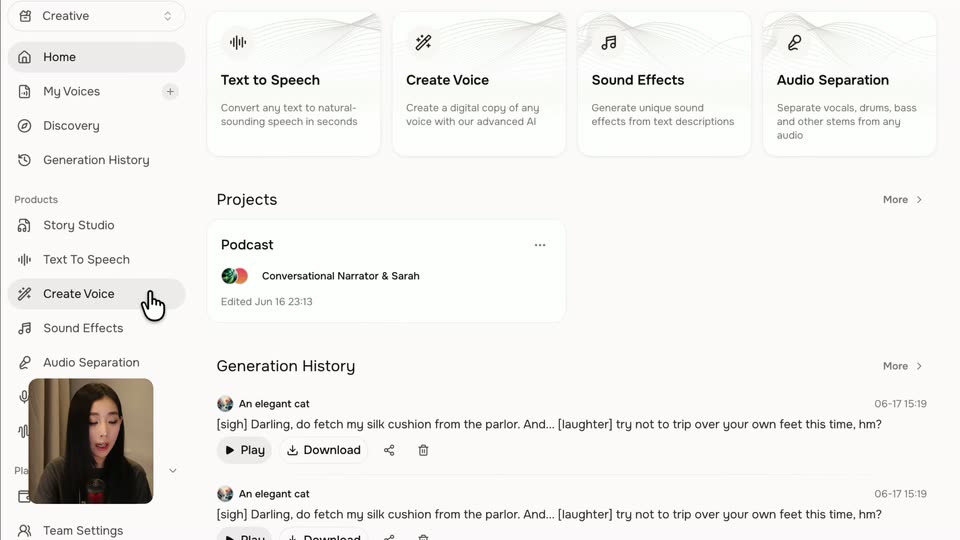
A light web dashboard fills the frame, its sidebar and feature cards in view. The view zooms onto the left menu as a cursor slides down to hover over the Create Voice item.
Techniques: UI zoom, Cursor demo
Camera: Push in
05 · Feature reveal · 0:37–0:38
A light product dashboard with a left navigation rail and three method cards under the heading Pick a method. A hand cursor hovers over the Create Voice item while the frame pans right to reveal the Voice Design card.
Techniques: UI zoom
Camera: Pan
06 · Feature reveal · 0:38–0:40
A product interface titled Pick a method shows three option cards. A cursor slides from the Instant Voice Clone card to the Voice Design card, while a small webcam video of a presenter plays in the lower left corner.
Techniques: Cursor demo
Camera: Static
07 · Feature reveal · 0:40–0:44
A white Voice Design panel shows a prompt box with gray placeholder text and a row of starter prompt chips. A black cursor glides from the right into the box, where a text-selection handle pops up. A small webcam video of a woman talking sits in the lower-left corner.
Techniques: Cursor demo
Camera: Static
08 · Feature reveal · 0:44–0:48
A white sentence types out letter by letter with a blinking caret over a grainy, blurred orange wave on black. A small rounded video inset of a woman speaking sits in the bottom-left corner.
On-screen text: “The quality of your voice depends heavily on the quality of your prompt.”
Techniques: Kinetic type
Camera: Static
09 · Feature reveal · 0:48–0:52
A centered white sentence sits over a dark, grainy orange gradient, then gives way to a five-line bulleted list that fades and scales in one item at a time. A small webcam inset of a woman speaking remains in the lower left.
On-screen text: “The quality of your voice depends heavily on the quality of your prompt.”, “- Age and gender”, “- Accent”, “- Tone and vocal texture”, “- Speaking pace”, “- Overall mood and personality”
Techniques: Kinetic type
Camera: Static
10 · Feature reveal · 0:52–0:56
A five-item white bullet list sits centered over a black background crossed by a blurred orange ribbon. A small inset video of a woman speaking holds the bottom-left corner. The line “Tone and vocal texture” pulses with a slight scale while the other lines hold still.
On-screen text: “- Age and gender”, “- Accent”, “- Tone and vocal texture”, “- Speaking pace”, “- Overall mood and personality”
Techniques: Kinetic type
Camera: Static
11 · Feature reveal · 0:56–1:00
White bullet points listing voice attributes sit over a blurred orange abstract background, with a small webcam inset of a woman in the corner. The list fades out as the sentence A gentle female voice. types itself out in the center behind a blinking caret.
On-screen text: “- Age and gender”, “- Accent”, “- Tone and vocal texture”, “- Speaking pace”, “- Overall mood and personality”, “A gentle female voice.”
Techniques: Kinetic type
Camera: Static
12 · Feature reveal · 1:00–1:04
White text types out over a dark, blurred orange abstract backdrop, while a small picture-in-picture of a woman at a microphone sits in the lower-left corner. The first line appears, then clears as the next line is typed.
On-screen text: “A gentle female voice.”, “A warm, intimate late-night radio host in her late 30s with a soft,”
Techniques: Kinetic type
Camera: Static
13 · Feature reveal · 1:04–1:12
A soft, grainy orange glow drifts slowly across a black field while a small rounded inset in the lower left shows a woman speaking. White text types out word by word across the center, ending with a blinking underscore.
On-screen text: “A warm, intimate late-night radio host in her late 30s with a soft, husky voice. Soothing and slow pacing with occasional gentle chuckles, like she's speaking t”
Techniques: Kinetic type
Camera: Static
14 · Feature reveal · 1:12–1:16
A blurred orange gradient fills the frame behind a three-line white text block at center-left, finished by a typing caret in the first second. A small rounded webcam inset of a woman in a gray top sits bottom-left, her head shifting as she speaks.
On-screen text: “A warm, intimate late-night radio host in her late 30s with a soft, husky voice. Soothing and slow pacing with occasional gentle chuckles, like she's speaking a”
Techniques: Kinetic type
Camera: Static
15 · Feature reveal · 1:16–1:20
A blurred orange-red wave fills a black background. White text types out word by word in the center with a blinking cursor, while a small video of a woman speaking into a microphone stays in the lower-left corner.
On-screen text: “An elegant cat voice that sounds relaxed.”
Techniques: Kinetic type
Camera: Static
16 · Feature reveal · 1:20–1:28
A blurred, grainy abstract background of red and purple waves on black. White text types out in the center, word by word, with a trailing underscore cursor, while a small rounded inset in the lower left shows a woman with long dark hair speaking into a microphone.
On-screen text: “An elegant cat with a smooth, velvety, high-class voice that has a British accent. Sounding like she is giving orders with relaxed, unhurried pacing.”
Techniques: Kinetic type
Camera: Static
17 · Feature reveal · 1:28–1:29
White prompt text types out line by line at center over a black field with a blurred orange shape. A small webcam inset of a woman speaking into a mic sits in the lower-left corner.
On-screen text: “An elegant cat with a smooth, velvety, high-class voice that has a British accent. Sounding like she is giving orders with relaxed, unhurried pacing.”
Techniques: Kinetic type
Camera: Static
18 · Feature reveal · 1:29–1:32
A woman with long dark hair sits at a desk speaking into a studio microphone, a laptop edge at the bottom right and a beige curtain behind her. The mic's ring glows green as she talks while the camera stays locked off.
On-screen text: “8”
Camera: Static
19 · Feature reveal · 1:32–1:39
White text types out over a dark field with a soft orange glow, then a paragraph appears as a gradient highlight sweeps down its lines and labels fade in at right. A small inset of a woman at a microphone sits in the corner before the scene cuts to her.
On-screen text: “A good formula is simple.”, “A warm, intimate late-night radio host in her late 30s with a soft, husky voice.Soothing and slow pacing with occasional gentle chuckles, like she's speaking to”, “a single listener in a quiet room.”, “Persona”, “Vocal Details”, “Scene/Situation”
Techniques: Kinetic type
Camera: Static
20 · Feature reveal · 1:39–1:41
A woman with long black hair speaks into a blue-lit microphone, then the frame cuts to a screen recording of the Fish Audio voice design page: a white layout with a prompt box and a Generate Samples button, plus a small video of her in the lower-left corner.
Camera: Static
21 · Feature reveal · 1:41–2:36
The view zooms onto the prompt chips of the Voice Design page, then the cursor opens the preview text field and clicks Generate Samples. Two waveform cards scroll in and the cursor plays each, with a small webcam feed of the presenter in the corner.
Techniques: UI zoom, Cursor demo
Camera: Static
22 · Feature reveal · 2:36–2:42
The Voice Design page of the Fish Audio web app fills the screen, with a small video of a woman wearing headphones in the lower-left corner. The cursor moves from the voice samples to the prompt field, then clicks Re-generate Samples, which shows a loading spinner.
Techniques: Cursor demo
Camera: Static
23 · Feature reveal · 2:42–3:01
The Fish Audio voice-design screen scrolls down to two waveform sample cards. The cursor clicks the play button on the right card, and its waveform animates as the sample plays, while a small webcam video of the presenter stays in the corner.
Techniques: Cursor demo
Camera: Static
24 · Feature reveal · 3:01–3:10
A cursor clicks the second voice sample to select it, then the page switches to a Voice Details form. The cursor types a name into the Voice Name field while a small webcam feed of a woman runs in the lower-left corner.
Techniques: Cursor demo
Camera: Static
25 · Feature reveal · 3:10–3:38
The Voice Design form scrolls down as a cursor clicks the Entertainment use case, then the Husky and Breathy style tags. It hovers the Public, Unlisted and Private options, ticks the confirmation box and presses Create Voice. A small live video of a woman sits in the lower left.
Techniques: Cursor demo
Camera: Pan
26 · Feature reveal · 3:38–3:42
A screen recording navigates the Fish Voice app: the cursor clicks Create Voice, the My Voices list appears, hovers a card and clicks Use, then the Text to Speech screen loads with the voice and sample text ready. A presenter webcam sits in the corner.
Techniques: Cursor demo
Camera: Static
27 · Feature reveal · 3:42–3:54
The cursor types a new line into the Fish Audio text-to-speech box, opens the Tags panel, hovers over tone chips and clicks [whispering], inserting it before the text. A small webcam feed of a presenter runs in the bottom-left corner.
Techniques: Cursor demo
Camera: Static
28 · Feature reveal · 3:54–3:59
A woman with long black hair in a dark gray t-shirt sits at a desk, speaking directly to the camera. A microphone with a purple glow stands in front of her, with a laptop edge in the lower right and beige curtains behind her. The locked-off shot holds steady as she talks.
Camera: Static
29 · Feature reveal · 3:59–4:06
A flat screen capture of the Fish Audio Text to Speech page. The cursor moves to the Generate Speech button and clicks it, a waveform player slides in below, then the cursor presses play and the waveform fills in as the timer counts up.
Techniques: Cursor demo
Camera: Static
30 · Feature reveal · 4:06–4:20
The Fish Audio Text to Speech screen fills the frame. A cursor sits on the play button of the first audio player as its timecode runs to 0:07, then moves to the second player and clicks play, which counts up from 0:00.
Techniques: Cursor demo
Camera: Static
31 · Other · 4:20–4:21
A third-person shooter view of a character running through a palm forest plays inside a glowing blue screen frame. The white headline GAME STARTED scales up in the center as the top banner reads ONLINE SHOOTER - TOURNAMENT.
On-screen text: “ONLINE SHOOTER - TOURNAMENT”, “GAME”, “STARTED”
Techniques: Kinetic type
Camera: Static
32 · Other · 4:21–4:22
A blurred game HUD reading GAME STARTED holds, then crossfades into a woman in headphones at a mixing desk with a microphone. The blue HUD frame and top label ghost over the live shot as it fades out.
On-screen text: “ONLINE SHOOTER - TOURNAMENT”, “GAME STARTED”
Techniques: Masking
Camera: Static
33 · Other · 4:22–4:23
A young man in an orange shirt and headphones sits at a desk, speaking into a studio microphone and gesturing with both hands. The blue wall behind him holds shelves with a vinyl record, a neon ring light and a framed photo.
Camera: Static
34 · CTA · 4:23–4:29
A woman in headphones reads from a book into a studio microphone. A white Voice Design card fades in over her, then a subscribe bar appears and a cursor clicks the button and bell. The shot fades to black.
On-screen text: “Voice Design”, “Describe the voice in plain text.”, “~15s”, “Best for original characters”, “SUBSCRIBE”, “SUBSCRIBED”
Techniques: Cursor demo
Camera: Static