1:14

RouterPlus Launch Video (YC F26) | Unveil Studio
RouterPlus · Oct 2026
Rystic · Oct 2026 · 0:58 · AI-annotated · YC Fall 2026
The video alternates live-action founder shots with flat vector cards on a cream halftone grid, staging a comedic day of agent failures with typewriter logs before pivoting to a localhost simulator demo. Signature moves include letter-by-letter typing, stamp and tag pops, and halftone dissolves that flatten live action into the dot-grid world.
RouterPlus · Oct 2026
BabyLoveGrowth · Oct 2026
The Browser Company · Productivity · Sep 2023
Two founders stand side by side in a bright office with a staircase and a code monitor behind them; the man on the left gestures as he speaks. White lower-third boxes expand to reveal their names and a bottom caption, then the shot dissolves into a halftone dot pattern.
On-screen text: “Evan Whitehouse”, “CO-FOUNDER · RYSTIC”, “Zachary Kiihne”, “CO-FOUNDER · RYSTIC”, “A day in the life of an AI agent”
Techniques: Masking
Camera: Push in
On a cream dot-grid background, the bracketed timestamp [9:00 AM] slides in above a blue agent label with a play arrow. Below, the line send the customer a thank-you letter types out letter by letter behind a black block caret.
On-screen text: “[9:00 AM]”, “agent”, “send the customer a thank-you letter”
Techniques: Kinetic type
Camera: Static
A monospace agent log builds in the top left of a cream halftone background, the timestamp and command lines typing in with a blinking cursor, a red timeout error appearing. A tan retry line fades in, then a large red ERROR stamp and a tilted blue postcard pop in on the right.
Camera: Static
On a dotted cream grid, a large red ERROR word sits above a tumbling pile of 'Thank you' postcards that stack and rotate into a heap. A monospace log on the left shows a ReadTimeout and a retry counter climbing to 40/40, then a white 'retried ×40' pill pops in over the ERROR.
On-screen text: “[9:00 AM]”, “agent ▸ send the customer a thank-you letter”, “Error: ReadTimeout — no response”, “retry 14/40 · POST /postcards → 200”, “ERROR”, “retried ×40”
Camera: Static
Left: a monospace terminal log reads the agent's task and a ReadTimeout error. Right: a pile of sketched Thank-you postcards under a big red ERROR stamp reading retried ×40, which clears as a hand-drawn MAIL truck slides in from the left.
On-screen text: “ERROR”, “retried ×40”
Camera: Static
On a cream halftone background, a flat line-art mail truck sits loaded with a jumble of 'Thank you!' postcards; the pile vanishes and the truck slides right toward the frame edge, while a timestamp and log lines stay fixed top left.
On-screen text: “[9:00 AM]”, “agent ▸ send the customer a thank-you letter”, “⊗ Error: ReadTimeout — no response”, “↻ retry 40/40 · POST /postcards → 200”
Camera: Static
A cream dot-grid background holds a monospace log: the 9:00 AM entry with red error lines fades out, then a large gray [1:00 PM] scales in at center above 'agent' with a blinking cursor.
On-screen text: “[9:00 AM]”, “agent ▸ send the customer a thank-you letter”, “Error: ReadTimeout - no response”, “retry 40/40 · POST /postcards → 200”, “[1:00 PM]”, “agent ▸”
Techniques: Kinetic type
Camera: Static
On a pale off-white dot-grid background, a centered monospace timestamp in blue brackets sits above a command line. The line starts with the blue word agent and a play arrow, then the phrase remove Dave's account types out letter by letter behind a blinking block cursor.
On-screen text: “[1:00 PM]”, “agent”, “remove Dave's account”
Techniques: Kinetic type
Camera: Static
On a beige halftone backdrop, six user cards named Dave and a help chat panel snap into a grid. Each card flips to a red DEPROVISIONED state as a matching message fills the chat, then white speech bubbles pop above every card.
On-screen text: “[1:00 PM]”, “agent ▸ remove Dave's account”, “deactivate where firstName = ”
Camera: Static
On a cream halftone background, a blue “agent” prompt sits under “[4:00 PM]”, which slides in and shifts to the top-left. A block cursor types “share the demo with the team”, then a red line with a small icon reads “company-code • visibility: private → public”.
On-screen text: “agent”, “[4:00 PM]”, “share the demo with the team”, “company-code • visibility: private → public”
Techniques: Kinetic type
Camera: Static
A white file card labeled company-code with a red PUBLIC tag scales up center-right as a dotted globe and faint contour lines fade in behind it. A monospace agent log with a blinking cursor holds top-left.
On-screen text: “[4:00 PM]”, “agent > share the demo with the team”, “company-code · visibility: private → public”
Camera: Static
A dotted world globe rotates on a cream topographic background while a monospace log types lines at left and a folder card flips from PRIVATE to PUBLIC. The globe's markers turn red, then a pixel grid dissolves into a live-action man in an office.
On-screen text: “[4:00 PM]”, “agent ▸ share the demo with the team”, “company-code · visibility: private → public”, “access granted · 8,000,000,000 people”
Camera: Push in
A man in a dark jacket stands in a bright loft with a staircase behind him, talking to camera and gesturing. A blue banner reading “ONLY A TEST” snaps in across his chest, then the shot cuts to a cream halftone-dot background.
On-screen text: “ONLY A TEST”
Camera: Static
A red document icon and a small person icon sit on a dotted cream background, then shrink and drop to the bottom as a bold building agents heading and three cards for Stripe, Slack and GitHub slide in above, each with a progress bar.
On-screen text: “building agents”
Camera: Static
A 3x3 grid of hand-drawn cards, each with a company logo and a percentage or short note, snaps into place on a cream dotted background. A centered headline cycles through phrases, shifting from black to red.
On-screen text: “building agents”, “training models”, “real customer data”, “on live systems”
Techniques: Kinetic type
Camera: Static
A man in glasses and a brown jacket speaks to camera. A red RISK tag pops in over his chest, then a white NOT A STRATEGY tag appears below. The shot cuts to hands typing on a laptop, a dark terminal bar with a dollar prompt at lower left.
On-screen text: “RISK”, “NOT A STRATEGY”
Techniques: Kinetic type
Camera: Static
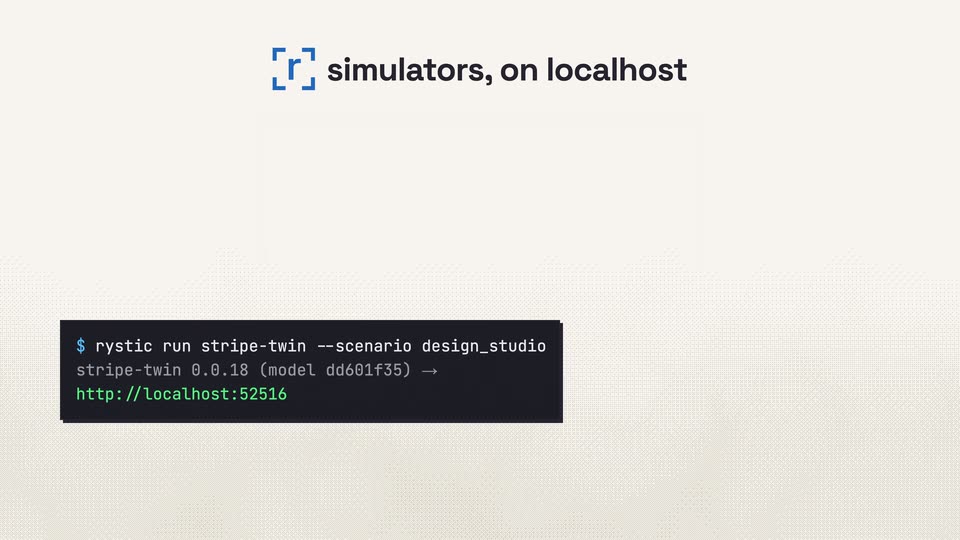
Close-up of hands typing on a laptop, a dark terminal box in the lower left types out a command character by character with a block cursor. The shot cuts to a light dotted background where the box fills in with two extra lines, the second a green URL.
On-screen text: “$ rystic run stripe-twin --scenario design_studio”, “stripe-twin 0.0.18 (model dd601f35) →”, “http://localhost:52516”
Techniques: Kinetic type
Camera: Static
A dark terminal window rests on a cream background with a fine diagonal line pattern, showing a rystic command and a localhost URL. A small blue bracket mark and the headline simulators, on localhost appear at the top center.
On-screen text: “simulators, on localhost”
Camera: Static
A flat vector laptop sits on a dotted cream background. A dark terminal card slides from the lower left into the center of the screen, then a localhost address chip slides in at the bottom.
On-screen text: “simulators, on localhost”, “localhost · 127.0.0.1”
Camera: Static
A flat laptop illustration on a dotted cream background shows a grid of service cards with uptime percentages. A bold blue headline above swaps from “simulators, on localhost” to “right on your laptop.” as the camera zooms into the screen to fill the frame with the cards.
On-screen text: “simulators, on localhost”, “right on your laptop.”
Techniques: Kinetic type, UI zoom
Camera: Push in
A flat browser window holds a 3x3 grid of test cards with logos, percentages and ticking run counters. The cards flip from blue scores to red errors, then green pass badges with checkmarks, while the headline cycles colored phrases beside a blue scan icon.
On-screen text: “Run every variation.”, “Break things.”, “Fix them.”, “Run it again.”
Techniques: Kinetic type
Camera: Static
Two men stand in a bright office, a staircase and a code-filled monitor behind them; the man on the right gestures as he speaks. The frame then flattens into a halftone dot pattern and a small Verify badge with a green check pops in at the bottom center.
On-screen text: “Verify.”
Camera: Static
A grid of small dark squares on a cream field dissolves as four blue corner brackets snap together into a square frame at center, and a pale white letter A fades in inside the frame.
Camera: Static
The Rystic logo is centered on a pale dotted background with faint contour lines. The wordmark shifts from gray to dark, then a blue boxed URL appears below it.
On-screen text: “rystic.ai”
Camera: Push in