3:23

Meet the all new Codex Cloud
OpenAI · AI · Sep 2026
Figma · Jun 2023 · 0:46 · Full motion · AI-annotated
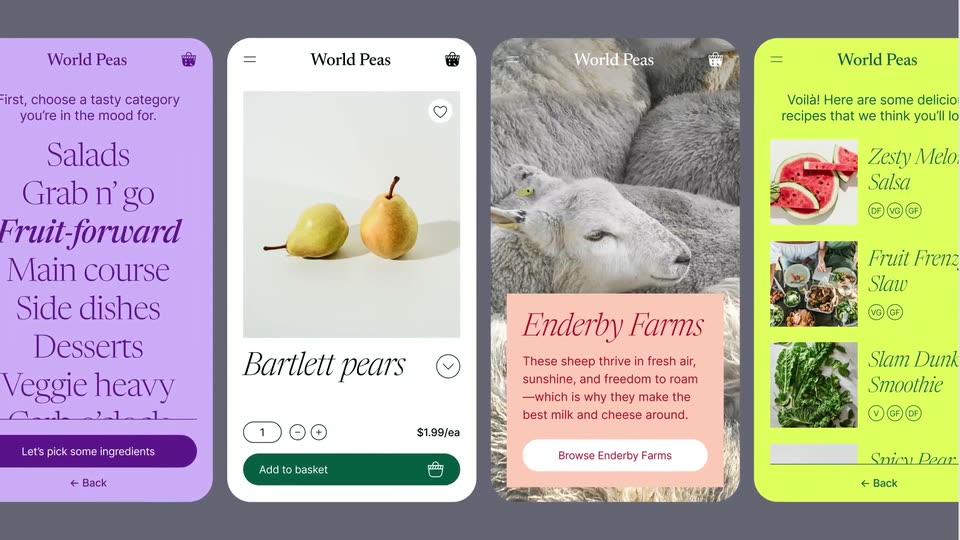
Figma’s 0:46 launch film runs 15 scenes, about 3.1 s each. The product is on screen from the first frame and 1 feature is revealed. There is no explicit call to action. Opens with a morphing logo mark, cuts through a fast flat-color montage of the World Peas design system, then slows into a cursor-led tour of the Figma panel that switches variable modes for color, screen size and language before naming the feature. Signature moves are hard cuts on a mid-tempo beat, big serif headlines over flat color fields, and a single oversized black cursor driving every interaction.
Is this your launch? to your site or press kit.
Films whose music sounds like this one, voice left out
Macadamia · Soul, R&B, Funk, Electronic, Hard Rock
Opennote · Jazz
A lime-green hexagon pops from a single point at the center of a black screen, scaling up to reveal a smaller pink hexagon nested inside it. The mark settles in the middle and holds as the clip ends.
Camera: Static
A chartreuse field with a tan octagon and a small purple hexagon ring at center holds, then the colors drop out to a black hexagon outline with a solid dot on a plain white background, the brand mark settling at center.
Techniques: Morph
Camera: Static
A black hexagon outline with a center dot morphs into a black palette icon with three dots, centered on a plain white field. The icon shrinks and slides left, turning gray, as the word color-cta types out in black to its right behind a blinking caret.
On-screen text: “color-cta”
Techniques: Morph, Kinetic type
Camera: Pan
A light design-tokens table with Name, Light and Dark columns scrolls upward. A white serif headline, Main course, scales up in the center of the frame and recedes as the rows keep moving.
On-screen text: “Main course”
Techniques: Kinetic type
Camera: Pull out
A flat mosaic of interface tiles drifts across the frame: a black strip with serif 'Veggie heavy', a green pill scaling in with 'Schedule a pick-up', a pink field with 'Enter your email', purple basket icons, and photo cards of watermelon, pear, beet and kale.
Techniques: Morph
Camera: Static
Opens zoomed on the green Schedule a pick-up button, pulls back to the full basket screen, then splits into light and dark versions as a cursor and a purple 260 × 90 selection box move between them. The light phone exits and the frame widens into a row of app screens.
On-screen text: “260 × 90”
Techniques: UI zoom, Cursor demo, Split screen
Camera: Pull out
A row of flat phone mockups showing the World Peas recipe app pans left across a gray backdrop, revealing a dark design-tool panel with layer and color controls sliding in from the right edge.
Camera: Pan
A Figma screen shows a food-app mockup on the left and the inspector panel on the right. The canvas pans as a black cursor slides from the product card to the Layer controls, and a dark tooltip reading Change variable modes appears beside the cube icon.
Techniques: Cursor demo
Camera: Push in
A design-tool screen: phone mockups of a World Peas app shift on the left as a yellow recipe list appears, while a cursor on the right hovers the hexagon icon, which turns blue after a tooltip reads Change variable modes.
Techniques: Cursor demo
Camera: Static
A blurred multi-panel interface fills the background while a sharp white card reading Layer with a blue hexagon icon stays centered. A black cursor arrow slides from the upper right down to the card's right edge.
Techniques: Cursor demo
Camera: Static
A blurred design tool workspace sits behind a dark dropdown menu. A white-outlined cursor hovers the highlighted Screen size row, opening a submenu, then selects Tablet as the framing reframes to follow the cascade.
Techniques: UI zoom, Cursor demo
Camera: Pan
A horizontal pan glides right across a row of flat phone mockups for the World Peas app, showing a pear product page, a recipe card, a green basket screen, then a peach values page with a serif tagline and two food photos.
Camera: Push in
A cursor in a design tool clicks a component icon, opens a dark menu, and selects Languages, then German. The button label on the peach canvas changes from Basket (4) to Warenkorb (4), and the view zooms out to reveal the full German webpage.
Techniques: Cursor demo, UI zoom
Camera: Pull out
On a white background, the word Variables in large black sans-serif sharpens from a soft blur, a small blue Beta pill pops in at its upper right, and the caption Available in Figma fades in below from light gray to black.
On-screen text: “Variables”, “Available in Figma”, “Beta”
Camera: Static
A title card shows “Variables” with a “Beta” badge and “Available in Figma” below. It cuts to a Figma canvas: a selection box labeled “Figma_Logo” frames the mark, a black cursor moves over it, a blue circle pops in, then the box and label fade, leaving the logo centered.
On-screen text: “Variables”, “Beta”, “Available in Figma”
Techniques: Cursor demo
Camera: Static