1:43

Meet the new Replit Canvas
Replit · Developer tools · May 2026
Exodus’s 2:25 launch film runs 51 scenes, about 2.9 s each. The product is on screen from the first frame and 8 features are revealed. The call to action lands at 1:59 (82% in), over a voiceover. The video opens with a slow 3D reveal of the wallet phone, then runs a tight feature tour in which each feature gets a bold white title card over alternating 3D renders and live-action finger taps, and ends on a starfield logo lockup. Its signature moves are the slow 3D phone rotations, the word-by-word title reveals with motion blur, and the constant purple neon lighting.
Is this your launch? to your site or press kit.
Replit · Developer tools · May 2026
Framer · Design · Oct 2025
Rive · Design · Jan 2026
Films whose music sounds like this one, voice left out
Arcus Power · Electronic
Microsoft · Upbeat corporate electronic
DJI · Modern electronic
A smartphone tilted in 3D perspective floats against a dark backdrop with a purple glow. Its screen shows a crypto portfolio: a circular balance chart reading $1,460.91 above a list of coins, while a purple ring pulses around the Bitcoin icon.
Techniques: 3D mockup
Camera: Static
A front-facing phone mockup floats on a dark background, its crypto wallet showing a balance ring and asset list. A large lavender headline, The new Exodus mobile, fades in across the screen while the phone and text drift apart, giving a slow parallax between the two layers.
On-screen text: “The new Exodus mobile”
Techniques: Kinetic type, 3D mockup, Parallax
Camera: Push in
A smartphone displays a crypto portfolio with a circular balance ring and asset rows. A lavender headline overlays the screen, then fades as the phone rotates into a tilted 3D view against a dark purple background.
On-screen text: “The new Exodus mobile”
Techniques: 3D mockup
Camera: Pan
A tilted phone mockup in 3D perspective shows the wallet portfolio screen against a dark purple glow. The shot racks from soft focus to sharp, settling on the circular total above the list of coins.
Techniques: 3D mockup
Camera: Push in
A phone lies on a dark wood table under a purple glow. On its screen a gold Bitcoin hexagon scales up inside a ring of radiating dashes, above the status line and a purple Continue button.
Techniques: 3D mockup
Camera: Static
A smartphone in 3D perspective against a purple gradient shows a crypto app: a large multicolored ring around the balance $1,473.44 and a Swapping pill. The camera drifts to center the phone as an Ethereum row slides up at the bottom.
Techniques: 3D mockup
Camera: Pan
A tilted smartphone mockup on a dark maroon backdrop shows a crypto portfolio with a circular gauge and coin list. The frame pulls back to reveal the full device, then the screen switches to a swap view where amounts scale in.
Techniques: 3D mockup
Camera: Static
A dark phone mockup tilts in 3D perspective. A translucent provider-selection sheet slides in from the right over a crypto portfolio screen showing a balance ring and a coin list.
Techniques: 3D mockup
Camera: Static
A smartphone stands upright on a wooden table, framed by pink and purple neon tubes. Its screen shows a BTC buy screen with a quantity slider and a Continue button. Faded app panels float in the dark background. The shot is static.
Techniques: 3D mockup
Camera: Static
A phone mockup floats in a purple void; a payment screen showing a Receive amount dissolves into a staking dashboard, the Total Earned ring and stat cards resolving into focus.
Techniques: 3D mockup
Camera: Static
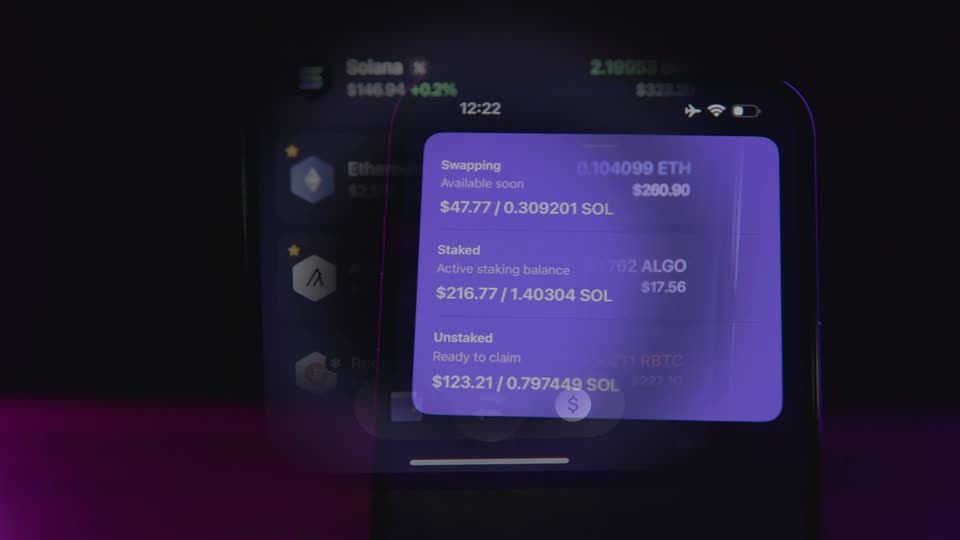
A dark phone mockup in 3D perspective displays a wallet list with Swapping, Staked and Unstaked rows. Behind it, a larger blurred balance card fades in under purple rim light.
Techniques: 3D mockup
Camera: Static
A phone angled on a dark wooden table shows a crypto portfolio list with a three-icon bottom bar. A white caption fades in over the screen, holds, then dissolves out.
On-screen text: “New navigation bar”
Techniques: 3D mockup
Camera: Static
A 3D phone mockup on a purple background tilts from an angled view to front-on as a finger taps the Buy/Sell button. The screen switches to a buy view with a dollar icon, a balance row and a numeric keypad.
Techniques: 3D mockup
Camera: Pan
Close-up of a phone screen. A finger taps the folder icon in a bottom bar holding folder, swap, and dollar buttons. The screen then fills with a list of crypto assets, Algorand and Rootstock BTC, each with a price and change.
Camera: Static
A close-up of a smartphone on a wooden table. A finger taps the swap icon in the bottom navigation bar, and the screen transitions from a portfolio overview to a token swap interface.
Camera: Static
A close-up of an angled smartphone on a dark wooden table shows a crypto swap screen with ETH and OSMO fields. A thumb slides in from the bottom right and taps the dollar button in the lower bar.
Camera: Static
A close-up of a smartphone on a dark wooden table shows a crypto app's Buy/Sell screen. A finger taps the Sell toggle, the slider knob glides to the MAX end, and thin white lines radiate outward from the center as the amount flips to 0 and Receive $0.
Techniques: Particles
Camera: Static
A smartphone on a dark wooden table, edged with purple rim light, shows a crypto app. The BTC buy screen with a large yellow amount crossfades into a portfolio screen listing a total balance and asset rows.
Techniques: 3D mockup
Camera: Static
A hand holds a phone showing a crypto balance, then releases it to center the device as the screen switches to a menu grid. The white headline 'Simple asset management' animates in across the frame with motion blur against a purple-lit backdrop.
On-screen text: “Simple asset management”
Techniques: Kinetic type
Camera: Static
A phone on a wooden table shows the Exodus app under purple light. A finger taps the Assets tile and the screen switches to a coin list. The white headline stays fixed across the center throughout.
On-screen text: “Simple asset management”
Camera: Static
A phone mockup stands upright on a dark wooden table under purple rim light, its screen showing a scrollable crypto asset list. A white headline spans the middle of the frame, static throughout the locked-off shot.
On-screen text: “Simple asset management”
Techniques: 3D mockup
Camera: Static
A phone on a dark table under purple light shows a crypto wallet's asset screen; a blurred headline band wipes out at the start, then the camera zooms into the pending swap rows, and a finger swipes up to reveal the total balance and chart.
Techniques: UI zoom
Camera: Push in
A hand holds a phone showing a crypto portfolio ring with a dollar total. A finger taps the search icon at the top, and the screen switches to a search bar above a list of network tokens with prices and green arrows.
Camera: Static
A phone mockup in 3D perspective sits against a purple backdrop as a token list refreshes while Sol is typed into the search bar. The white headline Browse and filter reveals across the center through a horizontal blur mask.
On-screen text: “Browse and filter”
Techniques: 3D mockup, Masking, Kinetic type
Camera: Static
A close-up of a phone screen shows a token list with Solana, Orca and Official Trump rows beneath a search bar reading Sol. A finger taps the Solana row while the caption Browse and filter fades out; the camera slowly pushes in.
On-screen text: “Browse and filter”
Camera: Static
A phone screen fills the frame against a purple gradient. A token list (Solana, Orca, OFFICIAL TRUMP) crossfades into a second list (USDC, Solaryn Dollar, JOE JOE) while the search field text changes from Sol to USDC.
Camera: Static
A phone in 3D perspective on a purple-lit wooden set shows a wallet asset list scrolling as a hand swipes the screen. White text reads Add, import, clean-up tokens, entering word by word across the frame.
On-screen text: “Add, import, clean-up tokens”
Techniques: Kinetic type, 3D mockup
Camera: Static
A smartphone stands upright on a wooden desk bathed in purple light, its screen showing a long list of crypto tokens that scrolls upward. A finger enters from the lower left and taps a row mid-scroll.
On-screen text: “Add, import, clean-up tokens”
Camera: Static
A tilted iPhone floats over a dark wooden surface under purple light, its screen showing a token list. Blurred white words drift horizontally behind the device, sliding right across the frame.
On-screen text: “Add, import, clean-up”, “import tokens”, “clean”
Techniques: 3D mockup, Kinetic type, Parallax
Camera: Static
A smartphone stands upright on a dark table between two pink and purple neon light tubes. A hand reaches in from the upper right and taps the plus icon at the top of the wallet's assets list.
Camera: Static
A phone on a neon-lit table shows the wallet's Add Token screen, which crossfades in from a network list. A finger taps the selector, switches to Solana, and types Ggo, scrolling a list of matching tokens.
Techniques: Cursor demo
Camera: Static
A hand holds a phone against a dark backdrop lit by pink and purple neon bars. The screen shows a token search list as a finger taps it, then the view switches to a staking dashboard with a circular Total Earned chart and APY cards.
Camera: Static
A phone in 3D perspective displays a staking dashboard. The frame pulls back from a close-up of the earnings ring to the whole device, while the words New, portfolio and views slide in around it against a dark purple background.
On-screen text: “New”, “portfolio”, “views”
Techniques: UI zoom, 3D mockup, Kinetic type
Camera: Push in
A smartphone stands on a dark table between two vertical magenta neon bars, its screen showing a portfolio gauge and asset list. A finger taps the screen, switching to a staking detail view, as the white headline blurs into place across the center.
On-screen text: “New portfolio views”
Techniques: Kinetic type
Camera: Static
A dark phone mockup tilts in 3D on a purple-lit stage, its staking app showing live earnings. A large white headline sits across the screen, then clears to reveal the full interface.
On-screen text: “New portfolio views”
Techniques: 3D mockup
Camera: Static
Opening on a cross-dissolve, a phone sits on a dark table flanked by pink and purple neon tubes. A finger taps its staking screen, a Claim confirmation dialog appears, the finger taps Claim, and the view dissolves into a portfolio chart.
Camera: Static
A real phone stands on a dark, purple-lit table showing a crypto wallet. The headline blurs in from below and sharpens at center while a hand taps the screen, switching the displayed chain from Ethereum to Base.
On-screen text: “Multichain navigation”
Techniques: Kinetic type
Camera: Static
A smartphone stands on a wooden table in a dark room lit by pink and purple neon bars, a blurred hand reaching in. The camera pushes in from the whole device to a close-up of the wallet screen, which switches from the Ethereum view to a USDC balance list by network (Solana, Ethereum, BNB, Avalanche). A large blurred white heading 'Multichain navig' fades out over the phone in the first second.
On-screen text: “Multichain navig”
Techniques: 3D mockup, UI zoom
Camera: Pull out
A real phone on a dark, purple-lit set shows a Bitcoin-to-Solana swap screen in close-up. The white headline Smarter swaps holds centered over the display, then a hand enters from the right and taps the screen.
On-screen text: “Smarter swaps”
Camera: Static
Against a dark purple-lit background, a phone shows a Select Asset list while the headline “Smarter swaps” fades out. The list scrolls to chain-specific USDC rows, and a finger taps the Solana entry.
On-screen text: “Smarter swaps”
Camera: Static
A smartphone in 3D perspective sits on a dark stage lit with magenta. The app screen plays a swap flow: the form fades out, a hexagonal swap icon animates, the status changes to Receiving USDC!, a USDC coin drops into the hexagon, and the screen settles on the wallet home.
Techniques: 3D mockup, Morph
Camera: Static
A front-facing phone on a dark purple backdrop cycles its screen from a USDC notification to the Exodus logo to a portfolio list. A bold white headline wipes across the middle as it builds word by word.
On-screen text: “Faster performance”
Techniques: Kinetic type
Camera: Static
A dark smartphone mockup in 3D perspective stands centered over a marbled purple backdrop, its screen showing a crypto portfolio with a circular balance ring and an asset list. Large white text sits behind the device.
On-screen text: “Faster performance”
Techniques: 3D mockup
Camera: Static
A tilted smartphone in 3D perspective shows a crypto app with a Bitcoin price and a yellow line chart on a dark screen. The camera slowly tilts down the screen to reveal the BTC balance and activity list.
Techniques: 3D mockup
Camera: Pan
A tilted smartphone mockup sits on the right, its screen showing a crypto portfolio with a circular balance and an asset list. The background fades from bright white to a dark purple gradient, bringing the 3D-angled device into focus.
Techniques: 3D mockup
Camera: Static
A smartphone mockup on a dark surface under purple light tilts from a diagonal angle to face the camera. Its screen shows a portfolio total of $1,479.87 inside a ring chart above a list of crypto assets.
Techniques: 3D mockup
Camera: Static
A tilted phone mockup in 3D perspective floats against a dark background with a soft purple glow. The screen shows a crypto portfolio with a balance circle and asset list, then the phone rotates to reveal a BTC buy screen with a price and slider.
Techniques: 3D mockup
Camera: Static
A tilted phone in 3D perspective shows a crypto app; the buy slider drags and the price updates, then the camera pulls back to reveal the device standing on a wooden table under pink neon tubes as the screen switches to the sell view.
Techniques: 3D mockup
Camera: Static
A smartphone with a dark crypto portfolio screen lies on a black table lit by magenta neon. The device rotates upright as the total value ticks down, then the camera pushes in slowly on the circular balance gauge and the coin list below it.
Techniques: 3D mockup, UI zoom
Camera: Push in
A pink zigzag line drifts from the left edge toward the center of a star-dusted gradient, soft and defocused. As it settles, the shape and the background shift from magenta-purple to deep blue with a top glow.
Camera: Static
A purple-to-blue gradient hexagonal mark sits centered above the white word EXODUS on a dark blue starfield. The lockup holds still for the duration, then fades out to leave the empty gradient.
On-screen text: “EXODUS”
Camera: Static