
0:49
Explore
Ellipsus - We can’t bring AO3 back online, but we CAN give you something else yo
Ellipsus · Nov 2026 · 0:40 · Full motion · AI-annotated
- Length
- 0:40
- Scenes
- 22 · 1.8 s avg
- Product on screen
- 0:13
- Features shown
- 5
- Call to action
- 0:29 · 72%
- Voiceover
- Yes
- Views
- 1.1M on X
as of November 22, 2026
00:00:00 / 00:40:09
- Length
- 0:40
- Scenes
- 22 · 1.8 s avg
- Product on screen
- 0:13
- Features shown
- 5
- Call to action
- 0:29 · 72%
- Voiceover
- Yes
- Views
- 1.1M on X
as of November 22, 2026
Ellipsus’s 0:40 launch film runs 22 scenes, about 1.8 s each. The product shows up at 0:13 and 5 features are revealed. The call to action lands at 0:29 (72% in), over a voiceover. The video is built as a run of short color-field beats, each pairing a self-drawing line-art doodle with a phone mockup and one serif keyword, then shifting to a dark stage for the offline pitch, a free pricing line, and a store-badge call to action. Its signature moves are the hand-drawn doodles that draw themselves in, the sliding high-contrast serif type, and the hard background color swaps that punctuate every feature change.
No filming indicatedEstimated needs: 5 capture groups — your screens or recordings · 1 official logo — reused across the film · 10 3D passages — build or supply
Is this your launch? to your site or press kit.
More like this


Ellipsus - We can’t bring AO3 back online, but we CAN give you something else yo, scene by scene
· 22 scenes as text
01 · Hook · 0:00–0:01
On a plain white background, the serif phrase “Let's face” sits centered in light gray, then the word “it” slides in to complete the line as the text darkens.
On-screen text: “Let's face it”
Techniques: Kinetic type
Camera: Static
02 · Hook · 0:01–0:02
The serif headline “Let's face it” slides left off a white frame as a thin black squiggle line draws across, and a front-facing phone mockup showing a writing app with keyboard slides in from the right.
On-screen text: “Let's face it”
Techniques: Kinetic type
Camera: Pan
03 · Feature reveal · 0:02–0:05
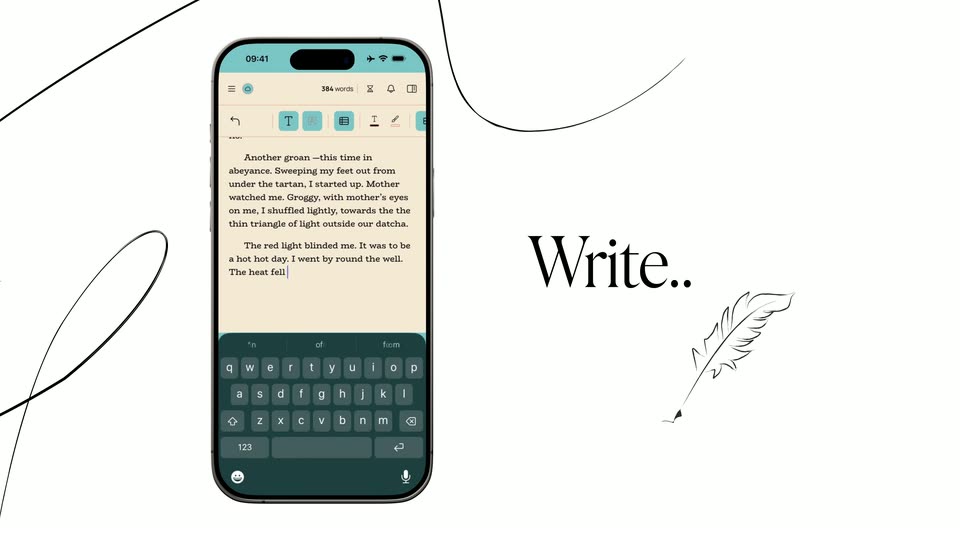
A tilted phone mockup shows a writing app on a white background as the serif word Write types in beside a line-drawn quill. The background turns blue, the screen switches to a comment panel, and the word Collaborate appears with a paper airplane and a cursor.
On-screen text: “Write..”, “Collaborate”
Techniques: 3D mockup, Kinetic type
Camera: Static
04 · Feature reveal · 0:05–0:07
A flat iPhone mockup on a light blue field shows a writing app with an open menu; its comment thread scrolls to reveal a sketch image. To the right, the serif word Collaborate stays static above a hand-drawn underline, flanked by two sketched cursor arrows.
On-screen text: “Collaborate”
Camera: Static
05 · Feature reveal · 0:07–0:11
A 3D phone mockup on a pink gradient shows a document diff, then a merge dialog, beside a serif 'Edit' label circled in red next to a magnifying-glass doodle. The scene warms to cream as the label becomes 'Share' with a paper-airplane sketch.
On-screen text: “Edit”, “Share”
Techniques: 3D mockup
Camera: Static
06 · Feature reveal · 0:11–0:13
A flat phone mockup on the left shows an article page whose text scrolls upward inside the browser. On the right, the word Share sits in large serif type above a hand-drawn paper airplane and a spiral doodle that draws itself in along a dashed flight path.
On-screen text: “Share”
Camera: Pan
07 · Feature reveal · 0:13–0:13
A tilted phone mockup in a browser shows a letter, with a hand-drawn signal fan, scribble, paper airplane and the serif word Share beside it. The phone clears and the sketch settles into a centered hand-drawn wifi icon on white.
On-screen text: “Share”
Techniques: 3D mockup
Camera: Static
08 · Product intro · 0:13–0:15
A red line-art logo of a quill pen with radiating arcs is drawn on a plain white background.
Camera: Static
09 · Feature reveal · 0:15–0:18
A flat iPhone mockup sits centered on white, its screen showing a green app header and a list with a Beta reading card over a floral background. A black line-drawn quill with a wavy line draws itself in on the left as the phone fades in from dim.
Camera: Static
10 · Feature reveal · 0:18–0:19
A white background frames an iPhone in 3D perspective showing Control Center; the airplane-mode toggle flips to orange while a hand-drawn sketch of a plug and steaming cup animates at left.
Techniques: 3D mockup
Camera: Static
11 · Feature reveal · 0:19–0:20
A tilted iPhone mockup on a dark background shows the Control Center, then rotates to a flat front view of a writing app with an active keyboard. The white serif word “Write” fades in on the right.
On-screen text: “Write”
Techniques: 3D mockup
Camera: Pull out
12 · Feature reveal · 0:20–0:21
A flat front-facing phone mockup sits left on a dark field, its screen crossfading from a compare-changes view to a library list. On the right, a large white serif headline reads Write Edit, then a grey Navigate fades in beneath.
On-screen text: “Write”, “Edit”, “Navigate”
Techniques: Kinetic type
Camera: Static
13 · Feature reveal · 0:21–0:26
A front-facing phone on a dark background shows the app's document list, then a create-document sheet slides up while a title is typed into the field. To the right, stacked white serif words sit above a purple handwritten script, both held static.
On-screen text: “Write”, “Edit”, “Navigate”, “Offline!!”
Camera: Static
14 · Pricing · 0:26–0:27
A flat iPhone mockup on the left shows a document form with the keyboard open. On the right, the black serif headline “Free of charge” wipes in from the left while a thin blue line draws under the first word.
On-screen text: “Free of charge”
Techniques: Kinetic type, Masking
Camera: Static
15 · Pricing · 0:27–0:29
A flat iPhone mockup showing a document-creation form and keyboard sits left of a serif headline with a blue underline stroke. The phone slides off the left edge as the headline and underline glide to the center of the white frame.
On-screen text: “Free for all”
Techniques: Kinetic type
Camera: Pan
16 · CTA · 0:29–0:29
A black wordmark fills a white frame in extreme close-up, a thin light-blue squiggle trailing at the left. The camera drifts slowly left across the bold letterforms, ending on a vertical stroke at the right edge.
On-screen text: “èllip?us”
Camera: Static
17 · CTA · 0:29–0:31
A white end card holds the serif wordmark èllip?us centered, with two black app-store badges beneath it. The wordmark eases from gray to black over the first second while the frame stays locked.
On-screen text: “èllip?us”, “Download on the App Store”, “GET IT ON Google Play”
Camera: Static
18 · CTA · 0:31–0:33
A white end card holds the black èllip?us wordmark centered, with two black App Store and Google Play badges below it. The frame stays static for the full duration.
On-screen text: “èllip?us”, “App Store”, “Google Play”
Camera: Static
19 · CTA · 0:33–0:35
A black serif wordmark sits centered on a plain off-white field, with two black App Store and Google Play badges placed beneath it. The frame is locked-off and holds still for the full shot.
On-screen text: “App Store”, “Google Play”
Camera: Static
20 · Outro · 0:35–0:35
A black stage with thin colored arcs holds a left-aligned white headline and a pill label, while a phone mockup tilts in 3D on the right, its writing app showing a Chapter 5 page and a floating drafts list. The composition stays locked and static.
On-screen text: “ELLIPSUS MOBILE APP”, “Unlimited documents and drafts, all in one place online or offline”, “App Store”, “Google Play”
Techniques: 3D mockup
Camera: Static
21 · Outro · 0:35–0:37
A dark field of thin colored orbital arcs and star glyphs holds a 3D-tilted phone on the right showing a writing app. Three white draft cards overlap its left edge. On the left, a white pill label and a large serif headline sit static.
On-screen text: “ELLIPSUS MOBILE APP”, “Unlimited documents and drafts, all in one place online or offline”
Techniques: 3D mockup
Camera: Static
22 · Outro · 0:37–0:40
A tilted phone mockup in 3D perspective shows a writing app on the right, with three draft cards floating beside it. On the left, a white pill label and a large white serif headline sit on a black field crossed by thin colored orbit lines.
On-screen text: “ELLIPSUS MOBILE APP”, “Unlimited documents and drafts, all in one place online or offline”
Techniques: 3D mockup
Camera: Static