3:51
Explore
00:00:00 / 01:35:21
- Length
- 1:35
- Scenes
- 58 · 1.7 s avg
- Product on screen
- 0:00
- Features shown
- 3
- Voiceover
- Yes
- Views
- 178K on YouTube
as of November 27, 2026
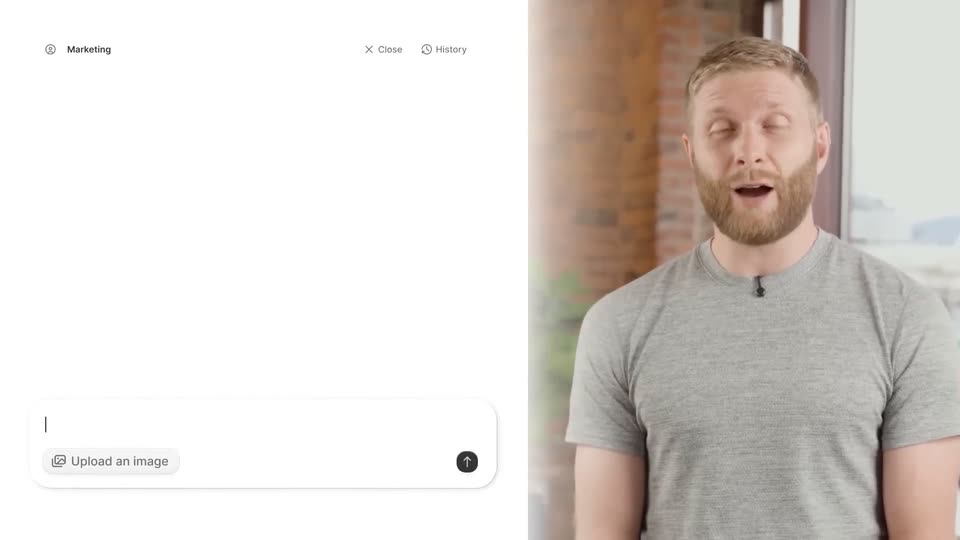
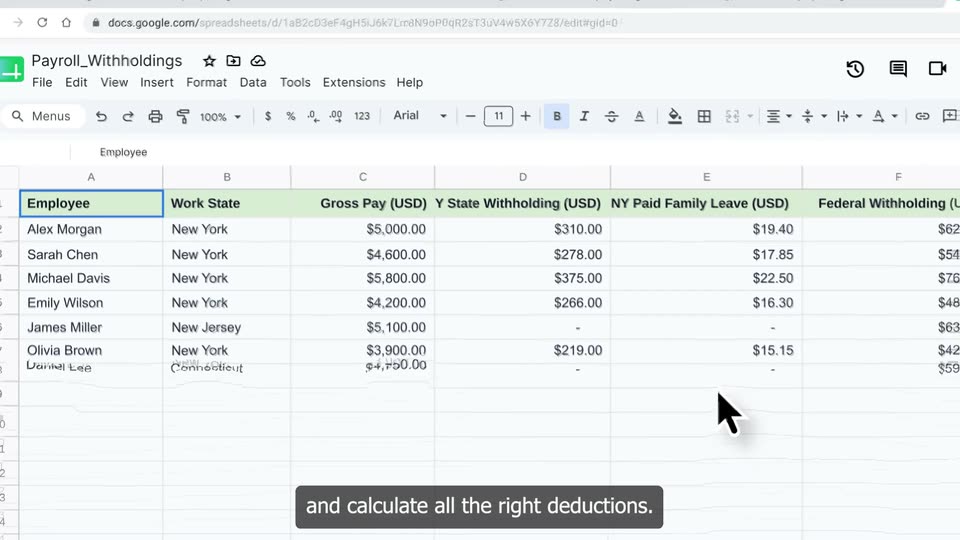
Durable’s 1:35 launch film runs 58 scenes, about 1.7 s each. The product is on screen from the first frame and 3 features are revealed, with social proof. There is no explicit call to action; a voiceover carries the film. The video alternates locked-off talking-head shots of the founder in a brick loft with fast 3D and 2D product mockups that resolve from pixelated mosaics into sharp pages, cutting on a steady 139 bpm pulse. Its signature moves are the typed prompt that triggers a cascade of generated sites, the floating 3D website cards that spin and push in, and counting-up metrics that land the pitch.
Footage neededEstimated needs: 5 capture groups — your screens or recordings · 1 official logo — reused across the film · 7 filmed passages — shoot, supply or replace · 2 graphic passages — draw or supply · 12 3D passages — build or supply
Is this your launch? to your site or press kit.
More like this


Similar soundtrack
Films whose music sounds like this one, voice left out
2:26

Ayush S - We’ve raised $85M for this moment. Introducing Warp 2.0: The first
Warp · Electronic, Corporate
1:50

Adam Guild - Introducing Grader: the world's first AI CMO for restaurants. It’s h
Owner · Upbeat electronic with cinematic elements
1:36
ben - Introducing Contra Payments. The first payments platform that lets y
Contra Payments · Modern electronic
The AI Business Builder That Replaces Your 9-5 | Durable, scene by scene
· 58 scenes as text
01 · Product intro · 0:00–0:01
A bearded man in a gray t-shirt sits by a window in a brick-walled room, speaking to camera. A white serif name caption, James Clift over Founder, scales in at the lower left.
On-screen text: “James Clift”, “Founder”
Camera: Static
02 · Product intro · 0:01–0:02
On a dark gray background, a white arc draws itself with a red glowing tip, then snaps into the full Durable mark and wordmark, which settle centered with a slight extruded depth. The camera stays locked off while the logo completes its reveal.
Techniques: Masking, Light sweep
Camera: Static
03 · Product intro · 0:02–0:03
A bearded man in a gray T-shirt stands in a brick loft with tall windows, speaking to camera and clapping his hands once. The frame stays locked off as the word Durable slides in across the shot.
On-screen text: “Durable”
Techniques: Kinetic type
Camera: Static
04 · Demo · 0:03–0:04
A white rounded shape wipes up from the bottom, covering a blurred brick-wall set with a person's head, then a prompt input bar fades in centered, showing the letter B with a blinking red caret and a circular send button on the right.
Techniques: Masking
Camera: Static
05 · Demo · 0:04–0:07
A white prompt card types out the sentence, the frame pushing in as it fills, then the card flips in 3D to reveal its plain gray back. A blinking orange caret follows the typed characters.
Techniques: Kinetic type, 3D mockup
Camera: Static
06 · Demo · 0:07–0:07
A dark tablet in 3D perspective tilts level on a white background as a black mask lifts off its screen, revealing a yellow card with a serif headline and a photo of a smiling woman, with a smaller floating photo card at the lower right.
Techniques: 3D mockup, Masking
Camera: Pull out
07 · Demo · 0:07–0:08
A browser window tilted in 3D floats on a white background. Its content cuts between three generated homepages in sequence: a cleaning service, an artisan goods shop, and a wellness brand.
On-screen text: “Photos that”
Techniques: 3D mockup
Camera: Static
08 · Demo · 0:08–0:09
A website mockup card floats in 3D perspective on a white background and spins around its vertical axis. It turns from a front page with a car photo and headline to a dark green back, then a light back with a logo and menu bar.
Techniques: 3D mockup
Camera: Static
09 · Demo · 0:09–0:09
A tilted laptop mockup floats on a white surface, its screen showing a dark green garden website. The hero photo of a man among flowers resolves from a pixelated mosaic to full clarity while the headline settles into place.
Techniques: 3D mockup
Camera: Static
10 · Demo · 0:09–0:11
A bearded man in a gray t-shirt sits in a brick loft with tall windows, speaking to camera and gesturing with his hands. Over him, three text lines appear: the first scales in, the others hold still.
On-screen text: “Create your”, “dream garden with”, “vibrant blooms.”
Techniques: Kinetic type
Camera: Static
11 · Demo · 0:11–0:12
A white website-builder panel with a large serif headline slides in from the left and widens, overlapping a live-action shot of a bearded man in a gray tee looking down at his phone.
Techniques: Split screen
Camera: Pan
12 · Demo · 0:12–0:14
A white product interface zooms in toward a rounded prompt box. A serif headline and subheading sit above while the typed prompt fills the box letter by letter, ending on a blinking caret beside a dark Start for free button.
Techniques: UI zoom
Camera: Push in
13 · Demo · 0:14–0:15
Macro close-up of a dark pill button reading Start for free with an arrow, centered on a white surface. The shot pulls focus from a blur until the button and a grid of video thumbnails behind it sharpen, while a white-outlined cursor arrow glides in and hovers over the button.
Techniques: Cursor demo
Camera: Static
14 · Demo · 0:15–0:17
A field of website mockups floats in 3D perspective over a light gray space, drifting and blurring at the edges. The camera pushes in on a pink and a dark window as their serif headlines scale into place.
Techniques: 3D mockup, UI zoom, Parallax
Camera: Push in
15 · Demo · 0:17–0:18
A rounded website mockup card sits centered on a light gray background, outlined in pink with a bounding-box coordinate readout in the corner. The card zooms forward as its blurred hero image of a car at a house sharpens, the serif headline and two buttons settling into place.
On-screen text: “Marketing that”, “holds up”
Techniques: Kinetic type, UI zoom
Camera: Push in
16 · Demo · 0:18–0:19
A website hero section resolves from a blurred, pixelated mosaic into a sharp photo of a house and dark SUV. The white serif headline scales in on the left while two buttons slide in at the bottom right.
Techniques: Masking
Camera: Pan
17 · Demo · 0:19–0:21
A generated detailing website scrolls from a hero banner with a car photo and two buttons down to three service cards, their images resolving from gray pixels. A right-hand Durable AI panel fills in build steps with green checkmarks and a blinking caret.
Camera: Pull out
18 · Demo · 0:21–0:24
A split view shows a car detailing website assembling on the left while a Durable AI task list ticks off steps on the right. The page scrolls from a hero headline over a car interior photo to a three-card section, then the frame zooms in on the cards.
Techniques: Split screen, UI zoom
Camera: Pan
19 · Demo · 0:24–0:28
A 3D carousel of website page mockups rotates on a white background, bringing a yellow “Modern cleaning” page flat to the front, then the view pushes in to the “Detail options” section as a white SEO score card slides in from the right.
Techniques: 3D mockup, UI zoom
Camera: Push in
20 · Demo · 0:28–0:30
A car-detailing website scrolls vertically through service cards and a van photo on a light gray stage. White callout panels fade in at the edges: an SEO score panel with two circular gauges, a Branding swatch panel, and a Typography font list.
Techniques: Parallax
Camera: Pull out
21 · Demo · 0:30–0:31
A blurred website page fades to white, isolating a dark rounded Launch button in the center. A cursor slides in from the right and clicks it, and the button compresses slightly on press.
Techniques: Cursor demo
Camera: Pull out
22 · Demo · 0:31–0:32
A dark rounded pill button reading Launch sits centered on a plain off-white field. A black arrow cursor with a white outline rests on it and clicks, the button flashing darker on each press.
Techniques: Cursor demo
Camera: Static
23 · Feature reveal · 0:32–0:33
A white chat interface fills the left side as a cursor clicks the black Launch button, then a marketing prompt appears in the input field while a bearded presenter talks on the right; the panel slides out to reveal him full frame.
Techniques: Cursor demo, Split screen
Camera: Static
24 · Feature reveal · 0:33–0:35
A white chat screen: a bearded man in a gray shirt fades out on the right as the camera zooms into the bottom prompt bar, where the question is typed out character by character.
Techniques: UI zoom
Camera: Static
25 · Feature reveal · 0:35–0:39
A cursor clicks send on a typed chat prompt, which pops up as a right-aligned bubble. A progress card fills and its checklist items tick off one by one as the view zooms out to reveal a comparison table sliding in below.
Techniques: Cursor demo, UI zoom
Camera: Pull out
26 · Feature reveal · 0:39–0:40
A white report screen scrolls down past a checked task list into a competitor table and a pricing donut chart, then reveals a bar chart. A caption line scales in over the interface while the voiceover narrates the plan being built.
On-screen text: “How do I hit $10K in 30 days? Make no mistakes.”
Techniques: Kinetic type, UI zoom
Camera: Static
27 · Feature reveal · 0:40–0:41
A light analytics dashboard fills the frame, a competitor table on the left beside a pricing donut chart and a brand bar chart on the right. The whole panel drifts upward with soft motion blur.
Camera: Static
28 · Feature reveal · 0:41–0:42
A wide interface table pans left to right across the pricing, pros-and-cons, and specialization columns, then settles on an infographic panel with a donut and bar chart. A red 'Critical Issue' tooltip pops in beside the luxury German cars row and fades out.
Camera: Push in
29 · Feature reveal · 0:42–0:44
A white analytics dashboard shows a donut chart titled 'Pricing' with a red-outlined tooltip, 'Critical issue High-Margin Segment Vulnerability', floating over it. A cursor glides in from the lower right and hovers at the chart's edge; a red 'Luxury German cars' line sits on the left.
Techniques: Cursor demo
Camera: Push in
30 · Feature reveal · 0:44–0:45
A website mockup reveals itself as a white panel wipes open from left to right, exposing an Interior Detail pricing page. On the left, a photo of a red leather car interior slides in, while the heading and a price list fade in on the white panel.
Techniques: Masking
Camera: Pan
31 · Feature reveal · 0:45–0:46
A website view scrolls down past a sticky header, revealing a hero photo of two technicians applying clear film to the hood of a blue car, with a red leather seat and a yellow Book Now button visible above.
Camera: Pan
32 · Feature reveal · 0:46–0:47
A green BMW front view sits in a dark 3D studio lit by vertical light bars, framed by a red border. The car scales up and down inside a website layout whose nav bar and footer slide into place above and below it.
On-screen text: “ESOTERIC”
Techniques: 3D mockup, Kinetic type, UI zoom
Camera: Pan
33 · Feature reveal · 0:47–0:48
A car detailing website page scrolls down slightly, clearing a red banner, and three pricing cards align in a row. Each card pairs a detailing photo with a service checklist, and a Compare packages button peeks in at the right edge.
Camera: Pull out
34 · Feature reveal · 0:48–0:52
Two browser windows of a car-detailing website sit side by side on a light gray background: a three-column pricing list left, a house-and-car hero right. A dark circular magnifier with a cursor grows over the right panel, then the scene blurs out.
Techniques: Split screen, Cursor demo, Masking
Camera: Pull out
35 · Feature reveal · 0:52–0:53
A vertical list of feature labels with line icons scrolls up on a pale background as a cursor rests on the Studio row. A browser window showing a house website slides in from the bottom edge.
Techniques: Cursor demo
Camera: Pan
36 · Feature reveal · 0:53–0:56
A website mockup for a car detailing service rotates in 3D perspective against a white background. The hero image cycles from a modern house to a white sports car, while a white Studio panel with toggles sits in the lower foreground.
Techniques: 3D mockup
Camera: Push in
37 · Feature reveal · 0:56–0:56
A 3D-tilted mockup of a car detailing website scrolls down past a hero banner into a packages grid, while a flat Studio panel in the foreground cycles its task list from generating visuals to optimizing conversions.
Techniques: 3D mockup
Camera: Pan
38 · Feature reveal · 0:56–0:58
A tilted webpage mockup shows a car-detailing package grid with a floating Studio panel listing styling options. The three photo tiles resolve from a pixelated mosaic into sharp images of car interiors and a blue car.
Techniques: Morph
Camera: Pull out
39 · Feature reveal · 0:58–1:00
A white conversion-rate card fades in over a blurred grid of photos, its line chart rising with a purple-to-green fill and a dark Change went live tooltip; the value counts up, then it cuts to a bearded man in a gray tee gesturing in a brick loft.
Camera: Push in
40 · Feature reveal · 1:00–1:02
A bearded man in a gray t-shirt sits in a brick-walled room beside a bright window, gesturing with his right hand while speaking to the camera. A potted plant stands in the soft-focus background.
Camera: Static
41 · Feature reveal · 1:02–1:05
A tilted laptop mockup on a white background eases upright as the camera pushes in on its screen, showing a detailing site with a black Mustang and serif headline. An orange hand cursor taps Book a detail and a New Customer pill slides in.
On-screen text: “New Customer”
Techniques: 3D mockup, UI zoom, Cursor demo
Camera: Push in
42 · Feature reveal · 1:05–1:06
A flat Discoverability dashboard fills the frame. A circular progress ring counts up from 20 to 23 out of 100 while the layout settles with a slight zoom. The left sidebar and right checklist stay static.
Techniques: UI zoom
Camera: Push in
43 · Feature reveal · 1:06–1:07
A white card on a pale gray field lists AI visibility rankings under a ChatGPT header, the third row flagged by a red warning pill. The card morphs into a ChatGPT search bar with a model label and input field while the warning pill stays put.
Techniques: Morph
Camera: Static
44 · Feature reveal · 1:07–1:10
A white ChatGPT input field on a plain background types out the query as the user searches. The page then scrolls, the input box slides to the top, and a list of mobile detailing businesses fades in below it.
Camera: Pan
45 · Feature reveal · 1:10–1:11
A white list of car-detailing businesses with short descriptions scrolls upward, lines sliding off the top as new entries enter from the bottom. Small gray tag chips sit beside some names.
Camera: Pan
46 · Feature reveal · 1:11–1:13
A white screen holds a small block of text at the top, then cuts to a bearded man in a gray t-shirt speaking to camera against a brick wall and a bright window.
Camera: Push in
47 · Feature reveal · 1:13–1:14
A website builder editor shows a hero page with a black car and the line Mobile detailing, done right. The canvas reframes from a wide desktop layout to a narrower tablet preview while the top toolbar gains Theme, Colors and Fonts controls.
Techniques: UI zoom
Camera: Static
48 · Feature reveal · 1:14–1:14
A website editor zooms in as the layout settles: the left sidebar and a dark site preview slide left while the right code panel expands to reveal more structured data lines.
Techniques: UI zoom
Camera: Push in
49 · Feature reveal · 1:14–1:16
A dark code editor fills the right pane with scrolling JSON-LD lines while a green 'Crawler code added' pill pops in. The pane swaps to a scoring dashboard where the arc and number climb from 38 to 88 as the left website preview stays put.
Camera: Static
50 · Feature reveal · 1:16–1:18
A Discoverability dashboard: a green circular gauge counts up from 53 to 96 as its arc fills, and an AI rankings list below shows the business at 1st. The view pans down to hold the gauge and rankings; a customer card with a blue car sits at right.
Techniques: UI zoom
Camera: Push in
51 · Feature reveal · 1:18–1:19
A white rankings panel shows AI visibility results with the ChatGPT row expanded into four positions, 1st to 4th. The list scrolls upward while a business profile card with a blue car photo slides out to the right edge.
Camera: Push in
52 · Feature reveal · 1:19–1:21
A ChatGPT results panel shows a ranked list, the first entry marked with a crown emoji, then the screen dissolves into a man in a white t-shirt.
Camera: Static
53 · Problem · 1:21–1:22
A man in a white t-shirt on a dark gray background fades in from blur, then a grid of small white characters and digits overlays his face. White serif text blocks for name, position, and working hours sit on either side of him.
On-screen text: “Name & Position”, “Working hours”, “Ryan Jones”, “Marketing”, “Manager”, “09:00-17:00”, “Mon-Fri”
Techniques: Particles
Camera: Static
54 · Problem · 1:22–1:24
A dark silhouette of a head and shoulders is built from flowing white code characters. The left text switches from Ryan Jones to Marketing Agent with a scale-in, while the right time changes from 17:00 to an infinity symbol under static Name & Position and Working hours labels.
On-screen text: “Name & Position”, “Working hours”, “Ryan Jones”, “17:00”, “Marketing”, “Agent”, “∞”
Techniques: Kinetic type, Particles
Camera: Static
55 · Problem · 1:24–1:27
A flat news-article card centered on a light gray background crossfades through four stories, from The New York Times to CNN, Business Insider and Forbes, each headlined about AI replacing jobs. Faint Marketing Agent and Working hours labels with an infinity sign fade out at the frame edges.
On-screen text: “The New York Times”, “Companies will replace human resource with AI”, “AI Integration Leads to Workforce Reductions”, “AI is changing the workforce landscape”, “AI Could Replace 300 Million Jobs By 2030, New Report Warns”
Camera: Static
56 · Problem · 1:27–1:29
A bearded man in a gray T-shirt stands in a loft with an exposed brick wall and a large window, speaking directly to camera. A static headline overlay reads “Al Integration Leads to Workforce Reductions.”
On-screen text: “NND”, “Al Integration Leads to”, “Workforce Reductions”
Camera: Pull out
57 · Social proof · 1:29–1:33
A white dashboard card shows a Total sales line chart. The purple line draws left to right, the area fill fades in, a dark tooltip tracks the curve, and the big number counts up to $1,114,948 as a purple +932% Past year badge pops in.
Camera: Push in
58 · Outro · 1:33–1:35
On a black background, a white angular logo mark sits left of the word Durable, which sharpens from a soft blur into a crisp centered lockup, the frame held static.
On-screen text: “Durable”
Camera: Static