
0:39
Explore
00:00:00 / 01:25:09
- Length
- 1:25
- Scenes
- 18 · 4.7 s avg
- Product on screen
- 0:00
- Features shown
- 1
- Voiceover
- No
- Views
- 163K on YouTube
as of November 23, 2026
DJI’s 1:25 launch film runs 18 scenes, about 4.7 s each. The product is on screen from the first frame and 1 feature is revealed. There is no explicit call to action. The video bookends a locked-off studio demo with a crystal-shard tunnel that assembles a brushed-metal logo, so the signature move is the shard burst reused as both opener and closer. The middle holds a single white-and-gray studio set where one hand installs and removes the propeller, with on-screen text limited to a feature list and a small URL watermark.
Footage neededEstimated needs: 1 official logo — reused across the film · 10 filmed passages — shoot, supply or replace · 1 graphic passage — draw or supply · 3 3D passages — build or supply
Is this your launch? to your site or press kit.
More like this

0:19

Archie McKenzie - General Translation has raised $27m led by @martin_casado at @a16z to
General Translation · Nov 2026
0:18

Black Forest Labs - Today we are releasing FLUX.1 Krea [dev] - a new state-of-the-art ope
Black Forest Labs · Jul 2025
Similar soundtrack
Films whose music sounds like this one, voice left out
0:32

humans& - No one changes the world alone Introducing Ampersand - the first mode
Ampersand · Instrumental, cinematic
1:32


HillStar launch film
HillStar · Cinematic orchestral
0:57
Cozy Game Restoration | Launch Trailer
Parasol Corp · Ambient/Cinematic Piano
DJI Introducing the Phantom Self - tightening Propeller, scene by scene
· 18 scenes as text
01 · Product intro · 0:00–0:01
A solid black frame holds for the full duration. No elements, text, or motion appear; the screen stays uniformly dark, reading as an opening hold or fade-in point.
Camera: Static
02 · Product intro · 0:01–0:03
A dense swarm of white and blue crystalline shards fills a black void, flying past the camera in a forward tunnel. The fragments blur and enlarge as the view accelerates through the field.
Techniques: Particles, Parallax
Camera: Push in
03 · Product intro · 0:03–0:05
A brushed-metal 3D logo mark assembles at center while a dense swarm of white and blue glass shards swirls past it on a dark blue field. The shards thin out as the logo sharpens and locks into place.
Techniques: Particles
Camera: Pull out
04 · Product intro · 0:05–0:05
A brushed-metal 3D emblem with a square cutout sits centered against a deep blue gradient, angled in perspective. White and blue glass-like shards float and drift around it, some blurred in the foreground, while the camera holds steady.
Techniques: Particles
Camera: Static
05 · Product intro · 0:05–0:06
A brushed-metal 3D logo sits centered on a deep blue field, ringed by drifting white and blue glass shards. The shards float past the mark while the lighting falls, dimming the logo toward black.
Techniques: Particles
Camera: Static
06 · Feature reveal · 0:06–0:20
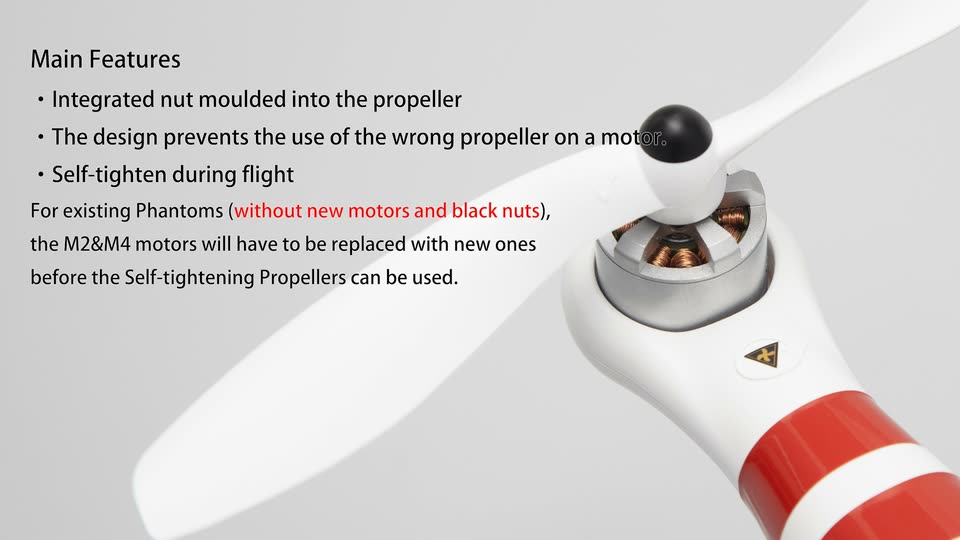
A white drone propeller on a silver motor with copper windings fills the right of a light gray frame, the arm banded in orange. A title holds top left while a feature list with one red phrase fades in on the left. The shot is locked off.
On-screen text: “Phantom Self-tightening Propeller”, “Main Features”, “Integrated nut moulded into the propeller”, “The design prevents the use of the wrong propeller on a motor.”, “Self-tighten during flight”, “For existing Phantoms (without new motors and black nuts), the M2&M4 motors will have to be replaced with new ones before the Self-tightening Propellers can be.”
Camera: Static
07 · Feature reveal · 0:20–0:27
A white quadcopter drone rests on a gray mat. A hand enters from the top right and sweeps across the four propellers one by one, showing they stay attached. A black caption reads Demo Video: in the top left.
On-screen text: “Demo Video:”
Camera: Static
08 · Feature reveal · 0:27–0:30
Close-up of a white drone arm with a two-blade propeller on a plain light gray background. A hand enters from the right, pinches the blade, and lifts it off the motor mount, exposing the copper motor beneath. Locked-off frame.
Camera: Static
09 · Feature reveal · 0:30–0:36
A close-up shows hands gripping a drone propeller's black hub, twisting and lifting it off the motor to reveal the threaded shaft and copper coils, against a plain white background.
On-screen text: “dji-innovations.com”
Camera: Static
10 · Feature reveal · 0:36–0:47
A white DJI quadcopter sits on a light gray surface in a locked-off shot. A hand brings a white propeller into frame, points to its black hub and the motor mount, then screws the propeller onto the front arm.
Camera: Static
11 · Feature reveal · 0:47–0:50
Close-up on a white drone arm: two hands twist a white two-blade propeller onto a silver motor hub, then let go, leaving the propeller seated. Shallow depth of field, plain light-gray background, the drone body blurred at left.
Camera: Static
12 · Feature reveal · 0:50–1:00
A white quadcopter rests on a light gray table as a hand enters to hold a white propeller. The finger points at the silver motor hub, then both hands twist the blade off and back on to show the quick-release mount.
Camera: Static
13 · Feature reveal · 1:00–1:08
A white quadcopter drone rests on a stand against a light gray backdrop. A hand enters from the top right, sweeps across the drone's body to show gesture control, then exits frame right. The camera stays locked off.
Camera: Static
14 · Feature reveal · 1:08–1:12
A white drone arm with one propeller and an exposed copper motor sits against a plain gray backdrop. A hand enters from the right with a white plastic tool, slips it under the propeller hub, and twists to release the blade.
Camera: Static
15 · Feature reveal · 1:12–1:17
Close-up on a white drone arm against a plain gray backdrop. A hand seats a white propeller with a silver dome cap onto the motor hub, then a small metal wrench tightens the blade; the propeller gives a quick spin.
Camera: Static
16 · Feature reveal · 1:17–1:18
Locked-off close-up of a white drone arm. Hands move fast at the motor mount, prying with a thin metal tool, then withdraw out of frame, leaving the bare silver motor exposed. The hand motion is quick and blurred.
Camera: Static
17 · Outro · 1:18–1:19
A white drone arm with a bare propeller bolt holds against a dark gray backdrop, then the device shatters into a dense cloud of small gray shards that radiates outward across black.
Techniques: Morph, Particles
Camera: Push in
18 · Outro · 1:19–1:25
A dense cloud of white and blue shards fills the black frame. A brushed-metal 3D logo assembles in the center as the background turns blue, shards drifting past it.
Techniques: Particles
Camera: Push in