1:28
Explore
depthfirst - We are excited to introduce Dependency Firewall with On-Device Protec
depthfirst · Sep 2026 · 1:43 · AI-annotated
- Length
- 1:43
- Scenes
- 20 · 5.2 s avg
- Product on screen
- 0:00
- Call to action
- 1:31 · 89%
- Voiceover
- Yes
00:00:00 / 01:43:01
depthfirst’s 1:43 launch film runs 20 scenes, about 5.2 s each. The product is on screen from the first frame. The call to action lands at 1:31 (89% in), over a voiceover. The video is built as a presenter-led explainer that alternates live-action talking head with white or charcoal motion-graphics cards, then a screen-recording tour of the product, closing on a title card with a demo request. Its style is defined by a near-monochrome palette of off-white and charcoal with one red accent, thin gray line geometry (spheres, arcs, grids) that rotates and drifts behind every card, and a slow, measured pace of roughly two cuts per minute with crossfades and split-scope
Footage neededEstimated needs: 2 capture groups — your screens or recordings · 6 filmed passages — shoot, supply or replace · 3 graphic passages — draw or supply
Is this your launch? to your site or press kit.
More like this
0:55

Runway - Today we're launching DIFFUSE: a platform for agencies, brands and st
Runway · AI · Sep 2026
0:43
Abacus.AI - 🚨 Excited To Launch Abacus AI Studio Use 100+ Top AI Video And Image
Abacus AI · Apr 2026
depthfirst - We are excited to introduce Dependency Firewall with On-Device Protec, scene by scene
· 20 scenes as text
01 · Product intro · 0:00–0:02
The depthfirst wordmark fades from gray to black at center while seven interface cards slowly dissolve in around it on white: a stacked bar chart, two line graphs, a package list, a risk diagram, and a firewall card with an astronaut photo.
Camera: Static
02 · Product intro · 0:02–0:09
A man with curly hair sits centered at a round table behind a closed laptop, speaking to camera in a dark room with an abstract painting and a plant. A name lower-third fades in at the bottom left, then a headline appears at the right.
On-screen text: “Shanyu Thibaut”, “Member of Technical Staff”, “Dependency Firewall”
Camera: Static
03 · Problem · 0:09–0:10
A man with curly hair and a beard sits at a wooden desk behind a closed MacBook, speaking to camera. The frame is split, with a white panel on the right where a thin gray line-art circle fades in.
Techniques: Split screen
Camera: Static
04 · Problem · 0:10–0:20
Split screen. Left, a curly-haired man in a dark sweater sits at a desk behind an open laptop, speaking to camera. Right, a thin gray wireframe sphere rotates on a white field as three dark pill labels, Developers, AI Agents, Systems, slide and scale in around it.
On-screen text: “Developers”, “AI Agents”, “Systems”
Techniques: Split screen, Kinetic type
Camera: Static
05 · Problem · 0:20–0:21
A man with curly hair in a black sweater sits at a desk with a laptop on the left; a thin gray wireframe sphere of overlapping ellipses rotates on a white field to the right. The left video panel slides off screen to the left, leaving the sphere centered.
Techniques: Split screen, Masking
Camera: Static
06 · Problem · 0:21–0:23
The text “Open source” scales in at the center of a plain white field while thin gray elliptical outlines drift and rotate slowly behind it. The frame stays locked off.
On-screen text: “Open source”
Techniques: Kinetic type
Camera: Static
07 · Problem · 0:23–0:37
On a white background, a small dark square labeled Engineers sits at center while thin arcs sweep in from the edges. Marketing, Sales, and Finance labels drop in one by one around it, then the arcs fade out, leaving the four labels in a loose cluster.
On-screen text: “Open source”, “Engineers”, “Marketing”, “Sales”, “Finance”
Techniques: Kinetic type
Camera: Pull out
08 · Problem · 0:37–0:38
Four team labels, Finance, Sales, Marketing and Engineers, each paired with a small square node, float on a dark background. The labels slide inward and dim as a rounded Function f() pill fades in at the center.
On-screen text: “Engineers”, “Marketing”, “Sales”, “Finance”, “Function f()”
Techniques: Kinetic type
Camera: Static
09 · Problem · 0:38–0:42
On a dark charcoal background, a diagram builds step by step: two white Function boxes link by lines to a gray Function box below, then a red Issue box pops in at the bottom as the headline Supply Chain Risk fades in above.
On-screen text: “Supply Chain Risk”
Camera: Static
10 · Problem · 0:42–1:03
A man with long hair sits at a table with a closed gold MacBook, speaking to camera and gesturing. White lines fade in at right listing risks, then a headline block appears at left, and a macOS window slides up from the bottom.
On-screen text: “Leak credentials”, “Plan a backdoor”, “Expose source code & sensitive documents”, “Dependency firewall blocks these issues before installation”
Camera: Pan
11 · Demo · 1:03–1:14
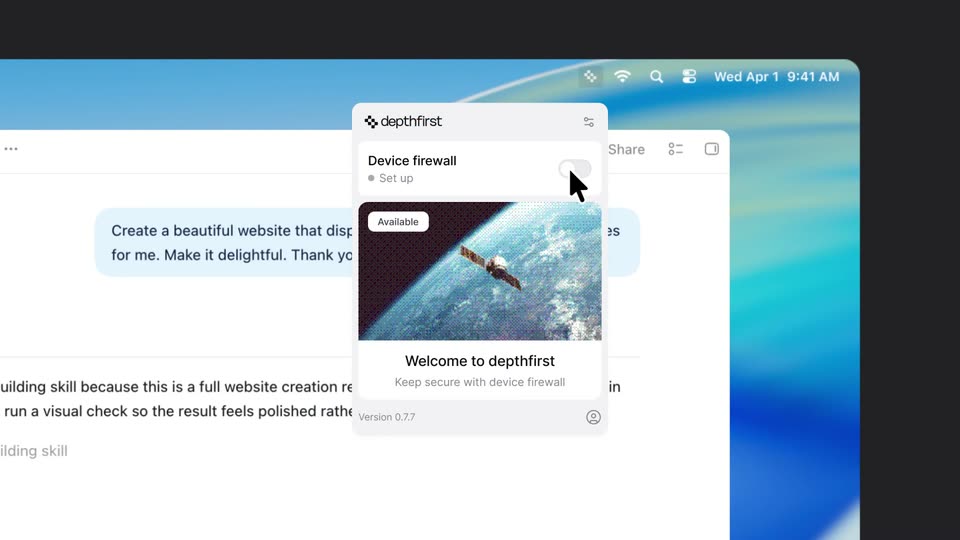
The Codex chat window types a prompt and streams a reply on a macOS desktop. The view zooms to the menu bar; the cursor opens the depthfirst popover, flips the firewall toggle, and browses allowed packages. A static caption states the dependency firewall blocks issues before installation.
On-screen text: “Dependency firewall”, “blocks these issues”, “before installation”
Techniques: Cursor demo, UI zoom
Camera: Push in
12 · Demo · 1:14–1:16
A white package card with a green shield sits center on a dark background as the word Approved fades in to its left. A second card with a red shield then drops in below, pushing the first card up.
On-screen text: “Approved”
Camera: Static
13 · Demo · 1:16–1:21
Two white package cards fade in under the labels Approved and Suspicious on a dark background. A cursor moves to the suspicious pnpm card, which expands to reveal a red block banner and a View in depthfirst button.
On-screen text: “Approved”, “Suspicious”
Techniques: Cursor demo
Camera: Static
14 · Demo · 1:21–1:22
A dark package-review list with Approved and Suspicious cards crossfades into a dashboard panel showing an Analyzed packages count of 61,364 and a line chart, then fades to black.
Camera: Static
15 · Demo · 1:22–1:24
A white chart card fills the frame on a dark background, its stacked bars rising one by one. The view then pulls back to reveal the full Dependency Firewall screen, with a search field and a Last 30 days control above the card.
Techniques: UI zoom
Camera: Pull out
16 · Demo · 1:24–1:31
On a dark background, a white dashboard panel assembles: three stat cards slide in from the right, a results table fades in under the stacked bar chart, and a left navigation rail slides in. The camera pulls back to frame the full screen, then pushes in on the top.
Techniques: UI zoom
Camera: Pull out
17 · CTA · 1:31–1:36
A thin gray grid drifts slowly over a dark field while a centered two-line white headline holds still, the second line fading in from gray. A live-action shot of a man then rises from the top, sliding the text down to the bottom edge.
On-screen text: “These deployments make it impossible”, “for AI agents or users to bypass”
Techniques: Parallax
Camera: Static
18 · CTA · 1:36–1:39
A man with curly hair sits at a round table behind a closed laptop, speaking to camera and gesturing with his hands. Two caption lines hold at the bottom while he talks, and the shot fades to white at the end.
On-screen text: “These deployments make it impossible”, “for Al agents or users to bypass”
Camera: Static
19 · CTA · 1:39–1:40
A two-line gray headline fades in at the center of a plain off-white background, then holds still. No other elements move or appear.
On-screen text: “Dependency Firewall with On-Device Protection”
Camera: Static
20 · CTA · 1:40–1:43
A white title card holds the gray depthfirst logo and a centered black two-line headline, with a gray Request a demo line below. Flat dashboard panels slide in from the edges to frame the static text.
On-screen text: “Dependency Firewall with On-Device Protection”, “Request a demo”
Camera: Push in