1:29


Tenera Podcast-Style Launch Video (a16z speedrun) | Unveil Studio
Tenera · Oct 2026
Delpha’s 0:30 launch film runs 8 scenes, about 3.8 s each. The product shows up at 0:08 and 1 feature is revealed. The call to action lands at 0:27 (90% in). A 30-second pitch built as a question-to-answer chain: flat blue text cards state the problem, then a split screen pairs bold all-caps headlines with a live Salesforce chat demo that fills the empty field. Signature moves are left-to-right and word-by-word text reveals, a red hand-drawn circle flagging the missing value, and a fade-to-white handoff into the live-action robot card.
Is this your launch? to your site or press kit.
On a flat blue field, three centered lines build in sequence: a white top line, a mint middle line, then a white bottom line, each revealed left to right until the full question reads.
On-screen text: “LOOKING TO IMPROVE”, “DATA QUALITY”, “IN SALESFORCE?”
Techniques: Kinetic type
Camera: Static
A blue band sits above a Salesforce contact record. A bold white headline types in word by word on the band. Below, an empty SIC Code field is circled in red, then a red question mark icon pops in beside the circle.
On-screen text: “WANT COMPLETE, ACCURATE, RELEVANT AND TIMELY DATA?”
Techniques: Kinetic type
Camera: Static
A blank white frame resolves into a light CRM account page showing a details table and an activity panel. A blue chat assistant card pops in at the bottom right, listing two suggestion rows with a check icon.
Camera: Static
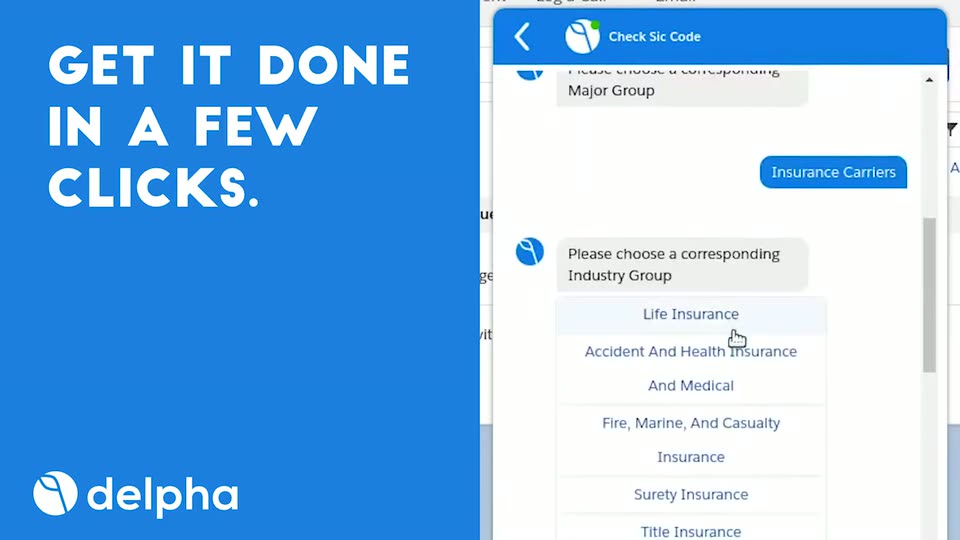
A blue panel on the left swaps two stacked headlines while the right side shows a chat widget. A cursor taps Check Sic Code, then clicks through a sequence of prompts, scrolling the conversation down.
On-screen text: “DELPHA ASSISTANT WILL DO IT FOR YOU.”, “GET IT DONE IN A FEW CLICKS.”
Techniques: Kinetic type, Split screen, Cursor demo
Camera: Static
A blue side panel holds a bold white headline and the delpha logo, beside a chat form where a cursor taps confirmation buttons. The form then switches to a data table listing revenue and address fields.
On-screen text: “GET IT DONE IN A FEW CLICKS.”
Techniques: Split screen, Cursor demo
Camera: Static
A split layout holds a solid blue panel on the left and a white data list on the right. The word VOILA! builds letter by letter in light mint beneath a white ET, then the entire frame fades to white.
On-screen text: “ET”, “VOILA!”
Techniques: Split screen, Kinetic type
Camera: Static
A white fade reveals a humanoid robot standing beside a smiling woman who holds a tablet. The locked-off headline and URL sit centered over the pair, while the delpha logo mark rests in the lower-left corner.
On-screen text: “IMPROVE DATA QUALITY WITH”, “DELPHA ASSISTANT”, “www.delpha.io”
Camera: Static
A white humanoid robot and a smiling woman holding a tablet stand against a plain light backdrop, the frame fading in from dim. Centered over them sit the headline and a URL, all held static for the duration.
On-screen text: “IMPROVE DATA QUALITY WITH”, “DELPHA ASSISTANT”, “www.delpha.io”
Camera: Static